Read the statement by Michael Teeuw here.
remoteFile in compliments module
-
@jcorraliza yeah… the only reason why i would use the remote file is the weather stuff, and obviously this feature has a bug, or we are to weak in coding ^^
-
Okay, I have the weather integration working. I’ll spare you the process I went through to figure it out, but the short version is that I am a worse developer than I originally suspected. The remoteFile capability works by replacing the three compliment arrays (morning, afternoon & evening). The weather integration works (sensibly, IMHO) by adding weather-specific compliments to the existing arrays.
So in order to get them both working, you need to specify both the original arrays and the weather-specific arrays. You can delete any weather-specific arrays you wish, but you must have the morning, afternoon & evening arrays. Copy & paste this
compliments.jsonfile to your mirror and then modify accordingly.{ "morning": ["Morning compliment"], "afternoon": ["Afternoon compliment"], "evening": ["Evening compliment"], "day_sunny" : [ "Day Sunny Compliment 1", "Day Sunny Compliment 2" ], "day_cloudy" : [ "Day Cloudy Compliment 1", "Day Cloudy Compliment 2" ], "cloudy" : ["Cloud 1"], "cloudy_windy" : ["Cloud windy"], "showers" : ["Showers"], "rain" : ["Rain"], "thunderstorm" : ["Thunderstorm"], "snow" : ["Snow"], "fog" : ["Fog"], "night_clear" : ["Night clear"], "night_cloudy" : ["Night Cloudy"], "night_showers" : ["Night showers"], "night_rain" : ["Night Rain"], "night_thunderstorm" : ["Night thunderstorm"], "night_snow" : ["Night Snow"], "night_alt_cloudy_wind": ["Night Cloudy Winds"] }I’m going to work on this a bit and hopefully the next release of the MirrorMirror software will be a bit more friendly. As an aside, I’ve noticed that the weather integration technique continually adds to the arrays. So the memory usage will grow and grow at whatever frequency you set the compliment refresh. This isn’t terrible, as straight text doesn’t take a whole lot of memory. But it may have unintended effects if you leave your mirror running for months at a time or if you are expecting a true randomization of the compliments you enter.
-
-
@bhepler said in remoteFile in compliments module:
I’m going to work on this a bit and hopefully the next release of the MirrorMirror software will be a bit more friendly. As an aside, I’ve noticed that the weather integration technique continually adds to the arrays. So the memory usage will grow and grow at whatever frequency you set the compliment refresh. This isn’t terrible, as straight text doesn’t take a whole lot of memory. But it may have unintended effects if you leave your mirror running for months at a time or if you are expecting a true randomization of the compliments you enter.
Hi, when I worked in this feature I remember was a flashing about this.
If you can help how improved this is welcome :)
-
Hi! I’m using a separate compliments file (for each user). I’ve noticed that when I use non english characters they are not shown correctly.
The complement in the picture should say: “Tänk positivt”.
Now it says:
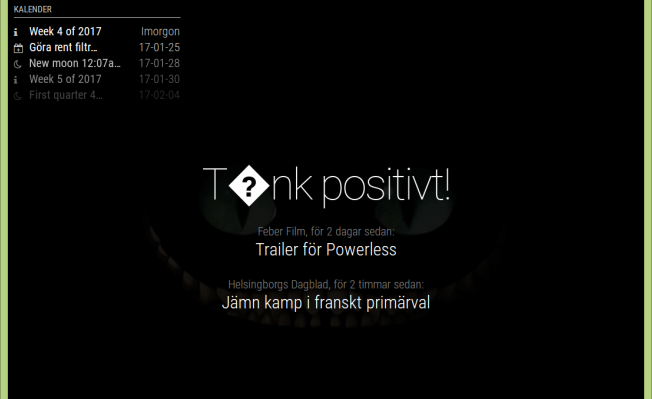
If I don’t use a compliments file and put the compliments directly in the config, it works fine.
What to do? :)
Best regards Snille
If you cant find it, make it and share it
MMM-homeassistant-sensors,MMM-Modulebar,MMM-Profilepicture,MMM-Videoplayer,MMM-TautulliLatest -
@Snille did you save the compliments file as utf8 encoded?
-
@strawberry-3.141 I had not, now I did and it works! :)
Thank you! -
@roramirez Is there already a solution for the memory ‘bug’?
-
-
@roramirez I meant this comment:
“As an aside, I’ve noticed that the weather integration technique continually adds to the arrays. So the memory usage will grow and grow at whatever frequency you set the compliment refresh. This isn’t terrible, as straight text doesn’t take a whole lot of memory. But it may have unintended effects”
I don’t know whether to call this a bug, but you get my point ;) I’m not an experienced coder whatsoever, so I doubt I might be of help, but I am always willing to test / assist.
-
@jm I can’t see that this is still happening on the current code base. Every time it tries to update an array will be generated with all possible values, after that the garbage collector will do his job and delete the array after usage.
-
Here is how I got the remote file compliments to work:
- The config.js settings must name the remote file with no path:
		{
			module: 'compliments',
			position: 'bottom_bar',
			config: {
				remoteFile: 'compliments.json'
			}
		},
IMO it would be great if it were possible to put a full path the the remote file so it can be stored in the config directory.
- Create a compliments.json file and be sure to put
double quotesaround the array names like so:
{ "morning" : [ "You're good enough, you're smart enough and doggone it, people like you!" ], "afternoon" : [ "Yes those jeans make you look fat." ], "evening" : [ "Please put on some pants." ] }-
Put the remote file (compliments.json) into the
~/MagicMirror/modules/default/complimentsdirectory. -
Restart MM. It will show the default compliment (usually “Hi Sexy”) for the first interval and then will start showing compliments from the external file.
Hope this helps
-
Guys where can be mistake:
config.js looks like:
{

module: “compliments”,

position: “lower_third”,

config: {

remoteFile: “compliments.json”

}

},
Remote file placed in ~/MagicMirror/modules/default/compliments
but it still does not work.
I made all following above written steps and nothing - still oryginal compliments are one the mirror.
I have no idea what is wrong. -
Your config entry looks okay. However, the curly quotes I see will cause problems. There should not be any in your config.js or your compliments.json file. This is an acceptable quote
"but this“is not. You can post your compliments.json file here (in a code block) so we can take a look at it. -
I have
“in oryginal file so I just copied it. I also tried with'but without luck.The
compliments.jsonfile looks like:{ "anytime" : [ "Dziala!" ], "morning" : [ "Good morning, sunshine!", "Who needs coffee when you have your smile?", "Go get 'em, Tiger!" ], "afternoon" : [ "dfadfafa", "dffffffff", "fsssss!" ], "evening" : [ "2", "1", "3333" ] }In
compliments.jsModule.register("compliments", { // Module config defaults. defaults: { compliments: { anytime: [ "Hey there sexy!" ], morning: [ "Good morning, handsome!", "Enjoy your day!", "How was your sleep?" ], afternoon: [ "Hello, beauty!", "You look sexy!", "Looking good today!" ], evening: [ "Wow, you look hot!", "You look nice!", "Hi, sexy!" ] }, updateInterval: 30000, remoteFile: null, fadeSpeed: 4000 },I see the
“anytime”are without"
so I also tried this in …json file but does not work. -
@Lahim said in remoteFile in compliments module:
so I also tried this in …json file but does not work.
So, I copied your example compliments.json file from above and tested it. Here is my config.js entry:
{
    disabled: false,
    module: "compliments",
    position: "lower_third",
    config: {
        updateInterval: 30000,
        fadeSpeed: 1000,
        remoteFile: "compliments.json", // this file is in the compliments module folder
}
},
And this was the result:



So, as long as you haven’t changed anything else and your config entry is correct, and your compliments.json file is name correctly and in the compliments module folder, it should work, as it does here
-
Thank you for trying and helping but I copied your setup but still the same thing.
Does compliments.json file has to be somehow written as json file? Or I can create new text file in nano and save it as compliments.json file? Does it need any special rights?
Can you attach your .json file here so I can download and place it in the /compliments/ folder?Here is list of my files in compliments folder

-
@Lahim said in remoteFile in compliments module:
Does compliments.json file has to be somehow written as json file?
Uhh, it MUST be saved as a .json file. It’s in the README file of compliments module.
QUOTE:
“This file must be straight JSON. Note that the array names need quotes around them (“morning”, “afternoon”, “evening”, “snow”, “rain”, etc.).”I don’t use nano if I don’t have to. I use notepad++. You don’t need the terminal to use it and it saves files in just about every file format imaginable, including JSON.
I will post my file in a moment
-
You MUST save this as a json file.
{ "anytime" : [ "You look like I need a drink!", "Did Pop create the Matrix?", "Why are you looking at yourself?", "That gut must be embarrassing!", "There's a zit on your forehead!", "You're fugging ugly!" ], "morning" : [ "Good morning, Pop!", "How's that dream job?", "You look like shit!", "Enjoy your day!", "Don't work too hard!" ], "afternoon" : [ "When my Bottle Pop?", "Move your fat ass today!", "Take a nap!", "Cowboysdude is a GURU!", "Is the pool open yet?", "You are not appreciated!", "You need a shave!" ], "evening" : [ "Strawberry 3.141 Rocks!", "What the hell are you?", "You're one ugly mother fucker!", "Pop is a fucking genius!", "You look fat in that dress!", "Did someone mention SEX?" ] } -
compliments.js_original
So, you did change something in the module file? That is not recommended and it makes it very difficult for me or anyone else to troubleshoot for you





Hello! It looks like you're interested in this conversation, but you don't have an account yet.
Getting fed up of having to scroll through the same posts each visit? When you register for an account, you'll always come back to exactly where you were before, and choose to be notified of new replies (either via email, or push notification). You'll also be able to save bookmarks and upvote posts to show your appreciation to other community members.
With your input, this post could be even better 💗
Register Login