MagicMirror Forum
    • Recent
    • Tags
    • Unsolved
    • Solved
    • MagicMirror² Repository
    • Documentation
    • 3rd-Party-Modules
    • Donate
    • Discord
    • Register
    • Login
    A New Chapter for MagicMirror: The Community Takes the Lead
    Read the statement by Michael Teeuw here.

    MMM-MyCommute

    Scheduled Pinned Locked Moved Transport
    286 Posts 80 Posters 655.0k Views 77 Watching
    Loading More Posts
    • Oldest to Newest
    • Newest to Oldest
    • Most Votes
    Reply
    • Reply as topic
    Log in to reply
    This topic has been deleted. Only users with topic management privileges can see it.
    • joela85J Offline
      joela85
      last edited by

      That’s ideal. Thanks for the quick turn around. I’ll look at adding that when I get time in the next couple of days.
      Thanks.

      1 Reply Last reply Reply Quote 0
      • Sandy2503S Offline
        Sandy2503 @j.e.f.f
        last edited by

        @j.e.f.f

        is it possible to set a second home adress ?

        I`d like to set my way to work
        and as second the way from work back to home.

        Sandy2503

        J 1 Reply Last reply Reply Quote 0
        • J Offline
          j.e.f.f Project Sponsor Module Developer @Sandy2503
          last edited by j.e.f.f

          @Sandy2503 Well the traffic gives you an up to the minute estimate based on current traffic conditions. So the estimate will likely have changed when you’re ready to come home from work. I’m assuming you don’t have your mirror with you at work :)

          That said, there is a Google API that allows exactly this… it’s called their matrix API and it gives you time estimates for multiple origin points to multiple destinations.

          Another idea is you could set up two instances of this module. One set up for your drive to work, and a second setup up for your drive home. That works nicely because each can have their own module header and schedule.

          EDIT I tried this, and it works nicely. Here’s my output:
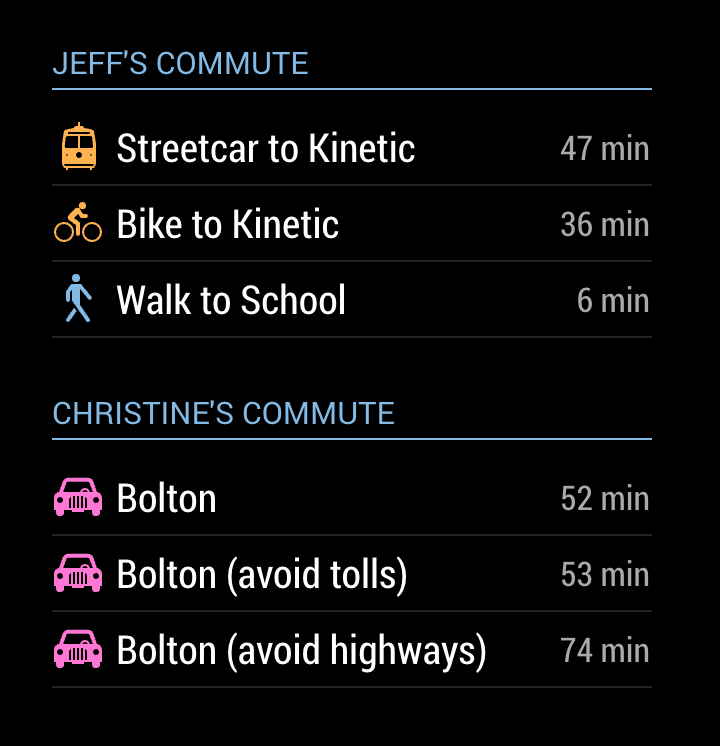
          0_1495037746268_upload-fcfe1fd9-d0b0-4a30-b320-5d8fac86ca59

          My config looks like this:

          {
            module: 'MMM-MyCommute',
            position: 'top_left',
            config: {
              ... configure for your drive to work
            }
          },
          {
            module: 'MMM-MyCommute',
            position: 'top_left',
            config: {
              ... configure for your drive home
            }
          },
          
          
          Sandy2503S 1 Reply Last reply Reply Quote 0
          • Sandy2503S Offline
            Sandy2503 @j.e.f.f
            last edited by

            @j.e.f.f

            im Moment i use 2 instances of the traffic module. so my wife can see how how long is my driving time back home …

            1 Reply Last reply Reply Quote 0
            • F Offline
              Fonfon
              last edited by Fonfon

              I think that module is really good it lacks one thing it would have that the journey time changes color according to the traffic

              B J 2 Replies Last reply Reply Quote 0
              • B Offline
                BlackTalon @Fonfon
                last edited by

                @Fonfon I agree that would make this Module perfect!

                1 Reply Last reply Reply Quote 0
                • J Offline
                  j.e.f.f Project Sponsor Module Developer @Fonfon
                  last edited by

                  @Fonfon @BlackTalon I’ve made an update that adds this capability, plus a whole lot more:

                  • added the config showSummary to toggle a brief route summary. For transit, this gives you the route names (bus, streetcar, subway numbers, etc).
                  • added the config colorCodeTravelTime to colour the travel red, yellow or green depending on traffic conditions. Only works for mode : 'driving'.
                  • added two configs moderateTimeThreshold and poorTimeThreshold to adjust the threshold for red (i.e.: poor) and yellow (i.e.: moderate) traffic. Defaults to 1.1 and 1.3 respectively for 10% and 30% time delays.
                  • for destinations where mode : 'transit', you can specify an additional config transitMode to instruct which transit modes you would like Google to use when calculating your route. Can be bus, subway, train, tram, or rail. Multiple choices allowed, separated by the | character (e.g.: transitMode : 'bus|subway'). Specifying rail is equivalent to specifying subway|train|tram.
                  • added more icons to support the various modes of transit.
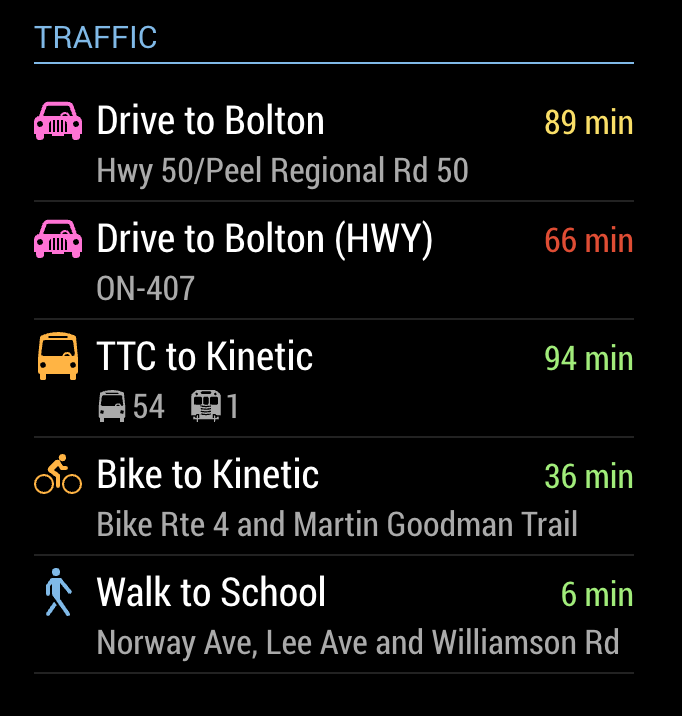
                  0_1495595633864_MMM-MyCommute.png

                  It’s still possible to use the old compact mode, by specifying showSummary : false. e.g.:
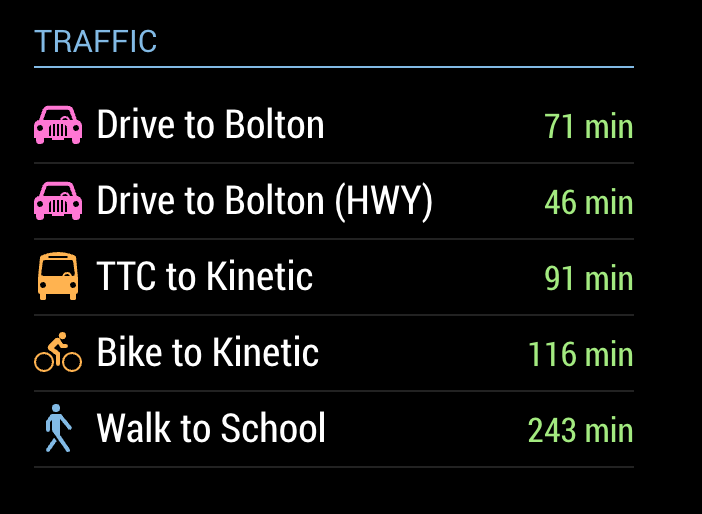
                  0_1495595766287_Screen Shot 2017-05-23 at 11.15.49 PM.png

                  J B 2 Replies Last reply Reply Quote 1
                  • J Offline
                    Johnson22 @j.e.f.f
                    last edited by

                    @j.e.f.f This update is fantastic! Thank you very much!

                    1 Reply Last reply Reply Quote 0
                    • joela85J Offline
                      joela85
                      last edited by

                      Do you need to do anything special with the google api key?
                      I can’t get this module to show up on my MM. Doesn’t look like it is picking any info up through the API key.

                      J 1 Reply Last reply Reply Quote 0
                      • J Offline
                        j.e.f.f Project Sponsor Module Developer @joela85
                        last edited by

                        @joela85 When you say nothing shows up, do you mean the module just doesn’t appear at all? Or you can get the module to show but the travel times never fill in (i.e.: you see the spinning circle forever?)

                        Can you post your config? Hide your API key of course.

                        B 1 Reply Last reply Reply Quote 0
                        • joela85J Offline
                          joela85
                          last edited by

                          The module doesn’t show up at all, looks like it doesn’t load the module. I’ll post config file when I get home tonight or tomorrow. Module doesn’t load even with standard commute config part.
                          Not sure if it has something to do with my other modules (remote module maybe)

                          1 Reply Last reply Reply Quote 0
                          • bheplerB Offline
                            bhepler Module Developer
                            last edited by

                            I saw the updates this morning at the office and updated. Looks great! Thanks for the work.

                            1 Reply Last reply Reply Quote 0
                            • joela85J Offline
                              joela85
                              last edited by

                              I re-installed the module and it works fine now.

                              J 1 Reply Last reply Reply Quote 0
                              • J Offline
                                j.e.f.f Project Sponsor Module Developer @joela85
                                last edited by

                                @joela85 good to hear you got it working.!

                                1 Reply Last reply Reply Quote 0
                                • F Offline
                                  Fonfon
                                  last edited by

                                  Very good job j.e.f.f !!! nice update ! thanks !

                                  1 Reply Last reply Reply Quote 0
                                  • B Offline
                                    beck0r
                                    last edited by beck0r

                                    Hey there,

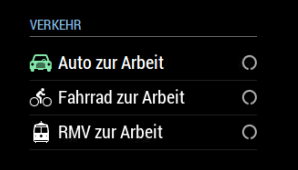
                                    very nice looking module! I only have a very little issue with my train icon.
                                    When the MM loads for the first time I can see the train icon but only as long as the driving time is being retrieved from google, then it disappears…

                                    Before

                                    0_1495808995559_upload-478cdab7-c23e-423b-8599-00022c06b7ed

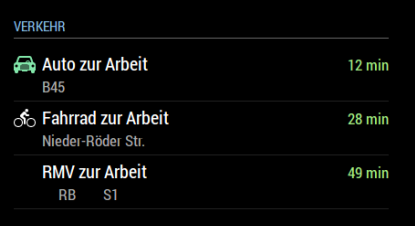
                                    After
                                    0_1495809045044_upload-5ca0c570-9c7e-48d2-ac3f-47ed05620364

                                    I have already switched the order of the destinations to check that out, but it only concentrates on the train icon.

                                    Can you support me on that?

                                    Thank you Kind Regards

                                    J 1 Reply Last reply Reply Quote 0
                                    • J Offline
                                      j.e.f.f Project Sponsor Module Developer @beck0r
                                      last edited by

                                      @beck0r Sure. Can you provide your config? Hide your API key, of course.

                                      B 1 Reply Last reply Reply Quote 0
                                      • B Offline
                                        beck0r @j.e.f.f
                                        last edited by

                                        @j.e.f.f

                                        Of course… here it comes

                                        	{
                                          				module: 'MMM-MyCommute',
                                          				position: 'top_left',
                                          				config: {
                                            					showHeader: true,
                                            					headerText: 'Verkehr',
                                           					apikey: '...',
                                            					origin: '...',
                                            					startTime: '05:00',
                                            					endTime: '17:00',
                                            					destinations: [
                                              							{
                                                						destination: '...',
                                               	 						label: 'Auto zur Arbeit',
                                                						mode: 'driving',
                                                						color: '#82E5AA'
                                              							},      						
                                              							{
                                                						destination: '...',
                                                						label: 'Fahrrad zur Arbeit',
                                                						mode: 'bicycling',
                                        							color: '#FFB444'
                                              							},
                                        							{
                                                						destination: '...',
                                                						label: 'RMV zur Arbeit',
                                                						mode: 'transit'
                                              							}
                                            							]
                                          					}
                                        		},
                                        
                                        J 1 Reply Last reply Reply Quote 0
                                        • J Offline
                                          j.e.f.f Project Sponsor Module Developer @beck0r
                                          last edited by j.e.f.f

                                          @beck0r Can you try doing a git pull in your MMM-MyCommute directory and restarting your mirror? I think I found your issue – I didn’t have an icon definition for High-speed rail.

                                          EDIT Maybe not… I need to add definitions for all sorts of possible transit vehicle types. Stay tuned…

                                          EDIT OK fixed for real this time. I added definitions for all of the transit modes listed here: https://developers.google.com/maps/documentation/directions/intro#VehicleType

                                          Note: You’ll see the tram icon while the route is loading, as that is the default icon used when no transitMode is specified. But you’ll see it change to the train icon after your travel times are retrieved.

                                          1 Reply Last reply Reply Quote 1
                                          • B Offline
                                            BlackTalon @j.e.f.f
                                            last edited by

                                            @j.e.f.f This is perfect! Thank you so much!

                                            1 Reply Last reply Reply Quote 0

                                            Hello! It looks like you're interested in this conversation, but you don't have an account yet.

                                            Getting fed up of having to scroll through the same posts each visit? When you register for an account, you'll always come back to exactly where you were before, and choose to be notified of new replies (either via email, or push notification). You'll also be able to save bookmarks and upvote posts to show your appreciation to other community members.

                                            With your input, this post could be even better 💗

                                            Register Login

                                            • 1
                                            • 2
                                            • 3
                                            • 4
                                            • 5
                                            • 14
                                            • 15
                                            • 1 / 15
                                            • First post
                                              Last post
                                            Enjoying MagicMirror? Please consider a donation!
                                            MagicMirror created by Michael Teeuw.
                                            Forum managed by Sam, technical setup by Karsten.
                                            This forum is using NodeBB as its core | Contributors
                                            Contact | Privacy Policy