MagicMirror Forum
    • Recent
    • Tags
    • Unsolved
    • Solved
    • MagicMirror² Repository
    • Documentation
    • 3rd-Party-Modules
    • Donate
    • Discord
    • Register
    • Login
    A New Chapter for MagicMirror: The Community Takes the Lead
    Read the statement by Michael Teeuw here.

    MMM-MyCommute

    Scheduled Pinned Locked Moved Transport
    286 Posts 80 Posters 655.1k Views 77 Watching
    Loading More Posts
    • Oldest to Newest
    • Newest to Oldest
    • Most Votes
    Reply
    • Reply as topic
    Log in to reply
    This topic has been deleted. Only users with topic management privileges can see it.
    • B Offline
      beck0r
      last edited by

      Hi,

      once again for everybody with the same issue. It’s working now! Thumbs up for j.e.f.f, thank you!

      1 Reply Last reply Reply Quote 0
      • joela85J Offline
        joela85
        last edited by

        One more question. I want to make a route going via different roads, can that be done in this config file?
        For example:
        Destination: X
        Via: A1

        Destination: X
        Via: A2

        J 3 Replies Last reply Reply Quote -1
        • J Offline
          j.e.f.f Project Sponsor Module Developer @joela85
          last edited by

          @joela85 so the google API doesn’t allow that specifically, but there are a couple of ways we could accomplish something similar:

          1. I can have Google return alternative routes, and they can be listed out. No garantee you’re going to get any of the routes you’re interested, but they will be the fastest.

          2. you can provide a list of waypoints and Google will return your route passing through those specific places. So if you put specific landmark addresses that are on the highways you’re interested in then you would more or less get the result you’re looking for.

          Both of these options seem fairly straightforward to add so I might just do both :)

          1 Reply Last reply Reply Quote 0
          • J Offline
            j.e.f.f Project Sponsor Module Developer @joela85
            last edited by

            @joela85 I added the first of the above two options. You can specify alternatives:true for any of your destinations to get alternative routes. showSummary must be set to true for this to work.

            Will be working on the second option soon.

            1 Reply Last reply Reply Quote 0
            • J Offline
              j.e.f.f Project Sponsor Module Developer @joela85
              last edited by

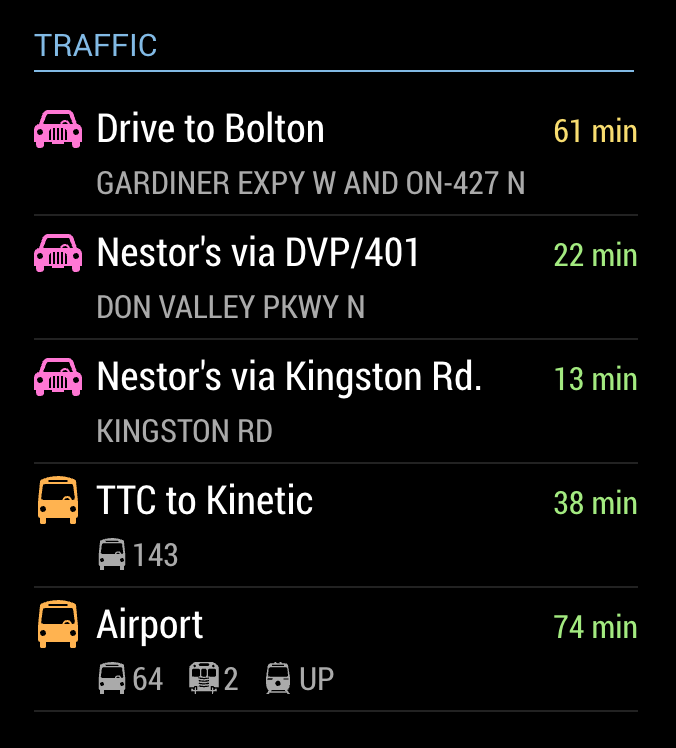
              @joela85 I’ve added the second option too. You can now specify a waypoints parameter for any of the destinations to influence the route Google will find.
              0_1496062463387_Screen Shot 2017-05-29 at 8.48.11 AM.png

              tidus5T 1 Reply Last reply Reply Quote 1
              • tidus5T Offline
                tidus5 @j.e.f.f
                last edited by

                @j.e.f.f Hey Jeff
                can you add the time for the next metro/tram/bus ?
                is it possible to catch the adress in the agenda ? and if its blank just used the definited adress in destination ? :-)

                J 2 Replies Last reply Reply Quote 0
                • J Offline
                  j.e.f.f Project Sponsor Module Developer @tidus5
                  last edited by

                  @tidus5 I’ll have to see what the API gives me. Not sure that info is available.

                  I wrote a transit-specific module that does that but it is for TTC (Toronto transit). However it is based in the NextBus API which supports many systems. It could easily be modified to work with a number of transit systems. Which is yours?

                  1 Reply Last reply Reply Quote 0
                  • J Offline
                    j.e.f.f Project Sponsor Module Developer @tidus5
                    last edited by j.e.f.f

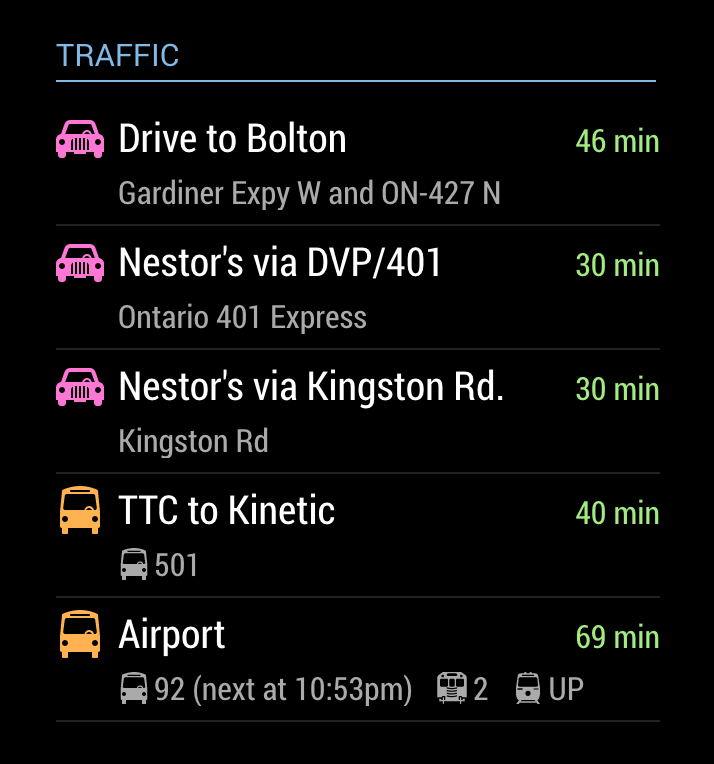
                    @tidus5 I’ve added a param showNextVehicleDeparture that you can specify for destinations with mode:'transit'. This will show you the next available vehicle factoring your walking time to the stop. It will only show the departure time for the first vehicle on your route to save summary space (and really once you’ve departed, you’ll either make your connections on time or you won’t. So the departure time is kind of moot.) My thinking is that you’ll want to know of you have enough to walk to the stop to catch the next vehicle.

                    There is a limit of 2500 requests per day to the Google API using the free service. Since each entry in your destinations list requires its own request, I’ve kept the poll frequency to a conservative 10 minute interval to avoid hitting this limit. As such, it is possible that you’ll see a next vehicle time that is unrealistic to walk to in time, or in some cases, the next vehicle time will be in the past. Keep it in mind that the next vehicle time may be a bit stale.

                    The time is shown as follows (see the last entry labelled “Airport”):
                    0_1496111951237_Screen Shot 2017-05-29 at 10.38.02 PM.png

                    tidus5T J 2 Replies Last reply Reply Quote 0
                    • tidus5T Offline
                      tidus5 @j.e.f.f
                      last edited by

                      @j.e.f.f Perfect!!!

                      thanks :-)

                      1 Reply Last reply Reply Quote 0
                      • J Offline
                        jon11a @j.e.f.f
                        last edited by jon11a

                        Hi @j.e.f.f
                        Just wanted to say, thanks so much for spending your time building this module! I have just finished my MagicMirror build and this module is by far the best and most used. I love how much I’m able to customise it to thanks to your hard work.

                        Now, I wondered if it was easy to add the following… My commute is always over an hour, would it be possible to format the commute time to show 1h 30 min rather than 90 min for example? It would still show just ‘min’ if under an hour (20 min for example).

                        If it’s not all that easy and you’d rather not alter the code, then that’s fine, I may have a bash at editing the code on my Pi myself.

                        Thanks again!

                        J 1 Reply Last reply Reply Quote 0
                        • J Offline
                          j.e.f.f Project Sponsor Module Developer @jon11a
                          last edited by

                          @jon11a It’s certainly possible. But it takes up considerably more space to render “1h 30 min” than it does to render “90 min”. The space that the travel time uses takes away from the space used for the text to its left. That is why I chose to render it that way. Even an extremely long commute of over 2 hours would only take up an extra 8 pixels or so. By doing it this way, it should be more or less the same width for everyone, with less chance of truncating the label.

                          If you want to change this yourself, it’s a fairly trivial change to the formatTime function in MMM-MyCommute.js. Google returns the travel time in the number of seconds. I’ve just done a simple division by 60 to get the number of minutes. You can just do a little more math and re-jig the formatting as you’d like.

                          Happy to hear that you like the module!

                          -Jeff

                          J 1 Reply Last reply Reply Quote 0
                          • J Offline
                            jon11a @j.e.f.f
                            last edited by

                            @j.e.f.f Thanks for your quick response Jeff. I thought that might be the reason behind your decision to just use mins. It does make sense to me.

                            I think I will have a go at changing mine, will be a good little challenge for me as I’m learning more and more programming skills!

                            Thanks again and I look forward to see what you come up with next ;)

                            J 1 Reply Last reply Reply Quote 0
                            • J Offline
                              j.e.f.f Project Sponsor Module Developer @jon11a
                              last edited by j.e.f.f

                              @jon11a Fair warning: this module was also the result of me wanting to change a thing or two to suit my own needs ;). Before I knew I had something completely new! It shares little resemblance with the module I originally forked from mrx-work-traffic.

                              Have fun. I can’t wait to see how it evolves!

                              -Jeff

                              J 1 Reply Last reply Reply Quote 0
                              • J Offline
                                jon11a @j.e.f.f
                                last edited by jon11a

                                @j.e.f.f
                                Managed to do it and pretty pleased with myself :)

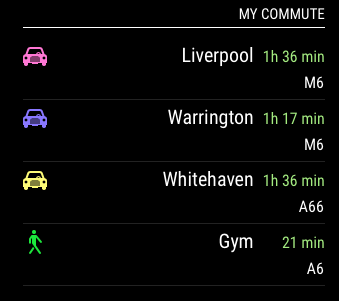
                                Here’s what it looks like:

                                0_1496151228319_commute.png

                                I had to edit the css file to move the destination-label slightly as you mentioned:

                                margin-right: 70px;
                                

                                I edited your formatTime function to format the time in hours and minutes or just minutes if it’s less than an hour in total.
                                Below is the code for that function with my bits added, I am sure it could be better but I think I did ok!

                                formatTime: function(time, timeInTraffic) {
                                
                                    var timeEl = document.createElement("span");
                                    timeEl.classList.add("travel-time");
                                    if (timeInTraffic != null) {
                                      var minutes = Math.floor(Number(timeInTraffic) /60);
                                      var h = Math.floor(minutes /60);
                                      var m = Math.floor(minutes %60);
                                      if (h == 0) {
                                        timeEl.innerHTML = m + " min";
                                      } else {
                                        timeEl.innerHTML = h + "h " + m + " min";
                                      }
                                      var variance = timeInTraffic / time;
                                      if (this.config.colorCodeTravelTime) {
                                        if (variance > this.config.poorTimeThreshold) {
                                          timeEl.classList.add("status-poor");
                                        } else if (variance > this.config.moderateTimeThreshold) {
                                          timeEl.classList.add("status-moderate");
                                        } else {
                                          timeEl.classList.add("status-good");
                                        }
                                      }
                                    } else {
                                      var minutes = Math.floor(Number(time) /60);
                                      var h = Math.floor(minutes /60);
                                      var m = Math.floor(minutes %60);
                                      if (h == 0) {
                                        timeEl.innerHTML = m + " min";
                                      } else {
                                        timeEl.innerHTML = h + "h " + m + " min";
                                      }
                                      timeEl.classList.add("status-good");
                                    }
                                

                                Thanks for your help Jeff, learned some more programming skills too so I’m happy! :)

                                1 Reply Last reply Reply Quote 2
                                • joela85J Offline
                                  joela85
                                  last edited by joela85

                                  startTime & endTime query.

                                  I’ve tried setting these times up for the morning time before going to work and after testing it hides itself but it never re-appeared this morning?
                                  Has anyone else had this issue?

                                  module: 'MMM-MyCommute',
                                    position: 'bottom_right',
                                    config: {
                                      showHeader: true,
                                      headerText: 'Traffic',
                                      apikey: 'API_KEY_FROM_GOOGLE',
                                      origin: 'My Address',
                                      startTime: '06:00',
                                      endTime: '09:00',
                                      destinations: [
                                                     etc...
                                  

                                  It would also be good if you could set it to run on Mon-Fri as well.
                                  If not possible I could use the MMM-Scheduler to do this instead, it’s just a bit tidier in this module.

                                  J 1 Reply Last reply Reply Quote 0
                                  • B Offline
                                    Blackmirror
                                    last edited by

                                    This module is great, but it was nicer, to take starttime and endtime for the different destinations.
                                    So, I will go to work in the morning, soIneed this only between 5.00 and 6.00 o’clock and if I will go to the salsa party I need this only in the evening.

                                    J 1 Reply Last reply Reply Quote 0
                                    • J Offline
                                      j.e.f.f Project Sponsor Module Developer @joela85
                                      last edited by

                                      @joela85 I just did a quick test on my laptop by changing the clock to mover forward a day at a time, and I had the module disappear and reappear consistently. I’ve set my config to startTime: '06:00' and endTime: '09:00' and I’ll let it run overnight to see if I can recreate your issue.

                                      I also like the Mon-Fri idea, as well as the individual time windows per destination. Will work on them over the next few days.

                                      1 Reply Last reply Reply Quote 1
                                      • J Offline
                                        j.e.f.f Project Sponsor Module Developer @Blackmirror
                                        last edited by

                                        @Blackmirror I ran a test overnight and my module came back on when it should have. But I did realize there is a fundamental problem with how I’ve architected the data pull. Are you using two instances of this module? If so I’m thinking that may be causing problems and possibly yours. I’m going to write an update soon, and I’ll have you try again.

                                        1 Reply Last reply Reply Quote 0
                                        • joela85J Offline
                                          joela85
                                          last edited by

                                          I just went back into my config and noticed on one of the times I used a semicolon instead of the colon. I must have looked at that 20 times and not noticed it. Maybe just needed some fresh eyes on it. Hopefully that will sort it. I only have one instance of this module.

                                          J 1 Reply Last reply Reply Quote 0
                                          • J Offline
                                            j.e.f.f Project Sponsor Module Developer @joela85
                                            last edited by j.e.f.f

                                            @joela85 ha! I should have thought to ask for your config. In any case, I’ve pushed an update that fixes the support for multiple instances of the module.

                                            Of note is that you now configure the header in the standard way instead using the “headerText” and “showHeader” configurations. I thought I needed to do it this way when showing and hiding, but it turned out not be the case. So if your config looked like this before:

                                                {
                                                  module: 'MMM-MyCommute',
                                                  position: 'top_left',
                                                  classes: 'default everyone', 
                                                  config: {
                                                    showHeader: true,
                                                    headerText: 'Traffic',
                                                    ...
                                                  }
                                                }
                                            

                                            change it to this:

                                               {
                                                  module: 'MMM-MyCommute',
                                                  position: 'top_left',
                                                  header: 'Traffic',
                                                  classes: 'default everyone', 
                                                  config: {
                                                    ...
                                                  }
                                                }
                                            

                                            If you don’t want a header, then just omit it.

                                            Will be working on configs for limiting to Mon-Fri and windowing for individual destinations next.


                                            bheplerB 1 Reply Last reply Reply Quote 1

                                            Hello! It looks like you're interested in this conversation, but you don't have an account yet.

                                            Getting fed up of having to scroll through the same posts each visit? When you register for an account, you'll always come back to exactly where you were before, and choose to be notified of new replies (either via email, or push notification). You'll also be able to save bookmarks and upvote posts to show your appreciation to other community members.

                                            With your input, this post could be even better 💗

                                            Register Login

                                            • 1
                                            • 2
                                            • 3
                                            • 4
                                            • 5
                                            • 14
                                            • 15
                                            • 2 / 15
                                            • First post
                                              Last post
                                            Enjoying MagicMirror? Please consider a donation!
                                            MagicMirror created by Michael Teeuw.
                                            Forum managed by Sam, technical setup by Karsten.
                                            This forum is using NodeBB as its core | Contributors
                                            Contact | Privacy Policy