MagicMirror Forum
    • Recent
    • Tags
    • Unsolved
    • Solved
    • MagicMirror² Repository
    • Documentation
    • 3rd-Party-Modules
    • Donate
    • Discord
    • Register
    • Login
    A New Chapter for MagicMirror: The Community Takes the Lead
    Read the statement by Michael Teeuw here.

    Motion Detector

    Scheduled Pinned Locked Moved Utilities
    213 Posts 38 Posters 526.0k Views 39 Watching
    Loading More Posts
    • Oldest to Newest
    • Newest to Oldest
    • Most Votes
    Reply
    • Reply as topic
    Log in to reply
    This topic has been deleted. Only users with topic management privileges can see it.
    • R Offline
      reaper81
      last edited by reaper81

      Can I use the Pi-Camera for Motion Detection and Face-Recognition at the same time or have I to use seperate cameras for each module?

      L bheplerB 2 Replies Last reply Reply Quote 0
      • L Offline
        Lange @reaper81
        last edited by

        @reaper81 said in Motion Detector:

        Can I use the Pi-Camera for Motion Detection and Face-Recognition at the same time or have I to use seperate cameras for each module?

        This uses a pir-sensor

        1 Reply Last reply Reply Quote 0
        • bheplerB Offline
          bhepler Module Developer @reaper81
          last edited by

          @reaper81 You can use the same camera for both, but you’ll want to use a different module for motion detection. If you check out my posts, I put up a tutorial on using the PiCam for motion detection outside of the MirrorMirror framework. There’s no reason you can’t use my tutorial to get motion detection to turn your mirror display on and then the facial recognition module to switch the layout.

          At least… no reason that I know of.

          1 Reply Last reply Reply Quote 0
          • J Offline
            jdahli1 @jdahli1
            last edited by

            @jdahli1 Anyone have any thoughts as to what else to try? I have had no luck so far. Mirror continues to not turn back on randomly. Nothing I have changed so far seems to have worked. Any thoughts are appreciated.

            1 Reply Last reply Reply Quote 0
            • N Offline
              Natacha3
              last edited by Natacha3

              Hello all,
              I m totally new to Raspberry Pi and it’s an absolute miracle that I succeed to make it works and to add some modules .
              So I feel sorry to ask and I beg your pardon if my request hurts some of you but can someone could explain me how to install this module ?
              So far I’ve only installed the ones in the MichMich page (https://github.com/MichMich/MagicMirror/wiki/MagicMirror²-Modules)
              Sorry again to ask but I’m so affraid to “break” my magic mirror which works fine now !
              if I disturb let me know I will delete my post.

              Thanks for your help

              Nat

              ? Mykle1M 2 Replies Last reply Reply Quote 0
              • ? Offline
                A Former User @Natacha3
                last edited by A Former User

                @Natacha3

                cd ~/MagicMirror/modules 
                git clone https://github.com/alexyak/motiondetector
                

                In your config.js

                {
                  module: "motiondetector"
                },
                

                I think it would work, maybe…

                1 Reply Last reply Reply Quote 0
                • N Offline
                  Natacha3
                  last edited by

                  Thank you so much Sean, I will try this at home tonight !
                  Thanks again for your patience and quick reply !
                  Nat

                  J 1 Reply Last reply Reply Quote 0
                  • Mykle1M Offline
                    Mykle1 Project Sponsor Module Developer @Natacha3
                    last edited by

                    @Natacha3 said in Motion Detector:

                    I’m so affraid to “break” my magic mirror which works fine now !

                    Suggestion:

                    Make a backup image of your mirror’s SD card.

                    You’ll sleep better. :^)

                    Create a working config
                    How to add modules

                    1 Reply Last reply Reply Quote 1
                    • J Offline
                      j.e.f.f Project Sponsor Module Developer @Natacha3
                      last edited by

                      @Natacha3 I second @Mykle1 's suggestion to make a backup of your SD card, especially before you make any significant change. This way if you mess up the change, you can revert to your backup and try again. Furthermore, take another backup immediately after you are successful in implementing the new change. This way if you SD card becomes corrupt and unbootable (say due to a power outage, pulling the power cable without a proper shutdown, etc), you’ll have a fully up-to-date backup that you can restore in 30 minutes or so. This will save you many MANY tears.

                      1 Reply Last reply Reply Quote 1
                      • N Offline
                        Natacha3
                        last edited by Natacha3

                        So I’ve installed motion detector as Sean explained
                        I’ve modified the config.JS file, restarted the mirror but no change!

                        Is there something more to do to activate this function ?

                        • @Mykle1 and @j-e-f-f => I’ve done as you said: back up done! Thank your for your kind advice and … yes! I sleep better and I expect no tears now ;-)
                        M J 2 Replies Last reply Reply Quote 0
                        • M Offline
                          mongo116 Module Developer @Natacha3
                          last edited by

                          @Natacha3 I had issues with Motion Detector, so ended up installing motion alongside Magic Mirror and using that - https://github.com/Motion-Project/motion

                          N 1 Reply Last reply Reply Quote 0
                          • J Offline
                            j.e.f.f Project Sponsor Module Developer @Natacha3
                            last edited by

                            @Natacha3 it took me a while to get my motion detector to work too. I suggest making a simple script independent of MagicMirror to test that your PIR sensor is working and tuned correctly. Mine has two adjustment screws on it that I needed to play with before it behaved properly.

                            More information here:
                            https://www.raspberrypi.org/learning/physical-computing-with-python/pir/

                            N 1 Reply Last reply Reply Quote 0
                            • N Offline
                              Natacha3 @j.e.f.f
                              last edited by

                              @j.e.f.f Thank you again Jeff but … I use a Pi camera, not a PIR sensor ! ;-)

                              I’ve checked that the camera was operating normally (sorry again, I’m not able to recover the link but … at least i’ve seen the picture !

                              1 Reply Last reply Reply Quote 0
                              • N Offline
                                Natacha3 @mongo116
                                last edited by Natacha3

                                @mongo116 Thank you for your advice but I’m a complete ignorant and I must admit that I’ve been affraid by reading https://github.com/Motion-Project/motion/blob/master/motion_guide.html

                                As a total noob, I guess it’s a bit out of reach for me. (maybe after 3 or 4 decades I will play the easy side with that ! ) ;-)

                                H 1 Reply Last reply Reply Quote 0
                                • H Offline
                                  Hawking @Natacha3
                                  last edited by

                                  @Natacha3
                                  I also tested the motiondetector of alexyak, without success and therefore installed Motion, which works without problems. However, I understand, that the process to compile it for your self is not easy for a beginner.
                                  Are you aware of https://forum.magicmirror.builders/topic/988/motion-detection-with-raspicam-non-module-version
                                  The linked thread provides a precompiled version of Motion and some recommended settings.

                                  N 1 Reply Last reply Reply Quote 0
                                  • N Offline
                                    Natacha3 @Hawking
                                    last edited by

                                    @Hawking Thank you so much for your input !
                                    It works as a charm !

                                    1 Reply Last reply Reply Quote 0
                                    • T Offline
                                      trividar
                                      last edited by

                                      Hello all,
                                      I updated my raspberry to stretch and now my MM disable the Monitor and the Monitor start immediate without motion. I got this massage:
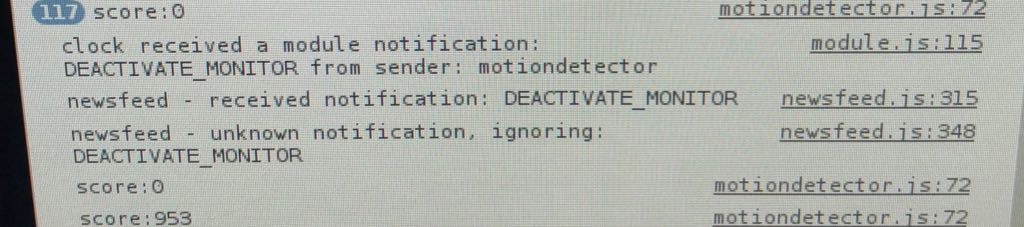
                                      0_1513424415280_5f35abe7-d769-4bc5-97d7-d0294b8e3dc2.jpg

                                      Does someone know why this happen?
                                      Thanks a lot!

                                      1 Reply Last reply Reply Quote 0
                                      • T Offline
                                        trividar
                                        last edited by

                                        No one an Idea?

                                        1 Reply Last reply Reply Quote 0
                                        • N Offline
                                          Natacha3
                                          last edited by

                                          Hi all,

                                          I just come back on this topic because I followed the install process as described by hawking:

                                          @hawking said in Motion Detector:

                                          @Natacha3
                                          Are you aware of https://forum.magicmirror.builders/topic/988/motion-detection-with-raspicam-non-module-version
                                          The linked thread provides a precompiled version of Motion and some recommended settings.

                                          So I just open a command window and do the following command ./motion -c motion.conf
                                          then I open another window and I start the MagicMirror with npm start

                                          Everything works fine for a couple of hours then the Mirror stays dark

                                          I do a CTRL Q
                                          and in the motion window I get the following :

                                          [1] [NTC] [ALL] motion_loop: fps: 3.998576 idle 63.46% over 0.00%
                                          [1] [NTC] [EVT] event_newfile: File of type 2 saved to: /run/shm/lastsnap.jpg
                                          [1] [NTC] [ALL] motion_loop: fps: 3.998768 idle 61.99% over 0.00%
                                          [1] [NTC] [ALL] motion_loop: fps: 3.999344 idle 62.23% over 0.00%
                                          [1] [NTC] [EVT] event_newfile: File of type 2 saved to: /run/shm/lastsnap.jpg
                                          [1] [NTC] [ALL] motion_loop: fps: 3.998928 idle 62.18% over 0.00%
                                          [1] [NTC] [ALL] motion_loop: fps: 3.998960 idle 62.16% over 0.00%
                                          [1] [NTC] [EVT] event_newfile: File of type 2 saved to: /run/shm/lastsnap.jpg
                                          [1] [NTC] [ALL] motion_loop: fps: 3.999136 idle 62.54% over 0.00%
                                          [1] [NTC] [ALL] motion_loop: fps: 3.995844 idle 61.22% over 0.00%
                                          [1] [NTC] [EVT] event_newfile: File of type 2 saved to: /run/shm/lastsnap.jpg
                                          [1] [NTC] [ALL] motion_loop: fps: 3.997186 idle 61.51% over 0.00%
                                          [1] [NTC] [ALL] motion_loop: fps: 4.001200 idle 62.69% over 0.00%
                                          [1] [NTC] [EVT] event_newfile: File of type 2 saved to: /run/shm/lastsnap.jpg
                                          [1] [NTC] [ALL] motion_loop: fps: 3.999360 idle 60.96% over 0.00%
                                          [1] [NTC] [ALL] motion_loop: fps: 3.998641 idle 59.35% over 0.00%
                                          [1] [NTC] [EVT] event_newfile: File of type 2 saved to: /run/shm/lastsnap.jpg
                                          [1] [NTC] [ALL] motion_loop: fps: 3.999232 idle 59.59% over 0.00%
                                          [1] [NTC] [ALL] motion_loop: fps: 3.999088 idle 58.86% over 0.00%
                                          [0] [ERR] [ALL] main: Thread 1 - Watchdog timeout, trying to do a graceful restart
                                          [0] [ERR] [ALL] main: Thread 1 - Watchdog timeout, did NOT restart graceful,killing it!
                                          [0] [INF] [ALL] motion_cleanup: Calling vid_close() from motion_cleanup
                                          [0] [INF] [VID] vid_close: calling video source cleanup
                                          [0] [ALR] [VID] MMAL Camera cleanup

                                          So I can see that some detection occured properly and pictures have been saved in /run/shm/lastsnap.jpg
                                          (I checked, this function is deactivated but … anyway ! Only 1 pic is stored so it’s not a matter of folder flooded)

                                          The Watchdog timeout would be a possible lead but google does not help me so much as so many different issues are linked… :cry:

                                          I hope that you will forgive me if I asked a stupid question and what you will be rather indulgent not to turn me down !

                                          bheplerB 1 Reply Last reply Reply Quote 0
                                          • bheplerB Offline
                                            bhepler Module Developer @Natacha3
                                            last edited by

                                            @natacha3 - It’s been a really long time since I wrote that Motion post. But I’ll try to help. IIRC, the lastsnap.jpg is intended to be a capture of the last image that the Motion system grabbed. It will continually overwrite that file. You may (or maybe not) have disabled the “capture screenshots to folder” functionality and left the “save last image to folder” feature running. Or not. I’d have to see your motion.conf file to be sure.

                                            Motion never did close gracefully, to my knowledge. It seems that motion is definitely detecting motion of some form and writing to the lastsnap.jpg file. So that’s a plus. If you read the whole thread that @Hawking linked, you’ll see that I had problems with Motion crashing. When it crashes, it stops detecting properly and never runs the script to wake up the monitor.

                                            I suspect that if you check the lastsnap.jpg timestamp, you’ll see that it was created at some point between “works fine” and “won’t turn the monitor on”. That would be the last time that motion successfully wrote to the disk before the process crashed.

                                            Try starting Motion with pm2. I found that pm2 will detect when the Motion process crashes and restart it for you. That should keep the detection active.

                                            1 Reply Last reply Reply Quote 0

                                            Hello! It looks like you're interested in this conversation, but you don't have an account yet.

                                            Getting fed up of having to scroll through the same posts each visit? When you register for an account, you'll always come back to exactly where you were before, and choose to be notified of new replies (either via email, or push notification). You'll also be able to save bookmarks and upvote posts to show your appreciation to other community members.

                                            With your input, this post could be even better 💗

                                            Register Login

                                            • 1
                                            • 2
                                            • 7
                                            • 8
                                            • 9
                                            • 10
                                            • 11
                                            • 11 / 11
                                            • First post
                                              Last post
                                            Enjoying MagicMirror? Please consider a donation!
                                            MagicMirror created by Michael Teeuw.
                                            Forum managed by Sam, technical setup by Karsten.
                                            This forum is using NodeBB as its core | Contributors
                                            Contact | Privacy Policy
