MagicMirror Forum
    • Recent
    • Tags
    • Unsolved
    • Solved
    • MagicMirror² Repository
    • Documentation
    • 3rd-Party-Modules
    • Donate
    • Discord
    • Register
    • Login
    A New Chapter for MagicMirror: The Community Takes the Lead
    Read the statement by Michael Teeuw here.

    MMM-GoogleMapsTraffic

    Scheduled Pinned Locked Moved Transport
    87 Posts 27 Posters 83.4k Views 28 Watching
    Loading More Posts
    • Oldest to Newest
    • Newest to Oldest
    • Most Votes
    Reply
    • Reply as topic
    Log in to reply
    This topic has been deleted. Only users with topic management privileges can see it.
    • cruunnerrC Offline
      cruunnerr
      last edited by

      This post is deleted!
      1 Reply Last reply Reply Quote 0
      • cruunnerrC Offline
        cruunnerr
        last edited by

        but where to add this code?

        i typed in this in my MagicMirror/config/config.js:

        {
                          module: 'MMM-GoogleMapsTraffic',
                          position: 'bottom_left',
                          config: {
                              key: 'xxxx',
                              lat: 50.959023,
                              lng: 6.333991,
                              height: '250px',
                              width: '250px',
                              zoom: 9,
                              enableTraffic: true,
                              disableDefaultUI: true,
                              styles: [
        			{elementType: 'geometry', stylers: [{color: '#242f3e'}]},
        			{elementType: 'labels.text.stroke', stylers: [{color: '#242f3e'}]},
        			{elementType: 'labels.text.fill', stylers: [{color: '#746855'}]},
        			{
        			    featureType: 'administrative.locality',
        			    elementType: 'labels.text.fill',
        			    stylers: [{color: '#d59563'}]
        			},
        			{
        				featureType: 'poi',
        				elementType: 'labels.text.fill',
        				stylers: [{color: '#d59563'}]
        			},
        			{
        				featureType: 'poi.park',
        			        elementType: 'geometry',
        			        stylers: [{color: '#263c3f'}]
        			},
        			{
        				featureType: 'poi.park',
        				elementType: 'labels.text.fill',
        				stylers: [{color: '#6b9a76'}]
        			},
        			{
        				featureType: 'road',
        				elementType: 'geometry',
        				stylers: [{color: '#38414e'}]
        			},
        			{
        				featureType: 'road',
        				elementType: 'geometry.stroke',
        					  stylers: [{color: '#212a37'}]
        			},
        			{
        				featureType: 'road',
        				elementType: 'labels.text.fill',
        					  stylers: [{color: '#9ca5b3'}]
        			},
        			{
        				featureType: 'road.highway',
        				elementType: 'geometry',
        				stylers: [{color: '#746855'}]
        			},
        			{
        				featureType: 'road.highway',
        				elementType: 'geometry.stroke',
        				stylers: [{color: '#1f2835'}]
        			},
        			{
        				featureType: 'road.highway',
        				elementType: 'labels.text.fill',
        				stylers: [{color: '#f3d19c'}]
        			},
        			{
        				featureType: 'transit',
        				elementType: 'geometry',
        				stylers: [{color: '#2f3948'}]
        			},
        			{
        			        featureType: 'transit.station',
        				elementType: 'labels.text.fill',
        				stylers: [{color: '#d59563'}]
        			},
        			{
        			        featureType: 'water',
        			        elementType: 'geometry',
        				stylers: [{color: '#17263c'}]
        			},
        			{
        				featureType: 'water',
        				elementType: 'labels.text.fill',
        				stylers: [{color: '#515c6d'}]
        			},
        			{
        				featureType: 'water',
        				elementType: 'labels.text.stroke',
        				stylers: [{color: '#17263c'}]
        			}
        			]
                              }
                        },
        

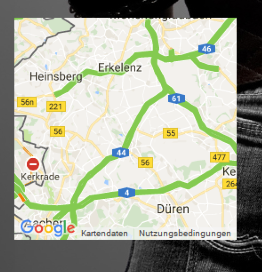
        and it looks like this:
        0_1514024561160_Bildschirmfoto 2017-12-23 um 11.20.22.png

        1 Reply Last reply Reply Quote 0
        • K Offline
          knubbl
          last edited by

          n,o not in the config.
          u need to edit the js file (MMM-GoogleMapsTraffic.js)

          if u want just replace ur js with the code i use

          /* global Module */
          
          /* Magic Mirror
           * Module: MMM-GoogleMapsTraffic
           *
           * By Victor Mora
           * MIT Licensed.
           */
          
          Module.register("MMM-GoogleMapsTraffic", {
          	// Module config defaults
          	defaults : {
          		lat: '',
          		lng: '',
          		height: '300px',
          		width: '300px',
          		zoom: 10,
                          mapTypeId: 'roadmap',
          		disableDefaultUI: true
          	},
          
          	getDom: function() {
                  var lat = this.config.lat;
                  var lng = this.config.lng;
          
          	var wrapper = document.createElement("div");
                  wrapper.setAttribute("id", "map");
          
                  wrapper.style.height = this.config.height;
                  wrapper.style.width = this.config.width;
          
                  var script = document.createElement("script");
                  script.type = "text/javascript";
                  script.src = "https://maps.googleapis.com/maps/api/js?key=" + this.config.key;
                  document.body.appendChild(script);
          
          	var self = this;
                  script.onload = function () {
                      var map = new google.maps.Map(document.getElementById("map"), {
                      	zoom: self.config.zoom,
                          mapTypeId: self.config.mapTypeId,
                      	center: {
                      		lat: self.config.lat,
                      		lng: self.config.lng
                      	},
          			//disableDefaultUI: self.config.disableDefaultUI
          			disableDefaultUI: true,
          			styles: [
          			{elementType: 'geometry', stylers: [{color: '#242f3e'}]},
          			{elementType: 'labels.text.stroke', stylers: [{color: '#242f3e'}]},
          			{elementType: 'labels.text.fill', stylers: [{color: '#746855'}]},
          			{
          			    featureType: 'administrative.locality',
          			    elementType: 'labels.text.fill',
          			    stylers: [{color: '#d59563'}]
          			},
          			{
          				featureType: 'poi',
          				elementType: 'labels.text.fill',
          				stylers: [{color: '#d59563'}]
          			},
          			{
          				featureType: 'poi.park',
          			        elementType: 'geometry',
          			        stylers: [{color: '#263c3f'}]
          			},
          			{
          				featureType: 'poi.park',
          				elementType: 'labels.text.fill',
          				stylers: [{color: '#6b9a76'}]
          			},
          			{
          				featureType: 'road',
          				elementType: 'geometry',
          				stylers: [{color: '#38414e'}]
          			},
          			{
          				featureType: 'road',
          				elementType: 'geometry.stroke',
          					  stylers: [{color: '#212a37'}]
          			},
          			{
          				featureType: 'road',
          				elementType: 'labels.text.fill',
          					  stylers: [{color: '#9ca5b3'}]
          			},
          			{
          				featureType: 'road.highway',
          				elementType: 'geometry',
          				stylers: [{color: '#746855'}]
          			},
          			{
          				featureType: 'road.highway',
          				elementType: 'geometry.stroke',
          				stylers: [{color: '#1f2835'}]
          			},
          			{
          				featureType: 'road.highway',
          				elementType: 'labels.text.fill',
          				stylers: [{color: '#f3d19c'}]
          			},
          			{
          				featureType: 'transit',
          				elementType: 'geometry',
          				stylers: [{color: '#2f3948'}]
          			},
          			{
          			        featureType: 'transit.station',
          				elementType: 'labels.text.fill',
          				stylers: [{color: '#d59563'}]
          			},
          			{
          			        featureType: 'water',
          			        elementType: 'geometry',
          				stylers: [{color: '#17263c'}]
          			},
          			{
          				featureType: 'water',
          				elementType: 'labels.text.fill',
          				stylers: [{color: '#515c6d'}]
          			},
          			{
          				featureType: 'water',
          				elementType: 'labels.text.stroke',
          				stylers: [{color: '#17263c'}]
          			}
          		]
                      });
          
                      var trafficLayer = new google.maps.TrafficLayer();
                      trafficLayer.setMap(map);
                  };
          
          		return wrapper;
          	}
          
          });
          
          
          W 1 Reply Last reply Reply Quote 1
          • cruunnerrC Offline
            cruunnerr
            last edited by

            Great, that worked. Thank you.

            Another question:

            Do you think its possible to show the map just at specific times.

            like in this module: https://github.com/jclarke0000/MMM-MyCommute

            so you were able to show the map just at times u need to know the traffic situation. for example i just need it Mo-Fr between 05:00-07:00 am and on Fr between 02:00-08:00 pm and Sa-So between 09:00am-02:00pm.

            its just an idea. Anyhow its a great module that worked now really fine for me :)

            K 1 Reply Last reply Reply Quote 0
            • K Offline
              knubbl @cruunnerr
              last edited by

              @cruunnerr

              try mmm-scheduler . this is a modul which gives u the opportunity to schedule all modules to show and hide to a spedific time.

              nice if u have not enough space on ur screen and want to switch between modules by time

              1 Reply Last reply Reply Quote 0
              • A Offline
                Aurelsam
                last edited by

                Hi everybody,
                Do you think it would be possible to include a marker on the map to see my house on the map I display?
                Thanks

                R 1 Reply Last reply Reply Quote 0
                • S Offline
                  sheddingmyskin
                  last edited by

                  Anyone else having issues with the map rendering streets / traffic /actual data rather than a blank frame? I have tried several of the forks, and they all end the same way. I have confirmed by use of MMM-Traffic that my API key is valid.

                  config.js:

                  modules: [
                  		{
                  			module: "alert",
                  		},
                  		{
                  			module: "updatenotification",
                  			position: "top_bar"
                  		},
                   // added Modules 
                                  {
                                          module: 'MMM-GoogleMapsTraffic',
                                          position: 'bottom_right',
                                          config: {
                                                  key: '************************',
                                                  lat: '30.00000',
                                                  lng: '-90.000000',
                                                  height: '300px',
                                                  width: '300px'
                  	  	            }
                                  },
                  		{
                  			module: 'MMM-Traffic',
                  			position: 'top_right',
                  			classes: 'dimmed medium', //optional, default is 'bright medium', only applies to commute info not route_name
                  			config: {
                  				api_key: '*******',
                  				mode: 'driving',
                  				origin: '**********',
                  				destination: '*********',
                  			//	mon_destination: '116th St & Broadway, New York, NY 10027',
                  			//	fri_destination: '1 E 161st St, Bronx, NY 10451',
                  				arrival_time: '0755', //optional, but needs to be in 24 hour time if used.
                  				route_name: 'Home to Work',
                  				changeColor: true,
                  				showGreen: false,
                  				limitYellow: 5, //Greater than 5% of journey time due to traffic
                  				limitRed: 20, //Greater than 20% of journey time due to traffic
                  				traffic_model: 'pessimistic',
                  				interval: 60000, //1 minutes
                  				showWeekend: false,
                  				allTime: false,
                  				startHr: 5,
                  				endHr:   10,
                  				hideOffHours: true
                  			}
                  		},
                  
                    //end of Module adds
                  		{
                  			module: "compliments",
                  			position: "lower_third"
                  		},
                  ]



                  0_1516249657158_MMM-GoogleTraffic.png

                  1 Reply Last reply Reply Quote 0
                  • cruunnerrC Offline
                    cruunnerr
                    last edited by

                    @sheddingmyskin said in MMM-GoogleMapsTraffic:

                                                lat: '30.00000',
                                                lng: '-90.000000',
                    

                    This is wrong. Must look like this:

                    lat: 30.00000,
                    lng: -90.000000,
                    

                    Without the ’

                    S 1 Reply Last reply Reply Quote 1
                    • S Offline
                      sheddingmyskin @cruunnerr
                      last edited by

                      @cruunnerr
                      Thanks! That was it. I had it like that to begin with, but using a different fork, that did not allow the module to appear at all. I changed at some point and thought I was making progress.

                      1 Reply Last reply Reply Quote 0
                      • A Offline
                        alkank
                        last edited by

                        Hi guys,

                        Is there anyway to change the Style of the map automaticaly according to sun like navigations systems?

                        1 Reply Last reply Reply Quote 0
                        • R Offline
                          rak @Aurelsam
                          last edited by rak

                          @aurelsam asked for markers. I built this in a very generic way. Will create a pull request soon.

                          R 1 Reply Last reply Reply Quote 0
                          • R Offline
                            rak @rak
                            last edited by

                            Hi,

                            I added a pull request to the original module which adds markers and an option for transparent maps.

                            Have fun.

                            Regards
                            Ralf

                            1 Reply Last reply Reply Quote 0
                            • S Offline
                              Smotx
                              last edited by

                              This post is deleted!
                              1 Reply Last reply Reply Quote 0
                              • S Offline
                                Smotx
                                last edited by Smotx

                                Hi,

                                when I don’t activate this module, all my other modules work and display’s, when I activate this module, some modules are no longer displayed, such as: MMM-TPlink, MMM-CalendarExt, MMM-FreefoxMonitor.

                                Anyone have an idea why?

                                Thanks for help.

                                1 Reply Last reply Reply Quote 0
                                • T Offline
                                  tbs86
                                  last edited by

                                  Every time i add this module and try to start the MM it tells me i have a syntax error and wont start any modules on my mirror.

                                  1 Reply Last reply Reply Quote 0
                                  • evroomE Offline
                                    evroom
                                    last edited by

                                    Read this for learning purposes:

                                    https://forum.magicmirror.builders/topic/5399/how-to-check-your-config-for-errors-for-absolute-beginners

                                    If you post the config:check output and your MMM-GoogleMapsTraffic part inside config.js, I am sure someone can help you.

                                    Good luck.

                                    MagicMirror version: 2.33.0
                                    Raspberry Pi 4 Model B Rev 1.5 (8 GB RAM)
                                    Raspbian GNU/Linux 12 (bookworm)

                                    Test environment:
                                    MagicMirror version: v2.33.0
                                    Raspberry Pi 3 Model B Plus Rev 1.3 (1 GB RAM)
                                    Raspbian GNU/Linux 12 (bookworm)

                                    T 2 Replies Last reply Reply Quote 1
                                    • T Offline
                                      tbs86 @evroom
                                      last edited by

                                      @evroom thank you i will give this a shot when i get home and post my results

                                      1 Reply Last reply Reply Quote 0
                                      • T Offline
                                        tbs86 @evroom
                                        last edited by

                                        @evroom ```here is my code

                                        	{
                                        		module: "calendar",
                                        		header: "US Holidays",
                                        		position: "top_left",
                                        		config: {
                                        			calendars: [
                                        				{
                                        					symbol: "calendar-check-o ",
                                        					url: "webcal://www.calendarlabs.com/templates/ical/US-Holidays.ics"
                                        				}
                                        			]
                                        		}
                                        	},
                                        		
                                        	{
                                        		module: "compliments",
                                        		position: "lower_third"
                                        	},
                                        	var config = {
                                        modules: [
                                            {
                                                module: 'MMM-GoogleMapsTraffic',
                                                position: 'bottom_left',
                                                config: {
                                                    key: 'YOUR_KEY',
                                                    lat: 37.8262306,
                                                    lng: -122.2920096,
                                                    height: '300px',
                                                    width: '300px'
                                                    styledMapType: "transparent",
                                                    disableDefaultUI: true,
                                                    backgroundColor: 'hsla(0, 0%, 0%, 0)',
                                                    markers: [
                                                        {
                                                            lat: 37.8262316,
                                                            lng: -122.2920196,
                                                            fillColor: '#9966ff'
                                                        },
                                                    ],
                                                },
                                            }
                                        ]
                                        

                                        }

                                        1 Reply Last reply Reply Quote 0
                                        • evroomE Offline
                                          evroom
                                          last edited by

                                          Yes, the README tricked you a bit.

                                          Remove this:

                                          var config = {
                                          modules: [
                                          

                                          and the last 2 lines:

                                          }
                                          ]
                                          

                                          Verify with:

                                          cd ~/MagicMirror; npm run config:check
                                          

                                          MagicMirror version: 2.33.0
                                          Raspberry Pi 4 Model B Rev 1.5 (8 GB RAM)
                                          Raspbian GNU/Linux 12 (bookworm)

                                          Test environment:
                                          MagicMirror version: v2.33.0
                                          Raspberry Pi 3 Model B Plus Rev 1.3 (1 GB RAM)
                                          Raspbian GNU/Linux 12 (bookworm)

                                          T 1 Reply Last reply Reply Quote 1
                                          • T Offline
                                            tbs86 @evroom
                                            last edited by

                                            @evroom

                                            did what you said and did the config check and this is what i got

                                            Line 134 col 5 Unexpected ‘]’.
                                            Line 134 col 5 Expected an identifier and instead saw ‘]’.
                                            Line 134 col 6 Missing semicolon.
                                            Line 134 col 5 Unrecoverable syntax error. (95% scanned).
                                            pi@raspberrypi:~/MagicMirror $

                                            1 Reply Last reply Reply Quote 0

                                            Hello! It looks like you're interested in this conversation, but you don't have an account yet.

                                            Getting fed up of having to scroll through the same posts each visit? When you register for an account, you'll always come back to exactly where you were before, and choose to be notified of new replies (either via email, or push notification). You'll also be able to save bookmarks and upvote posts to show your appreciation to other community members.

                                            With your input, this post could be even better 💗

                                            Register Login

                                            • 1
                                            • 2
                                            • 3
                                            • 4
                                            • 5
                                            • 2 / 5
                                            • First post
                                              Last post
                                            Enjoying MagicMirror? Please consider a donation!
                                            MagicMirror created by Michael Teeuw.
                                            Forum managed by Sam, technical setup by Karsten.
                                            This forum is using NodeBB as its core | Contributors
                                            Contact | Privacy Policy
