Read the statement by Michael Teeuw here.
MMM-GoogleMapsTraffic
-
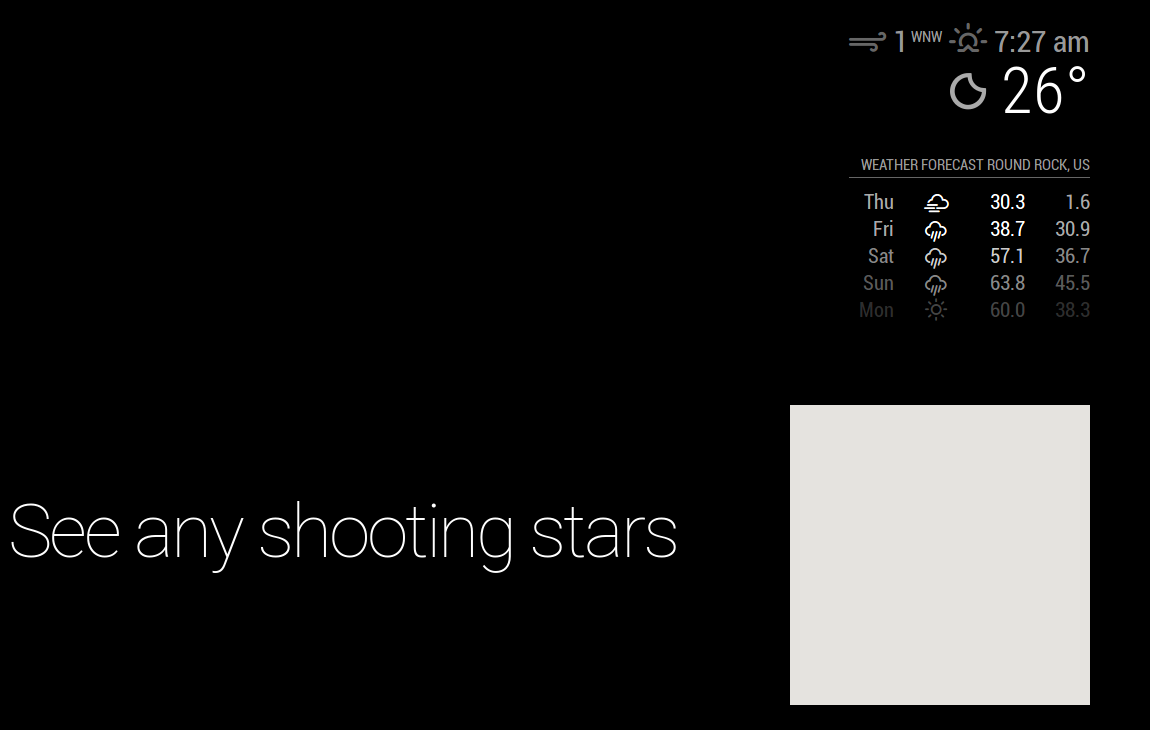
Anyone else having issues with the map rendering streets / traffic /actual data rather than a blank frame? I have tried several of the forks, and they all end the same way. I have confirmed by use of MMM-Traffic that my API key is valid.
config.js:
modules: [
		{
			module: "alert",
		},
		{
			module: "updatenotification",
			position: "top_bar"
		},
 // added Modules
                {
                        module: 'MMM-GoogleMapsTraffic',
                        position: 'bottom_right',
                        config: {
                                key: '************************',
                                lat: '30.00000',
                                lng: '-90.000000',
                                height: '300px',
                                width: '300px'
	  	            }
                },
		{
			module: 'MMM-Traffic',
			position: 'top_right',
			classes: 'dimmed medium', //optional, default is 'bright medium', only applies to commute info not route_name
			config: {
				api_key: '*******',
				mode: 'driving',
				origin: '**********',
				destination: '*********',
			//	mon_destination: '116th St & Broadway, New York, NY 10027',
			//	fri_destination: '1 E 161st St, Bronx, NY 10451',
				arrival_time: '0755', //optional, but needs to be in 24 hour time if used.
				route_name: 'Home to Work',
				changeColor: true,
				showGreen: false,
				limitYellow: 5, //Greater than 5% of journey time due to traffic
				limitRed: 20, //Greater than 20% of journey time due to traffic
				traffic_model: 'pessimistic',
				interval: 60000, //1 minutes
				showWeekend: false,
				allTime: false,
				startHr: 5,
				endHr:   10,
				hideOffHours: true
			}
		},

  //end of Module adds
		{
			module: "compliments",
			position: "lower_third"
		},
]
-
@sheddingmyskin said in MMM-GoogleMapsTraffic:
                            lat: '30.00000',
                            lng: '-90.000000',
This is wrong. Must look like this:
lat: 30.00000,
lng: -90.000000,
Without the ’
-
@cruunnerr
Thanks! That was it. I had it like that to begin with, but using a different fork, that did not allow the module to appear at all. I changed at some point and thought I was making progress. -
Hi guys,
Is there anyway to change the Style of the map automaticaly according to sun like navigations systems?
-
@aurelsam asked for markers. I built this in a very generic way. Will create a pull request soon.
-
Hi,
I added a pull request to the original module which adds markers and an option for transparent maps.
Have fun.
Regards
Ralf -
This post is deleted! -
Hi,
when I don’t activate this module, all my other modules work and display’s, when I activate this module, some modules are no longer displayed, such as: MMM-TPlink, MMM-CalendarExt, MMM-FreefoxMonitor.
Anyone have an idea why?
Thanks for help.
-
Every time i add this module and try to start the MM it tells me i have a syntax error and wont start any modules on my mirror.
-
Read this for learning purposes:
If you post the config:check output and your MMM-GoogleMapsTraffic part inside config.js, I am sure someone can help you.
Good luck.
-
@evroom thank you i will give this a shot when i get home and post my results
-
@evroom ```here is my code
	{
		module: "calendar",
		header: "US Holidays",
		position: "top_left",
		config: {
			calendars: [
				{
					symbol: "calendar-check-o ",
					url: "webcal://www.calendarlabs.com/templates/ical/US-Holidays.ics"
				}
			]
		}
	},

	{
		module: "compliments",
		position: "lower_third"
	},
	var config = {
modules: [
    {
        module: 'MMM-GoogleMapsTraffic',
        position: 'bottom_left',
        config: {
            key: 'YOUR_KEY',
            lat: 37.8262306,
            lng: -122.2920096,
            height: '300px',
            width: '300px'
            styledMapType: "transparent",
            disableDefaultUI: true,
            backgroundColor: 'hsla(0, 0%, 0%, 0)',
            markers: [
                {
                    lat: 37.8262316,
                    lng: -122.2920196,
                    fillColor: '#9966ff'
                },
            ],
        },
    }
]
}
-
Yes, the README tricked you a bit.
Remove this:
var config = {
modules: [
and the last 2 lines:
}
]
Verify with:
cd ~/MagicMirror; npm run config:check -
did what you said and did the config check and this is what i got
Line 134 col 5 Unexpected ‘]’.
Line 134 col 5 Expected an identifier and instead saw ‘]’.
Line 134 col 6 Missing semicolon.
Line 134 col 5 Unrecoverable syntax error. (95% scanned).
pi@raspberrypi:~/MagicMirror $ -
it says line 134 but the only thing on line 134 is a ]
here is my code leading up to 134
		{
    module: "MMM-EARTH",
    position: "bottom_center",
    config: {
        mode: "Natural",
        rotateInterval: 15000,
        MaxWidth: "50%",
        MaxHeight: "50%",
    }
},


	]

};
That is line 116 to 136 the end of my config
-
This is your current config entry
var config = {
modules: [
    {
        module: 'MMM-GoogleMapsTraffic',
        position: 'bottom_left',
        config: {
            key: 'YOUR_KEY',
            lat: 37.8262306,
            lng: -122.2920096,
            height: '300px',
            width: '300px'
            styledMapType: "transparent",
            disableDefaultUI: true,
            backgroundColor: 'hsla(0, 0%, 0%, 0)',
            markers: [
                {
                    lat: 37.8262316,
                    lng: -122.2920196,
                    fillColor: '#9966ff'
                },
            ],
        },
    }
]
Make it look like this or copy and paste
    {
        module: 'MMM-GoogleMapsTraffic',
        position: 'bottom_left',
        config: {
            key: 'YOUR_KEY',
            lat: 37.8262306,
            lng: -122.2920096,
            height: '300px',
            width: '300px'
            styledMapType: "transparent",
            disableDefaultUI: true,
            backgroundColor: 'hsla(0, 0%, 0%, 0)',
            markers: [
                {
                    lat: 37.8262316,
                    lng: -122.2920196,
                    fillColor: '#9966ff'
                },
            ],
        },
Props to @evroom
-
@mykle1 said in MMM-GoogleMapsTraffic:
{
    module: 'MMM-GoogleMapsTraffic',
    position: 'bottom_left',
    config: {
        key: 'YOUR_KEY',
        lat: 37.8262306,
        lng: -122.2920096,
        height: '300px',
        width: '300px'
        styledMapType: "transparent",
        disableDefaultUI: true,
        backgroundColor: 'hsla(0, 0%, 0%, 0)',
        markers: [
            {
                lat: 37.8262316,
                lng: -122.2920196,
                fillColor: '#9966ff'
            },
        ],
    },
still getting a error
-
Sorry about that. I just checked it. Try this please. There was a comma missing after
width: '300px',and no comma after the closing } Not your fault. The example in the readme is incorrect{ module: 'MMM-GoogleMapsTraffic', position: 'bottom_left', config: { key: 'YOUR_KEY', lat: 37.8262306, lng: -122.2920096, height: '300px', width: '300px', styledMapType: "transparent", disableDefaultUI: true, backgroundColor: 'hsla(0, 0%, 0%, 0)', markers: [ { lat: 37.8262316, lng: -122.2920196, fillColor: '#9966ff' }, ], } }, -
this worked thank you!!
-
You’re welcome, mate. :thumbsup:



Hello! It looks like you're interested in this conversation, but you don't have an account yet.
Getting fed up of having to scroll through the same posts each visit? When you register for an account, you'll always come back to exactly where you were before, and choose to be notified of new replies (either via email, or push notification). You'll also be able to save bookmarks and upvote posts to show your appreciation to other community members.
With your input, this post could be even better 💗
Register Login