MagicMirror Forum
    • Recent
    • Tags
    • Unsolved
    • Solved
    • MagicMirror² Repository
    • Documentation
    • 3rd-Party-Modules
    • Donate
    • Discord
    • Register
    • Login
    A New Chapter for MagicMirror: The Community Takes the Lead
    Read the statement by Michael Teeuw here.

    MMM-GoogleMapsTraffic

    Scheduled Pinned Locked Moved Transport
    87 Posts 27 Posters 95.4k Views 28 Watching
    Loading More Posts
    • Oldest to Newest
    • Newest to Oldest
    • Most Votes
    Reply
    • Reply as topic
    Log in to reply
    This topic has been deleted. Only users with topic management privileges can see it.
    • evroomE
      evroom
      last edited by

      Read this for learning purposes:

      https://forum.magicmirror.builders/topic/5399/how-to-check-your-config-for-errors-for-absolute-beginners

      If you post the config:check output and your MMM-GoogleMapsTraffic part inside config.js, I am sure someone can help you.

      Good luck.

      MagicMirror version: 2.37.0
      Raspberry Pi 4 Model B Rev 1.5 (8 GB RAM)
      Raspbian GNU/Linux 12 (bookworm)

      T 2 Replies Last reply
      Reply Quote 1
      • T
        tbs86 @evroom
        last edited by

        @evroom thank you i will give this a shot when i get home and post my results

        1 Reply Last reply
        Reply Quote 0
        • T
          tbs86 @evroom
          last edited by

          @evroom ```here is my code

          	{
          		module: "calendar",
          		header: "US Holidays",
          		position: "top_left",
          		config: {
          			calendars: [
          				{
          					symbol: "calendar-check-o ",
          					url: "webcal://www.calendarlabs.com/templates/ical/US-Holidays.ics"
          				}
          			]
          		}
          	},
          		
          	{
          		module: "compliments",
          		position: "lower_third"
          	},
          	var config = {
          modules: [
              {
                  module: 'MMM-GoogleMapsTraffic',
                  position: 'bottom_left',
                  config: {
                      key: 'YOUR_KEY',
                      lat: 37.8262306,
                      lng: -122.2920096,
                      height: '300px',
                      width: '300px'
                      styledMapType: "transparent",
                      disableDefaultUI: true,
                      backgroundColor: 'hsla(0, 0%, 0%, 0)',
                      markers: [
                          {
                              lat: 37.8262316,
                              lng: -122.2920196,
                              fillColor: '#9966ff'
                          },
                      ],
                  },
              }
          ]
          

          }

          1 Reply Last reply
          Reply Quote 0
          • evroomE
            evroom
            last edited by

            Yes, the README tricked you a bit.

            Remove this:

            var config = {
            modules: [
            

            and the last 2 lines:

            }
            ]
            

            Verify with:

            cd ~/MagicMirror; npm run config:check
            

            MagicMirror version: 2.37.0
            Raspberry Pi 4 Model B Rev 1.5 (8 GB RAM)
            Raspbian GNU/Linux 12 (bookworm)

            T 1 Reply Last reply
            Reply Quote 1
            • T
              tbs86 @evroom
              last edited by

              @evroom

              did what you said and did the config check and this is what i got

              Line 134 col 5 Unexpected ‘]’.
              Line 134 col 5 Expected an identifier and instead saw ‘]’.
              Line 134 col 6 Missing semicolon.
              Line 134 col 5 Unrecoverable syntax error. (95% scanned).
              pi@raspberrypi:~/MagicMirror $

              1 Reply Last reply
              Reply Quote 0
              • T
                tbs86
                last edited by tbs86

                it says line 134 but the only thing on line 134 is a ]

                here is my code leading up to 134

                		{
                    module: "MMM-EARTH",
                    position: "bottom_center",
                    config: {
                        mode: "Natural",
                        rotateInterval: 15000,
                        MaxWidth: "50%",
                        MaxHeight: "50%",
                    }
                },


                	]
                
                };


                That is line 116 to 136 the end of my config

                Mykle1M 1 Reply Last reply
                Reply Quote 0
                • Mykle1M
                  Mykle1 Project Sponsor Module Developer @tbs86
                  last edited by

                  @tbs86

                  This is your current config entry

                  var config = {
                  modules: [
                      {
                          module: 'MMM-GoogleMapsTraffic',
                          position: 'bottom_left',
                          config: {
                              key: 'YOUR_KEY',
                              lat: 37.8262306,
                              lng: -122.2920096,
                              height: '300px',
                              width: '300px'
                              styledMapType: "transparent",
                              disableDefaultUI: true,
                              backgroundColor: 'hsla(0, 0%, 0%, 0)',
                              markers: [
                                  {
                                      lat: 37.8262316,
                                      lng: -122.2920196,
                                      fillColor: '#9966ff'
                                  },
                              ],
                          },
                      }
                  ]
                  

                  Make it look like this or copy and paste

                      {
                          module: 'MMM-GoogleMapsTraffic',
                          position: 'bottom_left',
                          config: {
                              key: 'YOUR_KEY',
                              lat: 37.8262306,
                              lng: -122.2920096,
                              height: '300px',
                              width: '300px'
                              styledMapType: "transparent",
                              disableDefaultUI: true,
                              backgroundColor: 'hsla(0, 0%, 0%, 0)',
                              markers: [
                                  {
                                      lat: 37.8262316,
                                      lng: -122.2920196,
                                      fillColor: '#9966ff'
                                  },
                              ],
                          },
                  

                  Props to @evroom

                  Create a working config
                  How to add modules

                  T 1 Reply Last reply
                  Reply Quote 0
                  • T
                    tbs86 @Mykle1
                    last edited by

                    @mykle1 said in MMM-GoogleMapsTraffic:

                    {
                        module: 'MMM-GoogleMapsTraffic',
                        position: 'bottom_left',
                        config: {
                            key: 'YOUR_KEY',
                            lat: 37.8262306,
                            lng: -122.2920096,
                            height: '300px',
                            width: '300px'
                            styledMapType: "transparent",
                            disableDefaultUI: true,
                            backgroundColor: 'hsla(0, 0%, 0%, 0)',
                            markers: [
                                {
                                    lat: 37.8262316,
                                    lng: -122.2920196,
                                    fillColor: '#9966ff'
                                },
                            ],
                        },
                    

                    still getting a error

                    Mykle1M 1 Reply Last reply
                    Reply Quote 0
                    • Mykle1M
                      Mykle1 Project Sponsor Module Developer @tbs86
                      last edited by Mykle1

                      @tbs86

                      Sorry about that. I just checked it. Try this please. There was a comma missing after width: '300px', and no comma after the closing } Not your fault. The example in the readme is incorrect

                      {
                          module: 'MMM-GoogleMapsTraffic',
                          position: 'bottom_left',
                          config: {
                              key: 'YOUR_KEY',
                              lat: 37.8262306,
                              lng: -122.2920096,
                              height: '300px',
                              width: '300px',
                              styledMapType: "transparent",
                              disableDefaultUI: true,
                              backgroundColor: 'hsla(0, 0%, 0%, 0)',
                              markers: [
                                  {
                                      lat: 37.8262316,
                                      lng: -122.2920196,
                                      fillColor: '#9966ff'
                                  },
                              ],
                          }
                        },
                      

                      Create a working config
                      How to add modules

                      T 1 Reply Last reply
                      Reply Quote 1
                      • T
                        tbs86 @Mykle1
                        last edited by

                        @mykle1

                        this worked thank you!!

                        Mykle1M 1 Reply Last reply
                        Reply Quote 0
                        • Mykle1M
                          Mykle1 Project Sponsor Module Developer @tbs86
                          last edited by

                          @tbs86

                          You’re welcome, mate. :thumbsup:

                          Create a working config
                          How to add modules

                          1 Reply Last reply
                          Reply Quote 0
                          • R
                            rvanuden
                            last edited by

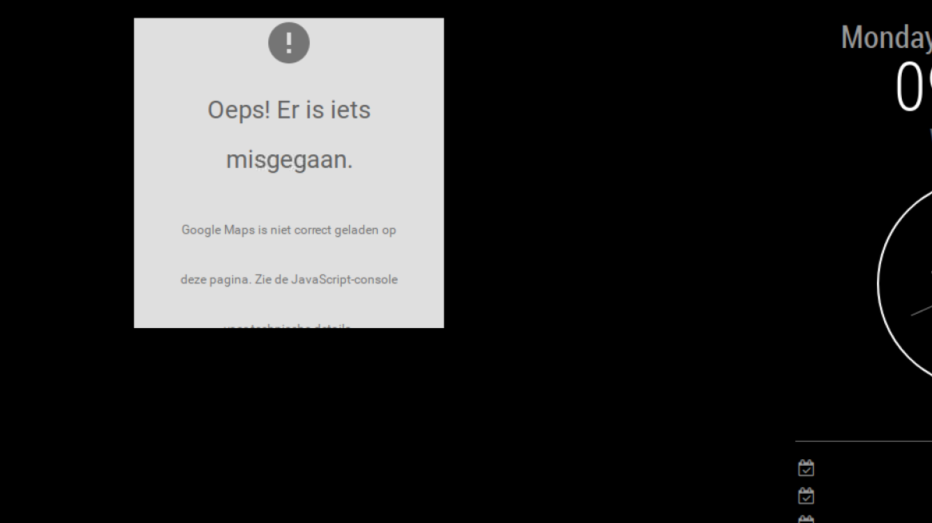
                            it all seems to be working but googlemaps can not be loaded, i used a new key though

                            any ideas?
                            0_1560152399610_maps.PNG

                            R 1 Reply Last reply
                            Reply Quote 0
                            • R
                              rvanuden @rvanuden
                              last edited by

                              @rvanuden anyone?

                              M 1 Reply Last reply
                              Reply Quote 0
                              • M
                                mcneilp @rvanuden
                                last edited by

                                @rvanuden I have the same problem. Did you find a solution?

                                1 Reply Last reply
                                Reply Quote 0
                                • S
                                  sdetweil
                                  last edited by sdetweil

                                  there is a problem with the original module… I have a fixed version
                                  here https://github.com/sdetweil/MMM-GoogleMapsTraffic

                                  Do this

                                  cd ~/MagicMirror/modules
                                  mv  MMM-GoogleMapsTraffic  MMM-GoogleMapsTraffic.original
                                  git clone https://github.com/sdetweil/MMM-GoogleMapsTraffic
                                  cd MMM-GoogleMapsTraffic
                                  npm install
                                  

                                  then restart the mirror app

                                  Sam

                                  How to add modules

                                  learning how to use browser developers window for css changes

                                  ChrisC 1 Reply Last reply
                                  Reply Quote 3
                                  • ChrisC
                                    Chris @sdetweil
                                    last edited by

                                    @sdetweil said in MMM-GoogleMapsTraffic:

                                    there is a problem with the original module… I have a fixed version
                                    here https://github.com/sdetweil/MMM-GoogleMapsTraffic

                                    Do this

                                    cd ~/MagicMirror/modules
                                    mv  MMM-GoogleMapsTraffic  MMM-GoogleMapsTraffic.original
                                    git clone https://github.com/sdetweil/MMM-GoogleMapsTraffic
                                    cd MMM-GoogleMapsTraffic
                                    npm install
                                    

                                    then restart the mirror app

                                    Hello,
                                    Thank you so much,

                                    Regards,

                                    1 Reply Last reply
                                    Reply Quote 0
                                    • M
                                      mcneilp
                                      last edited by

                                      I got it working. I did the above…plus I was using the wrong bit of text for my API key…and had to “setup billing” on my api account apparently to allow it to work.

                                      S 1 Reply Last reply
                                      Reply Quote 0
                                      • S
                                        sdetweil @mcneilp
                                        last edited by

                                        @mcneilp thanks for the feedback… sad how many of the apis want to charge…

                                        Sam

                                        How to add modules

                                        learning how to use browser developers window for css changes

                                        1 Reply Last reply
                                        Reply Quote 0
                                        • E
                                          Egnos
                                          last edited by Egnos

                                          Hello to all.
                                          Many thanks to the developer for the brilliant idea!

                                          I describe my environment:
                                          I’m testing the various modules on a virtual machine (Virtual Box) that runs on a Windows 10 PC.
                                          For now all modules work perfectly except MMM-GoogleMapsTraffic.

                                          Description of the problem:
                                          I successfully installed the module but when I launch MM I only see the classic purple Google Maps pointer and nothing else…

                                          The configuration of the .JSON seems ok, and the API has been entered correctly.

                                          Can you help me…?

                                          Thank you all!

                                          My Mirror https://forum.magicmirror.builders/topic/17262/the-raspimirror-was-born/7

                                          S 1 Reply Last reply
                                          Reply Quote 0
                                          • S
                                            sdetweil @Egnos
                                            last edited by

                                            @Egnos see back a couple posts to get my updated version.

                                            Sam

                                            How to add modules

                                            learning how to use browser developers window for css changes

                                            E 1 Reply Last reply
                                            Reply Quote 0

                                            Hello! It looks like you're interested in this conversation, but you don't have an account yet.

                                            Getting fed up of having to scroll through the same posts each visit? When you register for an account, you'll always come back to exactly where you were before, and choose to be notified of new replies (either via email, or push notification). You'll also be able to save bookmarks and upvote posts to show your appreciation to other community members.

                                            With your input, this post could be even better 💗

                                            Register Login

                                            • 1
                                            • 2
                                            • 3
                                            • 4
                                            • 5
                                            • 3 / 5
                                            • First post
                                              Last post
                                            Enjoying MagicMirror? Please consider a donation!
                                            MagicMirror created by Michael Teeuw.
                                            Forum managed by Sam, technical setup by Karsten.
                                            This forum is using NodeBB as its core | Contributors
                                            Contact | Privacy Policy