MagicMirror Forum
    • Recent
    • Tags
    • Unsolved
    • Solved
    • MagicMirror² Repository
    • Documentation
    • 3rd-Party-Modules
    • Donate
    • Discord
    • Register
    • Login
    A New Chapter for MagicMirror: The Community Takes the Lead
    Read the statement by Michael Teeuw here.

    MMM-GoogleMapsTraffic

    Scheduled Pinned Locked Moved Transport
    87 Posts 27 Posters 83.4k Views 28 Watching
    Loading More Posts
    • Oldest to Newest
    • Newest to Oldest
    • Most Votes
    Reply
    • Reply as topic
    Log in to reply
    This topic has been deleted. Only users with topic management privileges can see it.
    • evroomE Online
      evroom
      last edited by

      Yes, the README tricked you a bit.

      Remove this:

      var config = {
      modules: [
      

      and the last 2 lines:

      }
      ]
      

      Verify with:

      cd ~/MagicMirror; npm run config:check
      

      MagicMirror version: 2.33.0
      Raspberry Pi 4 Model B Rev 1.5 (8 GB RAM)
      Raspbian GNU/Linux 12 (bookworm)

      Test environment:
      MagicMirror version: v2.33.0
      Raspberry Pi 3 Model B Plus Rev 1.3 (1 GB RAM)
      Raspbian GNU/Linux 12 (bookworm)

      T 1 Reply Last reply Reply Quote 1
      • T Offline
        tbs86 @evroom
        last edited by

        @evroom

        did what you said and did the config check and this is what i got

        Line 134 col 5 Unexpected ‘]’.
        Line 134 col 5 Expected an identifier and instead saw ‘]’.
        Line 134 col 6 Missing semicolon.
        Line 134 col 5 Unrecoverable syntax error. (95% scanned).
        pi@raspberrypi:~/MagicMirror $

        1 Reply Last reply Reply Quote 0
        • T Offline
          tbs86
          last edited by tbs86

          it says line 134 but the only thing on line 134 is a ]

          here is my code leading up to 134

          		{
              module: "MMM-EARTH",
              position: "bottom_center",
              config: {
                  mode: "Natural",
                  rotateInterval: 15000,
                  MaxWidth: "50%",
                  MaxHeight: "50%",
              }
          },


          	]
          
          };


          That is line 116 to 136 the end of my config

          Mykle1M 1 Reply Last reply Reply Quote 0
          • Mykle1M Offline
            Mykle1 Project Sponsor Module Developer @tbs86
            last edited by

            @tbs86

            This is your current config entry

            var config = {
            modules: [
                {
                    module: 'MMM-GoogleMapsTraffic',
                    position: 'bottom_left',
                    config: {
                        key: 'YOUR_KEY',
                        lat: 37.8262306,
                        lng: -122.2920096,
                        height: '300px',
                        width: '300px'
                        styledMapType: "transparent",
                        disableDefaultUI: true,
                        backgroundColor: 'hsla(0, 0%, 0%, 0)',
                        markers: [
                            {
                                lat: 37.8262316,
                                lng: -122.2920196,
                                fillColor: '#9966ff'
                            },
                        ],
                    },
                }
            ]
            

            Make it look like this or copy and paste

                {
                    module: 'MMM-GoogleMapsTraffic',
                    position: 'bottom_left',
                    config: {
                        key: 'YOUR_KEY',
                        lat: 37.8262306,
                        lng: -122.2920096,
                        height: '300px',
                        width: '300px'
                        styledMapType: "transparent",
                        disableDefaultUI: true,
                        backgroundColor: 'hsla(0, 0%, 0%, 0)',
                        markers: [
                            {
                                lat: 37.8262316,
                                lng: -122.2920196,
                                fillColor: '#9966ff'
                            },
                        ],
                    },
            

            Props to @evroom

            Create a working config
            How to add modules

            T 1 Reply Last reply Reply Quote 0
            • T Offline
              tbs86 @Mykle1
              last edited by

              @mykle1 said in MMM-GoogleMapsTraffic:

              {
                  module: 'MMM-GoogleMapsTraffic',
                  position: 'bottom_left',
                  config: {
                      key: 'YOUR_KEY',
                      lat: 37.8262306,
                      lng: -122.2920096,
                      height: '300px',
                      width: '300px'
                      styledMapType: "transparent",
                      disableDefaultUI: true,
                      backgroundColor: 'hsla(0, 0%, 0%, 0)',
                      markers: [
                          {
                              lat: 37.8262316,
                              lng: -122.2920196,
                              fillColor: '#9966ff'
                          },
                      ],
                  },
              

              still getting a error

              Mykle1M 1 Reply Last reply Reply Quote 0
              • Mykle1M Offline
                Mykle1 Project Sponsor Module Developer @tbs86
                last edited by Mykle1

                @tbs86

                Sorry about that. I just checked it. Try this please. There was a comma missing after width: '300px', and no comma after the closing } Not your fault. The example in the readme is incorrect

                {
                    module: 'MMM-GoogleMapsTraffic',
                    position: 'bottom_left',
                    config: {
                        key: 'YOUR_KEY',
                        lat: 37.8262306,
                        lng: -122.2920096,
                        height: '300px',
                        width: '300px',
                        styledMapType: "transparent",
                        disableDefaultUI: true,
                        backgroundColor: 'hsla(0, 0%, 0%, 0)',
                        markers: [
                            {
                                lat: 37.8262316,
                                lng: -122.2920196,
                                fillColor: '#9966ff'
                            },
                        ],
                    }
                  },
                

                Create a working config
                How to add modules

                T 1 Reply Last reply Reply Quote 1
                • T Offline
                  tbs86 @Mykle1
                  last edited by

                  @mykle1

                  this worked thank you!!

                  Mykle1M 1 Reply Last reply Reply Quote 0
                  • Mykle1M Offline
                    Mykle1 Project Sponsor Module Developer @tbs86
                    last edited by

                    @tbs86

                    You’re welcome, mate. :thumbsup:

                    Create a working config
                    How to add modules

                    1 Reply Last reply Reply Quote 0
                    • R Offline
                      rvanuden
                      last edited by

                      it all seems to be working but googlemaps can not be loaded, i used a new key though

                      any ideas?
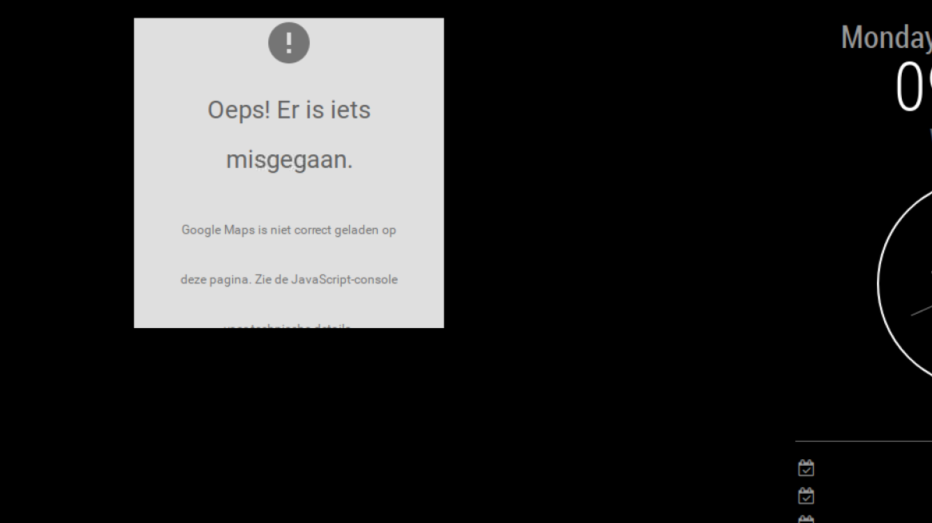
                      0_1560152399610_maps.PNG

                      R 1 Reply Last reply Reply Quote 0
                      • R Offline
                        rvanuden @rvanuden
                        last edited by

                        @rvanuden anyone?

                        M 1 Reply Last reply Reply Quote 0
                        • M Offline
                          mcneilp @rvanuden
                          last edited by

                          @rvanuden I have the same problem. Did you find a solution?

                          1 Reply Last reply Reply Quote 0
                          • S Offline
                            sdetweil
                            last edited by sdetweil

                            there is a problem with the original module… I have a fixed version
                            here https://github.com/sdetweil/MMM-GoogleMapsTraffic

                            Do this

                            cd ~/MagicMirror/modules
                            mv  MMM-GoogleMapsTraffic  MMM-GoogleMapsTraffic.original
                            git clone https://github.com/sdetweil/MMM-GoogleMapsTraffic
                            cd MMM-GoogleMapsTraffic
                            npm install
                            

                            then restart the mirror app

                            Sam

                            How to add modules

                            learning how to use browser developers window for css changes

                            ChrisC 1 Reply Last reply Reply Quote 3
                            • ChrisC Offline
                              Chris @sdetweil
                              last edited by

                              @sdetweil said in MMM-GoogleMapsTraffic:

                              there is a problem with the original module… I have a fixed version
                              here https://github.com/sdetweil/MMM-GoogleMapsTraffic

                              Do this

                              cd ~/MagicMirror/modules
                              mv  MMM-GoogleMapsTraffic  MMM-GoogleMapsTraffic.original
                              git clone https://github.com/sdetweil/MMM-GoogleMapsTraffic
                              cd MMM-GoogleMapsTraffic
                              npm install
                              

                              then restart the mirror app

                              Hello,
                              Thank you so much,

                              Regards,

                              1 Reply Last reply Reply Quote 0
                              • M Offline
                                mcneilp
                                last edited by

                                I got it working. I did the above…plus I was using the wrong bit of text for my API key…and had to “setup billing” on my api account apparently to allow it to work.

                                S 1 Reply Last reply Reply Quote 0
                                • S Offline
                                  sdetweil @mcneilp
                                  last edited by

                                  @mcneilp thanks for the feedback… sad how many of the apis want to charge…

                                  Sam

                                  How to add modules

                                  learning how to use browser developers window for css changes

                                  1 Reply Last reply Reply Quote 0
                                  • E Offline
                                    Egnos
                                    last edited by Egnos

                                    Hello to all.
                                    Many thanks to the developer for the brilliant idea!

                                    I describe my environment:
                                    I’m testing the various modules on a virtual machine (Virtual Box) that runs on a Windows 10 PC.
                                    For now all modules work perfectly except MMM-GoogleMapsTraffic.

                                    Description of the problem:
                                    I successfully installed the module but when I launch MM I only see the classic purple Google Maps pointer and nothing else…

                                    The configuration of the .JSON seems ok, and the API has been entered correctly.

                                    Can you help me…?

                                    Thank you all!

                                    My Mirror https://forum.magicmirror.builders/topic/17262/the-raspimirror-was-born/7

                                    S 1 Reply Last reply Reply Quote 0
                                    • S Offline
                                      sdetweil @Egnos
                                      last edited by

                                      @Egnos see back a couple posts to get my updated version.

                                      Sam

                                      How to add modules

                                      learning how to use browser developers window for css changes

                                      E 1 Reply Last reply Reply Quote 0
                                      • E Offline
                                        Egnos @sdetweil
                                        last edited by Egnos

                                        @sdetweil
                                        I installed the module this afternoon, I believe it is already the updated version.
                                        I have used this
                                        guide

                                        My Mirror https://forum.magicmirror.builders/topic/17262/the-raspimirror-was-born/7

                                        S 1 Reply Last reply Reply Quote 0
                                        • S Offline
                                          sdetweil @Egnos
                                          last edited by

                                          @Egnos from here, right?

                                          https://github.com/sdetweil/MMM-GoogleMapsTraffic

                                          Sam

                                          How to add modules

                                          learning how to use browser developers window for css changes

                                          E 3 Replies Last reply Reply Quote 0
                                          • E Offline
                                            Egnos @sdetweil
                                            last edited by

                                            @sdetweil
                                            Yes, of course.

                                            My Mirror https://forum.magicmirror.builders/topic/17262/the-raspimirror-was-born/7

                                            1 Reply Last reply Reply Quote 0

                                            Hello! It looks like you're interested in this conversation, but you don't have an account yet.

                                            Getting fed up of having to scroll through the same posts each visit? When you register for an account, you'll always come back to exactly where you were before, and choose to be notified of new replies (either via email, or push notification). You'll also be able to save bookmarks and upvote posts to show your appreciation to other community members.

                                            With your input, this post could be even better 💗

                                            Register Login

                                            • 1
                                            • 2
                                            • 3
                                            • 4
                                            • 5
                                            • 3 / 5
                                            • First post
                                              Last post
                                            Enjoying MagicMirror? Please consider a donation!
                                            MagicMirror created by Michael Teeuw.
                                            Forum managed by Sam, technical setup by Karsten.
                                            This forum is using NodeBB as its core | Contributors
                                            Contact | Privacy Policy