MagicMirror Forum
    • Recent
    • Tags
    • Unsolved
    • Solved
    • MagicMirror² Repository
    • Documentation
    • 3rd-Party-Modules
    • Donate
    • Discord
    • Register
    • Login
    A New Chapter for MagicMirror: The Community Takes the Lead
    Read the statement by Michael Teeuw here.

    MMM-doomsDay - The countdown module,

    Scheduled Pinned Locked Moved Utilities
    74 Posts 17 Posters 90.0k Views 16 Watching
    Loading More Posts
    • Oldest to Newest
    • Newest to Oldest
    • Most Votes
    Reply
    • Reply as topic
    Log in to reply
    This topic has been deleted. Only users with topic management privileges can see it.
    • B Offline
      bminer1
      last edited by

      Thanks! It worked but that was copied and pasted from GitHub. May want to make the change.

      0_1490728928244_upload-91d7f2b1-ed96-4c2d-b3e8-04cca60299c2

      1 Reply Last reply Reply Quote 0
      • B Offline
        bminer1
        last edited by

        Also, is there a way to add multiple count downs to the one module or do you duplicate the module with every countdown?

        brobergB 1 Reply Last reply Reply Quote 0
        • brobergB Offline
          broberg Project Sponsor @bminer1
          last edited by broberg

          @bminer1 nice catch, the example was wrong, somehow I missed that!
          (it’s correct in the Configuration list however)

          Multiple instances in the config is the way to go at the moment,

          1 Reply Last reply Reply Quote 0
          • M Offline
            mydiva
            last edited by mydiva

            It is possible to make instead of just days, weeks and days left? Thanks guys

            1 Reply Last reply Reply Quote 0
            • M Offline
              mydiva
              last edited by

              I did it by myself, thank you anyway for the great module.

              1 Reply Last reply Reply Quote 0
              • N Offline
                noelandrews
                last edited by

                Hi all,
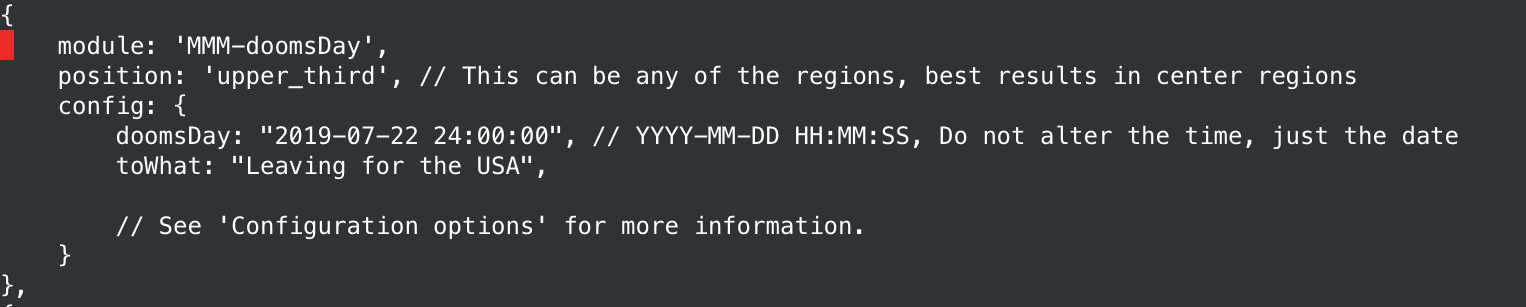
                Bringing an old thread back up, just installed and got this module activated. I think I’ve done it correctly as per github but its not working. It just displays the ‘finished’ message the death and despair bit.

                Can anyone tell me what silly obvious thing I’ve done wrong? Config in the pic below
                Thanks
                Noel0_1530566153187_8A3636F3-D374-443D-8951-8E0EBA008A38.jpeg
                justjim1220J Mykle1M 2 Replies Last reply Reply Quote 0
                • justjim1220J Offline
                  justjim1220 Module Developer @noelandrews
                  last edited by

                  @noelandrews

                  try removing the comma at the end of the ‘toWhat’ line

                  "Life's Too Short To Dance With Ugly People"
                  Jim Hallock - 1995

                  1 Reply Last reply Reply Quote 0
                  • Mykle1M Offline
                    Mykle1 Project Sponsor Module Developer @noelandrews
                    last edited by Mykle1

                    @noelandrews said in MMM-doomsDay - The countdown module,:

                    Can anyone tell me what silly obvious thing I’ve done wrong?

                    Your config looks fine. I just installed and ran the module without a problem, duplicating your config entry. Are you sure you saved the config after having made the entry or that you are not working a second config? I’ve done that plenty of times.

                    Here is a screenshot of the module working with your config

                    0_1530578697604_22.png

                    {
                        module: 'MMM-doomsDay',
                        position: 'bottom_center', // This can be any of the regions, best results in center regions
                        config: {
                            doomsDay: "2019-07-22 24:00:00", // YYYY-MM-DD HH:MM:SS, Do not alter the time, just the date
                            toWhat: "Leaving for the USA!",
                            
                            // See 'Configuration options' for more information.
                        }
                    },
                    

                    If it continues to give you trouble, you could try https://github.com/mykle1/MMM-EventHorizon which does basically the same thing, with a few more options, as well as a working countdown timer.

                    Create a working config
                    How to add modules

                    1 Reply Last reply Reply Quote 0
                    • N Offline
                      noelandrews
                      last edited by

                      Thanks guys, very weird. The config is exactly as you have copied straight from github. I’ll give Event Horizon a shot.
                      Thanks

                      1 Reply Last reply Reply Quote 0
                      • zdenekZ Offline
                        zdenek
                        last edited by

                        hi all
                        is there way how to countdown to repeating annivesary? smthg like

                        config: {
                                doomsDay: "XXXX-12-24 24:00:00", // YYYY-MM-DD HH:MM:SS, Do not alter the time, just the date
                                toWhat: "X-MASS",
                                
                                // See 'Configuration options' for more information.
                            }
                        

                        ? for x-mass (for kids), marriage anniversary, yearly TAX payment…

                        thanks,
                        Zdeněk

                        1 Reply Last reply Reply Quote 0
                        • D Offline
                          doubleT Module Developer
                          last edited by

                          @zdenek Even though I think it’s possible with a few changes to the code, I don’t think this would fit the scope of this module, which is to manually set a countdown to one specific event (noteven a few, right?) but not for a whole list of calendar dates.

                          Even if the code ignores the year and just always shows the next event, does it make sense to have it display “364 days left” right the next day?

                          Anyway, if you want to do that, I’d suggest adding:

                              doomsDay: "2018-12-24 24:00:00",
                              yearlyEvent: true,
                              toWhat: "X-Mass"
                          

                          The most simple simple change to the code would be to add this at line 48:

                          if (this.config.yearlyEvent && daysLeft < = 0) {
                              var diff = now.getFullYear() - doomsday.getFullYear();
                              // update doomsday:
                              doomsDay.setFullYear(d.getFullYear() + diff);
                              // calculate again:
                              timeparser = Date.parse(doomsDay) - Date.parse(now);
                              daysLeft = Math.floor(timeparser/(1000*60*60*24));
                          }
                          

                          (remove the space between “< =” … )
                          I didn’t test this, though, (and I don’t recommend it).

                          zdenekZ 1 Reply Last reply Reply Quote 0
                          • zdenekZ Offline
                            zdenek @doubleT
                            last edited by

                            @doublet thanks, but this module seems to be easier way :-) anway, thanks a lot

                            Zdeněk

                            1 Reply Last reply Reply Quote 0
                            • C Offline
                              ChrizZz
                              last edited by

                              Is it possible to add more than 1 event and the module switches between the events with fade in and fade out?

                              ? 1 Reply Last reply Reply Quote 0
                              • ? Offline
                                A Former User @ChrizZz
                                last edited by

                                @ChrizZz
                                See https://github.com/eouia/MMM-CountEvents It could be done with group feature.

                                1 Reply Last reply Reply Quote 1
                                • M Offline
                                  MajorC Project Sponsor
                                  last edited by

                                  Hello,

                                  first of all thank you for the great modules. I am currently using it to display the time until my vacation.

                                  Since I speak German, I made a few changes in the code. But these are lost after an update and I copy & paste them back. Is there a better way to make these changes than fiddling around in the code?

                                  I change:

                                  ORIGINAL: headerD.innerHTML = this.config.toWhat + "</br>";
                                  MY:       headerD.innerHTML = this.config.toWhat;
                                  
                                  ORIGINAL: timeLeft.innerHTML = daysLeft + " " + this.config.singular;
                                  MY:       timeLeft.innerHTML = this.config.singular;
                                  
                                  ORIGINAL: timeLeft.innerHTML = daysLeft + " " + this.config.plural;
                                  MY:       timeLeft.innerHTML = " noch " + daysLeft + " " + this.config.plural;

                                  
                                  1 Reply Last reply Reply Quote 0

                                  Hello! It looks like you're interested in this conversation, but you don't have an account yet.

                                  Getting fed up of having to scroll through the same posts each visit? When you register for an account, you'll always come back to exactly where you were before, and choose to be notified of new replies (either via email, or push notification). You'll also be able to save bookmarks and upvote posts to show your appreciation to other community members.

                                  With your input, this post could be even better 💗

                                  Register Login

                                  • 1
                                  • 2
                                  • 3
                                  • 4
                                  • 4 / 4
                                  • First post
                                    Last post
                                  Enjoying MagicMirror? Please consider a donation!
                                  MagicMirror created by Michael Teeuw.
                                  Forum managed by Sam, technical setup by Karsten.
                                  This forum is using NodeBB as its core | Contributors
                                  Contact | Privacy Policy

