Read the statement by Michael Teeuw here.
My First Mirror... until now ^^
-
Just type a header in the config:
{ module: "MMM-EasyPix", header: "WLAN-Code", position: "bottom_left", config: { picName: "guest_wifi_config.png", // Enter the picture file name. maxWidth: "150px", // Size picture precisely. Retains aspect ratio. } }, -
ah yes alright, thanks
-
hi… i have motion detector pir. and a led5050 strip.
can you please provide the software part between pir and led… for dimming and on off feature … pleeeese
thx -
Hey @metalldetector
I already did somewhere in the forum ^^
You need to install PIGPIOD.
sudo apt-get install build-essential python-dev unzip wgetwget http://abyz.me.uk/rpi/pigpio/pigpio.zip && unzip pigpio.zip && cd PIGPIO && sudo make installConnect the PIR like shown at Part 2.2 and follow the guide:
https://forum.magicmirror.builders/topic/6291/howto-turn-on-off-your-monitor-time-based-pir-button-app?page=1When creating the pir.py and fill ist with this code:
#!/usr/bin/env python

import sys
import time
import RPi.GPIO as io
import subprocess
import pigpio

io.setmode(io.BCM)
SHUTOFF_DELAY = 119 # seconds
PIR_PIN = 25       # 22 on the board
LED_PIN = 16

def main():
    io.setup(PIR_PIN, io.IN)
    io.setup(LED_PIN, io.OUT)
    turned_off = False
    last_motion_time = time.time()

    while True:
        if io.input(PIR_PIN):
            last_motion_time = time.time()
            io.output(LED_PIN, io.LOW)
            print ".",
            sys.stdout.flush()
            if turned_off:
                turned_off = False
                turn_on()
        else:
            if not turned_off and time.time() > (last_motion_time +
                                                 SHUTOFF_DELAY):
                turned_off = True
                turn_off()
            if not turned_off and time.time() > (last_motion_time + 1):
                io.output(LED_PIN, io.HIGH)
        time.sleep(.1)

def turn_on():
	subprocess.call("sh /home/pi/monitor_on.sh", shell=True)

def turn_off():
	subprocess.call("sh /home/pi/monitor_off.sh", shell=True)

if __name__ == '__main__':
    try:
        main()
    except KeyboardInterrupt:
        io.cleanup()
For the monitor_on.sh use this:
vcgencmd display_power 1

pigs p 17 1
pigs p 22 1
pigs p 24 1

sleep 0.06s

pigs p 17 2
pigs p 22 2
pigs p 24 2

sleep 0.06s

pigs p 17 3
pigs p 22 3
pigs p 24 3

sleep 0.06s

pigs p 17 4
pigs p 22 4
pigs p 24 4

sleep 0.06s

pigs p 17 5
pigs p 22 5
pigs p 24 5

sleep 0.06s

pigs p 17 6
pigs p 22 6
pigs p 24 5

sleep 0.06s

pigs p 17 7
pigs p 22 7
pigs p 24 6

sleep 0.06s

pigs p 17 8
pigs p 22 8
pigs p 24 7

sleep 0.06s

pigs p 17 9
pigs p 22 9
pigs p 24 8

sleep 0.06s

pigs p 17 10
pigs p 22 10
pigs p 24 9

sleep 0.06s

pigs p 17 11
pigs p 22 11
pigs p 24 10

sleep 0.06s

pigs p 17 12
pigs p 22 12
pigs p 24 11
For monitor_off.sh use this:
pigs p 17 12
pigs p 22 12
pigs p 24 11

sleep 0.06s

pigs p 17 11
pigs p 22 11
pigs p 24 10

sleep 0.06s

pigs p 17 10
pigs p 22 10
pigs p 24 9

sleep 0.06s

pigs p 17 9
pigs p 22 9
pigs p 24 8

sleep 0.06s

pigs p 17 8
pigs p 22 8
pigs p 24 7

sleep 0.06s

pigs p 17 7
pigs p 22 7
pigs p 24 6

sleep 0.06s

pigs p 17 6
pigs p 22 6
pigs p 24 5

sleep 0.06s

pigs p 17 5
pigs p 22 5
pigs p 24 5

sleep 0.06s

pigs p 17 4
pigs p 22 4
pigs p 24 4

sleep 0.06s

pigs p 17 4
pigs p 22 4
pigs p 24 4

sleep 0.06s

pigs p 17 3
pigs p 22 3
pigs p 24 3

sleep 0.06s

pigs p 17 2
pigs p 22 2
pigs p 24 2

vcgencmd display_power 0

sleep 0.06s

pigs p 17 1
pigs p 22 1
pigs p 24 1

sleep 0.06s

pigs p 17 0
pigs p 22 0
pigs p 24 0
Hope that helps. Try to find your best way and ask, if u need more help :)
Edit:
Oh and u need to start Pigpio on reboot with rc.local. ;) -
If you told me that your background wasn’t a stock photo I would upvote this! Nice work!
-
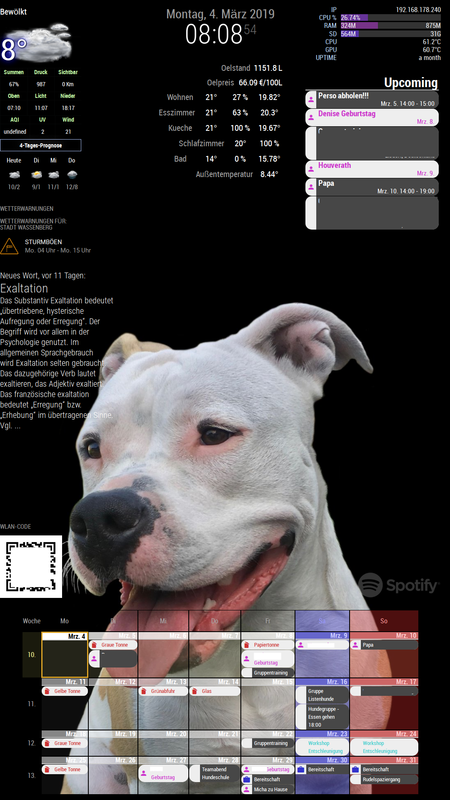
Well, meanwhile i changed my background, but still love it :P
-
@c:face_with_steam_from_nose: ruunnerr ok that works…
-What ist the Funktion of LED_PIN = 16 .
Only one pin …
Do I need RGB pins in the script?-And then the led stripe start it’s flickering…
Thx4yourhelp -
LED-Pin just shows, if the PIR detects motion. You don’t need to use it.
The pir.py script starts the other shell scripts when motion is detected.
So all commands for the RGB-Stripe are within the shell scripts (monitor_on / off.sh).
And as u can see, i used GPIO 17,22 and 24.
17 = red
22 = green
24 = blueTo control the LEDs i used PIGPIOD and it’s commands, as i wrote.
So after installing PIGIOD u can start it with:
sudo pigpiodCommands like
pigs p 22 128will set green to 50%.
pigs p 24 255will set blue to 100%in the shell script i fade all colors from 1 to 12% with sleeps.
Edit:
As i wrote before u need to Autostart pigpiod via rc.local.
sudo nano /etc/rc.localMine looks like this:
#!/bin/sh -e # # rc.local # # This script is executed at the end of each multiuser runlevel. # Make sure that the script will "exit 0" on success or any other # value on error. # # In order to enable or disable this script just change the execution # bits. # # By default this script does nothing. # Print the IP address _IP=$(hostname -I) || true if [ "$_IP" ]; then printf "My IP address is %s\n" "$_IP" fi iwconfig wlan0 power off & sleep 5 & /usr/local/bin/pigpiod sleep 10 & /usr/bin/python /home/pi/pir.py & exit 0 -
@cruunnerr ok I think this is the right way and I understand it with the led pin on Pin16
… Just the flickering looks not good… I try a other power consumption……can I only fade the LEDs or can I make a light like a animation around my mirror?
Thanks for your help … And so fast.
This is a good forum for me…
Thx to all guys
-
Well, if i had to do that project gain, i would not choose the RGB-5050 stripes again…
I would directly get WS2812, because u just need one PWM Pin and with that you were able to do things like animations…
In another project (infinity table) i choosed this one and was pretty amused :)
-
Yes. But what is the difference between WS2812, WS2812, neopixel…
What is the best stripe with a good price…
I think a meter for 60 euro is to much…Greetings from Saxony, Germany
-
I have got this one. 5m with 60 LEDs per meter for about 17€
-
@cruunnerr very good deal.
But what is the difference in the product options… blue or black pcm … -
Mensch… du sprichst bestimmt deutsch…
Wie hast du die Temperatur Module angebunden?Etwa mit wlan esp’s ?
-
Blau und schwarz beschreibt nur die Farbe des Streifens selber (nicht der LED). Also für die Funktion egal.
Naja, also die Temperaturen kommen von meinem IoBroker Server. Um ehrlich zu sein habe ich schon länger nicht mehr an meinem Spiegel gearbeitet, sondern andere Projekte gestartet und vollendet.
Mein ganzes Haus ist mittlerweile steuerbar (Licht, Thermostate, Lautsprecher etc…). Unter anderem habe ich eben auch Temperatursensoren von Xiaomi im Einsatz, die ihre Werte an meinen Server schicken.
Auf dem Spiegel zeige ich die Werte dann mit dem MMM-iobroker Modul an.Aber ich habe auch viel mit ESP’s gemacht. Habe derzeit ca. 8 Stück im Einsatz. Einer steuert meine komplette Heizung. Einer steuert meine Klingel. Einer wertet meine Alarmanlage aus. Zwei sind für meinen Infinity Tisch… etc. pp… ^^
Macht ziemlich viel Spaß
Blue and black only describes the color of the strip itself (not the LED). So no matter for the function.
Well, so the temperatures come from my IoBroker server. To be honest, I have not worked on my mirror for some time, but started and completed other projects.
My whole house is now controllable (lights, thermostats, speakers etc …). Among other things, I have also used temperature sensors from Xiaomi, which send their values to my server.
On the mirror I then display the values with the [MMM-iobroker] (https://github.com/ioBroker/MMM-ioBroker) module.But I also did a lot of ESP’s. Currently have about 8 pieces in use. One controls my entire heater. One controls my bell. One evaluates my alarm system. Two are for my infinity table … etc. pp … ^^
It’s a lot of fun -
Ja mach schon Spass…
Wollte auch einen openhub installieren … auf einem raspi Zero… Mal schauen ob das was wird… Meine ESP usb serial programmer hardware kommt erst noch.
Wollte die Temperaturwerte mit mmm-rest auslesen… Mal schauen… Ich danke dir jedenfalls für die tips -
@cruunnerr hello sir,
I have pir sensor & relay. I followed exactly step 5.2 in your tutorial (https://forum.magicmirror.builders/topic/6291/howto-turn-on-off-your-monitor-time-based-pir-button-app/2?page=1). but it doesn’t work for me.
The relay is off but when there is movement through the sensor, the relay does not turn back on. please help me.
I’m sorry my English is not very good -
The mirror looks amazing and I’ve been able to glean some inspiration. Thanks for posting!
-
I like the background picture (the girl). Does anyone know where to find that one?
-
@cruunnerr Hi, Can you show me your css of Newsfeed, I am interested in make it smaller (width) like on your mirror…
thanks




Hello! It looks like you're interested in this conversation, but you don't have an account yet.
Getting fed up of having to scroll through the same posts each visit? When you register for an account, you'll always come back to exactly where you were before, and choose to be notified of new replies (either via email, or push notification). You'll also be able to save bookmarks and upvote posts to show your appreciation to other community members.
With your input, this post could be even better 💗
Register Login