MagicMirror Forum
    • Recent
    • Tags
    • Unsolved
    • Solved
    • MagicMirror² Repository
    • Documentation
    • 3rd-Party-Modules
    • Donate
    • Discord
    • Register
    • Login
    A New Chapter for MagicMirror: The Community Takes the Lead
    Read the statement by Michael Teeuw here.

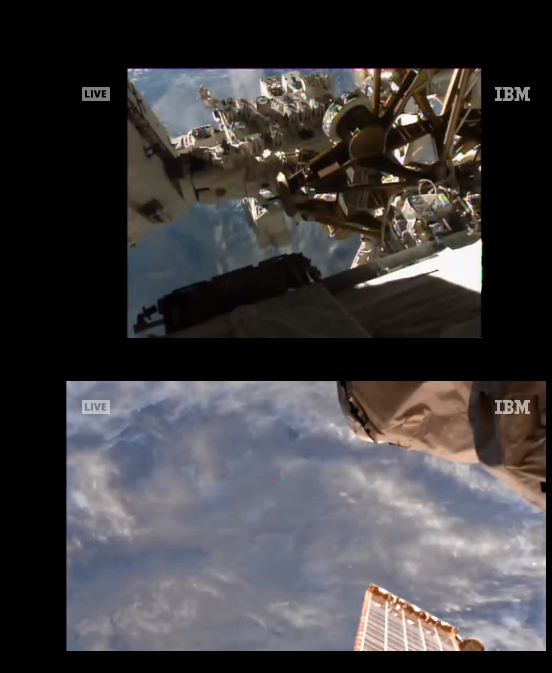
    MMM-EARTH-Live & MMM-ISS-Live

    Scheduled Pinned Locked Moved Education
    47 Posts 13 Posters 26.0k Views 14 Watching
    Loading More Posts
    • Oldest to Newest
    • Newest to Oldest
    • Most Votes
    Reply
    • Reply as topic
    Log in to reply
    This topic has been deleted. Only users with topic management privileges can see it.
    • S Do not disturb
      sdetweil @rudibarani
      last edited by

      @rudibarani i submitted a change request to upgrade to 6.0.12 on the next update

      Sam

      How to add modules

      learning how to use browser developers window for css changes

      1 Reply Last reply Reply Quote 0
      • E Offline
        Egnos
        last edited by

        Hi @Mykle1,
        After lunartic I also installed these two modules: MMM-ISS Live and MMM-Earth Live. I’m your fan …:grinning_face_with_smiling_eyes:

        I have the problem mentioned by @Vauxdvihl and @rudibarani, but for the ISS Live module I was able to close the message with the mouse, for the Earth Live module it is not possible … the pointer has no effect!
        Could you help me?

        2020-04-02-162749-1920x1080-scrot
        fotoonline

        Thanks for your interesting modules.

        @Mykle1 PS: do you like my “Astronomy” page? :smiling_face_with_open_mouth_cold_sweat:

        My Mirror https://forum.magicmirror.builders/topic/17262/the-raspimirror-was-born/7

        Mykle1M 1 Reply Last reply Reply Quote 0
        • Mykle1M Offline
          Mykle1 Project Sponsor Module Developer @Egnos
          last edited by

          @Egnos said in MMM-EARTH-Live & MMM-ISS-Live:

          @Mykle1 PS: do you like my “Astronomy” page?

          I do. I like all things related to the cosmos. :thumbsup:

          I just loaded up both modules and was able to close both warning messages. The modules are both working as expected, as you can see from the screenshot. Can you please try again?

          Create a working config
          How to add modules

          E 1 Reply Last reply Reply Quote 0
          • E Offline
            Egnos @Mykle1
            last edited by Egnos

            @Mykle1 said in MMM-EARTH-Live & MMM-ISS-Live:

            @Egnos said in MMM-EARTH-Live & MMM-ISS-Live:
            I just loaded up both modules and was able to close both warning messages. The modules are both working as expected, as you can see from the screenshot. Can you please try again?
            />

            Do I have to enable the mouse pointer or do I have to be on t the module?

            My Mirror https://forum.magicmirror.builders/topic/17262/the-raspimirror-was-born/7

            Mykle1M 1 Reply Last reply Reply Quote 0
            • Mykle1M Offline
              Mykle1 Project Sponsor Module Developer @Egnos
              last edited by

              @Egnos said in MMM-EARTH-Live & MMM-ISS-Live:

              Do I have to enable the mouse pointer or do I have to be on t the module?

              I used the mouse to click the close box on the message windows

              Create a working config
              How to add modules

              E 1 Reply Last reply Reply Quote 0
              • E Offline
                Egnos @Mykle1
                last edited by Egnos

                @Mykle1
                The problem is in the location of the form.
                If the module is positioned in the “upper_third” region it is not possible to interact with the mouse.
                To close the message I had to:

                • temporarily change the position to the MM-Earth Live module,

                • close the message,

                • and finally reposition it in its original position.

                Now it’s okay.

                Could you also check if it is not possible to interact with the module in the “upper_third” region?

                Thanks.

                My Mirror https://forum.magicmirror.builders/topic/17262/the-raspimirror-was-born/7

                Mykle1M 1 Reply Last reply Reply Quote 0
                • Mykle1M Offline
                  Mykle1 Project Sponsor Module Developer @Egnos
                  last edited by

                  @Egnos said in MMM-EARTH-Live & MMM-ISS-Live:

                  Could you also check if it is not possible to interact with the module in the “upper_third” region?

                  I moved mine to the upper third position (both modules) and they both respond to mouse clicks

                  Create a working config
                  How to add modules

                  1 Reply Last reply Reply Quote 0
                  • P Offline
                    Peter Leemon
                    last edited by

                    Hi all I have just installed this module on my MM and when I run it I have the following message on the screen “Your browser is out of date” how do i update this?

                    Cheers

                    Pete.

                    S Mykle1M 2 Replies Last reply Reply Quote 0
                    • S Do not disturb
                      sdetweil @Peter Leemon
                      last edited by

                      @Peter-Leemon what type hardware are u running on? pi 0?

                      on one system here *pi 0" I got ‘could not update chrome’ but there was a button

                      normally one would apply updates

                      open a terminal or ssh window , do

                      sudo apt-get update
                      sudo apt-get upgrade
                      

                      Sam

                      How to add modules

                      learning how to use browser developers window for css changes

                      1 Reply Last reply Reply Quote 0
                      • Mykle1M Offline
                        Mykle1 Project Sponsor Module Developer @Peter Leemon
                        last edited by

                        @Peter-Leemon

                        In the meantime, if you have the ability to click the close box that is also present, you can close the message and the module will work as expected until you restart MM again. That message does not always reappear after restart but it can.

                        Create a working config
                        How to add modules

                        1 Reply Last reply Reply Quote 0
                        • P Offline
                          Peter Leemon
                          last edited by

                          Thank you all yes I did that got it working now its showing a red screen?

                          Mykle1M 1 Reply Last reply Reply Quote 0
                          • Mykle1M Offline
                            Mykle1 Project Sponsor Module Developer @Peter Leemon
                            last edited by

                            @Peter-Leemon

                            The module is showing red or the entire MM?

                            Create a working config
                            How to add modules

                            1 Reply Last reply Reply Quote 0
                            • P Offline
                              Peter Leemon
                              last edited by

                              was weird just he Module then after about 6 hours and a few reboots came good however the live feed on my mac was perfect atm its working fine, must have been a gremlin lol

                              1 Reply Last reply Reply Quote 0
                              • R Offline
                                runny
                                last edited by

                                Hello,
                                Currently I struggle with a problem that already seems to be know but I somehow can not fix it. MMM-EARTH-LIVE is not autoplaying for me.

                                I have already tried adding :
                                app.commandLine.appendSwitch(‘autoplay-policy’, ‘no-user-gesture-required’); //< -------- added

                                to the recommended place in MagicMirror/js/electron.js but without any results. Further I have tried to update to the latest version of the electron browser with “npm install electron@latest” but that has also not helped me with the autoplay problem.

                                Is there further thins that I can try or any possibility that I did something wrong above?

                                Thanks for any help!

                                Mykle1M 1 Reply Last reply Reply Quote 0
                                • Mykle1M Offline
                                  Mykle1 Project Sponsor Module Developer @runny
                                  last edited by Mykle1

                                  @runny

                                  I also had some issues with the autostart but upgrading my electron seems to have fixed the issue with both modules. As long and you followed the “workaround” directions in the readme. it should work.

                                  Please try letting the modules run and see if they eventually start. I have seen this behavior. It may have to do with the feed being blacked out for periods of time at the source.

                                  So, please verify the workaround was done and that you are running the newest electron. My electron is at 11.3.

                                  Peace!
                                  Screenshot from 2021-03-07 19-14-46.png

                                  Create a working config
                                  How to add modules

                                  1 Reply Last reply Reply Quote 0
                                  • R Offline
                                    ruskythegreat
                                    last edited by

                                    Can anyone help please, I can’t get the feed to autoplay with Electron 15.3.0 even after adding the following
                                    app.commandLine.appendSwitch(‘autoplay-policy’, ‘no-user-gesture-required’);
                                    This is how the line looks in electron.js

                                    function createWindow() {
                                    app.commandLine.appendSwitch(‘autoplay-policy’, ‘no-user-gesture-required’);
                                    let electronSwitchesDefaults = [“autoplay-policy”, “no-user-gesture-required”];
                                    app.commandLine.appendSwitch(…new Set(electronSwitchesDefaults, config.electronSwitches));
                                    let electronOptionsDefaults = {

                                    S 1 Reply Last reply Reply Quote 0
                                    • S Do not disturb
                                      sdetweil @ruskythegreat
                                      last edited by

                                      @ruskythegreat autoplay is now part of the webPreferences config

                                      https://www.electronjs.org/docs/latest/api/browser-window

                                      but, I have heard others say this setting also doesn’t work

                                      (I did the change request to set it as it is now)

                                      also, your electron should be 13.5.1 (on MM version 2.17.1)

                                      Sam

                                      How to add modules

                                      learning how to use browser developers window for css changes

                                      R 1 Reply Last reply Reply Quote 0
                                      • R Offline
                                        ruskythegreat @sdetweil
                                        last edited by

                                        @sdetweil I did run npm install electron@latest but yes, I am running MM 2.17.1

                                        S 1 Reply Last reply Reply Quote 0
                                        • S Do not disturb
                                          sdetweil @ruskythegreat
                                          last edited by

                                          @ruskythegreat we haven’t tested above 13.5.1

                                          Sam

                                          How to add modules

                                          learning how to use browser developers window for css changes

                                          R 1 Reply Last reply Reply Quote 0
                                          • R Offline
                                            ruskythegreat @sdetweil
                                            last edited by

                                            @sdetweil I just downgraded to 13.5.1 but still no auto play.

                                            S 1 Reply Last reply Reply Quote 0

                                            Hello! It looks like you're interested in this conversation, but you don't have an account yet.

                                            Getting fed up of having to scroll through the same posts each visit? When you register for an account, you'll always come back to exactly where you were before, and choose to be notified of new replies (either via email, or push notification). You'll also be able to save bookmarks and upvote posts to show your appreciation to other community members.

                                            With your input, this post could be even better 💗

                                            Register Login

                                            • 1
                                            • 2
                                            • 3
                                            • 2 / 3
                                            • First post
                                              Last post
                                            Enjoying MagicMirror? Please consider a donation!
                                            MagicMirror created by Michael Teeuw.
                                            Forum managed by Sam, technical setup by Karsten.
                                            This forum is using NodeBB as its core | Contributors
                                            Contact | Privacy Policy
