MagicMirror Forum
    • Recent
    • Tags
    • Unsolved
    • Solved
    • MagicMirror² Repository
    • Documentation
    • 3rd-Party-Modules
    • Donate
    • Discord
    • Register
    • Login
    A New Chapter for MagicMirror: The Community Takes the Lead
    Read the statement by Michael Teeuw here.

    MMM-SystemStats (cpu temp/load, fre ram ...)

    Scheduled Pinned Locked Moved Utilities
    74 Posts 36 Posters 71.7k Views 35 Watching
    Loading More Posts
    • Oldest to Newest
    • Newest to Oldest
    • Most Votes
    Reply
    • Reply as topic
    Log in to reply
    This topic has been deleted. Only users with topic management privileges can see it.
    • F Offline
      Fifin404 @chinesesich
      last edited by

      @chinesesich Same issue… something new?

      lavolp3L 1 Reply Last reply Reply Quote 0
      • lavolp3L Offline
        lavolp3 Module Developer @Fifin404
        last edited by

        @Fifin404 @chinesesich The issue seems to be the change in version of Font Awesome icons.

        Try changing line 122 in MMM-SystemStats.js

                c2.innerHTML = `< i class="fa ${sysData[item].icon} fa-fw"></i>`;
        

        to

                c2.innerHTML = `< i class="fas ${sysData[item].icon} fa-fw"></i>`;
        

        ONLY change the “fa” to “fas”.
        The rest can stay the same.
        Don’t copy my input! I neede to put in a space for it to be viewable.

        How to troubleshoot modules
        MMM-soccer v2, MMM-AVStock

        1 Reply Last reply Reply Quote 0
        • LordyL Offline
          Lordy
          last edited by

          How can you only display individual parameters?
          I just want to see “Free memory” for example.
          Thank you very much in advance

          lavolp3L 1 Reply Last reply Reply Quote 0
          • lavolp3L Offline
            lavolp3 Module Developer @Lordy
            last edited by

            @Lordy
            if you mean free RAM, try this out in your custom.css

            .MMM-SystemStats tr { 
              display: none; 
            }
            
            .MMM-SystemStats tr:nth-child(3n+0) { 
              display: table-row; 
            }
            

            For free disk space it would be

            .MMM-SystemStats tr { 
              display: none; 
            }
            
            .MMM-SystemStats tr:nth-child(5n+0) { 
              display: table-row; 
            }
            

            No guarantees!! I haven’t tried it!!

            How to troubleshoot modules
            MMM-soccer v2, MMM-AVStock

            LordyL 1 Reply Last reply Reply Quote 1
            • LordyL Offline
              Lordy @lavolp3
              last edited by

              @lavolp3 said in MMM-SystemStats (cpu temp/load, fre ram ...):

              .MMM-SystemStats tr {
              display: none;
              }

              .MMM-SystemStats tr:nth-child(5n+0) {
              display: table-row;
              }

              Thanks, it helped me.
              How do I do this with “CPU_TEMP”?

              lavolp3L 2 Replies Last reply Reply Quote 0
              • lavolp3L Offline
                lavolp3 Module Developer @Lordy
                last edited by lavolp3

                @Lordy try tr:nth-child(6n+1)

                You have 5 children in the table element, which are the 5 table rows.
                nth-child counts every “nth” children from 0.
                So if you have nth-children(3n+0) it takes the 3rd 6th 9th. Only the 3rd is there so voila.

                nth-children(6n+1) SHOULD count the 1st, 7th, 13th children, of these only the 1st is available. So, hopefully again, voila.

                  getDom: function() {
                    var self = this;
                    var wrapper = document.createElement('table');
                
                    var sysData = {
                      cpuTemp: {
                        text: 'CPU_TEMP',
                        icon: 'fa-thermometer',
                      },
                      sysLoad: {
                        text: 'SYS_LOAD',
                        icon: 'fa-tachometer',
                      },
                      freeMem: {
                        text: 'RAM_FREE',
                        icon: 'fa-microchip',
                      },
                      upTime: {
                        text: 'UPTIME',
                        icon: 'fa-clock-o',
                      },
                      freeSpace: {
                        text: 'DISK_FREE',
                        icon: 'fa-hdd-o',
                      },
                    };
                

                How to troubleshoot modules
                MMM-soccer v2, MMM-AVStock

                1 Reply Last reply Reply Quote 1
                • lavolp3L Offline
                  lavolp3 Module Developer @Lordy
                  last edited by

                  @Lordy I’m honestly amazed it worked.

                  How to troubleshoot modules
                  MMM-soccer v2, MMM-AVStock

                  LordyL 1 Reply Last reply Reply Quote 0
                  • LordyL Offline
                    Lordy @lavolp3
                    last edited by

                    @lavolp3
                    Now I understand it.
                    It also works that “tr:nth-child(5n+1)”.
                    With the background knowledge, it is clear to me.
                    Nice Weekend

                    1 Reply Last reply Reply Quote 0
                    • BKeyportB Offline
                      BKeyport Module Developer
                      last edited by

                      This post is deleted!
                      1 Reply Last reply Reply Quote 0
                      • BKeyportB Offline
                        BKeyport Module Developer @BenRoe
                        last edited by

                        @BenRoe Hey, ben - love your module - would like to see a “quick” change if possible. Could you update the module to show both imperial and metric for CPU temp? This is only needed because I’m in a backwards country that hasn’t adopted sensable measurements, and it would be nice to have both temps on screen at the same time, so I can compare easily with others on how cool my system is.

                        Thanks!

                        lavolp3L 1 Reply Last reply Reply Quote 0
                        • lavolp3L Offline
                          lavolp3 Module Developer @BKeyport
                          last edited by lavolp3

                          @BKeyport I think this sound more like a change you could do to your own version instead of a general change for the module.
                          You could insert e.g.

                          this.stats.cpuTemp = payload.cpuTemp + " / " + (payload.cpuTemp * 9 / 5 + 32).toFixed(1) + "°F";
                          

                          into line 62

                          How to troubleshoot modules
                          MMM-soccer v2, MMM-AVStock

                          BKeyportB 1 Reply Last reply Reply Quote 0
                          • BKeyportB Offline
                            BKeyport Module Developer @lavolp3
                            last edited by

                            @lavolp3 that’s not working, just get NaN… I think that’s because the string’s already got the “°C” at that point.

                            On another point, how do you link back to the code and highlight like that?

                            lavolp3L 2 Replies Last reply Reply Quote 0
                            • lavolp3L Offline
                              lavolp3 Module Developer @BKeyport
                              last edited by

                              @BKeyport said in MMM-SystemStats (cpu temp/load, fre ram ...):

                              On another point, how do you link back to the code and highlight like that?

                              You can get a direct link by clicking on the line in github.

                              How to troubleshoot modules
                              MMM-soccer v2, MMM-AVStock

                              1 Reply Last reply Reply Quote 0
                              • lavolp3L Offline
                                lavolp3 Module Developer @BKeyport
                                last edited by

                                @BKeyport said in MMM-SystemStats (cpu temp/load, fre ram ...):

                                that’s not working, just get NaN… I think that’s because the string’s already got the “°C” at that point.

                                ah the parsefloat is missing.
                                How about

                                this.stats.cpuTemp = payload.cpuTemp + " / " + (parseFloat(payload.cpuTemp) * 9 / 5 + 32).toFixed(1) + "°F";
                                

                                How to troubleshoot modules
                                MMM-soccer v2, MMM-AVStock

                                BKeyportB 1 Reply Last reply Reply Quote 0
                                • BKeyportB Offline
                                  BKeyport Module Developer @lavolp3
                                  last edited by

                                  @lavolp3 That did it, thank you.

                                  1 Reply Last reply Reply Quote 0
                                  • uros76U Offline
                                    uros76
                                    last edited by

                                    Excellent module, works great.

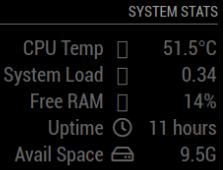
                                    I do have a question. I don’t see all the icons :/ how can I fix this?
                                    5578393d-6b2e-405e-a301-d69c56870c63-image.png

                                    My magicmirror projects: https://forum.magicmirror.builders/post/79889, https://forum.magicmirror.builders/post/93241 and https://forum.magicmirror.builders/post/94586

                                    BKeyportB 1 Reply Last reply Reply Quote 0
                                    • BKeyportB Offline
                                      BKeyport Module Developer @uros76
                                      last edited by

                                      @uros76 The icons are straight from font awesome, and part of the base package, from what I understand. Not having icons might be indicative of a weak connection to the 'net.

                                      1 Reply Last reply Reply Quote 0
                                      • V Offline
                                        v4r23
                                        last edited by v4r23

                                        missing stats
                                        Any idea what’s going wrong that it shows:

                                        loading &hellip;
                                        
                                        BKeyportB 1 Reply Last reply Reply Quote 0
                                        • BKeyportB Offline
                                          BKeyport Module Developer @v4r23
                                          last edited by

                                          @v4r23 If you followed the install completely, reboot the system. It’s the one step that fixed it for me.

                                          J 1 Reply Last reply Reply Quote 0
                                          • M Offline
                                            MajorC Project Sponsor
                                            last edited by MajorC

                                            Hi,

                                            is there a good way to shrink the font size and the icon size?

                                            I tried

                                            .MMM-SystemStats {
                                            Font-size: 70%;
                                            }
                                            

                                            but now there are a lot of space between each line.

                                            Or if I use

                                            transform: scale(0.90, 0.90);
                                            

                                            than the module is moved into the middle of the screen.

                                            Thank you

                                            1 Reply Last reply Reply Quote 0

                                            Hello! It looks like you're interested in this conversation, but you don't have an account yet.

                                            Getting fed up of having to scroll through the same posts each visit? When you register for an account, you'll always come back to exactly where you were before, and choose to be notified of new replies (either via email, or push notification). You'll also be able to save bookmarks and upvote posts to show your appreciation to other community members.

                                            With your input, this post could be even better 💗

                                            Register Login

                                            • 1
                                            • 2
                                            • 3
                                            • 4
                                            • 3 / 4
                                            • First post
                                              Last post
                                            Enjoying MagicMirror? Please consider a donation!
                                            MagicMirror created by Michael Teeuw.
                                            Forum managed by Sam, technical setup by Karsten.
                                            This forum is using NodeBB as its core | Contributors
                                            Contact | Privacy Policy