MagicMirror Forum
    • Recent
    • Tags
    • Unsolved
    • Solved
    • MagicMirror² Repository
    • Documentation
    • 3rd-Party-Modules
    • Donate
    • Discord
    • Register
    • Login
    A New Chapter for MagicMirror: The Community Takes the Lead
    Read the statement by Michael Teeuw here.

    MMM-RAIN-MAP (new: version 2.x)

    Scheduled Pinned Locked Moved Utilities
    192 Posts 38 Posters 277.1k Views 41 Watching
    Loading More Posts
    • Oldest to Newest
    • Newest to Oldest
    • Most Votes
    Reply
    • Reply as topic
    Log in to reply
    This topic has been deleted. Only users with topic management privileges can see it.
    • rubenixR Offline
      rubenix @Jalibu
      last edited by rubenix

      @Jalibu & @requiemmg was tempted to go for the 8GB one, but I can confirm 4Gb is more than enought; go for it and use the pi3 for another project :love-you_gesture_light_skin_tone:

      S 1 Reply Last reply Reply Quote 0
      • S Offline
        sdetweil @rubenix
        last edited by

        @rubenix u can make the swap space bigger too, helps in some environments

        Sam

        How to add modules

        learning how to use browser developers window for css changes

        rubenixR 1 Reply Last reply Reply Quote 0
        • rubenixR Offline
          rubenix @sdetweil
          last edited by

          @sdetweil i agree with that and sure it helps; but a pi 4 4Gb goes so smoth!!
          pi3 1gb its ok for a simple magic mirror; for a complex one with transitions / animations it needs more gauge!

          1 Reply Last reply Reply Quote 0
          • earnestrichardsE Offline
            earnestrichards
            last edited by

            Great module. It’s running fantastically on my PI4.

            1 Reply Last reply Reply Quote 0
            • R Offline
              requiemmg
              last edited by

              Okay, for now I will not switch to a 4gb version. So I need to remember this one for “later”. Thanks.

              1 Reply Last reply Reply Quote 0
              • bheplerB Offline
                bhepler Module Developer
                last edited by

                I just tried this out. Thank you for the excellent module! Exactly what I was looking for.

                Now if I could just get a dark theme going. I’m cool with the rain being in color, but it would be nice if I could figure out how to get the roads & state borders to only be outlines.

                karsten13K 1 Reply Last reply Reply Quote 0
                • B Offline
                  bdream
                  last edited by

                  @Jalibu Just tried it out and it works fantastic wit OSM. Great job! :clapping_hands_medium-light_skin_tone: Many thanks

                  –
                  cheers, bdream

                  1 Reply Last reply Reply Quote 0
                  • karsten13K Offline
                    karsten13 @bhepler
                    last edited by

                    @bhepler

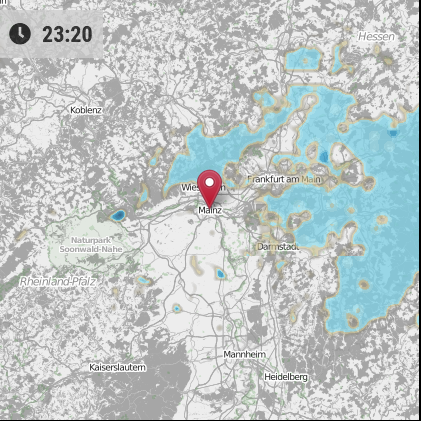
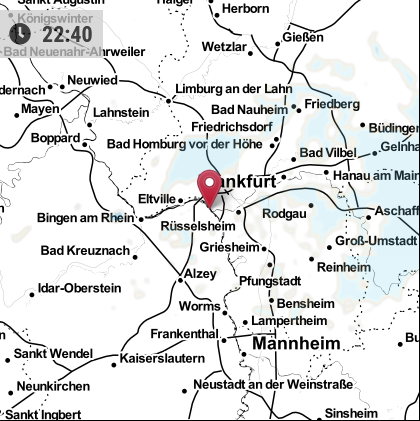
                    7f1425c3-cc31-41d3-9598-daa4d21fd75b-grafik.png

                    or

                    8fd0daf1-33d2-4c3f-aa00-c8a3f50e846b-grafik.png

                    JalibuJ 1 Reply Last reply Reply Quote 2
                    • JalibuJ Offline
                      Jalibu Module Developer @karsten13
                      last edited by

                      @karsten13 thanks for your contribution. I saw your PR and will merge it soon.

                      1 Reply Last reply Reply Quote 0
                      • ViDiBiV Offline
                        ViDiBi
                        last edited by ViDiBi

                        Hi @Jalibu!

                        This module is really amazing! Thank you so much!

                        Maybe you can help me with one issue: The map doesn’t center correctly on my Mirror… Have I done something wrong:

                                {
                                    module: "MMM-RAIN-MAP",
                                    position: "bottom_right",
                                    config: {
                                        animationSpeed: 600,
                                        displayClockSymbol: false,
                                        displayTime: true,
                                        extraDelayLastFrame: 1000,
                                        height: "420px",
                                        lat: 50.31,
                                        lon: 11.91,
                                        map: "OSM",
                                        markers: [
                                            { lat: 50.31, lng: 11.91, color: "red" },
                                        ],
                                        onlyOnRain: false,
                                        opacity: 0.65,
                                        timeFormat: 24,
                                        updateIntervalInSeconds: 300,
                                        width: "420px",
                                        zoom: 9,
                                        zoomOutEach: 1,
                                        zoomOutLevel: 3,
                                    }
                                },
                        

                        Bild 1
                        Bild 2

                        Thank you very much :-)

                        Victor

                        1 Reply Last reply Reply Quote 0
                        • karsten13K Offline
                          karsten13
                          last edited by

                          @ViDiBi said in MMM-RAIN-MAP:

                          lon: 11.91

                          I think you have a typo in your config, lon: 11.91 should be lng: 11.91

                          ViDiBiV 1 Reply Last reply Reply Quote 1
                          • ViDiBiV Offline
                            ViDiBi @karsten13
                            last edited by ViDiBi

                            @karsten13 said in MMM-RAIN-MAP:

                            @ViDiBi said in MMM-RAIN-MAP:

                            lon: 11.91

                            I think you have a typo in your config, lon: 11.91 should be lng: 11.91

                            That definitely was too easy!!! Thanks! I copied it from another module and didn’t see it :-)

                            1 Reply Last reply Reply Quote 0
                            • bheplerB Offline
                              bhepler Module Developer
                              last edited by

                              @karsten13 - Dude, that was exactly what I was looking for. Thank you.
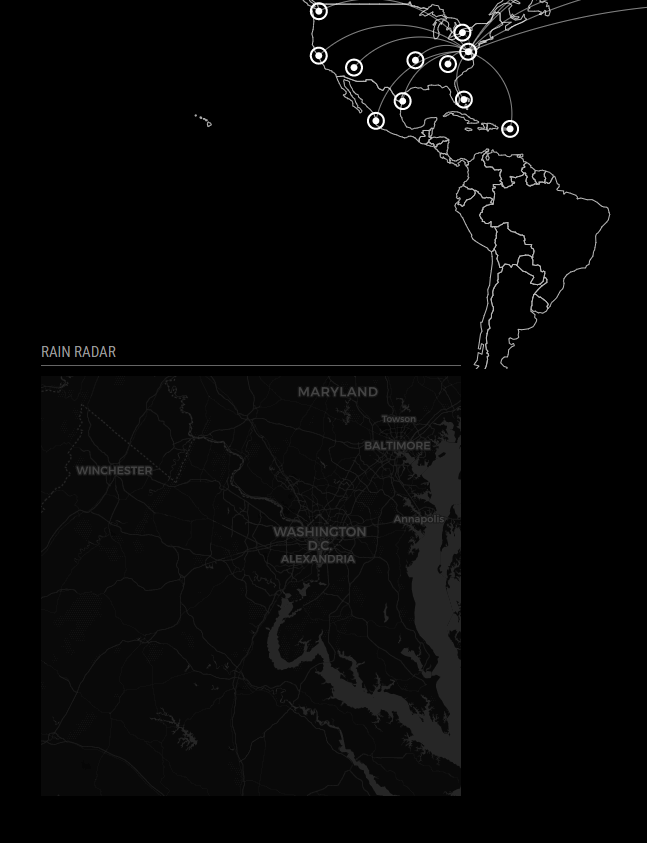
                              radar.png

                              1 Reply Last reply Reply Quote 0
                              • S Offline
                                singhharry12
                                last edited by

                                I think I’m too stupid to get an API key. Are there any instructions in German or can someone help me?

                                ViDiBiV 1 Reply Last reply Reply Quote 0
                                • ViDiBiV Offline
                                  ViDiBi @singhharry12
                                  last edited by

                                  @singhharry12 said in MMM-RAIN-MAP:

                                  I think I’m too stupid to get an API key. Are there any instructions in German or can someone help me?

                                  Hi @singhharry12!

                                  Für dieses Modul brauchst du keinen API Key, es sei denn du möchtest unbedingt GoogleMaps nutzen. Ich würde dir aber alleine wegen der Kosten empfehlen OpenStreetMaps zu nutzen. Das hier ist meine Config:

                                  {
                                              module: "MMM-RAIN-MAP",
                                              position: "bottom_right",
                                              config: {
                                                  animationSpeed: 600,
                                                  displayClockSymbol: false,
                                                  displayTime: true,
                                                  extraDelayLastFrame: 1000,
                                                  height: "420px",
                                                  lat: 50.31,
                                                  lng: 11.91,
                                                  map: "OSM",
                                                  markers: [
                                                      { lat: 50.31, lng: 11.91, color: "red" },
                                                  ],
                                                  onlyOnRain: false,
                                                  opacity: 0.65,
                                                  timeFormat: 24,
                                                  updateIntervalInSeconds: 300,
                                                  width: "420px",
                                                  zoom: 9,
                                                  zoomOutEach: 1,
                                                  zoomOutLevel: 3,
                                              }
                                          },
                                  

                                  Solltest du aber unbedingt die Google Maps Karte nutzen wollen, musst du dir einen API Key bei Google erstellen und dieser kostet bei Zugriffen etwas… Wenn du das unbedingt willst, sag Bescheid und ich mache dir eine Anleitung auf deutsch :-)

                                  BG

                                  Victor

                                  1 Reply Last reply Reply Quote 1
                                  • S Offline
                                    singhharry12
                                    last edited by

                                    Now if I could just get a dark theme going. I’m cool with the rain being in color, but it would be nice if I could figure out how to get the roads & state borders to only be outlines. 9apps cartoonhd.onl

                                    bheplerB 1 Reply Last reply Reply Quote 0
                                    • bheplerB Offline
                                      bhepler Module Developer @singhharry12
                                      last edited by bhepler

                                      @singhharry12 - That’s exactly what I did. Add this line to your configuration: osmMapUrl: "https://cartodb-basemaps-{s}.global.ssl.fastly.net/dark_all/{z}/{x}/{y}.png"

                                      Looks great (actual rain on rain map today!)
                                      rainmap.png

                                      M F 2 Replies Last reply Reply Quote 2
                                      • M Offline
                                        MajorC Project Sponsor @bhepler
                                        last edited by MajorC

                                        @bhepler is there a good way to set the opacity of the map?

                                        @Jalibu Thank you for this awesome module!

                                        C 1 Reply Last reply Reply Quote 0
                                        • C Offline
                                          chassain 0 @MajorC
                                          last edited by

                                          @MajorC

                                          add maybe to custom.css

                                          .MMM Rain-Map {
                                          opacity: 0 //0 to 1
                                          }

                                          1 Reply Last reply Reply Quote 0
                                          • M Offline
                                            MajorC Project Sponsor
                                            last edited by MajorC

                                            Thank you,

                                            .MMM-RAIN-MAP {
                                               opacity: 0.7;
                                            }
                                            

                                            in the custom.css works very well.

                                            1 Reply Last reply Reply Quote 1

                                            Hello! It looks like you're interested in this conversation, but you don't have an account yet.

                                            Getting fed up of having to scroll through the same posts each visit? When you register for an account, you'll always come back to exactly where you were before, and choose to be notified of new replies (either via email, or push notification). You'll also be able to save bookmarks and upvote posts to show your appreciation to other community members.

                                            With your input, this post could be even better 💗

                                            Register Login

                                            • 1
                                            • 2
                                            • 3
                                            • 4
                                            • 5
                                            • 9
                                            • 10
                                            • 3 / 10
                                            • First post
                                              Last post
                                            Enjoying MagicMirror? Please consider a donation!
                                            MagicMirror created by Michael Teeuw.
                                            Forum managed by Sam, technical setup by Karsten.
                                            This forum is using NodeBB as its core | Contributors
                                            Contact | Privacy Policy