Read the statement by Michael Teeuw here.
Problems With Weather
-
try running
pm2 statusin the terminal (I think that’s the command) and post the result here please.Don’t post a picture. Copy the terminal output and paste it into your reply.
Also, do you have any other programs running on the Pi besides Magic Mirror?
-
This post is deleted! -
output should look like this
pi@Pi3:~ $ pm2 status ┌──────┬──────┬────────┬───┬─────┬──────────┐ │ Name │ mode │ status │ ↺ │ cpu │ memory │ ├──────┼──────┼────────┼───┼─────┼──────────┤ │ mm │ fork │ online │ 0 │ 0% │ 1.3 MB │ └──────┴──────┴────────┴───┴─────┴──────────┘ Use `pm2 show <id|name>` to get more details about an app pi@Pi3:~ $ -
@mykle1 pi@raspberrypi:~ $ pm2 status
┌────┬────────────────────┬──────────┬──────┬───────────┬──────────┬──────────┐
│ id │ name │ mode │ ↺ │ status │ cpu │ memory │
├────┼────────────────────┼──────────┼──────┼───────────┼──────────┼──────────┤
│ 0 │ MagicMirror │ fork │ 6 │ online │ 0% │ 2.6mb │
└────┴────────────────────┴──────────┴──────┴───────────┴──────────┴──────────┘
pi@raspberrypi:~ $ -
@mykle1 I should not have any other programs running besides the magic mirror as it is the only one I have installed , but not totally sure if there are any default programs already on there.
-
-
@mykle1 pi@raspberrypi:~ $ pm2 stop MagicMirror
[PM2] Applying action stopProcessId on app [MagicMirror](ids: 0)
[PM2] MagicMirror ✓
┌────┬────────────────────┬──────────┬──────┬───────────┬──────────┬──────────┐
│ id │ name │ mode │ ↺ │ status │ cpu │ memory │
├────┼────────────────────┼──────────┼──────┼───────────┼──────────┼──────────┤
│ 0 │ MagicMirror │ fork │ 6 │ stopped │ 0% │ 0b │
└────┴────────────────────┴──────────┴──────┴───────────┴──────────┴──────────┘
pi@raspberrypi:~ $ pm2 start MagicMirror
[PM2] Applying action restartProcessId on app [MagicMirror](ids: 0)
[PM2] MagicMirror ✓
[PM2] Process successfully started
┌────┬────────────────────┬──────────┬──────┬───────────┬──────────┬──────────┐
│ id │ name │ mode │ ↺ │ status │ cpu │ memory │
├────┼────────────────────┼──────────┼──────┼───────────┼──────────┼──────────┤
│ 0 │ MagicMirror │ fork │ 6 │ online │ 0% │ 2.4mb │
└────┴────────────────────┴──────────┴──────┴───────────┴──────────┴──────────┘
pi@raspberrypi:~ $
Still no luck displaying forecast, thank you again for bearing with me this long -
Were there any errors when MM launched?
-
MagicMirror should have launched when you issued the
pm2 start MagicMirrorcommand -
@mykle1 No errors and yes MM launched, everything is displaying but the forecast
-
@mykle1 now it is displaying message: “Please set the correct openweather appid in the config for module: weatherforecast.”
-
I’m done for the night, mate. I would suggest you double check your appid at openweather. copy and paste it into your config entry for weatherforecast and make sure it is in quotes.
Perhaps someone else will continue to help you tonight.
Good luck
-
@mykle1 So I emailed Openweathermap for help and he said I should use the “One Call Api” https://openweathermap.org/api/one-call-api but I am having trouble figuring out how to incorporate the API call code into the weather forecast module?
-
@brendan_c23 said in Problems With Weather:
So I emailed Openweathermap for help and he said I should use the “One Call Api” https://openweathermap.org/api/one-call-api but I am having trouble figuring out how to incorporate the API call code into the weather forecast module?
Uhhh, I’m pretty sure the default weatherforecast module DOES use the One Call API.
I would try getting another api key using a different email. However, I suspect there might be something else going on there. Would you object to sending me your current openweather api key so I can test it here? If you agree, send it in a private chat message. I’ve sent you a chat. You can send your api key there if you agree.
-
weatherforecast: Your AppID does not support long term forecasts. Switching to fallback endpoint.Totally not your fault, just so you know.
And I guess mine does not either, However, the module does load after a short delay but it only displays tomorrow’s weather. Same as when using my api key.
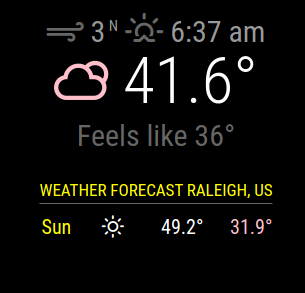
This is very odd as I tested your api key in another weather module that uses open weather and it is giving all the data and NO errors. SO, I’m guessing the weatheforecast module itself has some issues.

Are you dead set on using weatherforecast? There are many weather modules that provide you with forecasts and current weather. I’m fairly sure that some of them were built upon the openweather api and your current api key should work fine with them. Personally, I don’t use the default weather modules. I’ll be happy to give you a hand with them if you are willing to try them.
Edit:
I’ve just been informed that in the new MM release (April 1) both of those modules are being replaced by a newer version that does both current and forecast. Sheeesh
-
@mykle1 I see the edit but now I’m wondering if the issue you and Brendan are experiencing are related to this old bug that was fixed last year and maybe it came back? Or that code could be a workaround until the fix next month.
-
Well, I’m not going to do that because the module is deprecated. Doesn’t make much sense to me. If you feel the need, have at it. :-)
-
@csoogos said in Problems With Weather:
How do I run the mirror from within the directory?
- Open a terminal
- Change directory to MagicMirror. Usually done by
cd MagicMirrorunless you installed somewhere else. - Then
npm start
-
MagicMirror is a web page (see index.html) loaded by a browser (electron)
the main core of mm is a JavaScript wrapper around standard dynamic html, which allows api calls to manipulate the web page (DOM) content.
there are predefined areas (positions) for scripts (modules) to place their content in.
the mm runtime calls the module to get it’s content contribution. and then puts that content in the position defined for this module (in config.js module entry)all content is provided by module entries in config.js otherwise the page is empty ( see index.html)
some additional functions are provided by the runtime.
inter module communications, by way of typeless broadcast messages. the receiver must understand and handle the data format of any message it proposes to process.
due to browser security constraints, a module (running in the browser) cannot access the file system or any hardware.
so a ‘server’ side module component is launched in the background, ‘node_helper’… which CAN , and communications are supported between the helper and the browser module code, in a similar way as between modules. except the flow is only between the module and ITS helper.
the implementation of the helper/module communications supports messaging over networks, so the helper is where the ‘server’ is and the browser can be where the user is… the browser can be any es6 or above browser
electron chrome firefox edge…
as it’s a web page all the standard css techniques are available to style the content, by module or collectively…
-
@csoogos Not sure I’ve seen calcium temperature LOL


Hello! It looks like you're interested in this conversation, but you don't have an account yet.
Getting fed up of having to scroll through the same posts each visit? When you register for an account, you'll always come back to exactly where you were before, and choose to be notified of new replies (either via email, or push notification). You'll also be able to save bookmarks and upvote posts to show your appreciation to other community members.
With your input, this post could be even better 💗
Register Login