MagicMirror Forum
    • Recent
    • Tags
    • Unsolved
    • Solved
    • MagicMirror² Repository
    • Documentation
    • 3rd-Party-Modules
    • Donate
    • Discord
    • Register
    • Login
    A New Chapter for MagicMirror: The Community Takes the Lead
    Read the statement by Michael Teeuw here.

    MMM-MotionEye - surveillance video stream on your mirror!

    Scheduled Pinned Locked Moved Utilities
    70 Posts 15 Posters 93.8k Views 15 Watching
    Loading More Posts
    • Oldest to Newest
    • Newest to Oldest
    • Most Votes
    Reply
    • Reply as topic
    Log in to reply
    This topic has been deleted. Only users with topic management privileges can see it.
    • SnilleS Offline
      Snille Module Developer
      last edited by Snille

      Fixed. Just sent you a PR. :)
      Check it, I’m fairly new to Node.js so it may not be the best solution. :)

      If you cant find it, make it and share it!
      Modules: MMM-homeassistant-sensors, MMM-Modulebar, MMM-Profilepicture, MMM-Videoplayer

      CatoC 1 Reply Last reply Reply Quote 0
      • lolobyteL Offline
        lolobyte
        last edited by

        Hi @Snille

        before i made a MM2, i started with a motion cam. It’s running now roundabout a half year outside from 30 ° to -20 ° C.

        I tried to insert my IP and port, but it don’t’ run.

        Any proposal to try a forensic research where to find the shitty error?

        CatoC 1 Reply Last reply Reply Quote 0
        • CatoC Offline
          Cato Module Developer @Snille
          last edited by

          @Snille Had some comments. Fix those and I’ll merge it :)

          SnilleS 1 Reply Last reply Reply Quote 0
          • CatoC Offline
            Cato Module Developer @lolobyte
            last edited by

            @lolobyte First question: What motion software do you use?

            lolobyteL 1 Reply Last reply Reply Quote 0
            • SnilleS Offline
              Snille Module Developer @Cato
              last edited by

              @Cato Great! Thanks for fixing my mistakes. :)

              If you cant find it, make it and share it!
              Modules: MMM-homeassistant-sensors, MMM-Modulebar, MMM-Profilepicture, MMM-Videoplayer

              1 Reply Last reply Reply Quote 0
              • lolobyteL Offline
                lolobyte @Cato
                last edited by

                @Cato

                Hi, that’s the info of help.
                Downloaded from
                https://www.dropbox.com/s/xdfcxm5hu71s97d/motion-mmal.tar.gz

                pi@raspi3-MM2:~ $ motion -h
                motion Version mmaltest, Copyright 2000-2005 Jeroen Vreeken/Folkert van Heusden/Kenneth Lavrsen

                usage: motion [options]

                Possible options:

                -n Run in non-daemon mode.
                -s Run in setup mode.
                -c config Full path and filename of config file.
                -d level Log level (1-9) (EMR, ALR, CRT, ERR, WRN, NTC, ERR, DBG, ALL). default: 6 / NTC.
                -k type Type of log (COR, STR, ENC, NET, DBL, EVT, TRK, VID, ALL). default: ALL.
                -p process_id_file Full path and filename of process id file (pid file).
                -l log file Full path and filename of log file.
                -m Disable motion detection at startup.
                -h Show this screen.

                Motion is configured using a config file only. If none is supplied,
                it will read motion.conf from current directory, ~/.motion or /etc.

                CatoC 1 Reply Last reply Reply Quote 0
                • CatoC Offline
                  Cato Module Developer @lolobyte
                  last edited by

                  @lolobyte You will have to install motionEyeOS or motionEye to use this module. Please read pre-requisites.

                  lolobyteL 1 Reply Last reply Reply Quote 0
                  • lolobyteL Offline
                    lolobyte @Cato
                    last edited by

                    @Cato
                    Thank you for your answer.

                    I just tried MotionEyeOS before i went to Motion.
                    In my eyes it wasn’t configurable with my desired functionality.

                    I just hoped there is a possibility to implement foreign streams.

                    CatoC 1 Reply Last reply Reply Quote 0
                    • CatoC Offline
                      Cato Module Developer @lolobyte
                      last edited by

                      @lolobyte As long as the software can provide a “motion jpeg”-stream, it can be supported.

                      Basically, you can test it your selv by making a local .html-file with <img src="xxxxx" />

                      1 Reply Last reply Reply Quote 0
                      • E Offline
                        emos
                        last edited by

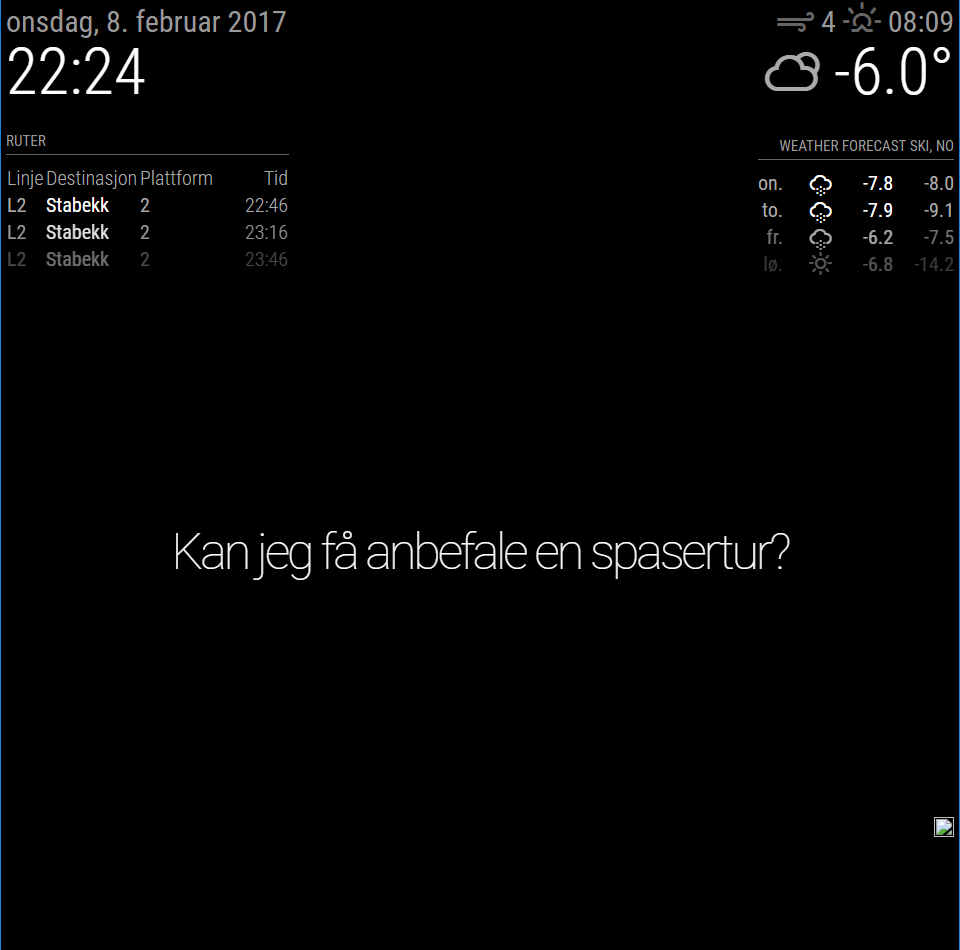
                        For some reason i just get a “broken” picture icon, and if i try to open http://MotionEyeIP/motioneye/1 the site just says:

                        {"error": "not found"}
                        

                        I have disable the password for the ‘Surveillance Username’ so no login is required.

                        I know the cam is available and motioneyos is working as normal. If i open http://192.168.1.200:8080/picture/1/current/ in my browser i can see the last snapshot, but not doing me any good…

                        Any suggestion?

                        {
                        	module: 'MMM-MotionEye',
                        	position: 'bottom_right',
                        	config: {
                        		url: "http://192.168.1.200:8080/motioneye/1",
                        		debug: false
                        		}
                        },
                        

                        0_1486589382299_mm-motioneye.png

                        S CatoC 2 Replies Last reply Reply Quote 0
                        • S Offline
                          shashank @emos
                          last edited by

                          @emos hi, try changing the port (8080) in MM or camera , both MM and camera with 8080 will not work

                          1 Reply Last reply Reply Quote 0
                          • CatoC Offline
                            Cato Module Developer @emos
                            last edited by Cato

                            @emos The URL you are using in your config seems to be the “web hook”-URL that you have to configure inside MotionEye if you want to automatically show video stream when motion is detected.

                            The URL should be configured like this (from documentation): Video Streaming URL. You find it in Motion Eye in the Video Streaming Section under Usefull URLs by by clicking the Streaming URL link. It should look something like this: http://motioneye:8081 (probably an IP instead of hostname).

                            1 Reply Last reply Reply Quote 0
                            • E Offline
                              emos
                              last edited by

                              reinstalled motioneye on my other r.pi and now im able to view a stream from http://MotionEyeOS:8081, but only from cam 1.
                              With http://MotionEyeOS:8081/motioneye/2 i still just get cam 1. Get the feeling im not understanding something.

                              		{
                              			module: 'MMM-MotionEye',
                              			position: 'lower_third',
                              			config: {
                              				url: "http://192.168.1.200:8081/motioneye/2",
                              				autoHide: false,
                              				debug: false
                              			}
                              		},
                              
                              D 1 Reply Last reply Reply Quote 0
                              • SnilleS Offline
                                Snille Module Developer
                                last edited by Snille

                                Hi @emos I’m also using different cameras from the same MotionEye install.
                                I have my cameras set on different ports like this.
                                http://MotionEyeOS:8081
                                http://MotionEyeOS:8082
                                http://MotionEyeOS:8083
                                I think that the default way…
                                Then you have the motiontrigger url like this in MotionEyeOS/Camera (for example):
                                http://MagicMirror:8080/motioneye/1
                                http://MagicMirror:8080/motioneye/2
                                http://MagicMirror:8080/motioneye/3

                                That’s it. :)

                                If you cant find it, make it and share it!
                                Modules: MMM-homeassistant-sensors, MMM-Modulebar, MMM-Profilepicture, MMM-Videoplayer

                                E 1 Reply Last reply Reply Quote -1
                                • E Offline
                                  emos @Snille
                                  last edited by emos

                                  @Snille
                                  My second camera is a remote camera, not a local one on my LAN.
                                  Also http://MagicMirror:8080/motioneye/1 and http://MagicMirror:8080/motioneye/2 is the same livestream. changing from motioneye/1 to motioneye/2 does nothing.

                                  SnilleS 1 Reply Last reply Reply Quote 0
                                  • SnilleS Offline
                                    Snille Module Developer @emos
                                    last edited by

                                    @emos you need to add it in to MotionEyeOS. So it knows about it. I have 3 cameras in the same way. You can add any “network-camera”.
                                    rtsp://yourcam:port/whatever-format in the “add” dialog in MotionEyeOS. :)

                                    If you cant find it, make it and share it!
                                    Modules: MMM-homeassistant-sensors, MMM-Modulebar, MMM-Profilepicture, MMM-Videoplayer

                                    E 1 Reply Last reply Reply Quote 0
                                    • E Offline
                                      emos @Snille
                                      last edited by

                                      @Snille
                                      Camera is added to MotionEye
                                      Under MotionEyeOS Settings>Video Device>Camera ID the ID is 1 and 2 :/

                                      SnilleS 1 Reply Last reply Reply Quote 0
                                      • SnilleS Offline
                                        Snille Module Developer @emos
                                        last edited by

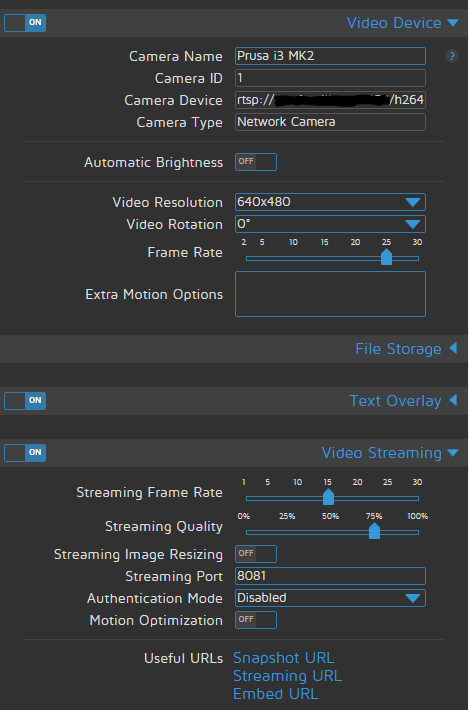
                                        @emos Here is one of mine: 0_1486731274088_Cam01.png

                                        If you cant find it, make it and share it!
                                        Modules: MMM-homeassistant-sensors, MMM-Modulebar, MMM-Profilepicture, MMM-Videoplayer

                                        E 1 Reply Last reply Reply Quote 0
                                        • E Offline
                                          emos @Snille
                                          last edited by

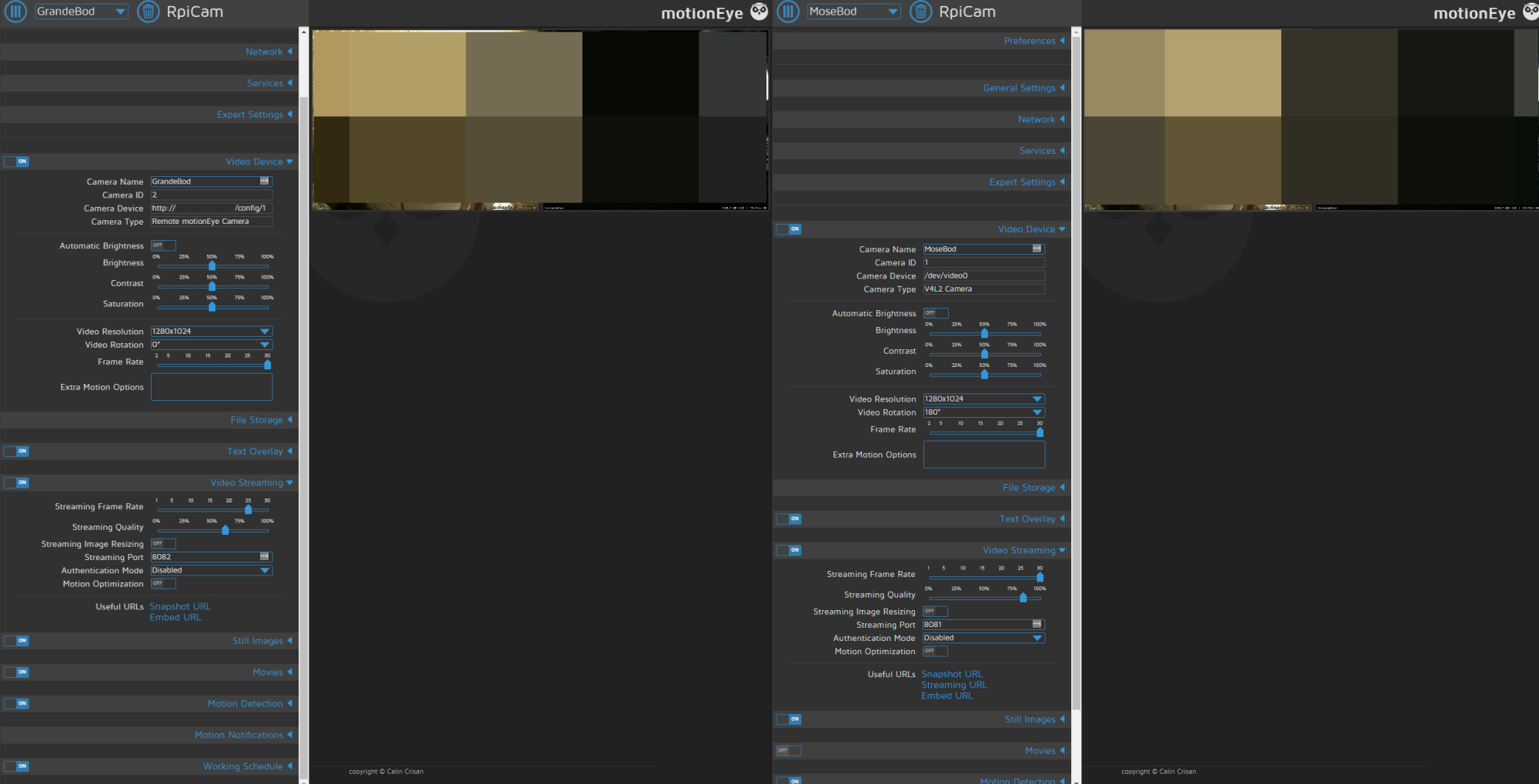
                                          Only thing thats not identical is under video streaming > Useful URLs.
                                          As you can see that under cam ID 2 (left one) is that streaming URL are missing… don’t know if this is a deal breaker or how to change it… :/
                                          0_1486731559516_MotionEye setup.jpg

                                          SnilleS 1 Reply Last reply Reply Quote 0
                                          • SnilleS Offline
                                            Snille Module Developer @emos
                                            last edited by

                                            @emos Hmm… I wounder if it is because you use an http link? Can you try to change it to an rtsp link?


                                            If you cant find it, make it and share it!
                                            Modules: MMM-homeassistant-sensors, MMM-Modulebar, MMM-Profilepicture, MMM-Videoplayer

                                            1 Reply Last reply Reply Quote 0

                                            Hello! It looks like you're interested in this conversation, but you don't have an account yet.

                                            Getting fed up of having to scroll through the same posts each visit? When you register for an account, you'll always come back to exactly where you were before, and choose to be notified of new replies (either via email, or push notification). You'll also be able to save bookmarks and upvote posts to show your appreciation to other community members.

                                            With your input, this post could be even better 💗

                                            Register Login

                                            • 1
                                            • 2
                                            • 3
                                            • 4
                                            • 5 / 4
                                            • First post
                                              Last post
                                            Enjoying MagicMirror? Please consider a donation!
                                            MagicMirror created by Michael Teeuw.
                                            Forum managed by Sam, technical setup by Karsten.
                                            This forum is using NodeBB as its core | Contributors
                                            Contact | Privacy Policy