Read the statement by Michael Teeuw here.
MMM-MotionEye - surveillance video stream on your mirror!
-
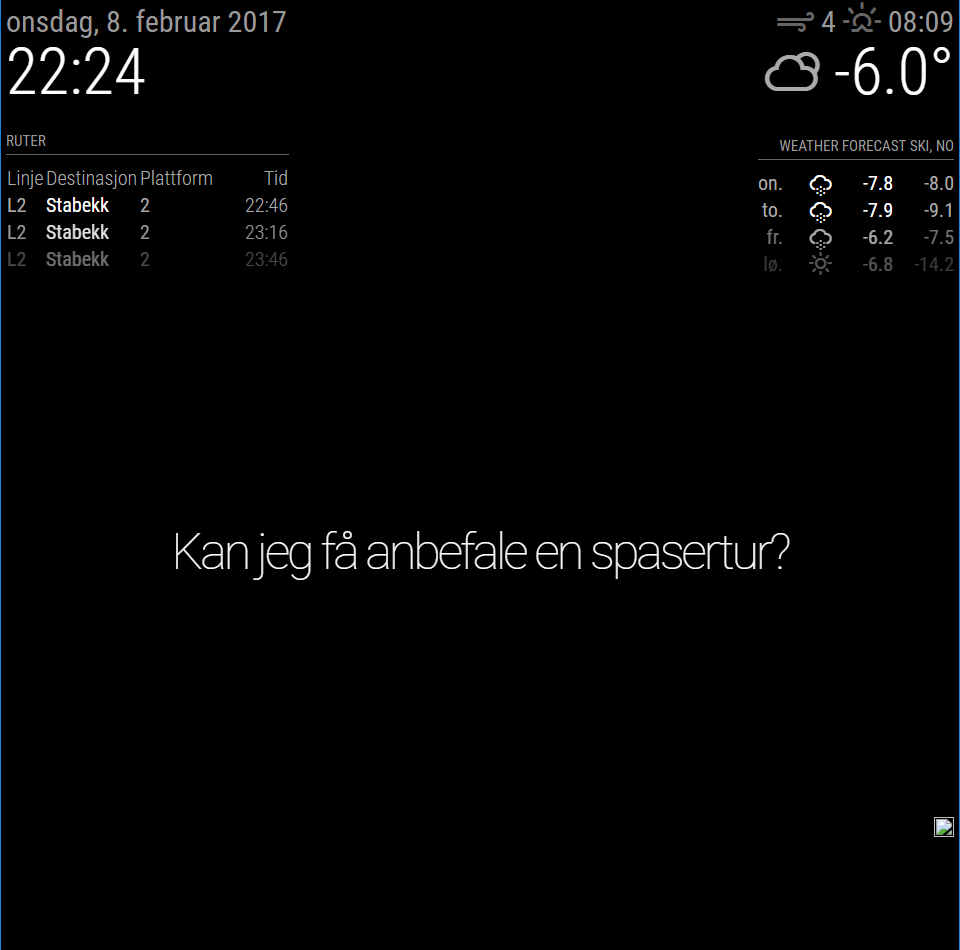
For some reason i just get a “broken” picture icon, and if i try to open http://MotionEyeIP/motioneye/1 the site just says:
{"error": "not found"}I have disable the password for the ‘Surveillance Username’ so no login is required.
I know the cam is available and motioneyos is working as normal. If i open http://192.168.1.200:8080/picture/1/current/ in my browser i can see the last snapshot, but not doing me any good…
Any suggestion?
{
	module: 'MMM-MotionEye',
	position: 'bottom_right',
	config: {
		url: "http://192.168.1.200:8080/motioneye/1",
		debug: false
		}
},
-
@emos hi, try changing the port (8080) in MM or camera , both MM and camera with 8080 will not work
-
@emos The URL you are using in your config seems to be the “web hook”-URL that you have to configure inside MotionEye if you want to automatically show video stream when motion is detected.
The URL should be configured like this (from documentation): Video Streaming URL. You find it in Motion Eye in the Video Streaming Section under Usefull URLs by by clicking the Streaming URL link. It should look something like this: http://motioneye:8081 (probably an IP instead of hostname).
-
reinstalled motioneye on my other r.pi and now im able to view a stream from
http://MotionEyeOS:8081, but only from cam 1.
Withhttp://MotionEyeOS:8081/motioneye/2i still just get cam 1. Get the feeling im not understanding something.{ module: 'MMM-MotionEye', position: 'lower_third', config: { url: "http://192.168.1.200:8081/motioneye/2", autoHide: false, debug: false } }, -
Hi @emos I’m also using different cameras from the same MotionEye install.
I have my cameras set on different ports like this.
http://MotionEyeOS:8081
http://MotionEyeOS:8082
http://MotionEyeOS:8083
I think that the default way…
Then you have the motiontrigger url like this in MotionEyeOS/Camera (for example):
http://MagicMirror:8080/motioneye/1
http://MagicMirror:8080/motioneye/2
http://MagicMirror:8080/motioneye/3That’s it. :)
-
@Snille
My second camera is a remote camera, not a local one on my LAN.
Also http://MagicMirror:8080/motioneye/1 and http://MagicMirror:8080/motioneye/2 is the same livestream. changing from motioneye/1 to motioneye/2 does nothing. -
@emos you need to add it in to MotionEyeOS. So it knows about it. I have 3 cameras in the same way. You can add any “network-camera”.
rtsp://yourcam:port/whatever-format in the “add” dialog in MotionEyeOS. :) -
@Snille
Camera is added to MotionEye
UnderMotionEyeOS Settings>Video Device>Camera IDthe ID is 1 and 2 :/ -
@emos Here is one of mine:
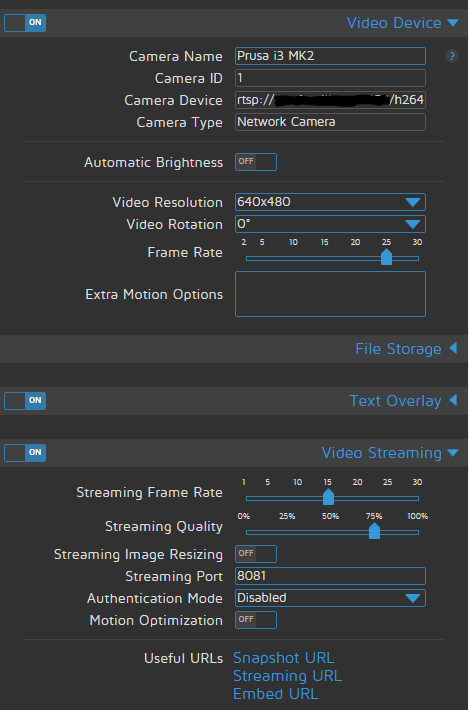
-
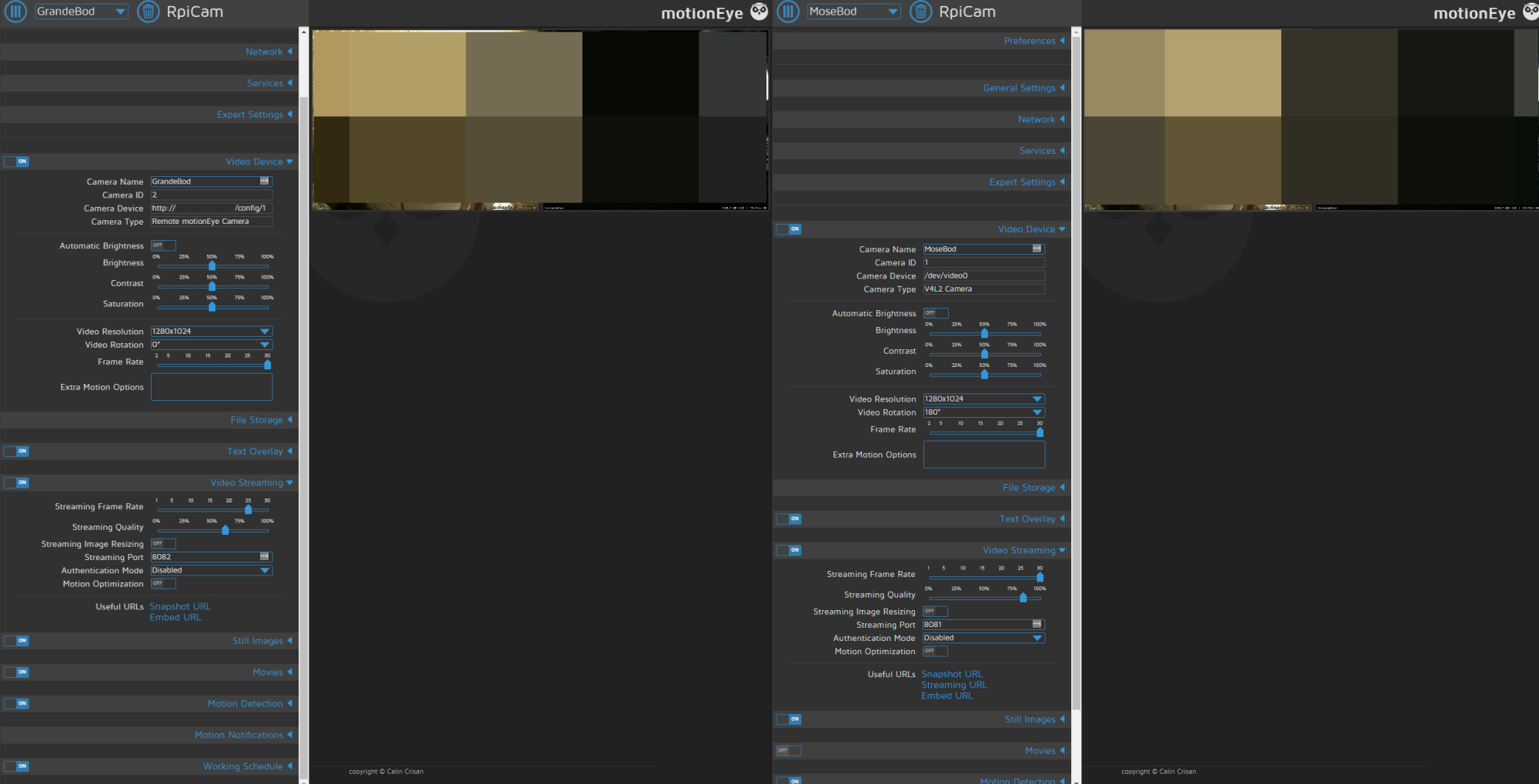
Only thing thats not identical is under
video streaming > Useful URLs.
As you can see that under camID 2(left one) is that streaming URL are missing… don’t know if this is a deal breaker or how to change it… :/
-
@emos Hmm… I wounder if it is because you use an http link? Can you try to change it to an rtsp link?
-
can i use rtsp for another MotionEye cam? Does it even have rtsp? :o
-
@emos Nah, you only need to use rtsp for the “network” cameras. The right one you have looks like a “locally” connected camera?
-
the right one is local, correct
-
Hi Cato, thanks for this Module, I installed it and it works like a charm. One thing I like to ask you is the positioning of the module. I tried to arrange the module appearence pixel-precise with the help of the custom.ccs but was not successful. I added this to the custom.css and deleted the position definition in the config.js. Any idea what went wrong here :question: :question: :question:
.MMM-MotionEye { left : 700px; top: 1500px; } -
I’m really not sure since I’m not very deep into CSS. I would have to test it this weekend. By schedule is pretty tight…
I assume you have a very large screen since you’re putting Motion-Eye 1500 pixels down on it?!? :smiley:
-
Of cause, I’ve a more or less large screen but this is only one of some other positions I tried without success to prevent overlapping with other modules.
Would be great if you could help with this of cause spezific problem.
Thx in advance… -
Hey there. My problem is, that I do not get an image one the screen, when using autohide.
It works without using autohide.
Is it true, that it appears - using autohide - if a motion is recognized?So motioneye is recognizing correctly, but obviously it does not parse the info to the module.
this is my config:```{ module: 'MMM-MotionEye', position: 'middle_center', config: { url: "http://motioneye:8081", autoHide: true, autoHideDelay:"10000", debug: true, animationSpeed: "2000", width: "300", }, },```Can someone please post a screenshot of the motioneye-config (as seen above) how the settings should be set?
Thank You very much !!
-
Hi all,
Just started my adventure with the MagicMirror, running into some problems with streaming 2 ipcams into MM.
I installed Motioneye in the Rpi and also in the MM module.Both ipcams are visable when i log into Motioneye (in my case: 192.168.1.105:8765) but only a small icon appears in the MagicMirror.
My config is:{ module: 'MMM-MotionEye', position: 'bottom_right', config: { url: "http://192.168.1.105:8765/motioneye/1", debug: true, }I have tried all above mentioned ideas but to no succes.
The cams are installed in Motioneye with:
http://192.168.1.102:88/cgi-bin/CGIStream.cgi?cmd=GetMJStream&usr=XXX&pwd=XXX
RTSP give me an error.
Hope someone can help me out… -
I have that more often than I can believe. That normally means motioneye crashed,. or something. there is no connection between MM and Motioneye.
I do the login ins my http://IP:8081 an see if it is running,. normally then MM reloads the full image.Give it a try!
BTW is there a way to let motioneye run through pm2 ?


Hello! It looks like you're interested in this conversation, but you don't have an account yet.
Getting fed up of having to scroll through the same posts each visit? When you register for an account, you'll always come back to exactly where you were before, and choose to be notified of new replies (either via email, or push notification). You'll also be able to save bookmarks and upvote posts to show your appreciation to other community members.
With your input, this post could be even better 💗
Register Login