Read the statement by Michael Teeuw here.
[MMM-JaST] Just another Stock Ticker (new: version 2.x)
-
Hi community,
please feel free to check out my stock ticker ;-)Main Features
- Uses Yahoo Finance API to collect current
- stock values
- indexes
- cryptocurrencies
- No API Key required
- Multiple display modes
- Static
- Vertical scroll
- Horizontal scroll
- Table
- Share Portfolio value and growth summary
- Very customizable
- Easy to use
Download and instructions on Github.
Feedback welcome.
Display Modes
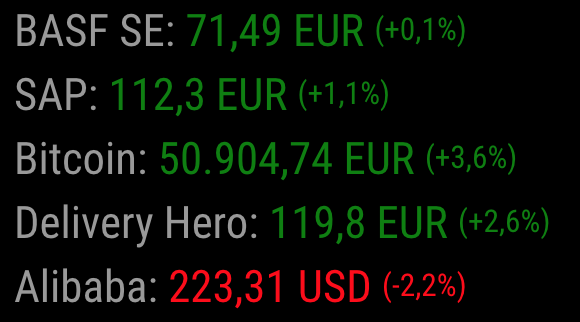
Vertical

Horizontal

Table

Static
Support
I put a lot of time and effort into the creation and maintenance for this module and I’m glad so many people like it.
If you also like this module and want to thank, please rate this repository with a star or donate a small amount that is worth it to you. - Uses Yahoo Finance API to collect current
-
Cool. :thumbsup:
-
I pushed a newer version with a few improvements:
- New feature: Daily sum (depot growth)
- Improvement: Better handling of API calls when there are more than 5 stocks in the ticker (the free API limit is 5 request per minute)
- Improvement: Nicer rendering of stocks with (yet) unknown value
I renamed some config properties. As this is a breaking change to the older version, please read the Readme file.
-
something like this for goldprice i could need, whitch display a chart of the last 30 days …
-
@Jalibu I would really like to see this working in my mirror! so far I have had no luck getting data from Alpha avantage. Is there a way to test and see what data is returned? or maybe what error code comes back? The ticker itself is running well with 15 stocks in it but no values are showing. I went back and used your sample config code and still no values returned. Your thoughts?
Here is what i used for my code:{ module: "MMM-Jast", position: "bottom_bar", config: { updateIntervalInSeconds: 1800, fadeSpeedInSeconds: 3.5, stocks: [ { name: "Amazon", symbol: "AMZN" }, { name: "Disney", symbol: "DIS" }, { name: "Ford", symbol: "F" }, { name: "Starbucks", symbol: "SBUX" }, { name: "JD.com", symbol: "JD" }, { name: "Microsoft", symbol: "MSFT" }, { name: "Verizon", symbol: "VZ" }, { name: "Phizer", symbol: "PFE" }, { name: "Intuit", symbol: "INTU" }, { name: "Zinga", symbol: "ZNGA" }, { name: "Cognex", symbol: "CGNX" }, { name: "Fortnet", symbol: "FTNT" }, { name: "Ilumina", symbol: "ILMN" }, { name: "KinderMorgen", symbol: "KMI" }, { name: "NewBev", symbol: "NBEV" }, { name: "Neptune", symbol: "NEPT" }, { name: "Alibaba", symbol: "BABA", tradeCurrency: "USD", displayCurrency: "USD" }, ], defaultCurrency: "USD", apiKey: "My_API_KEY_HERE", scroll: "horizontal", //"<none, vertical, horizontal>" maxWidth: "100%", showDepotGrowth: true } }, -
@popeye2002 open the developers window, (f12 or ctrl-shift-i), select the tab labeled console,
enter jast in the filter field and look for any errors (usually red text)AlphaVantage is very protective of their api, and will reject calls too soon from last one
-
@sdetweil Thank you sam… I’m learning all the time. well nothing was red with a search for jast.
But, I learned a little more about how to troubleshoot!Load script: modules/MMM-Jast//MMM-Jast.js module.js:479 Module registered: MMM-Jast loader.js:150 Bootstrapping module: MMM-Jast loader.js:155 Scripts loaded for: MMM-Jast loader.js:194 Load stylesheet: modules/MMM-Jast/MMM-Jast.css loader.js:157 Styles loaded for: MMM-Jast translator.js:175 MMM-Jast - Load translation fallback: translations/en.json loader.js:159 Translations loaded for: MMM-Jast -
@popeye2002 ok, how did u start MM??? pm2 or npm start
if pm2
then dopm2 logs --lines=100the module says it puts out messages
console.log(“Sending Stock result:”, { symbol, current, last });my guess is based on the node_helper design, that AlphaVantage has rejected the requests as too frequent…
(as it does one request per stock)
you should see the errors in the pm2 log (or terminal window if npm start)config.stocks.forEach((stock) => { if (!stock.lastUpdate || Date.now() - stock.lastUpdate >= config.updateIntervalInSeconds * 1000) { const url = `${config.baseURL}query?function=TIME_SERIES_DAILY&outputsize=compact&apikey=${config.apiKey}&symbol=${stock.symbol}`; request(url, { json: true }, (err, res, body) => {it should do ALL stocks in one request
AlphaVantage also only does NYSE, nasdaq requires a separate api from a different provider
-
@sdetweil Gosh, I’m not having much luck. I’m in well over my head but the desire to succede keeps me going. I don’t know how i start my mirror… kinda dumb but it auto starts. I mean dumb that i don’t know pm2 or not.
I made an error when i installed the module and ran the npm install from the incorrect directory… do you think that would have caused errors? I immeadiately went and ran npm install from the correct directory but perhaps some damage was already done?
pi@raspberrypi:~/MagicMirror/modules $ npm installpi@raspberrypi:~/MagicMirror/modules $ npm install > magicmirror@2.11.0 install /home/pi/MagicMirror > echo "Installing vendor files ... " && cd vendor && npm install --loglevel=error Installing vendor files ... audited 220 packages in 4.134s found 8 vulnerabilities (7 low, 1 high) run `npm audit fix` to fix them, or `npm audit` for details > magicmirror@2.11.0 postinstall /home/pi/MagicMirror > npm run install-fonts && echo "MagicMirror installation finished successfully! " > magicmirror@2.11.0 install-fonts /home/pi/MagicMirror > echo "Installing fonts ... " && cd fonts && npm install --loglevel=error Installing fonts ... audited 1 package in 2.072s found 0 vulnerabilities MagicMirror installation finished successfully! npm WARN optional SKIPPING OPTIONAL DEPENDENCY: fsevents@2.1.3 (node_modules/fsevents): npm WARN notsup SKIPPING OPTIONAL DEPENDENCY: Unsupported platform for fsevents@2.1.3: wanted {"os":"darwin","arch":"any"} (current: {"os":"linux","arch":"arm"}) audited 3224 packages in 25.621s 73 packages are looking for funding run `npm fund` for details found 2 low severity vulnerabilities run `npm audit fix` to fix them, or `npm audit` for details pi@raspberrypi:~/MagicMirror/modules $ cd MMM-JaST bash: cd: MMM-JaST: No such file or directory pi@raspberrypi:~/MagicMirror/modules $ cd MMM-Jast pi@raspberrypi:~/MagicMirror/modules/MMM-Jast $ npm install > magicmirror@2.11.0 install /home/pi/MagicMirror > echo "Installing vendor files ... " && cd vendor && npm install --loglevel=error Installing vendor files ... audited 220 packages in 4.073s found 8 vulnerabilities (7 low, 1 high) run `npm audit fix` to fix them, or `npm audit` for details > magicmirror@2.11.0 postinstall /home/pi/MagicMirror > npm run install-fonts && echo "MagicMirror installation finished successfully! " > magicmirror@2.11.0 install-fonts /home/pi/MagicMirror > echo "Installing fonts ... " && cd fonts && npm install --loglevel=error Installing fonts ... audited 1 package in 1.865s found 0 vulnerabilities MagicMirror installation finished successfully! npm WARN optional SKIPPING OPTIONAL DEPENDENCY: fsevents@2.1.3 (node_modules/fsevents): npm WARN notsup SKIPPING OPTIONAL DEPENDENCY: Unsupported platform for fsevents@2.1.3: wanted {"os":"darwin","arch":"any"} (current: {"os":"linux","arch":"arm"}) audited 3224 packages in 25.347s 73 packages are looking for funding run `npm fund` for details found 2 low severity vulnerabilities run `npm audit fix` to fix them, or `npm audit` for details pi@raspberrypi:~/MagicMirror/modules/MMM-Jast $ -
@popeye2002 Is there a working stock ticker module out there?
-
@sdetweil
pm2 logs returnedpi@raspberrypi:~ $ pm2 logs --lines=100 [TAILING] Tailing last 100 lines for [all] processes (change the value with --lines option) /home/pi/.pm2/pm2.log last 100 lines: PM2 | 2020-04-24T21:36:53: PM2 log: pid=4346 msg=process killed PM2 | 2020-04-24T21:36:53: PM2 log: App [MagicMirror:0] starting in -fork mode- PM2 | 2020-04-24T21:36:53: PM2 log: App [MagicMirror:0] online PM2 | 2020-04-24T21:38:43: PM2 log: Change detected on path config/config.js for app MagicMirror - restarting PM2 | 2020-04-24T21:38:43: PM2 log: Stopping app:MagicMirror id:0 PM2 | 2020-04-24T21:38:43: PM2 log: App [MagicMirror:0] exited with code [0] via signal [SIGINT] PM2 | 2020-04-24T21:38:43: PM2 log: pid=5038 msg=process killed PM2 | 2020-04-24T21:38:43: PM2 log: App [MagicMirror:0] starting in -fork mode- PM2 | 2020-04-24T21:38:43: PM2 log: App [MagicMirror:0] online PM2 | 2020-04-24T21:40:07: PM2 log: Change detected on path config/config.js for app MagicMirror - restarting PM2 | 2020-04-24T21:40:07: PM2 log: Stopping app:MagicMirror id:0 PM2 | 2020-04-24T21:40:07: PM2 log: App [MagicMirror:0] exited with code [0] via signal [SIGINT] PM2 | 2020-04-24T21:40:07: PM2 log: pid=5170 msg=process killed PM2 | 2020-04-24T21:40:07: PM2 log: App [MagicMirror:0] starting in -fork mode- PM2 | 2020-04-24T21:40:07: PM2 log: App [MagicMirror:0] online PM2 | 2020-04-25T08:32:15: PM2 log: Change detected on path config/config.js for app MagicMirror - restarting PM2 | 2020-04-25T08:32:15: PM2 log: Stopping app:MagicMirror id:0 PM2 | 2020-04-25T08:32:15: PM2 log: App [MagicMirror:0] exited with code [0] via signal [SIGINT] PM2 | 2020-04-25T08:32:15: PM2 log: pid=5304 msg=process killed PM2 | 2020-04-25T08:32:15: PM2 log: App [MagicMirror:0] starting in -fork mode- PM2 | 2020-04-25T08:32:15: PM2 log: App [MagicMirror:0] online PM2 | 2020-04-25T08:36:17: PM2 log: Change detected on path config/config.js for app MagicMirror - restarting PM2 | 2020-04-25T08:36:17: PM2 log: Stopping app:MagicMirror id:0 PM2 | 2020-04-25T08:36:17: PM2 log: App [MagicMirror:0] exited with code [0] via signal [SIGINT] PM2 | 2020-04-25T08:36:17: PM2 log: pid=9302 msg=process killed PM2 | 2020-04-25T08:36:17: PM2 log: App [MagicMirror:0] starting in -fork mode- PM2 | 2020-04-25T08:36:17: PM2 log: App [MagicMirror:0] online PM2 | 2020-04-25T09:57:23: PM2 log: Change detected on path config/config.js for app MagicMirror - restarting PM2 | 2020-04-25T09:57:23: PM2 log: Stopping app:MagicMirror id:0 PM2 | 2020-04-25T09:57:24: PM2 log: App [MagicMirror:0] exited with code [0] via signal [SIGINT] PM2 | 2020-04-25T09:57:24: PM2 log: pid=9444 msg=process killed PM2 | 2020-04-25T09:57:24: PM2 log: App [MagicMirror:0] starting in -fork mode- PM2 | 2020-04-25T09:57:24: PM2 log: App [MagicMirror:0] online PM2 | 2020-04-25T09:58:28: PM2 log: Change detected on path config/config.js for app MagicMirror - restarting PM2 | 2020-04-25T09:58:28: PM2 log: Stopping app:MagicMirror id:0 PM2 | 2020-04-25T09:58:28: PM2 log: App [MagicMirror:0] exited with code [0] via signal [SIGINT] PM2 | 2020-04-25T09:58:28: PM2 log: pid=10527 msg=process killed PM2 | 2020-04-25T09:58:28: PM2 log: App [MagicMirror:0] starting in -fork mode- PM2 | 2020-04-25T09:58:28: PM2 log: App [MagicMirror:0] online PM2 | 2020-04-25T10:09:42: PM2 log: Change detected on path config/config.js for app MagicMirror - restarting PM2 | 2020-04-25T10:09:42: PM2 log: Stopping app:MagicMirror id:0 PM2 | 2020-04-25T10:09:43: PM2 log: App [MagicMirror:0] exited with code [0] via signal [SIGINT] PM2 | 2020-04-25T10:09:43: PM2 log: pid=10657 msg=process killed PM2 | 2020-04-25T10:09:43: PM2 log: App [MagicMirror:0] starting in -fork mode- PM2 | 2020-04-25T10:09:43: PM2 log: App [MagicMirror:0] online PM2 | 2020-04-25T10:11:40: PM2 log: Change detected on path config/config.js for app MagicMirror - restarting PM2 | 2020-04-25T10:11:40: PM2 log: Stopping app:MagicMirror id:0 PM2 | 2020-04-25T10:11:40: PM2 log: pid=10870 msg=failed to kill - retrying in 100ms PM2 | 2020-04-25T10:11:40: PM2 log: App [MagicMirror:0] exited with code [0] via signal [SIGINT] PM2 | 2020-04-25T10:11:40: PM2 log: pid=10870 msg=process killed PM2 | 2020-04-25T10:11:41: PM2 log: App [MagicMirror:0] starting in -fork mode- PM2 | 2020-04-25T10:11:41: PM2 log: App [MagicMirror:0] online PM2 | 2020-04-25T10:12:19: PM2 log: Change detected on path config/config.js for app MagicMirror - restarting PM2 | 2020-04-25T10:12:19: PM2 log: Stopping app:MagicMirror id:0 PM2 | 2020-04-25T10:12:19: PM2 log: App [MagicMirror:0] exited with code [0] via signal [SIGINT] PM2 | 2020-04-25T10:12:19: PM2 log: pid=11003 msg=process killed PM2 | 2020-04-25T10:12:19: PM2 log: App [MagicMirror:0] starting in -fork mode- PM2 | 2020-04-25T10:12:19: PM2 log: App [MagicMirror:0] online PM2 | 2020-04-25T10:24:01: PM2 log: Change detected on path config/config.js for app MagicMirror - restarting PM2 | 2020-04-25T10:24:01: PM2 log: Stopping app:MagicMirror id:0 PM2 | 2020-04-25T10:24:01: PM2 log: App [MagicMirror:0] exited with code [0] via signal [SIGINT] PM2 | 2020-04-25T10:24:01: PM2 log: pid=11121 msg=process killed PM2 | 2020-04-25T10:24:01: PM2 log: App [MagicMirror:0] starting in -fork mode- PM2 | 2020-04-25T10:24:01: PM2 log: App [MagicMirror:0] online PM2 | 2020-04-25T10:25:09: PM2 log: Change detected on path config/config.js for app MagicMirror - restarting PM2 | 2020-04-25T10:25:09: PM2 log: Stopping app:MagicMirror id:0 PM2 | 2020-04-25T10:25:09: PM2 log: App [MagicMirror:0] exited with code [0] via signal [SIGINT] PM2 | 2020-04-25T10:25:09: PM2 log: pid=11325 msg=process killed PM2 | 2020-04-25T10:25:09: PM2 log: App [MagicMirror:0] starting in -fork mode- PM2 | 2020-04-25T10:25:09: PM2 log: App [MagicMirror:0] online PM2 | 2020-04-25T10:26:54: PM2 log: Change detected on path config/config.js for app MagicMirror - restarting PM2 | 2020-04-25T10:26:54: PM2 log: Stopping app:MagicMirror id:0 PM2 | 2020-04-25T10:26:54: PM2 log: App [MagicMirror:0] exited with code [0] via signal [SIGINT] PM2 | 2020-04-25T10:26:54: PM2 log: pid=11455 msg=process killed PM2 | 2020-04-25T10:26:54: PM2 log: App [MagicMirror:0] starting in -fork mode- PM2 | 2020-04-25T10:26:54: PM2 log: App [MagicMirror:0] online PM2 | 2020-04-25T10:29:18: PM2 log: Change detected on path config/config.js for app MagicMirror - restarting PM2 | 2020-04-25T10:29:18: PM2 log: Stopping app:MagicMirror id:0 PM2 | 2020-04-25T10:29:18: PM2 log: App [MagicMirror:0] exited with code [0] via signal [SIGINT] PM2 | 2020-04-25T10:29:18: PM2 log: pid=11592 msg=process killed PM2 | 2020-04-25T10:29:18: PM2 log: App [MagicMirror:0] starting in -fork mode- PM2 | 2020-04-25T10:29:18: PM2 log: App [MagicMirror:0] online PM2 | 2020-04-25T10:47:32: PM2 log: Change detected on path config/config.js for app MagicMirror - restarting PM2 | 2020-04-25T10:47:32: PM2 log: Stopping app:MagicMirror id:0 PM2 | 2020-04-25T10:47:32: PM2 log: App [MagicMirror:0] exited with code [0] via signal [SIGINT] PM2 | 2020-04-25T10:47:32: PM2 log: pid=11736 msg=process killed PM2 | 2020-04-25T10:47:32: PM2 log: App [MagicMirror:0] starting in -fork mode- PM2 | 2020-04-25T10:47:32: PM2 log: App [MagicMirror:0] online PM2 | 2020-04-25T10:56:09: PM2 log: Change detected on path config/config.js for app MagicMirror - restarting PM2 | 2020-04-25T10:56:09: PM2 log: Stopping app:MagicMirror id:0 PM2 | 2020-04-25T10:56:09: PM2 log: App [MagicMirror:0] exited with code [0] via signal [SIGINT] PM2 | 2020-04-25T10:56:09: PM2 log: pid=11989 msg=process killed PM2 | 2020-04-25T10:56:09: PM2 log: App [MagicMirror:0] starting in -fork mode- PM2 | 2020-04-25T10:56:09: PM2 log: App [MagicMirror:0] online PM2 | 2020-04-25T13:07:00: PM2 log: Change detected on path config/config.js for app MagicMirror - restarting PM2 | 2020-04-25T13:07:00: PM2 log: Stopping app:MagicMirror id:0 PM2 | 2020-04-25T13:07:01: PM2 log: App [MagicMirror:0] exited with code [0] via signal [SIGINT] PM2 | 2020-04-25T13:07:01: PM2 log: pid=12193 msg=process killed PM2 | 2020-04-25T13:07:01: PM2 log: App [MagicMirror:0] starting in -fork mode- PM2 | 2020-04-25T13:07:01: PM2 log: App [MagicMirror:0] online /home/pi/.pm2/logs/MagicMirror-out.log last 100 lines: 0|MagicMir | [2020-04-25 13:07:03.816] [LOG] Module helper loaded: calendar 0|MagicMir | [2020-04-25 13:07:03.817] [LOG] No helper found for module: compliments. 0|MagicMir | [2020-04-25 13:07:03.817] [LOG] No helper found for module: currentweather. 0|MagicMir | [2020-04-25 13:07:03.818] [LOG] No helper found for module: weatherforecast. 0|MagicMir | [2020-04-25 13:07:03.866] [LOG] Initializing new module helper ... 0|MagicMir | [2020-04-25 13:07:03.866] [LOG] Module helper loaded: newsfeed 0|MagicMir | [2020-04-25 13:07:03.867] [LOG] All module helpers loaded. 0|MagicMir | [2020-04-25 13:07:03.963] [LOG] Starting server on port 8080 ... 0|MagicMir | [2020-04-25 13:07:03.975] [LOG] Server started ... 0|MagicMir | [2020-04-25 13:07:03.976] [LOG] Connecting socket for: updatenotification 0|MagicMir | [2020-04-25 13:07:03.977] [LOG] Connecting socket for: calendar 0|MagicMir | [2020-04-25 13:07:03.978] [LOG] Starting node helper for: calendar 0|MagicMir | [2020-04-25 13:07:03.978] [LOG] Connecting socket for: newsfeed 0|MagicMir | [2020-04-25 13:07:03.979] [LOG] Starting module: newsfeed 0|MagicMir | [2020-04-25 13:07:03.979] [LOG] Sockets connected & modules started ... 0|MagicMir | [2020-04-25 13:07:04.063] [LOG] Launching application. 0|MagicMir | [2020-04-25 13:07:06.150] [LOG] Create new calendar fetcher for url: https://calendar.google.com/calendar/ical/popeye2002%40yahoo.com/private-xxx/basic.ics - Interval: 300000 0|MagicMir | [2020-04-25 13:07:06.204] [LOG] Create new news fetcher for url: http://feeds.foxnews.com/foxnews/latest - Interval: 300000 0|MagicMir | [2020-04-25 14:04:21.937] [LOG] Create new calendar fetcher for url: http://e-qo.de/9jxe.ics - Interval: 300000 0|MagicMir | [2020-04-25 14:04:21.939] [LOG] Create new calendar fetcher for url: https://calendar.google.com/calendar/embed?src=en.usa%23holiday%40group.v.calendar.google.com&ctz=America%2FLos_Angeles - Interval: 300000 0|MagicMir | [2020-04-25 14:04:21.966] [LOG] Use existing news fetcher for url: http://feeds.foxnews.com/foxnews/latest 0|MagicMir | [2020-04-25 14:22:22.979] [LOG] Use existing news fetcher for url: http://feeds.foxnews.com/foxnews/latest 0|MagicMir | [2020-04-25 14:38:37.847] [LOG] Use existing news fetcher for url: http://feeds.foxnews.com/foxnews/latest 0|MagicMir | [2020-04-25 14:41:32.981] [LOG] Use existing news fetcher for url: http://feeds.foxnews.com/foxnews/latest 0|MagicMir | [2020-04-25 14:43:12.220] [LOG] Use existing news fetcher for url: http://feeds.foxnews.com/foxnews/latest 0|MagicMir | [2020-04-25 15:56:03.874] [LOG] Use existing news fetcher for url: http://feeds.foxnews.com/foxnews/latest 0|MagicMir | [2020-04-25 16:00:45.169] [LOG] Use existing news fetcher for url: http://feeds.foxnews.com/foxnews/latest 0|MagicMir | [2020-04-25 16:29:16.261] [LOG] Use existing news fetcher for url: http://feeds.foxnews.com/foxnews/latest 0|MagicMir | [2020-04-25 16:31:44.312] [LOG] Use existing news fetcher for url: http://feeds.foxnews.com/foxnews/latest 0|MagicMir | [2020-04-25 16:42:07.916] [LOG] Use existing news fetcher for url: http://feeds.foxnews.com/foxnews/latest 0|MagicMir | [2020-04-25 16:43:13.644] [LOG] Use existing news fetcher for url: http://feeds.foxnews.com/foxnews/latest 0|MagicMir | [2020-04-25 16:47:47.950] [LOG] Use existing news fetcher for url: http://feeds.foxnews.com/foxnews/latest 0|MagicMir | [2020-04-25 16:49:40.896] [LOG] Use existing news fetcher for url: http://feeds.foxnews.com/foxnews/latest 0|MagicMir | [2020-04-25 16:50:37.811] [LOG] Use existing news fetcher for url: http://feeds.foxnews.com/foxnews/latest 0|MagicMir | [2020-04-25 16:51:42.489] [LOG] Use existing news fetcher for url: http://feeds.foxnews.com/foxnews/latest 0|MagicMir | [2020-04-25 17:15:51.073] [LOG] Use existing news fetcher for url: http://feeds.foxnews.com/foxnews/latest 0|MagicMir | [2020-04-25 19:05:16.061] [LOG] Use existing news fetcher for url: http://feeds.foxnews.com/foxnews/latest 0|MagicMir | [2020-04-25 19:08:27.076] [LOG] Use existing news fetcher for url: http://feeds.foxnews.com/foxnews/latest 0|MagicMir | [2020-04-25 19:32:33.228] [LOG] Use existing news fetcher for url: http://feeds.foxnews.com/foxnews/latest 0|MagicMir | [2020-04-25 19:39:22.974] [LOG] Use existing news fetcher for url: http://feeds.foxnews.com/foxnews/latest 0|MagicMir | [2020-04-25 19:40:50.989] [LOG] Use existing news fetcher for url: http://feeds.foxnews.com/foxnews/latest 0|MagicMir | [2020-04-25 19:46:01.896] [LOG] Use existing news fetcher for url: http://feeds.foxnews.com/foxnews/latest 0|MagicMir | [2020-04-25 19:46:45.924] [LOG] Use existing news fetcher for url: http://feeds.foxnews.com/foxnews/latest 0|MagicMir | [2020-04-25 19:49:33.873] [LOG] Use existing news fetcher for url: http://feeds.foxnews.com/foxnews/latest 0|MagicMir | [2020-04-25 20:09:46.906] [LOG] Use existing news fetcher for url: http://feeds.foxnews.com/foxnews/latest 0|MagicMir | [2020-04-25 20:11:40.481] [LOG] Use existing news fetcher for url: http://feeds.foxnews.com/foxnews/latest 0|MagicMir | [2020-04-25 20:12:47.970] [LOG] Use existing news fetcher for url: http://feeds.foxnews.com/foxnews/latest 0|MagicMir | [2020-04-25 20:16:52.618] [LOG] Use existing news fetcher for url: http://feeds.foxnews.com/foxnews/latest 0|MagicMir | [2020-04-25 20:29:10.761] [LOG] Use existing news fetcher for url: http://feeds.foxnews.com/foxnews/latest 0|MagicMir | [2020-04-25 20:29:58.254] [LOG] Use existing news fetcher for url: http://feeds.foxnews.com/foxnews/latest 0|MagicMir | [2020-04-25 20:35:13.756] [LOG] Use existing news fetcher for url: http://feeds.foxnews.com/foxnews/latest 0|MagicMir | [2020-04-25 20:36:40.770] [LOG] Use existing news fetcher for url: http://feeds.foxnews.com/foxnews/latest 0|MagicMir | [2020-04-25 20:53:02.011] [LOG] Use existing news fetcher for url: http://feeds.foxnews.com/foxnews/latest 0|MagicMir | [2020-04-26 08:30:45.489] [LOG] Use existing news fetcher for url: http://feeds.foxnews.com/foxnews/latest 0|MagicMir | [2020-04-26 08:31:45.053] [LOG] Use existing news fetcher for url: http://feeds.foxnews.com/foxnews/latest 0|MagicMir | [2020-04-26 08:36:19.897] [LOG] Use existing news fetcher for url: http://feeds.foxnews.com/foxnews/latest 0|MagicMir | [2020-04-26 08:37:40.487] [LOG] Use existing news fetcher for url: http://feeds.foxnews.com/foxnews/latest 0|MagicMir | [2020-04-26 08:39:57.737] [LOG] Use existing news fetcher for url: http://feeds.foxnews.com/foxnews/latest 0|MagicMir | [2020-04-26 08:40:44.174] [LOG] Use existing news fetcher for url: http://feeds.foxnews.com/foxnews/latest 0|MagicMir | [2020-04-26 08:42:17.747] [LOG] Use existing news fetcher for url: http://feeds.foxnews.com/foxnews/latest 0|MagicMir | [2020-04-26 08:43:16.624] [LOG] Use existing news fetcher for url: http://feeds.foxnews.com/foxnews/latest 0|MagicMir | [2020-04-26 08:43:48.457] [LOG] Use existing news fetcher for url: http://feeds.foxnews.com/foxnews/latest 0|MagicMir | [2020-04-26 08:46:29.751] [LOG] Use existing news fetcher for url: http://feeds.foxnews.com/foxnews/latest 0|MagicMir | [2020-04-26 08:50:03.961] [LOG] Use existing news fetcher for url: http://feeds.foxnews.com/foxnews/latest 0|MagicMir | [2020-04-26 08:52:17.072] [LOG] Use existing news fetcher for url: http://feeds.foxnews.com/foxnews/latest 0|MagicMir | [2020-04-26 08:59:47.487] [LOG] Use existing news fetcher for url: http://feeds.foxnews.com/foxnews/latest 0|MagicMir | [2020-04-26 09:05:07.514] [LOG] Use existing news fetcher for url: http://feeds.foxnews.com/foxnews/latest 0|MagicMir | [2020-04-26 11:53:35.705] [LOG] Use existing news fetcher for url: http://feeds.foxnews.com/foxnews/latest 0|MagicMir | [2020-04-26 11:57:53.203] [LOG] Use existing news fetcher for url: http://feeds.foxnews.com/foxnews/latest 0|MagicMir | [2020-04-26 12:14:42.469] [LOG] Use existing news fetcher for url: http://feeds.foxnews.com/foxnews/latest 0|MagicMir | [2020-04-26 12:16:20.914] [LOG] Use existing news fetcher for url: http://feeds.foxnews.com/foxnews/latest 0|MagicMir | [2020-04-26 12:21:55.192] [LOG] Use existing news fetcher for url: http://feeds.foxnews.com/foxnews/latest 0|MagicMir | [2020-04-26 12:33:42.311] [LOG] Use existing news fetcher for url: http://feeds.foxnews.com/foxnews/latest 0|MagicMir | [2020-04-26 12:36:20.656] [LOG] Use existing news fetcher for url: http://feeds.foxnews.com/foxnews/latest 0|MagicMir | [2020-04-26 12:42:09.482] [LOG] Use existing news fetcher for url: http://feeds.foxnews.com/foxnews/latest 0|MagicMir | [2020-04-26 13:30:08.975] [LOG] Use existing news fetcher for url: http://feeds.foxnews.com/foxnews/latest 0|MagicMir | [2020-04-26 13:32:30.059] [LOG] Use existing news fetcher for url: http://feeds.foxnews.com/foxnews/latest 0|MagicMir | [2020-04-26 13:33:13.172] [LOG] Use existing news fetcher for url: http://feeds.foxnews.com/foxnews/latest 0|MagicMir | [2020-04-26 13:34:20.052] [LOG] Use existing news fetcher for url: http://feeds.foxnews.com/foxnews/latest 0|MagicMir | [2020-04-26 13:58:13.440] [LOG] Use existing news fetcher for url: http://feeds.foxnews.com/foxnews/latest 0|MagicMir | [2020-04-26 14:06:10.539] [LOG] Use existing news fetcher for url: http://feeds.foxnews.com/foxnews/latest 0|MagicMir | [2020-04-26 14:11:08.838] [LOG] Use existing news fetcher for url: http://feeds.foxnews.com/foxnews/latest 0|MagicMir | [2020-04-26 19:20:53.046] [LOG] Use existing news fetcher for url: http://feeds.foxnews.com/foxnews/latest 0|MagicMir | [2020-04-26 19:48:59.181] [LOG] Use existing news fetcher for url: http://feeds.foxnews.com/foxnews/latest 0|MagicMir | [2020-04-26 19:51:37.038] [LOG] Use existing news fetcher for url: http://feeds.foxnews.com/foxnews/latest 0|MagicMir | [2020-04-26 19:56:36.109] [LOG] Use existing news fetcher for url: http://feeds.foxnews.com/foxnews/latest 0|MagicMir | [2020-04-26 20:28:25.851] [LOG] Use existing news fetcher for url: http://feeds.foxnews.com/foxnews/latest 0|MagicMir | [2020-04-26 20:34:06.918] [LOG] Use existing news fetcher for url: http://feeds.foxnews.com/foxnews/latest 0|MagicMir | [2020-04-26 20:34:52.257] [LOG] Use existing news fetcher for url: http://feeds.foxnews.com/foxnews/latest 0|MagicMir | [2020-04-26 20:36:22.352] [LOG] Use existing news fetcher for url: http://feeds.foxnews.com/foxnews/latest 0|MagicMir | [2020-04-27 07:10:49.993] [LOG] Use existing news fetcher for url: http://feeds.foxnews.com/foxnews/latest 0|MagicMir | [2020-04-27 09:08:47.141] [LOG] Use existing news fetcher for url: http://feeds.foxnews.com/foxnews/latest 0|MagicMir | [2020-04-27 09:35:53.935] [LOG] Use existing news fetcher for url: http://feeds.foxnews.com/foxnews/latest 0|MagicMir | [2020-04-27 12:18:36.586] [LOG] Use existing news fetcher for url: http://feeds.foxnews.com/foxnews/latest 0|MagicMir | [2020-04-27 12:22:08.714] [LOG] Use existing news fetcher for url: http://feeds.foxnews.com/foxnews/latest 0|MagicMir | [2020-04-27 14:47:40.446] [LOG] Use existing news fetcher for url: http://feeds.foxnews.com/foxnews/latest 0|MagicMir | [2020-04-27 14:50:03.962] [LOG] Use existing news fetcher for url: http://feeds.foxnews.com/foxnews/latest 0|MagicMir | [2020-04-27 14:52:23.478] [LOG] Use existing news fetcher for url: http://feeds.foxnews.com/foxnews/latest 0|MagicMir | [2020-04-27 15:01:12.576] [LOG] Use existing news fetcher for url: http://feeds.foxnews.com/foxnews/latest 0|MagicMir | [2020-04-27 15:05:17.725] [LOG] Use existing news fetcher for url: http://feeds.foxnews.com/foxnews/latest /home/pi/.pm2/logs/MagicMirror-error.log last 100 lines: 0|MagicMir | syscall: 'getaddrinfo', 0|MagicMir | hostname: 'calendar.google.com' 0|MagicMir | } 0|MagicMir | [2020-04-27 04:06:22.096] [ERROR] Calendar Error. Could not fetch calendar: https://calendar.google.com/calendar/embed?src=en.usa%23holiday%40group.v.calendar.google.com&ctz=America%2FLos_Angeles Error: getaddrinfo EAI_AGAIN calendar.google.com 0|MagicMir | at GetAddrInfoReqWrap.onlookup [as oncomplete] (dns.js:60:26) { 0|MagicMir | errno: 'EAI_AGAIN', 0|MagicMir | code: 'EAI_AGAIN', 0|MagicMir | syscall: 'getaddrinfo', 0|MagicMir | hostname: 'calendar.google.com' 0|MagicMir | } 0|MagicMir | [2020-04-27 04:11:22.067] [ERROR] Calendar Error. Could not fetch calendar: https://calendar.google.com/calendar/embed?src=en.usa%23holiday%40group.v.calendar.google.com&ctz=America%2FLos_Angeles Error: getaddrinfo EAI_AGAIN calendar.google.com 0|MagicMir | at GetAddrInfoReqWrap.onlookup [as oncomplete] (dns.js:60:26) { 0|MagicMir | errno: 'EAI_AGAIN', 0|MagicMir | code: 'EAI_AGAIN', 0|MagicMir | syscall: 'getaddrinfo', 0|MagicMir | hostname: 'calendar.google.com' 0|MagicMir | } 0|MagicMir | [2020-04-27 04:11:22.078] [ERROR] Calendar Error. Could not fetch calendar: https://calendar.google.com/calendar/embed?src=en.usa%23holiday%40group.v.calendar.google.com&ctz=America%2FLos_Angeles Error: getaddrinfo EAI_AGAIN calendar.google.com 0|MagicMir | at GetAddrInfoReqWrap.onlookup [as oncomplete] (dns.js:60:26) { 0|MagicMir | errno: 'EAI_AGAIN', 0|MagicMir | code: 'EAI_AGAIN', 0|MagicMir | syscall: 'getaddrinfo', 0|MagicMir | hostname: 'calendar.google.com' 0|MagicMir | } 0|MagicMir | [2020-04-27 04:11:22.085] [ERRO1a567b5b65e5b7b2ee1188a1c7b1e51eR] Calendar Error. Could not fetch calendar: https://calendar.google.com/calendar/embed?src=en.usa%23holiday%40group.v.calendar.google.com&ctz=America%2FLos_Angeles Error: getaddrinfo EAI_AGAIN calendar.google.com 0|MagicMir | at GetAddrInfoReqWrap.onlookup [as oncomplete] (dns.js:60:26) { 0|MagicMir | errno: 'EAI_AGAIN', 0|MagicMir | code: 'EAI_AGAIN', 0|MagicMir | syscall: 'getaddrinfo', 0|MagicMir | hostname: 'calendar.google.com' 0|MagicMir | } 0|MagicMir | [2020-04-27 04:36:22.076] [ERROR] Calendar Error. Could not fetch calendar: https://calendar.google.com/calendar/embed?src=en.usa%23holiday%40group.v.calendar.google.com&ctz=America%2FLos_Angeles Error: getaddrinfo EAI_AGAIN calendar.google.com 0|MagicMir | at GetAddrInfoReqWrap.onlookup [as oncomplete] (dns.js:60:26) { 0|MagicMir | errno: 'EAI_AGAIN', 0|MagicMir | code: 'EAI_AGAIN', 0|MagicMir | syscall: 'getaddrinfo', 0|MagicMir | hostname: 'calendar.google.com' 0|MagicMir | } 0|MagicMir | [2020-04-27 04:36:22.086] [ERROR] Calendar Error. Could not fetch calendar: https://calendar.google.com/calendar/embed?src=en.usa%23holiday%40group.v.calendar.google.com&ctz=America%2FLos_Angeles Error: getaddrinfo EAI_AGAIN calendar.google.com 0|MagicMir | at GetAddrInfoReqWrap.onlookup [as oncomplete] (dns.js:60:26) { 0|MagicMir | errno: 'EAI_AGAIN', 0|MagicMir | code: 'EAI_AGAIN', 0|MagicMir | syscall: 'getaddrinfo', 0|MagicMir | hostname: 'calendar.google.com' 0|MagicMir | } 0|MagicMir | [2020-04-27 04:36:22.094] [ERROR] Calendar Error. Could not fetch calendar: https://calendar.google.com/calendar/embed?src=en.usa%23holiday%40group.v.calendar.google.com&ctz=America%2FLos_Angeles Error: getaddrinfo EAI_AGAIN calendar.google.com 0|MagicMir | at GetAddrInfoReqWrap.onlookup [as oncomplete] (dns.js:60:26) { 0|MagicMir | errno: 'EAI_AGAIN', 0|MagicMir | code: 'EAI_AGAIN', 0|MagicMir | syscall: 'getaddrinfo', 0|MagicMir | hostname: 'calendar.google.com' 0|MagicMir | } 0|MagicMir | [2020-04-27 04:37:17.474] [ERROR] fatal: unable to access 'https://github.com/MichMich/MagicMirror.git/':1a567b5b65e5b7b2ee1188a1c7b1e51e Could not resolve host: github.com 0|MagicMir | 0|MagicMir | [2020-04-27 04:38:09.577] [ERROR] Calendar Error. Could not fetch calendar: http://e-qo.de/9jxe.ics Error: getaddrinfo EAI_AGAIN e-qo.de 0|MagicMir | at GetAddrInfoReqWrap.onlookup [as oncomplete] (dns.js:60:26) { 0|MagicMir | errno: 'EAI_AGAIN', 0|MagicMir | code: 'EAI_AGAIN', 0|MagicMir | syscall: 'getaddrinfo', 0|MagicMir | hostname: 'e-qo.de' 0|MagicMir | } 0|MagicMir | [2020-04-27 04:53:13.424] [ERROR] Calendar Error. Could not fetch calendar: http://e-qo.de/9jxe.ics 502: Bad Gateway 0|MagicMir | [2020-04-27 06:28:34.409] [ERROR] Calendar Error. Could not fetch calendar: http://e-qo.de/9jxe.ics Error: getaddrinfo EAI_AGAIN e-qo.de 0|MagicMir | at GetAddrInfoReqWrap.onlookup [as oncomplete] (dns.js:60:26) { 0|MagicMir | errno: 'EAI_AGAIN', 0|MagicMir | code: 'EAI_AGAIN', 0|MagicMir | syscall: 'getaddrinfo', 0|MagicMir | hostname: 'e-qo.de' 0|MagicMir | } 0|MagicMir | [2020-04-27 08:06:03.590] [ERROR] Calendar Error. Could not fetch calendar: http://e-qo.de/9jxe.ics 502: Bad Gateway 0|MagicMir | [2020-04-27 09:01:16.407] [ERROR] Calendar Error. Could not fetch calendar: http://e-qo.de/9jxe.ics 502: Bad Gateway 0|MagicMir | [2020-04-27 10:56:11.863] [ERROR] Calendar Error. Could not fetch calendar: http://e-qo.de/9jxe.ics 502: Bad Gateway 0|MagicMir | [2020-04-27 11:56:25.483] [ERROR] Calendar Error. Could not fetch calendar: http://e-qo.de/9jxe.ics 502: Bad Gateway 0|MagicMir | [2020-04-27 14:50:05.187] [ERROR] Calendar Error. Could not fetch calendar: http://e-qo.de/9jxe.ics 502: Bad Gateway 0|MagicMir | [2020-04-27 15:14:26.570] [ERROR] Calendar Error. Could not fetch calendar: http://e-qo.de/9jxe.ics 502: Bad Gateway 0|MagicMir | [2020-04-27 15:16:51.611] [ERROR] Calendar Error. Could not fetch calendar: http://e-qo.de/9jxe.ics 502: Bad Gateway 0|MagicMir | [2020-04-27 15:35:40.384] [ERROR] Calendar Error. Could not fetch calendar: http://e-qo.de/9jxe.ics 502: Bad Gateway 0|MagicMir | [2020-04-27 17:47:57.546] [ERROR] Calendar Error. Could not fetch calendar: http://e-qo.de/9jxe.ics 502: Bad Gateway 0|MagicMir | [2020-04-27 19:08:04.123] [ERROR] Calendar Error. Could not fetch calendar: http://e-qo.de/9jxe.ics 502: Bad Gateway 0|MagicMir | [2020-04-27 19:45:57.164] [ERROR] Calendar Error. Could not fetch calendar: http://e-qo.de/9jxe.ics 502: Bad Gateway 0|MagicMir | [2020-04-27 20:08:40.898] [ERROR] Calendar Error. Could not fetch calendar: http://e-qo.de/9jxe.ics 502: Bad Gateway 0|MagicMir | [2020-04-27 20:48:57.682] [ERROR] Calendar Error. Could not fetch calendar: http://e-qo.de/9jxe.ics 502: Bad Gateway 0|MagicMir | [2020-04-27 21:39:15.415] [ERROR] Calendar Error. Could not fetch calendar: http://e-qo.de/9jxe.ics 502: Bad Gateway 0|MagicMir | [2020-04-27 22:04:27.692] [ERROR] Calendar Error. Could not fetch calendar: http://e-qo.de/9jxe.ics 502: Bad Gateway 0|MagicMir | [2020-04-27 22:44:40.582] [ERROR] Calendar Error. Could not fetch calendar: http://e-qo.de/9jxe.ics 502: Bad Gateway 0|MagicMir | [2020-04-28 02:51:08.557] [ERROR] Calendar Error. Could not fetch calendar: http://e-qo.de/9jxe.ics 502: Bad Gateway 0|MagicMir | [2020-04-28 03:26:20.716] [ERROR] Calendar Error. Could not fetch calendar: http://e-qo.de/9jxe.ics 502: Bad Gateway 0|MagicMir | [2020-04-28 04:21:43.061] [ERROR] Calendar Error. Could not fetch calendar: http://e-qo.de/9jxe.ics 502: Bad Gateway 0|MagicMir | [2020-04-28 05:37:09.320] [ERROR] Calendar Error. Could not fetch calendar: http://e-qo.de/9jxe.ics 502: Bad Gateway 0|MagicMir | [2020-04-28 07:02:39.505] [ERROR] Calendar Error. Could not fetch calendar: http://e-qo.de/9jxe.ics 502: Bad Gateway 0|MagicMir | [2020-04-28 07:07:41.896] [ERROR] Calendar Error. Could not fetch calendar: http://e-qo.de/9jxe.ics 502: Bad Gateway 0|MagicMir | [2020-04-28 08:20:25.487] [ERROR] Calendar Error. Could not fetch calendar: http://e-qo.de/9jxe.ics 502: Bad Gateway 0|MagicMir | [2020-04-28 09:00:47.847] [ERROR] Calendar Error. Could not fetch calendar: http://e-qo.de/9jxe.ics 502: Bad Gateway 0|MagicMir | [2020-04-28 09:27:46.569] [ERROR] Calendar Error. Could not fetch calendar: http://e-qo.de/9jxe.ics 502: Bad Gateway 0|MagicMir | [13333:0428/102617.256655:ERROR:CONSOLE(24)] "Empty response arrived for script 'devtools://devtools/remote/serve_file/@6c341de72733661bdcb7ecb31803cc85d29f5f17/product_registry_impl/product_registry_impl_module.js'", source: devtools://devtools/bundled/shell.js (24) 0|MagicMir | [13333:0428/102617.274103:ERROR:CONSOLE(109)] "Uncaught (in promise) Error: Could not instantiate: ProductRegistryImpl.Registry", source: devtools://devtools/bundled/shell.js (109) 0|MagicMir | [13333:0428/102617.274201:ERROR:CONSOLE(109)] "Uncaught (in promise) Error: Could not instantiate: ProductRegistryImpl.Registry", source: devtools://devtools/bundled/shell.js (109) 0|MagicMir | [13333:0428/102617.274666:ERROR:CONSOLE(109)] "Uncaught (in promise) Error: Could not instantiate: ProductRegistryImpl.Registry", source: devtools://devtools/bundled/shell.js (109) 0|MagicMir | [13333:0428/102617.274765:ERROR:CONSOLE(109)] "Uncaught (in promise) Error: Could not instantiate: ProductRegistryImpl.Registry", source: devtools://devtools/bundled/shell.js (109) 0|MagicMir | [13333:0428/102617.274841:ERROR:CONSOLE(109)] "Uncaught (in promise) Error: Could not instantiate: ProductRegistryImpl.Registry", source: devtools://devtools/bundled/shell.js (109) -
@popeye2002 said in [MMM-JaST] Just another Stock Ticker:
:~/MagicMirror/modules $ npm install
still wrong.
need to be in the actual module folder
cd ~/MagicMirror/modules/MMM-Jast
npm install -
@popeye2002 don’t see this module at all
-
@sdetweil it was in there but hard to see with out any break
pi@raspberrypi:~/MagicMirror/modules $ cd MMM-Jast pi@raspberrypi:~/MagicMirror/modules/MMM-Jast $ npm install > magicmirror@2.11.0 install /home/pi/MagicMirror > echo "Installing vendor files ... " && cd vendor && npm install --loglevel=error Installing vendor files ... audited 220 packages in 4.073s found 8 vulnerabilities (7 low, 1 high) run `npm audit fix` to fix them, or `npm audit` for details > magicmirror@2.11.0 postinstall /home/pi/MagicMirror > npm run install-fonts && echo "MagicMirror installation finished successfully! " > magicmirror@2.11.0 install-fonts /home/pi/MagicMirror > echo "Installing fonts ... " && cd fonts && npm install --loglevel=error Installing fonts ... audited 1 package in 1.865s found 0 vulnerabilities MagicMirror installation finished successfully! npm WARN optional SKIPPING OPTIONAL DEPENDENCY: fsevents@2.1.3 (node_modules/fsevents): npm WARN notsup SKIPPING OPTIONAL DEPENDENCY: Unsupported platform for fsevents@2.1.3: wanted {"os":"darwin","arch":"any"} (current: {"os":"linux","arch":"arm"}) audited 3224 packages in 25.347s 73 packages are looking for funding run `npm fund` for details found 2 low severity vulnerabilities run `npm audit fix` to fix them, or `npm audit` for details pi@raspberrypi:~/MagicMirror/modules/MMM-Jast $ -
@popeye2002 something is messed up…
I suggest you erase the MMM-Jast folder and git clone again
docd ~/MagicMirror/modules rm -rf MMM-Jast git clone https://github.com/jalibu/MMM-Jast.git cd MMM-Jast npm install cd ~/MagicMirrorthen restart mm
pm2 restart 0 -
@sdetweil much much better!!!
and now I do see the errors for to many calls0|MagicMirror | [2020-04-28 11:05:25.153] [ERROR] 0|MagicMirror | Error processing Stock response { 0|MagicMirror | Note: 'Thank you for using Alpha Vantage! Our standard API call frequency is 5 ' + 0|MagicMirror | 'calls per minute and 500 calls per day. Please visit ' + 0|MagicMirror | 'https://www.alphavantage.co/premium/ if you would like to target a higher ' + 0|MagicMirror | 'API call frequency.' 0|MagicMirror | } 0|MagicMirror | [2020-04-28 11:05:25.167] [ERROR] 0|MagicMirror | Error processing Stock response { 0|MagicMirror | Note: 'Thank you for using Alpha Vantage! Our standard API call frequency is 5 ' + 0|MagicMirror | 'calls per minute and 500 calls per day. Please visit ' + 0|MagicMirror | 'https://www.alphavantage.co/premium/ if you would like to target a higher ' + 0|MagicMirror | 'API call frequency.' 0|MagicMirror | } 0|MagicMirror | [2020-04-28 11:05:25.460] [LOG] 0|MagicMirror | Sending Stock result: { symbol: 'SBUX', current: 77.74, last: 75.58 } 0|MagicMirror | [2020-04-28 11:05:25.482] [LOG] 0|MagicMirror | Sending Stock result: { symbol: 'MSFT', current: 174.05, last: 174.55 } 0|MagicMirror | [2020-04-28 11:05:25.555] [LOG] 0|MagicMirror | Sending Stock result: { symbol: 'JD', current: 45.58, last: 45.05 } 0|MagicMirror | [2020-04-28 11:05:25.649] [LOG] 0|MagicMirror | Sending Stock result: { symbol: 'VZ', current: 58.22, last: 57.81 } 0|MagicMirror | [2020-04-28 11:05:25.683] [LOG] 0|MagicMirror | Sending Stock result: { symbol: 'PFE', current: 38.1199, last: 38.33 } 0|MagicMirror | [2020-04-28 11:05:28.263] [ERROR] 0|MagicMirror | Error processing Stock response { 0|MagicMirror | Note: 'Thank you for using Alpha Vantage! Our standard API call frequency is 5 ' + 0|MagicMirror | 'calls per minute and 500 calls per day. Please visit ' + 0|MagicMirror | 'https://www.alphavantage.co/premium/ if you would like to target a higher ' + 0|MagicMirror | 'API call frequency.' -
@sdetweil
Can’t thank you enough!!!
You really made my day a whole lot better! no idea how I may pass it along but you can belive i will pass it forward one way or another.Cheers
Scott
-
@popeye2002 cool, thats the idea around here… we all work together
-
Hello I have installed Jast, everything is fine.
I just don’t see a share.
Biontech
FRA: 22UA
there is zero also 22UA.DE does not work.how can i “https://www.stockdio.com/”
insert as API? -
What “symbol” should I use for the Dow Jones Industrial Average? I tried DJI and .DJI




Hello! It looks like you're interested in this conversation, but you don't have an account yet.
Getting fed up of having to scroll through the same posts each visit? When you register for an account, you'll always come back to exactly where you were before, and choose to be notified of new replies (either via email, or push notification). You'll also be able to save bookmarks and upvote posts to show your appreciation to other community members.
With your input, this post could be even better 💗
Register Login