Read the statement by Michael Teeuw here.
Weatherunderground - currently - hourly - daily - configurable
-
@bminer1 i think you have another issue, because the text wi-from-sw should actually be an icon
-
@bminer1 Pull the new version ;)
-
@RedNax much better! Thank you!
Just one thing, aesthetically, the little wind icons arent all uniform.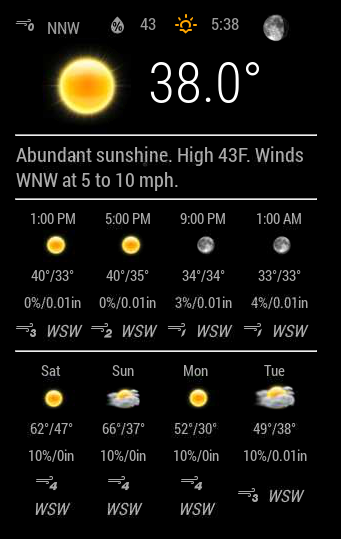
-
@bminer1 Made the fontsize smaller in css.Please try it.
You can try to tweak this is it still behaves oddly.
.MMM-WunderGround .smaller { font-size: 60%; } -
@RedNax After the latest update, the Module wouldn’t start :-(
-
@ostfilinchen Anything in the logs? Works fine here…
IT could be your chosen weatherstation is feeding ‘estimated’ forecasts. The module skips those as they vary wildly (0 to 15 degrees C)… Should clear up on it’s own in that case.
Update: There was no logging on skipping estimated forecasts. Added it just now.
-
@RedNax in dev Mode it says: uncaught TypeError: cannot read property ‘cloudy’ of undefined. MMM-WunderGround.js Line 877
-
@ostfilinchen Some obsolete coloricon code got in the way it seems. Are you not using the coloricons?
-
Thanks @RedNax I still remember the day I was trying to get this module to work [NOOOOOB LOL] and you helped me I appreciated that! Now the colors are just awesome!!!
I’m finding that myself personally colors are making my mirror stand out and I like it… I’m sure many other users do as well!
Thanks!
-
@RedNax I Use the colored Icons. After the last update it works. But i’m Not sure if it goes wrong with an other weather like cloudy…
-
@RedNax still the Same error. If the weather is cloudy on daytime, the Module don’t starts or hangs up. Can u please check this?
-
@ostfilinchen Cannot reproduce your error. We have cloudy conditions here now and everything works fine.
One thing i did notice when using the remote control module is that it places the icon tables in the config.js for some reason. Could you check your config? Maybe you can pm me your config section.maybe it’s some combination of settings… -
@RedNax I Start my mirror this afternoon in dev-mode. I will Check if I get an error. Also today i will send you my config. And yes. I Use the Remote control.
I also have Noticed that the Module scheduler not work. But there i have to Check the dev-mode.
-
@RedNax said in Weatherunderground - currently - hourly - daily - configurable:
Mykle1: I have to run off to work right now but I will “give it a go” as soon as I get home. I’ll let you know. Thanks for this.
I meant to get back to you, RedNax. It’s working nicely for me, and with the help of Strawberry, I’m running it twice. Once for just the current weather, under the clock, top center, and once for just the forecast, top right. Exactly the way I wanted it.
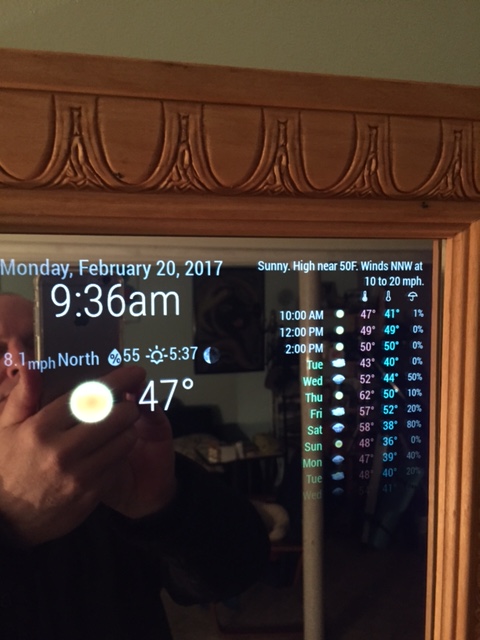
-
@Mykle1 Can you share how you did this?
-
@strawberry-3.141 said in Throwing down the gauntlet:
if someone wants to achieve the same, actually there is the module wunderground twice (center and right), but once the forecast and the other time the current weather is hidden
.region.top.center .MMM-WunderGround table.small, //selector for forecast .region.top.right .MMM-WunderGround table:not(.small), //selector for current weather .region.top.right .MMM-WunderGround table.small td:nth-child(6) { //selector for rain amount display:none; } ` -
@bminer1 said in Weatherunderground - currently - hourly - daily - configurable:
Can you share how you did this?
There you go. You got it from the source. (I was sleeping) Virtually every entry in my custom.css file is commented with
/* Thanks to Strawberry 3.141 */
-
@strawberry-3.141 I tried this. No luck. The full data is in both top center and top left (i have mine on the other side and replaced “right” with “left”). I put the code in both the custom.css and the wunderground.css file. I think i am missing something.
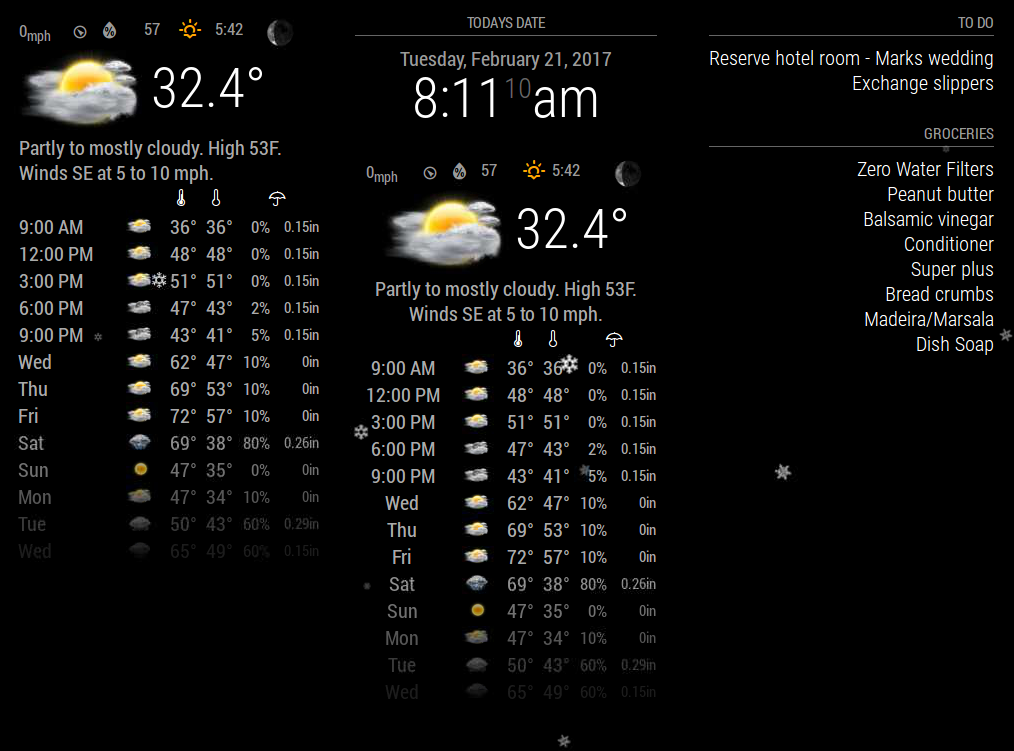
-
@bminer1 can you share your wunderground config
-
@strawberry-3.141
Here is the Config:{ module: 'MMM-WunderGround', position: 'top_left', config: { apikey: '', // private; don't share! pws: 'pws:KNJMOORE3', //Chester Ave hourly: '1', fctext: '1', fcdaycount: "9", fcdaystart: "1", hourlyinterval: "3", hourlycount: "3", alerttime: 30000, alerttruncatestring: "english:", roundTmpDecs: '1', layout: "vertical", windunits: "mph", coloricon: true, sysstat: 0 } },



Hello! It looks like you're interested in this conversation, but you don't have an account yet.
Getting fed up of having to scroll through the same posts each visit? When you register for an account, you'll always come back to exactly where you were before, and choose to be notified of new replies (either via email, or push notification). You'll also be able to save bookmarks and upvote posts to show your appreciation to other community members.
With your input, this post could be even better 💗
Register Login