MagicMirror Forum
    • Recent
    • Tags
    • Unsolved
    • Solved
    • MagicMirror² Repository
    • Documentation
    • 3rd-Party-Modules
    • Donate
    • Discord
    • Register
    • Login
    A New Chapter for MagicMirror: The Community Takes the Lead
    Read the statement by Michael Teeuw here.

    MMM-NewPIR v3

    Scheduled Pinned Locked Moved System
    67 Posts 18 Posters 32.6k Views 20 Watching
    Loading More Posts
    • Oldest to Newest
    • Newest to Oldest
    • Most Votes
    Reply
    • Reply as topic
    Log in to reply
    This topic has been deleted. Only users with topic management privileges can see it.
    • B Offline
      bdream
      last edited by

      It’s working :smiling_face_with_open_mouth:

      After a couple of tries with all available PIR Modules it’s working with MMM-NewPIR perfect!
      Many thanks!

      –
      cheers, bdream

      1 Reply Last reply Reply Quote 0
      • B Offline
        bdream
        last edited by

        …Ohh no.
        Getting update notification for MMM-NewPIR.
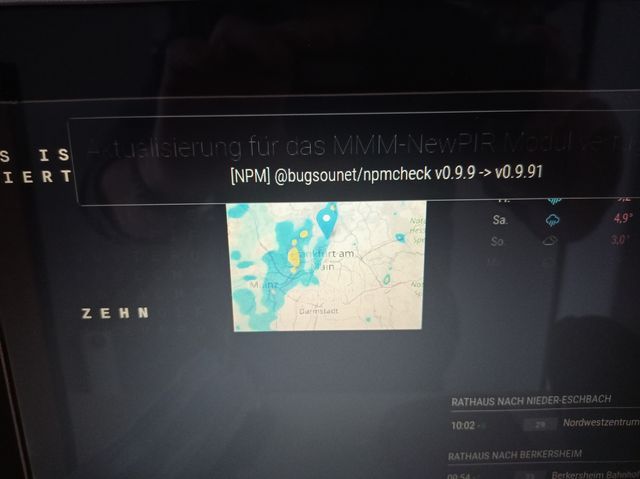
        MMM_NewPIR.jpg

        I’m trying in MagicMirror/modules/MMM-NewPIR

        git pull
        

        but get the message “it’s actual already”

        Notification message still there.

        Any idea please?

        –
        cheers, bdream

        1 Reply Last reply Reply Quote 0
        • FoziF Offline
          Fozi Project Sponsor
          last edited by

          I had the same. After

          git pull
          

          Enter

          mom run update
          

          and reboot.

          HowTo: Replace PIR Sensor with a RCWL-0516 Microwave Sensor

          1 Reply Last reply Reply Quote 0
          • B Offline
            bdream
            last edited by

            where to run mom run update?
            I tried in home, MagicMirror, modules and MMM-NewPIR
            got th message

            -bash: mom: Kommando nicht gefunden.
            
            -bash: mom: Command not found.
            

            –
            cheers, bdream

            B 1 Reply Last reply Reply Quote 0
            • B Offline
              bdream @bdream
              last edited by

              Hast noone an Idea how to get rid of thus Update Message?

              –
              cheers, bdream

              1 Reply Last reply Reply Quote 0
              • L Offline
                lolo
                last edited by

                This should work

                cd ~/MagicMirror/modules/MMM-NewPIR
                
                git pull
                
                npm run update
                
                sudo reboot
                
                B 1 Reply Last reply Reply Quote 0
                • B Offline
                  bdream @lolo
                  last edited by

                  @lolo it works!
                  Many thanks

                  Again this Forum ist so helpful 🥳

                  –
                  cheers, bdream

                  1 Reply Last reply Reply Quote 0
                  • C Offline
                    ChrisDub
                    last edited by ChrisDub

                    Hey there Guys,
                    I´m stuck and I need your help.

                    My Code:

                    		{
                    			module: 'MMM-NewPIR',
                    			position: 'top_left',
                    			configDeepMerge: true,
                    				config: {
                    				debug: false,
                    				screen: {
                    					delay: 2 * 60 * 1000, // 2 * 60 * 1000 = 2 Minuten
                    					turnOffDisplay: true,
                    					mode: 1,
                    					ecoMode: true,
                    					displayCounter: true,
                    					text: "Auto Turn Off Screen:",
                    					displayBar: true,
                    					displayStyle: "SemiCircle",
                    					governorSleeping: false,
                    					displayLastPresence: true,
                    					LastPresenceText: "Last Presence:",
                    					useTouch: false,
                    					delayed: 0
                    						},
                    				pir: 	{
                    					usePir: true,
                    					gpio: 21,
                    					reverseValue: false
                    						}
                    					}
                    		 },	
                    

                    My HC-SR501 Sensor is wired as following:
                    VCC (+5V) > GPIO PIN 2
                    OUT > GPIO PIN 21
                    GND > GPIO PIN 6

                    Problem:
                    The timer runs down, the display switches off and then stays black.
                    It seems as the movement is not recognized by the PIR.

                    I already tried another PIR, same failure.
                    Switching to another PIN > 22 with editing the config results with the same “failure”.

                    At the moment I don´t know, where the source of my problem is buried and I could use some help from you.

                    Thank you in advance

                    M 1 Reply Last reply Reply Quote 0
                    • M Offline
                      MajorC Project Sponsor @ChrisDub
                      last edited by

                      @chrisdub have you activated the pins at your Raspberry OS?

                      C 1 Reply Last reply Reply Quote 0
                      • C Offline
                        ChrisDub @MajorC
                        last edited by

                        @majorc said in MMM-NewPIR v3:

                        @chrisdub have you activated the pins at your Raspberry OS?

                        Good morning.
                        To be honest, I don´t really know. Is there a special way to activate the PINS? Maybe via raspi-config?!

                        M 1 Reply Last reply Reply Quote 0
                        • M Offline
                          MajorC Project Sponsor @ChrisDub
                          last edited by

                          @chrisdub https://lmgtfy.app/?q=raspberry+pi+activate+gpio :beaming_face_with_smiling_eyes:

                          C 1 Reply Last reply Reply Quote 0
                          • C Offline
                            ChrisDub @MajorC
                            last edited by ChrisDub

                            @majorc said in MMM-NewPIR v3:

                            @chrisdub https://lmgtfy.app/?q=raspberry+pi+activate+gpio :beaming_face_with_smiling_eyes:

                            Thank you for your fast answer, ´ve found some articles for activating the GPIOs.

                            I´ve followed this tutorial for testing my PIR Sensor: https://www.einplatinencomputer.com/raspberry-pi-pir-bewegungsmelder-ansteuern/

                            The author doesn´t mention, that activating the GPIOs is necessary. Now I´m a little bit confused.

                            When I´m starting the script, I´m getting the following output. When I´m moving in front of the sensor, nothing happens.
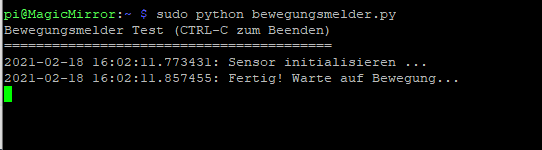
                            1a8064bb-a5ab-4934-a5b1-6b30531745fb-image.png

                            Just in case it helps, a picture from my setup:
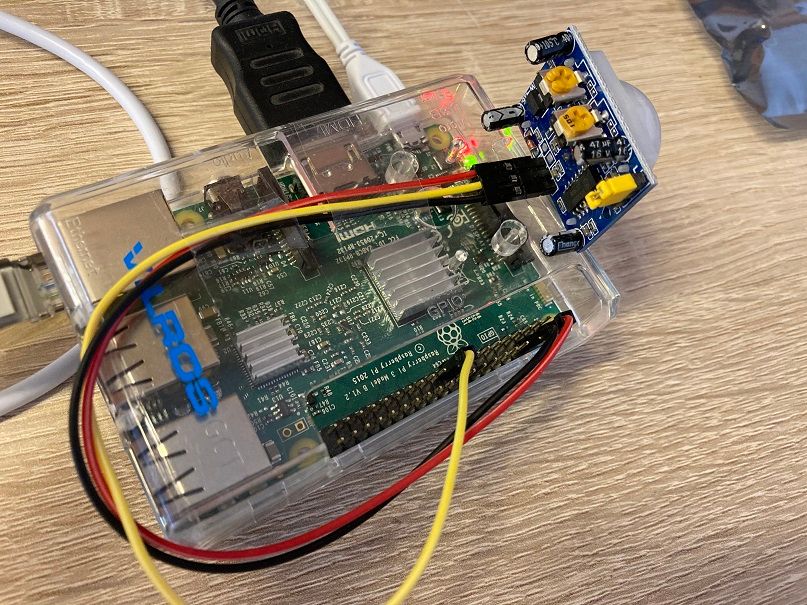
                            Foto 18.02.21, 16 01 29.jpg

                            1 Reply Last reply Reply Quote 0
                            • J Offline
                              jordes
                              last edited by

                              can i add an exception module to not hide, while hiding all others?

                              1 Reply Last reply Reply Quote 0
                              • cowboysdudeC Offline
                                cowboysdude Module Developer
                                last edited by

                                What is this module made for…RPI3 or RPI4?

                                S 1 Reply Last reply Reply Quote 1
                                • S Offline
                                  sdetweil @cowboysdude
                                  last edited by

                                  @cowboysdude I don’t understand the question?

                                  it supports all the different screen dimming approaches

                                  Sam

                                  How to add modules

                                  learning how to use browser developers window for css changes

                                  cowboysdudeC 1 Reply Last reply Reply Quote 1
                                  • cowboysdudeC Offline
                                    cowboysdude Module Developer @sdetweil
                                    last edited by

                                    @sdetweil Thanks Sam.

                                    1 Reply Last reply Reply Quote 1
                                    • P Offline
                                      philmavedzenge
                                      last edited by

                                      Hi guys,

                                      After updating my MagicMirror to the latest version, this modules does not work. I tried reinstalling but its giving an error that i do not understand. Could someone help please? I have attached the logs, not sure if they will help.

                                      at Module._compile (internal/modules/cjs/loader.js:778:30)
                                      

                                      npm WARN notsup Unsupported engine for electron-rebuild@3.2.3: wanted: {“node”:“>=12.13.0”} (current: {“node”:“10.24.0”,“npm”:“6.13.6”})
                                      npm WARN notsup Not compatible with your version of node/npm: electron-rebuild@3.2.3
                                      npm WARN notsup Unsupported engine for @malept/cross-spawn-promise@2.0.0: wanted: {“node”:“>= 12.13.0”} (current: {“node”:“10.24.0”,“npm”:“6.13.6”})
                                      npm WARN notsup Not compatible with your version of node/npm: @malept/cross-spawn-promise@2.0.0
                                      npm WARN notsup Unsupported engine for fs-extra@10.0.0: wanted: {“node”:“>=12”} (current: {“node”:“10.24.0”,“npm”:“6.13.6”})
                                      npm WARN notsup Not compatible with your version of node/npm: fs-extra@10.0.0
                                      npm WARN notsup Unsupported engine for yargs@17.2.1: wanted: {“node”:“>=12”} (current: {“node”:“10.24.0”,“npm”:“6.13.6”})
                                      npm WARN notsup Not compatible with your version of node/npm: yargs@17.2.1

                                      npm ERR! code ELIFECYCLE
                                      npm ERR! errno 1
                                      npm ERR! @bugsounet/pir@1.0.6 postinstall: electron-rebuild
                                      npm ERR! Exit status 1
                                      npm ERR!
                                      npm ERR! Failed at the @bugsounet/pir@1.0.6 postinstall script.
                                      npm ERR! This is probably not a problem with npm. There is likely additional logging output above.

                                      1 Reply Last reply Reply Quote 0
                                      • D Offline
                                        DJBOOB66
                                        last edited by

                                        @philmavedzenge said in MMM-NewPIR v3:

                                        npm WARN notsup Unsupported engine for yargs@17.2.1: wanted: {“node”:“>=12”} (current: {“node”:“10.24.0”,“npm”:“6.13.6”})

                                        You need to update npm and node

                                        P 1 Reply Last reply Reply Quote 0
                                        • P Offline
                                          philmavedzenge @DJBOOB66
                                          last edited by

                                          @djboob66 said in MMM-NewPIR v3:

                                          @philmavedzenge said in MMM-NewPIR v3:

                                          npm WARN notsup Unsupported engine for yargs@17.2.1: wanted: {“node”:“>=12”} (current: {“node”:“10.24.0”,“npm”:“6.13.6”})

                                          You need to update npm and node

                                          Thanks for the response. How do I do that? Which folder should I update it in?

                                          FoziF 1 Reply Last reply Reply Quote 0
                                          • FoziF Offline
                                            Fozi Project Sponsor @philmavedzenge
                                            last edited by Fozi

                                            @philmavedzenge in your home directory execute following two commands:

                                            sudo npm  install -g n
                                            sudo n latest
                                            

                                            This installs the latest node version

                                            Edit: added sudo

                                            HowTo: Replace PIR Sensor with a RCWL-0516 Microwave Sensor

                                            1 Reply Last reply Reply Quote 0

                                            Hello! It looks like you're interested in this conversation, but you don't have an account yet.

                                            Getting fed up of having to scroll through the same posts each visit? When you register for an account, you'll always come back to exactly where you were before, and choose to be notified of new replies (either via email, or push notification). You'll also be able to save bookmarks and upvote posts to show your appreciation to other community members.

                                            With your input, this post could be even better 💗

                                            Register Login

                                            • 1
                                            • 2
                                            • 3
                                            • 4
                                            • 3 / 4
                                            • First post
                                              Last post
                                            Enjoying MagicMirror? Please consider a donation!
                                            MagicMirror created by Michael Teeuw.
                                            Forum managed by Sam, technical setup by Karsten.
                                            This forum is using NodeBB as its core | Contributors
                                            Contact | Privacy Policy
