Read the statement by Michael Teeuw here.
[MMM-PIR-Sensor] Install failing
-
-
@thoimi Check for the correct wiring (PIN-Numbers can be confusing, there is the BCM numbering and the other one), also make sure GND and 5V are conncted correctly, adjust sensitivity to maximum and time to minimum (so it hopefully switch back and forth quickly), try covering up the sensor under a bowl or something and then put your hand in to test.
When I set up the sensor, I also searched for the error for hours, and at the end my problem was the sensor was plugged into pin 4 (BCM) and not 7 as I thought. Also I think you need to remove the
, pull_up_down=GPIO.PUD_DOWNpart (PIR example). -
@Jopyth Thank you for your quick reply! :)
I tried for hours now… I think it’s connected correctly, because when I’m switching the pin-number in the script the script shows me always “0” - with the correct pin-number it shows me “1”…
I also put the sensor in a box - always shows me “1”… completely strange… :/ -
@thoimi
It shows1because of the pull up resistor. Try removing that part, check my edited post above.Edit: The
1does not mean it is wired correctly, it just shows 1 because of the pull up resistor. -
@Jopyth
thank you for the updated script!
the new script also shows me “Intruder detected” … i tried many variations of time and sensitivity adjustments…I found another script on the internet:
from gpiozero import MotionSensor

pir = MotionSensor(4)
while True:
    if pir.motion_detected:
        print("Motion detected!")
This script shows me also the “Motion detected” all the time…
Maybe the PIR-Sensor itself is the problem… I will try with another Sensor next week :( -
Thanks for trying to help me.
I tried what you said. It always says “motion detected”.
I’m sure the wiring is right… I also use the dht22 sensor and that works perfectly fine. And the way you count the pins is the same… isn’t it?I bought a new PIR sensor… but the problem is still there.
-
@Makradon Nope, definitely not the same numbering.
-
@Jopyth said in [MMM-PIR-Sensor] Install failing:
@Makradon Nope, definitely not the same numbering.
Now I’m confused.
5V is Pin 2
Ground is Pin 6
I think that is right when you count like this:http://www.elektronik-kompendium.de/sites/raspberry-pi/fotos/raspberry-pi-15b.jpg
And when you don’t change the pin in the config file it says SensorPin 22.
So which is the right pin in the pic above to connect the output of the PIR sensor that it works with this module? -
@Makradon Sensor PIN 22 for the PIR-Sensor module is this one:
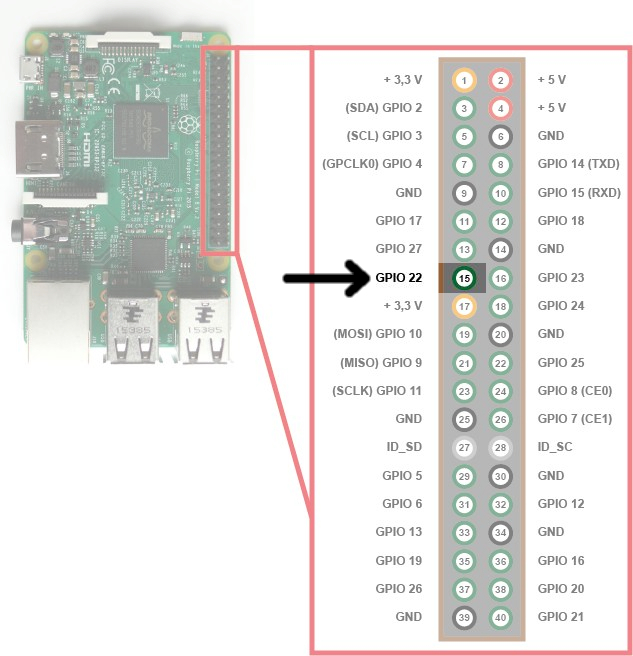
Edit: Maybe I was confused by the diagram of the DHT22 module. It looked to me like the GPIO and WiringPi numbers are different.
Helpful sticky: How to troubleshoot
-
In other post they posted this link, maybe it will help??
https://diyhacking.com/raspberry-pi-gpio-control/ -
@PindaPower said in [MMM-PIR-Sensor] Install failing:
In other post they posted this link, maybe it will help??
https://diyhacking.com/raspberry-pi-gpio-control/Thank you. With that i understood the delay and sensitivy knob.
But! When i put sensivity at most right, the monitor goes on automatically ON after a while, even when there is NO movement in the radius… How can i debug this? -
I’ve tried following the instruction above of removing and reinstalling but I keep getting the below errors. I’m not even sure what they are unfortunately, wondering if anyone is able to help.
pi@raspberrypi:~/MagicMirror/modules/MMM-PIR-Sensor $ npm install
npm WARN engine electron-rebuild@1.5.7: wanted: {"node":">=6.0.0"} (current: {"node":"4.2.1","npm":"2.14.7"})

> epoll@0.1.20 install /home/pi/MagicMirror/modules/MMM-PIR-Sensor/node_modules/onoff/node_modules/epoll
> node-gyp rebuild

make: Entering directory '/home/pi/MagicMirror/modules/MMM-PIR-Sensor/node_modules/onoff/node_modules/epoll/build'
  CXX(target) Release/obj.target/epoll/src/epoll.o
  SOLINK_MODULE(target) Release/obj.target/epoll.node
  COPY Release/epoll.node
make: Leaving directory '/home/pi/MagicMirror/modules/MMM-PIR-Sensor/node_modules/onoff/node_modules/epoll/build'
-
> Magic-Mirror-Module-PIR-Sensor@1.1.0 postinstall /home/pi/MagicMirror/modules/MMM-PIR-Sensor
> electron-rebuild -e ../../node_modules/electron-prebuilt

/home/pi/MagicMirror/modules/MMM-PIR-Sensor/node_modules/electron-rebuild/node_modules/spawn-rx/lib/index.js:139
    let cmdArgs = ['/C', exe, ...args];
                              ^^^

SyntaxError: Unexpected token ...
    at exports.runInThisContext (vm.js:53:16)
    at Module._compile (module.js:414:25)
    at Object.Module._extensions..js (module.js:442:10)
    at Module.load (module.js:356:32)
    at Function.Module._load (module.js:311:12)
    at Module.require (module.js:366:17)
    at require (module.js:385:17)
    at Object. (/home/pi/MagicMirror/modules/MMM-PIR-Sensor/node_modules/electron-rebuild/lib/rebuild.js:38:16)
    at Module._compile (module.js:435:26)
    at Object.Module._extensions..js (module.js:442:10)
    at Module.load (module.js:356:32)
    at Function.Module._load (module.js:311:12)
    at Module.require (module.js:366:17)
    at require (module.js:385:17)
    at Object. (/home/pi/MagicMirror/modules/MMM-PIR-Sensor/node_modules/electron-rebuild/lib/cli.js:24:16)
    at Module._compile (module.js:435:26)

npm ERR! Linux 4.4.38+
npm ERR! argv "/usr/local/bin/node" "/usr/local/bin/npm" "install"
npm ERR! node v4.2.1
npm ERR! npm  v2.14.7
npm ERR! code ELIFECYCLE
npm ERR! Magic-Mirror-Module-PIR-Sensor@1.1.0 postinstall: `electron-rebuild -e ../../node_modules/electron-prebuilt`
npm ERR! Exit status 1
npm ERR!
npm ERR! Failed at the Magic-Mirror-Module-PIR-Sensor@1.1.0 postinstall script 'electron-rebuild -e ../../node_modules/electron-prebuilt'.
npm ERR! This is most likely a problem with the Magic-Mirror-Module-PIR-Sensor package,
npm ERR! not with npm itself.
npm ERR! Tell the author that this fails on your system:
npm ERR!     electron-rebuild -e ../../node_modules/electron-prebuilt
npm ERR! You can get their info via:
npm ERR!     npm owner ls Magic-Mirror-Module-PIR-Sensor
npm ERR! There is likely additional logging output above.

npm ERR! Please include the following file with any support request:
npm ERR!     /home/pi/MagicMirror/modules/MMM-PIR-Sensor/npm-debug.log
edit: I have tried modifying the package.json file in the FAQ but the install exits within a minute, vs a really long time leaving the original. Seems like it gets farther through the install the first time. Though I’ve noticed i do have the electron folder and not an electron-prebuilt. The following is the error I get when i remove the -prebuilt.
pi@raspberrypi:~/MagicMirror/modules/MMM-PIR-Sensor $ npm install
|
> Magic-Mirror-Module-PIR-Sensor@1.1.0 postinstall /home/pi/MagicMirror/modules/MMM-PIR-Sensor
> electron-rebuild -e ../../node_modules/electron

/home/pi/MagicMirror/modules/MMM-PIR-Sensor/node_modules/electron-rebuild/node_modules/spawn-rx/lib/index.js:139
    let cmdArgs = ['/C', exe, ...args];
                              ^^^

SyntaxError: Unexpected token ...
    at exports.runInThisContext (vm.js:53:16)
    at Module._compile (module.js:414:25)
    at Object.Module._extensions..js (module.js:442:10)
    at Module.load (module.js:356:32)
    at Function.Module._load (module.js:311:12)
    at Module.require (module.js:366:17)
    at require (module.js:385:17)
    at Object.<anonymous> (/home/pi/MagicMirror/modules/MMM-PIR-Sensor/node_modules/electron-rebuild/lib/rebuild.js:38:16)
    at Module._compile (module.js:435:26)
    at Object.Module._extensions..js (module.js:442:10)
    at Module.load (module.js:356:32)
    at Function.Module._load (module.js:311:12)
    at Module.require (module.js:366:17)
    at require (module.js:385:17)
    at Object.<anonymous> (/home/pi/MagicMirror/modules/MMM-PIR-Sensor/node_modules/electron-rebuild/lib/cli.js:24:16)
    at Module._compile (module.js:435:26)

npm ERR! Linux 4.4.38+
npm ERR! argv "/usr/local/bin/node" "/usr/local/bin/npm" "install"
npm ERR! node v4.2.1
npm ERR! npm  v2.14.7
npm ERR! code ELIFECYCLE
npm ERR! Magic-Mirror-Module-PIR-Sensor@1.1.0 postinstall: `electron-rebuild -e ../../node_modules/electron`
npm ERR! Exit status 1
npm ERR!
npm ERR! Failed at the Magic-Mirror-Module-PIR-Sensor@1.1.0 postinstall script 'electron-rebuild -e ../../node_modules/electron'.
npm ERR! This is most likely a problem with the Magic-Mirror-Module-PIR-Sensor package,
npm ERR! not with npm itself.
npm ERR! Tell the author that this fails on your system:
npm ERR!     electron-rebuild -e ../../node_modules/electron
npm ERR! You can get their info via:
npm ERR!     npm owner ls Magic-Mirror-Module-PIR-Sensor
npm ERR! There is likely additional logging output above.

npm ERR! Please include the following file with any support request:
npm ERR!     /home/pi/MagicMirror/modules/MMM-PIR-Sensor/npm-debug.log
After doing the npm rebuild suggested above I get this error (with original/modified package.json)
pi@raspberrypi:~/MagicMirror/modules/MMM-PIR-Sensor $ npm install - > Magic-Mirror-Module-PIR-Sensor@1.1.0 postinstall /home/pi/MagicMirror/modules/MMM-PIR-Sensor > electron-rebuild -e ../../node_modules/electron-prebuilt /home/pi/MagicMirror/modules/MMM-PIR-Sensor/node_modules/electron-rebuild/node_modules/spawn-rx/lib/index.js:139 let cmdArgs = ['/C', exe, ...args]; ^^^ SyntaxError: Unexpected token ... at exports.runInThisContext (vm.js:53:16) at Module._compile (module.js:414:25) at Object.Module._extensions..js (module.js:442:10) at Module.load (module.js:356:32) at Function.Module._load (module.js:311:12) at Module.require (module.js:366:17) at require (module.js:385:17) at Object.<anonymous> (/home/pi/MagicMirror/modules/MMM-PIR-Sensor/node_modules/electron-rebuild/lib/rebuild.js:38:16) at Module._compile (module.js:435:26) at Object.Module._extensions..js (module.js:442:10) at Module.load (module.js:356:32) at Function.Module._load (module.js:311:12) at Module.require (module.js:366:17) at require (module.js:385:17) at Object.<anonymous> (/home/pi/MagicMirror/modules/MMM-PIR-Sensor/node_modules/electron-rebuild/lib/cli.js:24:16) at Module._compile (module.js:435:26) npm ERR! Linux 4.4.38+ npm ERR! argv "/usr/local/bin/node" "/usr/local/bin/npm" "install" npm ERR! node v4.2.1 npm ERR! npm v2.14.7 npm ERR! code ELIFECYCLE npm ERR! Magic-Mirror-Module-PIR-Sensor@1.1.0 postinstall: `electron-rebuild -e ../../node_modules/electron-prebuilt` npm ERR! Exit status 1 npm ERR! npm ERR! Failed at the Magic-Mirror-Module-PIR-Sensor@1.1.0 postinstall script 'electron-rebuild -e ../../node_modules/electron-prebuilt'. npm ERR! This is most likely a problem with the Magic-Mirror-Module-PIR-Sensor package, npm ERR! not with npm itself. npm ERR! Tell the author that this fails on your system: npm ERR! electron-rebuild -e ../../node_modules/electron-prebuilt npm ERR! You can get their info via: npm ERR! npm owner ls Magic-Mirror-Module-PIR-Sensor npm ERR! There is likely additional logging output above. npm ERR! Please include the following file with any support request: npm ERR! /home/pi/MagicMirror/modules/MMM-PIR-Sensor/npm-debug.log -
@Mar said in [MMM-PIR-Sensor] Install failing:
I’ve tried following the instruction above of removing and reinstalling but I keep getting the below errors. I’m not even sure what they are unfortunately, wondering if anyone is able to help.
pi@raspberrypi:~/MagicMirror/modules/MMM-PIR-Sensor $ npm install
npm WARN engine electron-rebuild@1.5.7: wanted: {"node":">=6.0.0"} (current: {"node":"4.2.1","npm":"2.14.7"})
This is an old node version. Please update your
nodeandnpm. (If you need help check the answers to this SO question.) -
@Jopyth thank you very much for all your efforts for this community.
Even its in your spare time it should be honored ! -
@Jopyth Hi, thanks for taking the time to respond to this. Sorry I was away for work and didnt have too much time to test this out.
So i managed to, using your link, to update node. But there was issues even getting there, I had to use an older version of node to update npm…but anyways here is the output showing I’ve updated to the latest version.
pi@raspberrypi:~/MagicMirror/modules/MMM-PIR-Sensor $ npm -v
4.0.5
pi@raspberrypi:~/MagicMirror/modules/MMM-PIR-Sensor $ node -v
v7.4.0
But now I’m getting this issue. Again thanks @Jopyth for responding so quickly last time.
pi@raspberrypi:~/MagicMirror/modules/MMM-PIR-Sensor $ npm install npm WARN prefer global node-gyp@3.5.0 should be installed with -g > epoll@0.1.20 install /home/pi/MagicMirror/modules/MMM-PIR-Sensor/node_modules/epoll > node-gyp rebuild make: Entering directory '/home/pi/MagicMirror/modules/MMM-PIR-Sensor/node_modules/epoll/build' CXX(target) Release/obj.target/epoll/src/epoll.o SOLINK_MODULE(target) Release/obj.target/epoll.node COPY Release/epoll.node make: Leaving directory '/home/pi/MagicMirror/modules/MMM-PIR-Sensor/node_modules/epoll/build' > Magic-Mirror-Module-PIR-Sensor@1.1.0 postinstall /home/pi/MagicMirror/modules/MMM-PIR-Sensor > electron-rebuild -e ../../node_modules/electron-prebuilt An unhandled error occurred inside electron-rebuild Unable to find electron-prebuilt's version number, either install it or specify an explicit version Error: Unable to find electron-prebuilt's version number, either install it or specify an explicit version at _callee$ (/home/pi/MagicMirror/modules/MMM-PIR-Sensor/node_modules/electron-rebuild/lib/cli.js:74:17) at tryCatch (/home/pi/MagicMirror/modules/MMM-PIR-Sensor/node_modules/babel-runtime/node_modules/regenerator-runtime/runtime.js:63:40) at Generator.invoke [as _invoke] (/home/pi/MagicMirror/modules/MMM-PIR-Sensor/node_modules/babel-runtime/node_modules/regenerator-runtime/runtime.js:337:22) at Generator.prototype.(anonymous function) [as next] (/home/pi/MagicMirror/modules/MMM-PIR-Sensor/node_modules/babel-runtime/node_modules/regenerator-runtime/runtime.js:96:21) at Generator.tryCatcher (/home/pi/MagicMirror/modules/MMM-PIR-Sensor/node_modules/bluebird/js/release/util.js:16:23) at PromiseSpawn._promiseFulfilled (/home/pi/MagicMirror/modules/MMM-PIR-Sensor/node_modules/bluebird/js/release/generators.js:97:49) at /home/pi/MagicMirror/modules/MMM-PIR-Sensor/node_modules/bluebird/js/release/generators.js:201:15 at Object. (/home/pi/MagicMirror/modules/MMM-PIR-Sensor/node_modules/electron-rebuild/lib/cli.js:197:4) at Module._compile (module.js:571:32) at Object.Module._extensions..js (module.js:580:10) at Module.load (module.js:488:32) at tryModuleLoad (module.js:447:12) at Function.Module._load (module.js:439:3) at Module.runMain (module.js:605:10) at run (bootstrap_node.js:420:7) at startup (bootstrap_node.js:139:9) npm ERR! Linux 4.4.38+ npm ERR! argv "/usr/local/bin/node" "/usr/local/bin/npm" "install" npm ERR! node v7.4.0 npm ERR! npm v4.0.5 npm ERR! code ELIFECYCLE npm ERR! Magic-Mirror-Module-PIR-Sensor@1.1.0 postinstall: `electron-rebuild -e ../../node_modules/electron-prebuilt` npm ERR! Exit status 255 npm ERR! npm ERR! Failed at the Magic-Mirror-Module-PIR-Sensor@1.1.0 postinstall script 'electron-rebuild -e ../../node_modules/electron-prebuilt'. npm ERR! Make sure you have the latest version of node.js and npm installed. npm ERR! If you do, this is most likely a problem with the Magic-Mirror-Module-PIR-Sensor package, npm ERR! not with npm itself. npm ERR! Tell the author that this fails on your system: npm ERR! electron-rebuild -e ../../node_modules/electron-prebuilt npm ERR! You can get information on how to open an issue for this project with: npm ERR! npm bugs Magic-Mirror-Module-PIR-Sensor npm ERR! Or if that isn't available, you can get their info via: npm ERR! npm owner ls Magic-Mirror-Module-PIR-Sensor npm ERR! There is likely additional logging output above. npm ERR! Please include the following file with any support request: npm ERR! /home/pi/MagicMirror/modules/MMM-PIR-Sensor/npm-debug.log -
-
@Jopyth It finally worked!!! :lifter_tone2: thanks so much. Ive spent days on this :(
Tried this last link you provided previously before posting but nothing was working, your support around getting node updated (and npm) was all that needed to happen first.
Thanks again!
-
@Jopyth Though looks like its failing on the config file now, Do you see any issues with the following?
               {
                        module: 'MMM-PIR-Sensor',
                        config: {
                                sensorPin: 17,
                        }
                },
i seem to get an error and MM doesnt load when this is in the config file. I can even have disabled:true and it loads, otherwise I’ll get a blank webpage.
-
using PM2 Im able to get the logs when starting, and even though it installed with your instructions i now get this error in the logs.
0|mm | Error: The module '/home/pi/MagicMirror/modules/MMM-PIR-Sensor/node_modules/epoll/build/Release/epoll.node' 0|mm | was compiled against a different Node.js version using 0|mm | NODE_MODULE_VERSION 50. This version of Node.js requires 0|mm | NODE_MODULE_VERSION 51. Please try re-compiling or re-installing 0|mm | the module (for instance, using `npm rebuild` or`npm install`). 0|mm | at Object.Module._extensions..node (module.js:598:18) 0|mm | at Module.load (module.js:488:32) 0|mm | at tryModuleLoad (module.js:447:12) 0|mm | at Function.Module._load (module.js:439:3) 0|mm | at Module.require (module.js:498:17) 0|mm | at require (internal/module.js:20:19) 0|mm | at bindings (/home/pi/MagicMirror/modules/MMM-PIR-Sensor/node_modules/bindings/bindings.js:76:44) 0|mm | at Object. (/home/pi/MagicMirror/modules/MMM-PIR-Sensor/node_modules/epoll/epoll.js:1:99) 0|mm | at Module._compile (module.js:571:32) 0|mm | at Object.Module._extensions..js (module.js:580:10) 0|mm | unclutter: someone created a sub-window to my sub-window! giving up -
@Mar for anyone else who is getting this an npm rebuild fixes it. from here https://github.com/atom/apm/issues/635


Hello! It looks like you're interested in this conversation, but you don't have an account yet.
Getting fed up of having to scroll through the same posts each visit? When you register for an account, you'll always come back to exactly where you were before, and choose to be notified of new replies (either via email, or push notification). You'll also be able to save bookmarks and upvote posts to show your appreciation to other community members.
With your input, this post could be even better 💗
Register Login