Read the statement by Michael Teeuw here.
MMM-OpenWeatherForecast - Replacement for MMM-DarkSkyForecast
-
@swvalenti yes you can. The weather alerts are part of the summary section. OpenWeather returns such a short summary that I didn’t think it necessary to make two separate configure. Two ways to turn off the alerts:
- set
summary : false - if you want the summary but not the alerts, you can hide them in your custom css as follows:
.MMM-OpenWeatherForecast .weather-alert {
  display: none;
}
I think I’ll look at a way to truncate weather alerts so they don’t take up so much space.
- set
-
@karsten13 I don’t think there is much I can do here. I’ve coded this module to explicitly pass through a language parameter, either whatever is set in your main MM config, or whatever you explicitly set in the module’s config. It seems that OpenWeather doesn’t translate the weather alert, but merely passes them on as-is from whatever source it gets them from. Which is why sometimes you’re getting only English, and other times you’re getting multiple translations.
-
@j-e-f-f said in MMM-OpenWeatherForecast - Replacement for MMM-DarkSkyForecast:
@swvalenti yes you can. The weather alerts are part of the summary section. OpenWeather returns such a short summary that I didn’t think it necessary to make two separate configure. Two ways to turn off the alerts:
- set
summary : false - if you want the summary but not the alerts, you can hide them in your custom css as follows:
.MMM-OpenWeatherForecast .weather-alert {
  display: none;
}
I think I’ll look at a way to truncate weather alerts so they don’t take up so much space.
Awesome thanks @j-e-f-f !
- set
-
@j-e-f-f
Thanks Jeff!!
-
@j-e-f-f I see, thank you for your help. I thought it can be done because the example picture on Github is in km/h, but for myself, I am only seeing m/s as you mentioned. I guess it can not be change from m/s to km/h?
-
@j-e-f-f
I don’t think there is much I can do here.
yes, I’m aware of this. Sent a mail to openweathermap.org and will let you know if I ever get a response …
-
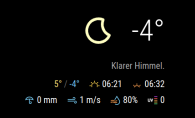
Did anyone have an idea how to chage the timeformat from sundown?
Now its displayed: 6:20… i want to have 18:20
I already changed the rest. -
label_sunriseTimeFormat: "k:mm", -
@karsten13 said in MMM-OpenWeatherForecast - Replacement for MMM-DarkSkyForecast:
label_sunriseTimeFormat: “k:mm”,
Not working: :(
			iconset: "3c",
			label_hourlyTimeFormat: "k[ Uhr]",
			label_sunriseTimeFormat: "hh:mm",
			label_sunsetTimeFormat: "k:mm",
			label_days: ["So", "Mo", "Di", "Mi", "Do", "Fr", "Sa"]
			}
i also tried:
label_sunsetTimeFormat: "hh:mm",also not working. The sunset on top is still not in german timeformat.
-
@oberfragger said in MMM-OpenWeatherForecast - Replacement for MMM-DarkSkyForecast:
label_sunsetTimeFormat
there is no property
label_sunsetTimeFormat, onlylabel_sunriseTimeFormat, remove the not existing one …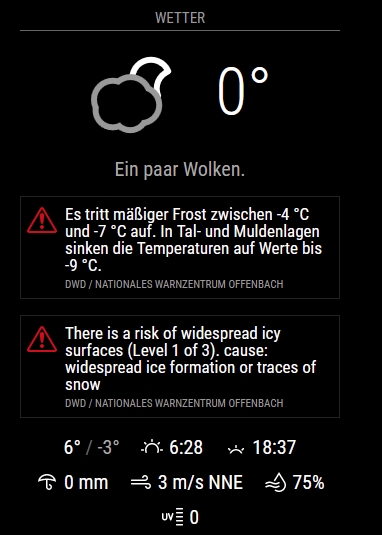
-
There is only one property that is used for both sunrise and sunset:
label_sunriseTimeFormat. In your example above, you’ve specifiedhh:mmfor this property, which displays 12h time, not 24h time.Change your config from this:
iconset: "3c",
label_hourlyTimeFormat: "k[ Uhr]",
label_sunriseTimeFormat: "hh:mm",
label_sunsetTimeFormat: "k:mm",
label_days: ["So", "Mo", "Di", "Mi", "Do", "Fr", "Sa"]
to this:
iconset: "3c", label_hourlyTimeFormat: "k[ Uhr]", label_sunriseTimeFormat: "k:mm", // change the format for this one label_days: ["So", "Mo", "Di", "Mi", "Do", "Fr", "Sa"] -
@shiryu1031 The screenshots you see in GitHub were incorrect. My old code for Dark Sky was using km/h, and I hadn’t replaced the label with m/s when I took these screen shots. So the screenshots are actually illustrating a bug! The actual speed value shown is m/s, but the label is incorrect as km/h. :beaming_face_with_smiling_eyes:
I thought about it, and it would take me just as much time to fix the screen shots as it would to add the capability to convert m/s into km/h. So now there is a new config parameter:
displayKmhForWind. If you add this to your config and set it totrue, m/s wind speed will be converted and displayed as km/h. This parameter only works whenunitsis set to"metric"or"standard". If you’re using"imperial"you will always see mph.Do a
git pullin your installedMMM-OpenWeatherForecastdirectory to get the updated code. -
@swvalenti I’ve made a modification that now truncates alerts to no more than 3 lines of description. This is controlled with CSS so if you’ve like to adjust this for more or less lines, you can do so in your custom CSS file as follows:
.MMM-OpenWeatherForecast .weather-alert .weather-alert-description {
  -webkit-line-clamp: 3; /* adjust this as desired */
}
do a
git pullin your installedMMM-OpenWeatherForecastdirectory to get the latest code. -
@j-e-f-f Thx a lot! Its working now as expected.
-
@j-e-f-f thanks bro!
-
Hello,
It is somehow possible to show the unit of measurement for the temperature (in my case, “C” for Celsius) ?
Thank you.
-
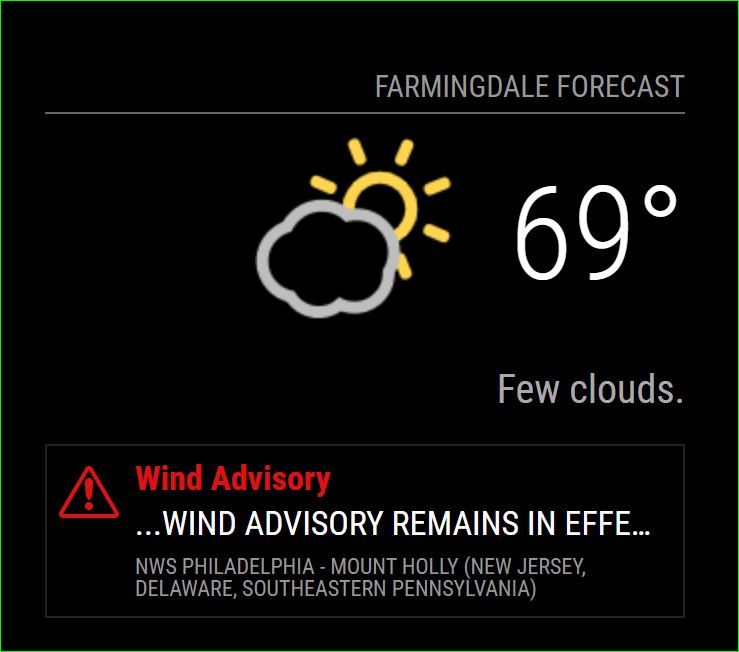
@j-e-f-f Last thing is it possible to just get the red to display and nothing else? Yea that’s right it’s FN 69 out here in NJ!
-
concerning the duplicate weather alerts and mix up between german and english I got an answer from openweathermap.org:
Currently we receive data in such format from the provider. The development team is working on the new version of alerts, which should eliminate such behavior. -
@mielu80 said in MMM-OpenWeatherForecast - Replacement for MMM-DarkSkyForecast:
It is somehow possible to show the unit of measurement for the temperature (in my case, “C” for Celsius) ?
Yes. You can do that in your
custom.cssfile.For the big current temperature display:
.MMM-OpenWeatherForecast .current-conditions-wrapper .current.temperature:after {
    content: "C";
}
In the extra current conditions Hi/Lo display:
.MMM-OpenWeatherForecast .extra-current-conditions-wrapper  . temperature-container . high-temperature:after,
.MMM-OpenWeatherForecast .extra-current-conditions-wrapper  . temperature-container . low-temperature:after {
    content: "C";
}
In the hourly forecast items:
.MMM-OpenWeatherForecast .forecast-item.hourly .temperature-container:after {
    content: "C";
}
In the daily forecast Hi/Lo display:
.MMM-OpenWeatherForecast .forecast-item.daily .high-temperature:after,
.MMM-OpenWeatherForecast .forecast-item.daily .low-temperature:after {
    content: "C";
}
In all of the examples above, whatever you specify for
contentwill be displayed. So if you wantedFfor Fahrenheit, you would specifycontent: "F"; -
@swvalenti said in MMM-OpenWeatherForecast - Replacement for MMM-DarkSkyForecast:
Last thing is it possible to just get the red to display and nothing else?
Yes, you can do this in your
custom.cssfile.To hide the description and alert source:
.MMM-OpenWeatherForecast .weather-alert .weather-alert-description,
.MMM-OpenWeatherForecast .weather-alert .weather-alert-source {
    display: none;
}
To change the size of the red title text:
.MMM-OpenWeatherForecast .weather-alert .weather-alert-title {
   font-size: 17px; /* adjust this */
}
alternatively, to change the size of the alert icon:
.MMM-OpenWeatherForecast .weather-alert {
    background-size: 30px 26px;  /* width height */
    background-position: 6px 10px;  /* top left */
}
If you change the size of the icon, you may want to adjust the title padding as well:
.MMM-OpenWeatherForecast .weather-alert .weather-alert-title {
  padding-left: 36px; /* adjust this */
}
EVERYTHING is in this module has a CSS class applied to it so you can tailor every last little bit to your specific needs. Take a look at
MMM-OpenWeatherForecast.cssfor existing CSS rules andmmm-openweather-forecast.njkto see what classes have been applied to which UI elements.


Hello! It looks like you're interested in this conversation, but you don't have an account yet.
Getting fed up of having to scroll through the same posts each visit? When you register for an account, you'll always come back to exactly where you were before, and choose to be notified of new replies (either via email, or push notification). You'll also be able to save bookmarks and upvote posts to show your appreciation to other community members.
With your input, this post could be even better 💗
Register Login