Read the statement by Michael Teeuw here.
[MMM-Buttons] Connect multiple buttons to send configurable notifications
-
This post is deleted! -
This post is deleted! -
This post is deleted! -
have installed the module, just small maybe stupid question. (i have no skills in electronics)
when you talk about pin 24, pin 25, do you mean GPIO24 - GPIO25 ? -
Hello Power Users,
i also have a problem with MMM-Buttons, that Buttonpress is only sometimes recognized if i press twice or triple.
Intension:
I want to change MMM-Pages with to buttons, to move left/right through my pages.
MMM-Remote-Control is set up and works.
Moving through pages work bei MMM-Remote-Control Links and sendnotification.My setup:
Raspberry 1 B+
2 Buttons (circuit closed when pressed)
connected between 1: GND an BCM26; 2: GND and BMC20
I tested the buttons with a python script an they are recognizedI searched this forum and still have some questions.
- Do Buttons on GND work or do i have to put them on +3,3V with a resistor instead?
- how do i use
activeLowin MMM-Buttons Configuration? … activeLow: true ?
Looking forward getting some tips.
Regards AxLed
-
@AxLed said in [MMM-Buttons] Connect multiple buttons to send configurable notifications:
i also have a problem with MMM-Buttons, that Buttonpress is only sometimes recognized if i press twice or triple.
Maybe play around with the min and max Presstime.
connected between 1: GND an BCM26; 2: GND and BMC20
I tested the buttons with a python script an they are recognizedWondering that this works with the module… when u press the Button the gpio would be set to low which is equal to 0.
- Do Buttons on GND work or do i have to put them on +3,3V with a resistor instead?
- how do i use
activeLowin MMM-Buttons Configuration? … activeLow: true ?
Afaik this isn’t possible through the module. Maybe u find a solution in the web, fo how changing the input state detection.
And yes, u should use resistors for giving the GPIO a defined state when not pressing. When u don’t want to connect them physically (but i recommend) u could use the internal resistors (check below on this site http://wiringpi.com/the-gpio-utility/)
So normal way (or the way i used) is to connect the button like this:
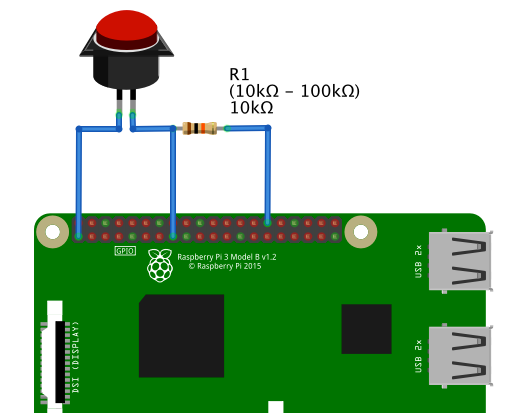
-
@cruunnerr
Thanks for the tips, you made my day, it works now.
What i did: Changed the wiring from negativ (GND) to 3.3V (with resistor) as shown on picture of cruunnerr wiring diagram.No i try to get a rotary switch and got it working, as i need some WAF (Woman acceptance faktor) for my mirror.
Regards
AxLED
-
@AxLed said in [MMM-Buttons] Connect multiple buttons to send configurable notifications:
as i need some WAF (Woman acceptance faktor) for my mirror.
We could open a petition XD
-
Your wiring diagram is fantastic. Is that a program?
-



Hello! It looks like you're interested in this conversation, but you don't have an account yet.
Getting fed up of having to scroll through the same posts each visit? When you register for an account, you'll always come back to exactly where you were before, and choose to be notified of new replies (either via email, or push notification). You'll also be able to save bookmarks and upvote posts to show your appreciation to other community members.
With your input, this post could be even better 💗
Register Login