MagicMirror Forum
    • Recent
    • Tags
    • Unsolved
    • Solved
    • MagicMirror² Repository
    • Documentation
    • 3rd-Party-Modules
    • Donate
    • Discord
    • Register
    • Login
    A New Chapter for MagicMirror: The Community Takes the Lead
    Read the statement by Michael Teeuw here.

    MMM-Flights

    Scheduled Pinned Locked Moved Transport
    47 Posts 7 Posters 23.9k Views 7 Watching
    Loading More Posts
    • Oldest to Newest
    • Newest to Oldest
    • Most Votes
    Reply
    • Reply as topic
    Log in to reply
    This topic has been deleted. Only users with topic management privileges can see it.
    • karsten13K Offline
      karsten13 @lif
      last edited by

      @lif said in MMM-Flights:

      The map changes width depending upon the ac in the area.
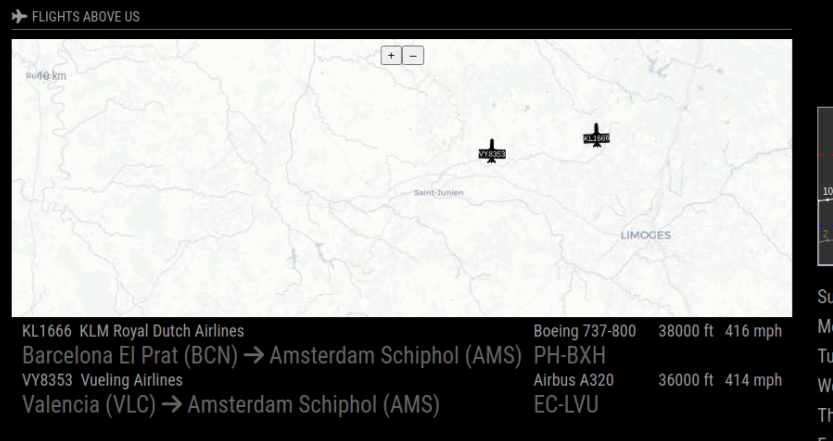
      yes, the map changes width because of the length of the flight data in the table below, the area inside the map does not change. You can test this with setting mapFontColor: "red", so you see the area points.

      But I have to rethink this behavior or provide an option for a fixed width.

      Also the map shows even with no traffic and showMap: “ifTraffic”,

      will look into this, I did a rewrite of the module so maybe this was lost …

      L 1 Reply Last reply Reply Quote 0
      • L Offline
        lif @sdetweil
        last edited by sdetweil

        @sdetweil said in MMM-Flights:

        @lif can u show the config for this module
        module code

        /**
         * @file MMM-Flights.js
         *
         * @author Karsten Hassel
         * @license MIT
         *
         * @see  https://gitlab.com/khassel/MMM-Flights
         */
        
        Module.register("MMM-Flights", {
          defaults: {
            provider: "flightradar24",
            instanceId: "FR", // needs to be set to different values if you run more than 1 instance of this module
            // // example for ADSBexchange:
            // provider: "ADSBexchange",
            // providerApiKey: "your-api-key",
            // providerUrl: "https://adsbx-flight-sim-traffic.p.rapidapi.com/api/aircraft/json",
            // // example for opensky:
            // provider: "opensky",
            // providerApiKey: "user:password", //optional, without limited requests
            // providerUrl: "https://opensky-network.org/api/states/all",
            unknown: "?", // string used if no data available
            title: "Flights Above Us",
            logoTitle: "fas fa-plane",
            logoUp: "fas fa-plane-departure",
            logoDown: "fas fa-plane-arrival",
            logoTo: "fas fa-arrow-right",
            // area defined by a bounding box of WGS84 coordinates (la=latitude, lo=longitude):
            laMin: 49.85,
            laMax: 50.25,
            loMin: 7.8,
            loMax: 9.3,
            showGrounded: false, // show grounded airplanes
            showMap: "ifTraffic", // "always", "never", "ifTraffic"
            noFlightsMessage: "Currently no flights in chosen area ...", // message shown if no data available
            mapUrl: "https://{a-d}.basemaps.cartocdn.com/light_all/{z}/{x}/{y}.png", // you can bring your own map
        //    mapAttributions:      '',
            mapHeight: "300px",
            mapFixedArea: true, // if set, the defined area is shown, if not the area is calculated from the plane locations
            mapPosition: "bottom", // "top" or "bottom"
            // some params to define styles in map:
            mapFont: "40% sans-serif",
            mapPadding: [1, 5, 0, 7],
            mapFontColor: "white",
            mapBackgroundColor: "black",
            mapCurrentFlightColor: "#9c294f",
            mapBackgroundOpacity: 0.9,
            mapPlanePngSrc: "modules/MMM-Flights/data/plane.png",
            mapPlanePngScale: 0.07,
            mapPlaneTextOffset: 4,
            useMockData: false, // if set, test data is used
            updateInterval: 2 * 60 * 1000, // every 2 minutes
            units: "imperial", // metric uses m and km/h, imperial uses ft and mph
          },
        

        Config.js

          {
              module: "MMM-Flights",
              position: "center",
              config: {
                laMin: 45.80,
                laMax: 46.0081,
                loMin: 0.4674,
                loMax: 1.207,
              },
            },
        

        Hope this helps

        Regards

        S 1 Reply Last reply Reply Quote 0
        • L Offline
          lif @karsten13
          last edited by

          @karsten13 said in MMM-Flights:

          @lif said in MMM-Flights:

          The map changes width depending upon the ac in the area.
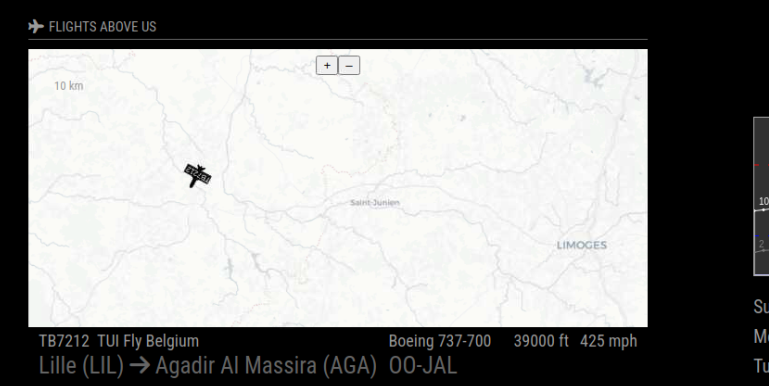
          yes, the map changes width because of the length of the flight data in the table below, the area inside the map does not change. You can test this with setting mapFontColor: "red", so you see the area points.

          Ah, OK, I’ll change the font size down a bit.

          But I have to rethink this behavior or provide an option for a fixed width.

          Also the map shows even with no traffic and showMap: “ifTraffic”,
          will look into this, I did a rewrite of the module so maybe this was lost …

          Yes, it did work before I applied an update this morning

          Thanks for your help.

          karsten13K 1 Reply Last reply Reply Quote 0
          • S Offline
            sdetweil @lif
            last edited by sdetweil

            @lif please NEVER edit the source file. unless you KNOW what you are getting yourself into.

            all config should go in config.js
            everything in the defaults section can be overridden in config.js

            also on forum posts use the code block wrapper for all code and config.

            paste text into message editor
            select pasted text
            hit button </>

            Sam

            How to add modules

            learning how to use browser developers window for css changes

            L 1 Reply Last reply Reply Quote 0
            • karsten13K Offline
              karsten13 @lif
              last edited by

              @lif said in MMM-Flights:

              Yes, it did work before I applied an update this morning

              should be fixed now with latest version …

              L 1 Reply Last reply Reply Quote 0
              • L Offline
                lif @sdetweil
                last edited by

                @sdetweil said in MMM-Flights:

                @lif please NEVER edit the source file. unless you KNOW what you are getting yourself into.

                When the {module}.js file has lines which state something like
                'units: “imperial”, // metric uses m and km/h, imperial uses ft and mph,
                I assume that it can be changed in the {module}.js file.

                all config should go in config.js
                everything in the defaults section can be overridden in config.js

                Some modules list all the options in the example that goes into the config.js file, MMM-Flights (and many others) don’t.

                also on forum posts use the code block wrapper for all code and config.

                paste text into message editor
                select pasted text
                hit button </>

                OK, sorry.

                S 1 Reply Last reply Reply Quote 0
                • L Offline
                  lif @karsten13
                  last edited by

                  @karsten13 said in MMM-Flights:

                  @lif said in MMM-Flights:

                  Yes, it did work before I applied an update this morning

                  should be fixed now with latest version …

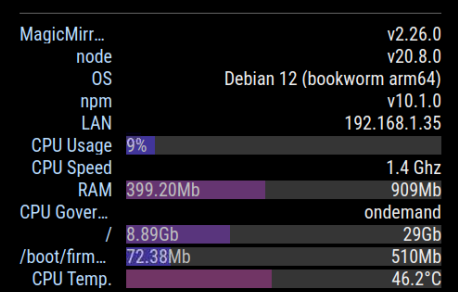
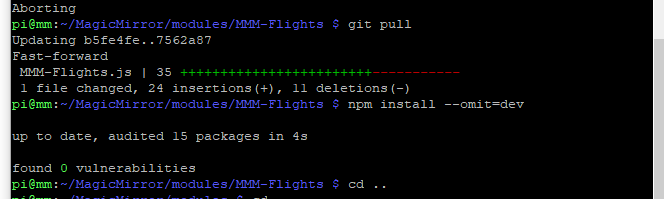
                  Sorry, still the same after (I think) installing the latest version
                  cd5d1690-4b51-462e-84bd-7a6a2742afcc-image.png

                  karsten13K 1 Reply Last reply Reply Quote 0
                  • karsten13K Offline
                    karsten13 @lif
                    last edited by

                    @lif

                    was talking about showMap: "ifTraffic", and this works on my side, tested it again

                    L 1 Reply Last reply Reply Quote 0
                    • L Offline
                      lif @karsten13
                      last edited by

                      @karsten13 said in MMM-Flights:

                      @lif

                      was talking about showMap: "ifTraffic", and this works on my side, tested it again

                      Yes

                       showMap: "ifTraffic", // "always", "never", "ifTraffic"
                      
                      1 Reply Last reply Reply Quote 0
                      • S Offline
                        sdetweil @lif
                        last edited by

                        @lif said in MMM-Flights:

                        I assume that it can be changed in the {module}.js file.

                        no.

                        in config.js

                        the design is config js is used to override the values set in the modulename.js defaults section

                        lacking documentation is a different probem.

                        if you find properties in the defaults section you can override them in config.js

                        Sam

                        How to add modules

                        learning how to use browser developers window for css changes

                        S 1 Reply Last reply Reply Quote 0
                        • S Offline
                          sdetweil @sdetweil
                          last edited by

                          @lif I have a module that presents a form for config customization, built on the fly based on the modules you have installed now

                          it uses the values from defaults

                          https://github.com/sdetweil/MMM-Config

                          in places where there could be choices, the author can augment the definition to make it more usable and understandable.

                          not every module works some need help.
                          if the module is old or the author chooses not to provide an improved definition, I can ship one created by a user, with my module to make the user experience better.

                          Sam

                          How to add modules

                          learning how to use browser developers window for css changes

                          L 1 Reply Last reply Reply Quote 0
                          • L Offline
                            lif @sdetweil
                            last edited by

                            @sdetweil said in MMM-Flights:

                            @lif I have a module that presents a form for config customization, built on the fly based on the modules you have installed now

                            it uses the values from defaults

                            https://github.com/sdetweil/MMM-Config

                            in places where there could be choices, the author can augment the definition to make it more usable and understandable.

                            not every module works some need help.
                            if the module is old or the author chooses not to provide an improved definition, I can ship one created by a user, with my module to make the user experience better.

                            Nice advert :-) but I’ve never been able to cut and paste, in some cases , 20 - 30 lines of options from the module config file to config.js using a command line editor if the author doesn’t give all the options in the default config.js example on Git Hub.

                            S 1 Reply Last reply Reply Quote 0
                            • S Offline
                              sdetweil @lif
                              last edited by

                              @lif it’s a fun challenge.

                              the downside of changing the modulename.js file is, when an update comes, git pull will fail. and YOU have to figure it out.

                              everything takes work. I’m just trying to help you learn the best practice so you don’t get smashed later on.

                              Sam

                              How to add modules

                              learning how to use browser developers window for css changes

                              1 Reply Last reply Reply Quote 0
                              • S Offline
                                stashu
                                last edited by

                                Hi! Thank you for the module, it is my favorite on my MM, as I live on the flight path to KIAD, so lots of activity.

                                I am wondering if there is a way I can hide the horizontal line which is under the ‘Flights’ label. When there are no flights, the line is still visible, and I would love if I were able to hide it somehow. I’m happy to add something to custom.css, but I am unsure how to do so. Thanks!

                                S karsten13K 2 Replies Last reply Reply Quote 0
                                • S Offline
                                  sdetweil @stashu
                                  last edited by sdetweil

                                  @stashu So, there is indeed custom.css entry you can use the hide the separator on the header…

                                  BUT I want to teach you how to find these things yourself… so you won’t be dependant on waiting for someone

                                  see the second link in my signature below, it will show you how to use the developers window elements tab and locate the element that is displaying the thing you want to modify/hide…

                                  in the upper right window you can try different styles on the selected element to see its behavior and once you’ve found it, you can copy paste those styles into custom.css
                                  and put the selector wrapper around it.

                                  the selector chain is shown on the bottom of the elements window , for example here on another element
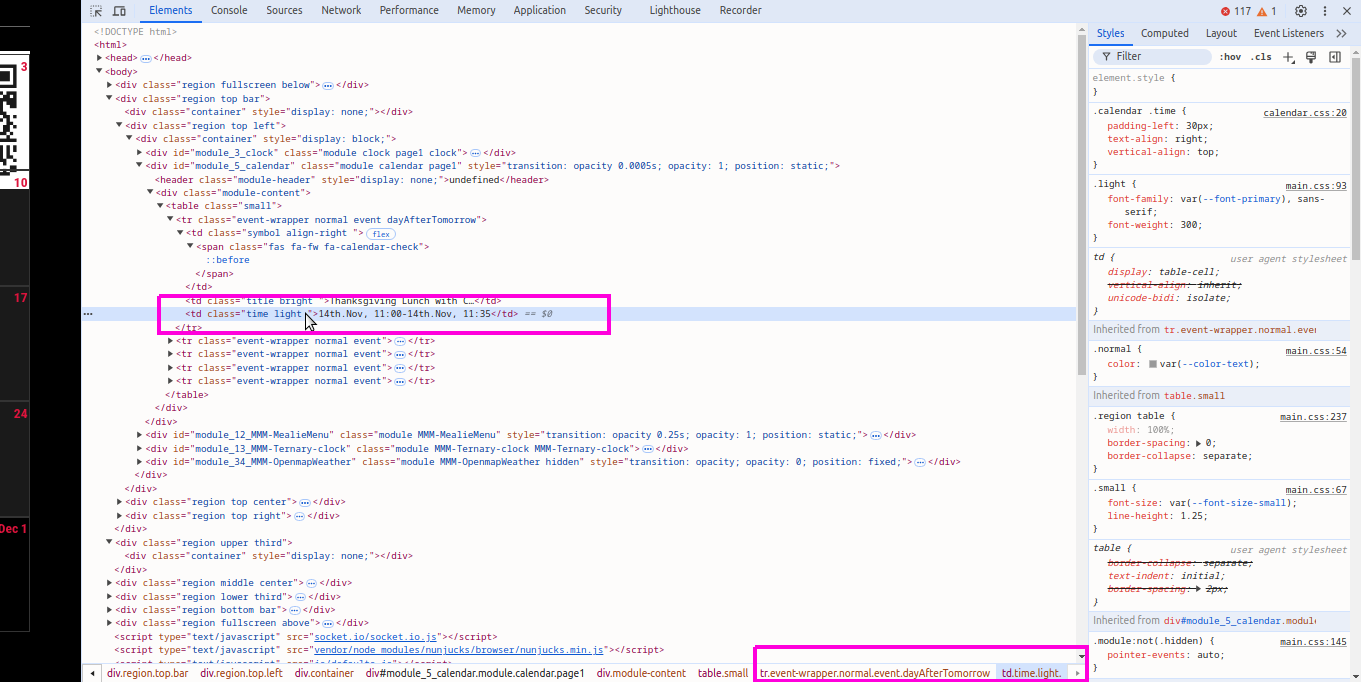
                                  Screenshot at 2024-11-12 15-30-58.png

                                  Sam

                                  How to add modules

                                  learning how to use browser developers window for css changes

                                  S 1 Reply Last reply Reply Quote 0
                                  • S Offline
                                    stashu @sdetweil
                                    last edited by

                                    @sdetweil thanks for the quick reply and the pointer to finding the element. I’m not in web stuff, so it’s a bit more of a mystery to me than I wish it were. Anyway, I found it, and the following custom.css entry works to remove the header:

                                    .MMM-Flights .module-header {
                                    	border-bottom: 0px; /* removes line */
                                    	font-size: 0px; /* removes 'Flights' and logo (?) */
                                    }
                                    

                                    Not sure if that’s an elegant way, but it works :) . I’m not clear on why the 0 font size removes the logo, but it does.

                                    Thanks again!

                                    S 1 Reply Last reply Reply Quote 0
                                    • S Offline
                                      sdetweil @stashu
                                      last edited by

                                      @stashu all good… sorry for the firehose treatment… lol

                                      anyhow to hide an element is actually easier

                                      selector {
                                         display:none;
                                      }
                                      

                                      Sam

                                      How to add modules

                                      learning how to use browser developers window for css changes

                                      1 Reply Last reply Reply Quote 0
                                      • karsten13K Offline
                                        karsten13 @stashu
                                        last edited by

                                        @stashu said in MMM-Flights:

                                        if there is a way I can hide the horizontal line which is under the ‘Flights’ label.

                                        I updated the module, if you now set title and logoTitle to empty strings no header and no line is diplayed anymore.

                                        1 Reply Last reply Reply Quote 0
                                        • W Offline
                                          wswenson
                                          last edited by wswenson

                                          I would like to see a configuration option to filter out non-commercial flights. I played around with this code segment and think it could be done with some minor logic added for a configuration option of onlyCommercial (or something like that). I live in an area where there is a high concentration of private planes as well, and generally I am mostly interested in the commercial flights.

                                          I tried to open an issue in Gitlabs, but wants me to create an account and pay for membership and such.

                                          Thanks for the module!

                                           async makeFlightArray(configPayload) {
                                                let flights = [];
                                          
                                                const prov = configPayload.provider.toLowerCase();
                                                if (this.providers.includes(prov)) {
                                                  await require(`./provider/${prov}`).getData(
                                                    configPayload,
                                                    flights,
                                                    this.airports,
                                                    this.airlines,
                                                    this.planes,
                                                    this.setFlightData,
                                                    this.fetchUrl
                                                  );
                                                } else {
                                                  Log.error(
                                                    `${this.name}: Unknown provider  + ${configPayload.provider}`
                                                  );
                                                }
                                          	  
                                          	  // Filter out flights with empty airline
                                                flights = flights.filter((flight) => flight.airline && flight.airline.trim() !== "");
                                          	  
                                          	  console.log(flights);
                                                return flights;
                                              },
                                          

                                          222ff981-bdda-48e5-a800-faeffafc449a-image.png

                                          karsten13K 2 Replies Last reply Reply Quote 0
                                          • karsten13K Offline
                                            karsten13 @wswenson
                                            last edited by

                                            @wswenson said in MMM-Flights:

                                            I tried to open an issue in Gitlabs, but wants me to create an account and pay for membership and such.

                                            they are free see https://about.gitlab.com/pricing/

                                            will look into the filter stuff …

                                            1 Reply Last reply Reply Quote 0

                                            Hello! It looks like you're interested in this conversation, but you don't have an account yet.

                                            Getting fed up of having to scroll through the same posts each visit? When you register for an account, you'll always come back to exactly where you were before, and choose to be notified of new replies (either via email, or push notification). You'll also be able to save bookmarks and upvote posts to show your appreciation to other community members.

                                            With your input, this post could be even better 💗

                                            Register Login

                                            • 1
                                            • 2
                                            • 3
                                            • 2 / 3
                                            • First post
                                              Last post
                                            Enjoying MagicMirror? Please consider a donation!
                                            MagicMirror created by Michael Teeuw.
                                            Forum managed by Sam, technical setup by Karsten.
                                            This forum is using NodeBB as its core | Contributors
                                            Contact | Privacy Policy