Read the statement by Michael Teeuw here.
Module calendar - whole day event
-
@Babene1
UsetimeFormat: “dateheaders”,in your calendar config.https://docs.magicmirror.builders/modules/calendar.html#configuration-options
-
@MMRIZE Thanks, I’m currently using MMM-MyCalendar but I’m going to give it a try this evening.
-
@MMRIZE I’ve succesfully configured the calendar, but I’m looking how to add different icons to calendar items.
Example: checkered-flag to F1 time, calendar to appointment, etc.
I’ve looked in the manual, but I think I miss it. Do you have an example? -
{
			module: "calendar",
			header: "US Holidays",
			position: "top_left",
			config: {
				calendars: [
					{
						url: "webcal://www.calendarlabs.com/ical-calendar/ics/76/US_Holidays.ics"
                                                symbol: "car", // <==this.
					},
				],

			}
},
You can find other symbols in font-awesome.
https://fontawesome.com/ -
@MMRIZE Oke, so if I understand correct, you add a symbol to a calendar and not to a calendar line?
-
@htilburgs I edited original post (my bad, typed on iPhone)
-
@MMRIZE So now my F1 Calendar looks like this.
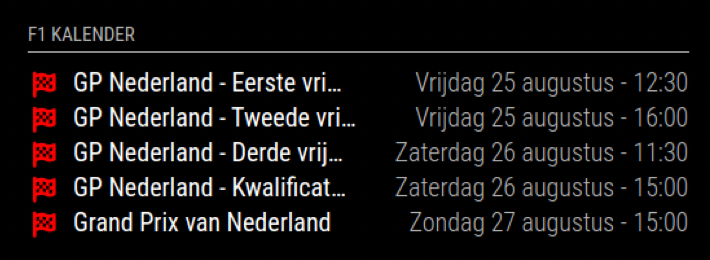
Do you know if it’s possible to get the date and time underneed an item instead of behind?
-
@htilburgs
By default, NO. It is coded as table so you cannot adjust it by only CSS without source modification.
You might have 3 options.- modifying original source. But you will have some annoying issues on next update.
- Use other module equivalent which has that chance, But only module I know is my “MMM-CalendarExt3Agenda”, and you might need somewhat tweaks on CSS.
- Or you can use “MMM-ModuleMonkeyPatch”(the original subject of this thread!!!) to patch source without worrying update issue.
-
@MMRIZE
Oke, thanks for the quick reply. I leave it as is at the moment. It looks great. I’m going to give it a look on an other moment. -
@MMRIZE Thank you very much, I have overlooked it. You make my day :-)

Hello! It looks like you're interested in this conversation, but you don't have an account yet.
Getting fed up of having to scroll through the same posts each visit? When you register for an account, you'll always come back to exactly where you were before, and choose to be notified of new replies (either via email, or push notification). You'll also be able to save bookmarks and upvote posts to show your appreciation to other community members.
With your input, this post could be even better 💗
Register Login