Read the statement by Michael Teeuw here.
MMM-OpenWeatherForecast
-
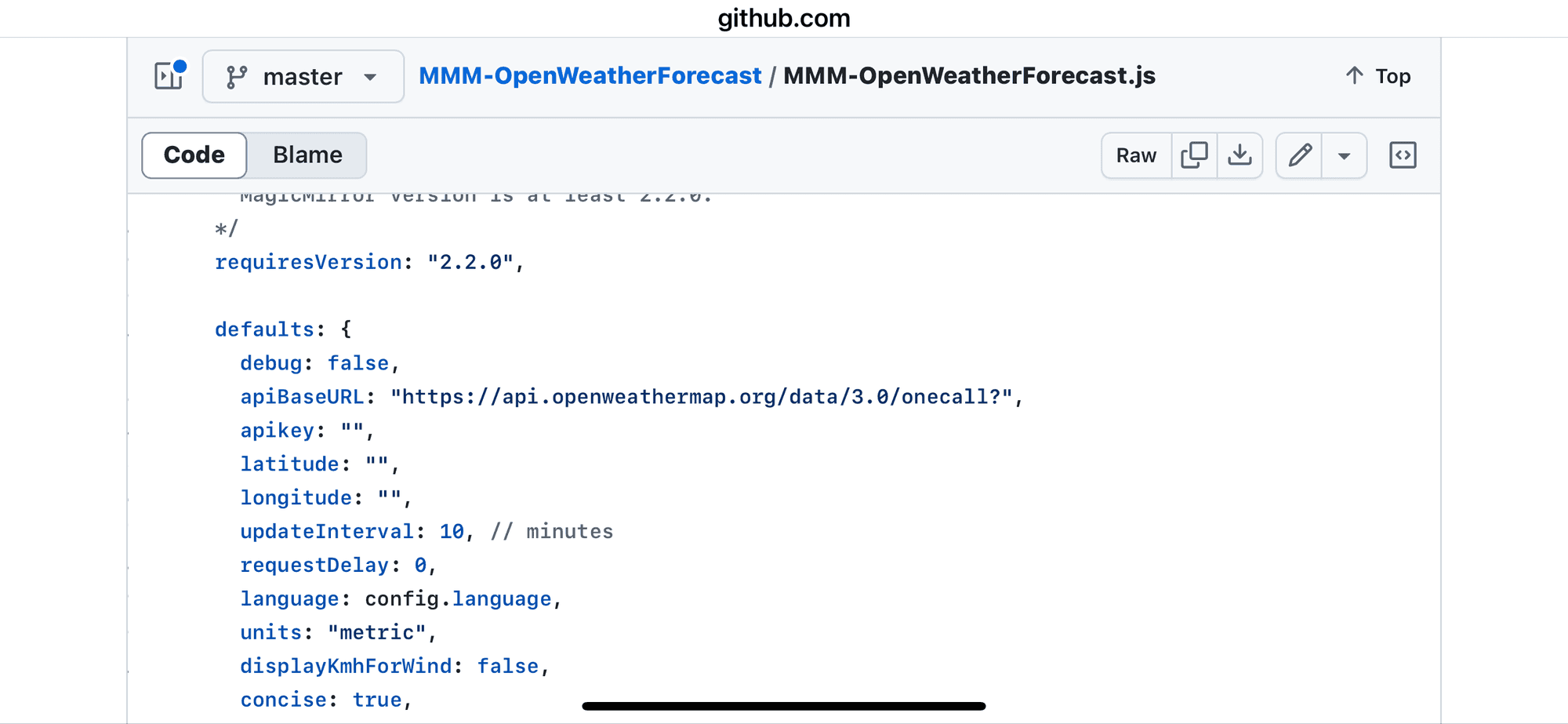
@megagprime id let the module set the urlbase
-
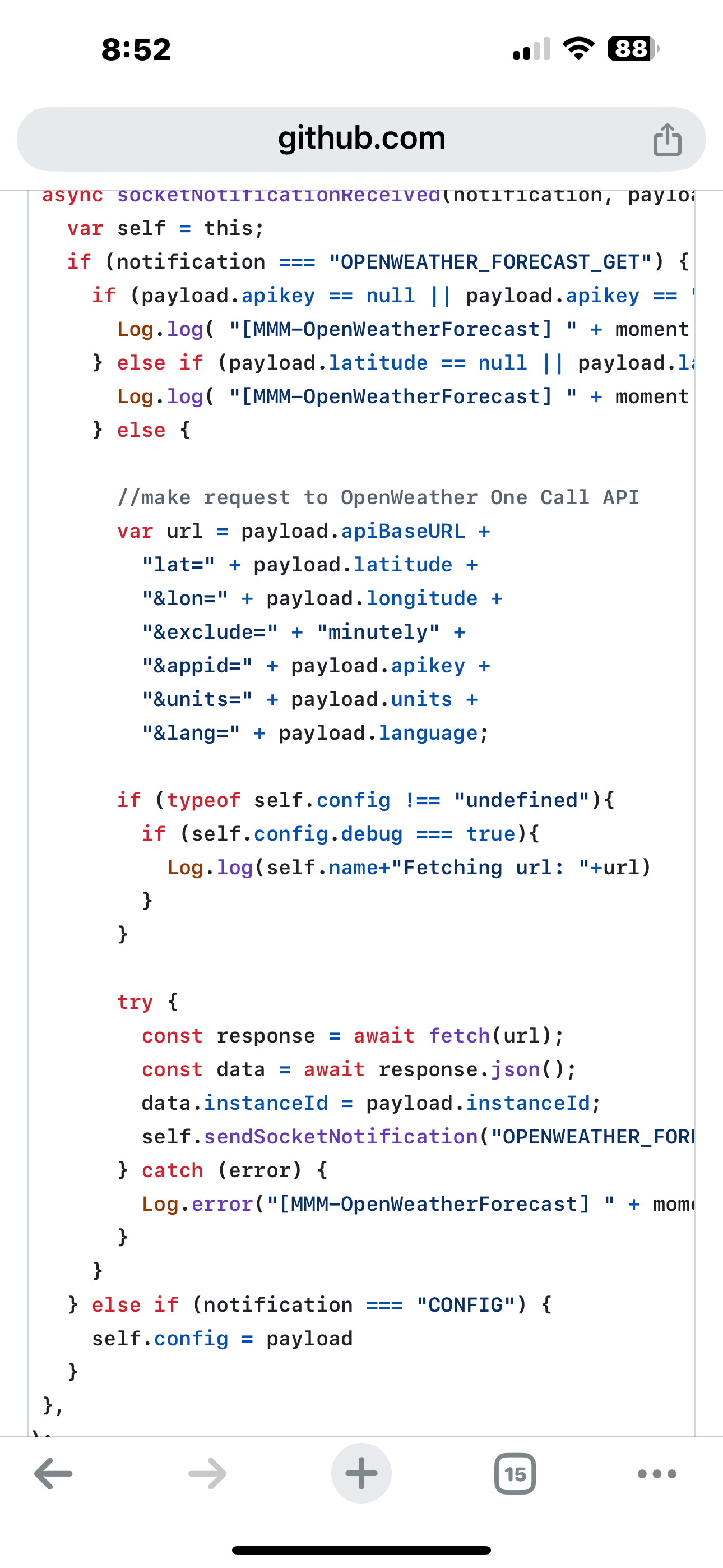
@megagprime also note the config parms it uses
-
@sdetweil i did, i commented out the urlbase. All the other config settings are the same that have been working for years.
-
@megagprime You will need to update to the new fork of the module.
It does not matter if the old settings worked for years as the provider shut down the old api and you need to use the new api if you want some information to be displayed again.
The original module did not provide a way to change the url the information is fetched of. Even if you add the apiBaseUrl to the settings the old module will ignore it.
I released a new version IN MY FORK yesterday which uses the new URL in default. So no need to set the base URL in the settings anymore. The version in my fork before yesterday needed the parameter in the config to work with the new api.So either change to my fork and update with:
cd ~/MagicMirror/modules/MMM-OpenWeatherForecast

git remote set-url origin https://github.com/Tom-Hirschberger/MMM-OpenWeatherForecast.git

git pull

rm -rf node_modules package-lock.json

npm install
Or remove the old module folder and reinstall from this Url:
-
@wishmaster270 thanks Tom
-
Howdy,
I am having trouble getting MMM-OpenWeatherForecast to run and have been working my way through the problems.
First problem was a typo of “apiKey” which caused this message to flood the .pm2/logs/MagicMirror-out.log. Problem solved by correctly spelling the variable name “apikey” - notice the subtle difference between the “K” and “k”.
[2024-10-03 10:22:54.732] [LOG] [MMM-OpenWeatherForecast] 3-Oct-24 10:22 ** ERROR ** No API key configured. Get an API key at https://darksky.netOnce the “apikey” spelling problem was solved, the next error arrived and the log file was flooded with thousands of this message:
code_[2024-10-03 12:09:29.002] [LOG] [MMM-OpenWeatherForecast] 3-Oct-24 12:09 ** ERROR ** Latitude and/or longitude not provided.This error was caused by confusing documentation that made it appear the variables were “lat” and “lon” instead of “latitude” and “longitude”. Correcting the spelling eliminated the error messages.
The current problem is this message which is again flooding the pm2 error.log:
[2024-10-03 14:10:02.077] ^[[31m[ERROR]^[[39m ^[[31m[MMM-OpenWeatherForecast] 3-Oct-24 14:10 ** ERROR ** TypeError: fetch failed^[[39mI need a hint of where to look or what to do. I sure it is not hard but just me overlooking something.
However,the three problems reveal that the Module contains an error that flood the log files with thousands of messages.
Here is the portion configuration file relative to the OpenWeatherForecast module:
                        module: "MMM-OpenWeatherForecast",
                        position: "top_right",
                        header: "Current Weather",
                        config: {
                                weatherProvider: "openweathermap",
                                type: "hourly",
                                units: "imperial",
                                tempUnits: "imperial",
                                roundTemp: true,
                                timeFormat: 24,
                                onlyTemp: false,
                                appendLocationNameToHeader: true,
                                showSun: true,
                                fade: false,
                                fadePoint: 1,
                                colored: true,
                                updateInterval: 900000,      // 15 minutes, 900 seconds
                                maxEntries: 10,
                                degreeLabel: true,
                                lang: "en",
                                location: "Sachse,Texas",
                                locationID: "4724564", //ID from http://bulk.openweathermap.org/sample/city.list.json.gz;
                                latitude: 32.98579,
                                longitude: -96.60234,
                                apiVersion: "3.0",
                                weatherEndpoint: "/onecall",
                                apikey: "This is a 3.0 key"
                        }
I am also confused about the updateInterval value. Previously in this module and in other modules, time intervals are given in milliseconds so 15 minutes is written as 900000.
Thank you for reading.
Butch
-
@butchkemper it seems that you are mixing configuration for the standard weather module and configuration for MMM-OpenWeatherForecast
-
@MarcLandis Thank you for the push in the right direction. I took the time to remove all the unused options and corrected the updateInterval. Now everything is back to working.
Now I will need to study the new options to see if I need to change anything.
Thanks again.
Butch
-
So after getting everything set up with the new version 3.0 at openweathermap.org
I turned on my mirror for the first time this morning and it displayed the weather
and so I went to openweathermap.org just to check how many calls I made it already had me down for 20 calls
am I missing something here -
@Ray how often is the module fetching the weather ?
-
@sdetweil In default the module calls the Api every 10 minutes.
-
@wishmaster270 thanks. i knew i could go look, asking poster to do the same.
-
@wishmaster270 yes I have mine set for 15
but that doesn’t explain why when I turn it on for the first time in the morning they already have 20 calls I don’t get that -
@sdetweil I have it set for 15 minutes
-
@Ray said in MMM-OpenWeatherForecast:
@wishmaster270 yes I have mine set for 15
but that doesn’t explain why when I turn it on for the first time in the morning they already have 20 calls I don’t get thatWhat means “turn it on”? Boot up the Pi or turn on the screen?
-
@MarcLandis sorry for the misunderstanding there
when I activate my mirror and it checks the weather -
@Ray updates are still done even the screen is off.
-
@MarcLandis yes I get that and I totally understand that
but that’s not my question maybe it can’t be answered
my magic mirror is on a computer when I boot the computer up in the morning it will automatically start magic mirror usually the first thing it checks is the weather
if I turn the computer off there should be no more calls to the weather appso my original question would be if I turn my computer on first thing in the morning and I go to the weather app why does it say I already have 20 calls that’s my real question
-
@Ray
Hi, I do not know your set up nor do I know when the “in one day” changes to the next day at OpenWeaterMap.
I use the API Key exactly in this module and only have one instance of the mirror running…
I just checked my statistics at OpenWeaterMap and I do have at about 112 calls a day. Which is correct as my mirror is shutdown between 11:30pm and 5am.Maybe it is a matter of your timezone and calls of the last day are counted in the current one.
What does your statistic look like
https://home.openweathermap.org/statistics/onecall_30
Edit:
And one small side note. Even if you use different keys the calls a summarized per account -
@wishmaster270
I totally agree with everything you said I do have two keys but I only use one
the only thing I can think of is maybe the 20 calls are a carryover from the previous day that’s the only thing I can think of
I shut down my mirror around 7 o’clock at nightand when I started up in the morning around 8 o’clock in the morning I would think there would only be one call
but when I looked it said there were 20
so like I said maybe it’s a carryover from the previous dayso tomorrow morning I’m going to conduct a test
I will check the website first to see if there any calls there before I start my mirrorif you want I will let you know


Hello! It looks like you're interested in this conversation, but you don't have an account yet.
Getting fed up of having to scroll through the same posts each visit? When you register for an account, you'll always come back to exactly where you were before, and choose to be notified of new replies (either via email, or push notification). You'll also be able to save bookmarks and upvote posts to show your appreciation to other community members.
With your input, this post could be even better 💗
Register Login