MagicMirror Forum
    • Recent
    • Tags
    • Unsolved
    • Solved
    • MagicMirror² Repository
    • Documentation
    • 3rd-Party-Modules
    • Donate
    • Discord
    • Register
    • Login
    A New Chapter for MagicMirror: The Community Takes the Lead
    Read the statement by Michael Teeuw here.

    How to put a module under another one

    Scheduled Pinned Locked Moved General Discussion
    5 Posts 4 Posters 3.4k Views 4 Watching
    Loading More Posts
    • Oldest to Newest
    • Newest to Oldest
    • Most Votes
    Reply
    • Reply as topic
    Log in to reply
    This topic has been deleted. Only users with topic management privileges can see it.
    • F Offline
      Fonfon
      last edited by

      HI,

      i try to put for exemple the module network scanner under the module forecast on the top left on the sreen ,
      but i can not .
      how is the region of screen ?
      and how configure it ?

      thanks ;)

      Mykle1M 1 Reply Last reply Reply Quote 0
      • cowboysdudeC Offline
        cowboysdude Module Developer
        last edited by

        When you enter your info in the config.js just put in the order you want it in… for example

                      {
        			module: 'clock',
        			position: 'top_left'
        		},
                      {        module: 'network-scanner',
                               position: 'top_left'
                              config: { 
                                             options
                             }
                       },


        This will load the clock first then below it the network scanner… if you want them reversed then you put the network scanner first…

        :)

        1 Reply Last reply Reply Quote 2
        • Mykle1M Offline
          Mykle1 Project Sponsor Module Developer @Fonfon
          last edited by Mykle1

          @Fonfon said in How to put a module under another one:

          how is the region of screen ?

          For a visual of the regions
          https://forum.magicmirror.builders/topic/286/regions
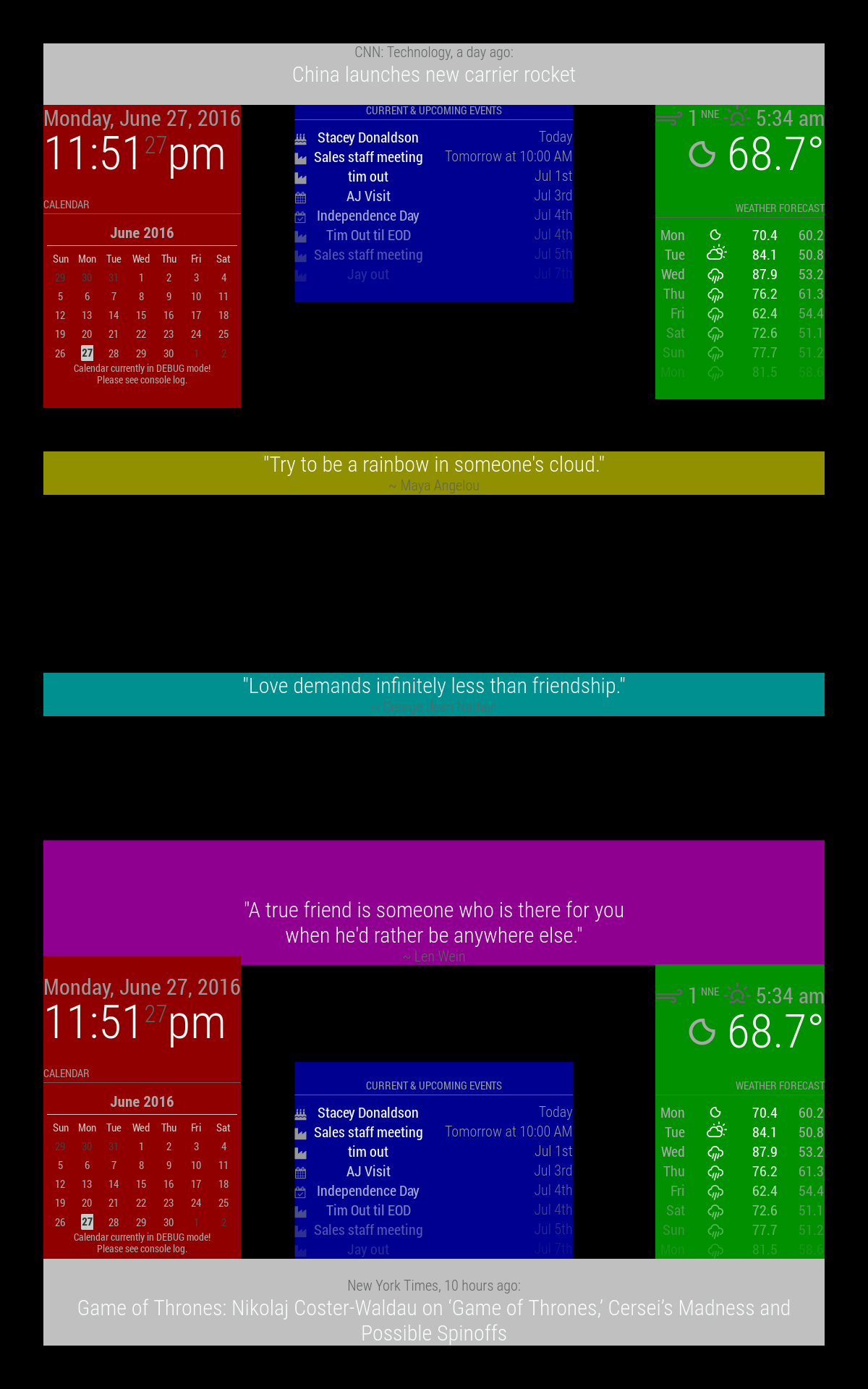
          0_1488134229434_regions.png

          Create a working config
          How to add modules

          johnnyboyJ 1 Reply Last reply Reply Quote 3
          • F Offline
            Fonfon
            last edited by

            lot of thanks !!

            1 Reply Last reply Reply Quote 1
            • johnnyboyJ Offline
              johnnyboy @Mykle1
              last edited by johnnyboy

              @Mykle1

              Good to know, as i was not aware there was a yellow - upper_third or cyan - middle_centre zones available… just the magneta - lower_third for compliments.

              top_bar and bottom_bar are light gray
              top_left and bottom_left are red
              top_center and bottom_center are blue
              top_right and bottom_right are green
              upper_third is yellow
              middle_center is cyan
              lower_third is magenta

              All these regions will resize as needed.

              1 Reply Last reply Reply Quote 2

              Hello! It looks like you're interested in this conversation, but you don't have an account yet.

              Getting fed up of having to scroll through the same posts each visit? When you register for an account, you'll always come back to exactly where you were before, and choose to be notified of new replies (either via email, or push notification). You'll also be able to save bookmarks and upvote posts to show your appreciation to other community members.

              With your input, this post could be even better 💗

              Register Login

              • 1 / 1
              • First post
                Last post
              Enjoying MagicMirror? Please consider a donation!
              MagicMirror created by Michael Teeuw.
              Forum managed by Sam, technical setup by Karsten.
              This forum is using NodeBB as its core | Contributors
              Contact | Privacy Policy

