MagicMirror Forum
    • Recent
    • Tags
    • Unsolved
    • Solved
    • MagicMirror² Repository
    • Documentation
    • 3rd-Party-Modules
    • Donate
    • Discord
    • Register
    • Login
    A New Chapter for MagicMirror: The Community Takes the Lead
    Read the statement by Michael Teeuw here.

    v2.29.0 weather module issue

    Scheduled Pinned Locked Moved Bug Hunt
    21 Posts 8 Posters 6.1k Views 8 Watching
    Loading More Posts
    • Oldest to Newest
    • Newest to Oldest
    • Most Votes
    Reply
    • Reply as topic
    Log in to reply
    This topic has been deleted. Only users with topic management privileges can see it.
    • K Offline
      kent79
      last edited by

      I just update to v2.29.0, but find out the weather module doesn’t work (MagicMirror\modules\default\weather). It can’t show the information.

      I used the old module to replace. It works again. So it must be weather module issue. Please fix it. Thanks.

      Below is my config

                      {
                      
                      			module: "weather",
                      
                      			position: "top_right",
                      
                      			config: {
                      
                      				weatherProvider: "openweathermap",
                      
                      				type: "current",
                      
                      				location: "s",
                      
                      				locationID: "1",
                      
                      				apiKey: "1",
                      
                      				showSun: false,
                      
                      				showHumidity: "wind",		
                      
                      			}
                      
                      		},
                      
                      		{
                      
                      			module: "weather",
                      
                      			position: "top_right",
                      
                      			header: "weather",
                      
                      			config: {
                      
                      				weatherProvider: "openweathermap",
                      
                      				type: "forecast",
                      
                      				location: "s",
                      
                      				locationID: "1",
                      
                      				apiKey: "1",
                      
                      				colored: true,
                      
                      			}
                      
                      		},
      M 1 Reply Last reply Reply Quote 0
      • M Offline
        MarcLandis Module Developer @kent79
        last edited by

        @kent79 Did you get a new V3 API key at openweathermap.com? Old V2.5 keys won’t work anymore.

        K A 2 Replies Last reply Reply Quote 0
        • K Offline
          kent79 @MarcLandis
          last edited by

          @MarcLandis

          V3 submittion need to provide a credit information. It is bad idea. Well, I will keep using 2.5 api key and 2.28 old weather module in this moment.

          I wish MM can revert it later since version 2.5 is totally free. Thanks.

          M 1 Reply Last reply Reply Quote 0
          • M Offline
            MarcLandis Module Developer @kent79
            last edited by

            @kent79 from openweathermap.com:

            "Dear OpenWeather user,

            We would like to inform you about our plans to complete the migration from One Call 2.5 to One Call 3.0 that started 2 years ago. In line with this, access to One Call 2.5 will be finally closed in June 2024.

            One Call 3.0 provides you with significantly advanced business-demanded features such as a minute forecast for 1 hour, 4 days forecast for any timestamp, a daily forecast for 8 days, including a human-readable summary, historical data (45-year archive) for timestamps, and with daily aggregation, 1.5-year long-term forecast with daily aggregation, and others."

            So V2.5 is only working because openwaethermap didn’t fully shut it down even the deadline is over. It can happen any day.

            K 1 Reply Last reply Reply Quote 0
            • K Offline
              kent79 @MarcLandis
              last edited by

              @MarcLandis

              I see. Thank you for your quick reply. Any free API is available now? I will move

              M 1 Reply Last reply Reply Quote 0
              • M Offline
                MarcLandis Module Developer @kent79
                last edited by

                @kent79 V3 is free for 1000 calls a day and unless you update the weather every minute you probably won’t reach that limit.

                K 1 Reply Last reply Reply Quote 0
                • K Offline
                  kent79 @MarcLandis
                  last edited by

                  @MarcLandis

                  Thank you for information

                  H 1 Reply Last reply Reply Quote 0
                  • D Offline
                    dawookie1979
                    last edited by

                    Hi,

                    i have same issue. I have signed up for the v3 api. Does anyone have a config for me to copy my api into?

                    my code:
                    {
                    module: “weather”,
                    position: “top_left”,
                    header: “Weather Forecast”,
                    config: {
                    weatherProvider: “openweathermap”,
                    type: “forecast”,
                    location: “Haverhill”,
                    locationID: “2647310”, //
                    apiKey: “LEFT BLANK”
                    }

                    R 1 Reply Last reply Reply Quote 0
                    • R Offline
                      reilley @dawookie1979
                      last edited by

                      @dawookie1979 - Be sure to add apiVersion: ‘3.0’ to your config

                      D K 2 Replies Last reply Reply Quote 0
                      • D Offline
                        dawookie1979 @reilley
                        last edited by

                        @reilley Hello, where do i add it? can you help me edit my script?

                        Thanks

                        S R 2 Replies Last reply Reply Quote 0
                        • S Do not disturb
                          sdetweil @dawookie1979
                          last edited by

                          @dawookie1979 see the documentation. its a property in the config section of the weather module configuration

                          documentation is linked from the top menu here

                          Sam

                          How to add modules

                          learning how to use browser developers window for css changes

                          1 Reply Last reply Reply Quote 1
                          • A Offline
                            Andreas1956 @MarcLandis
                            last edited by

                            @MarcLandis
                            i only added

                            apiVersion: “2.5”,

                            to my config, now its all fine again.

                            S 1 Reply Last reply Reply Quote 0
                            • S Do not disturb
                              sdetweil @Andreas1956
                              last edited by

                              @Andreas1956 tgat means you gave the old apikey, which will fail ‘soon’

                              Sam

                              How to add modules

                              learning how to use browser developers window for css changes

                              P 1 Reply Last reply Reply Quote 0
                              • P Offline
                                Peter @sdetweil
                                last edited by

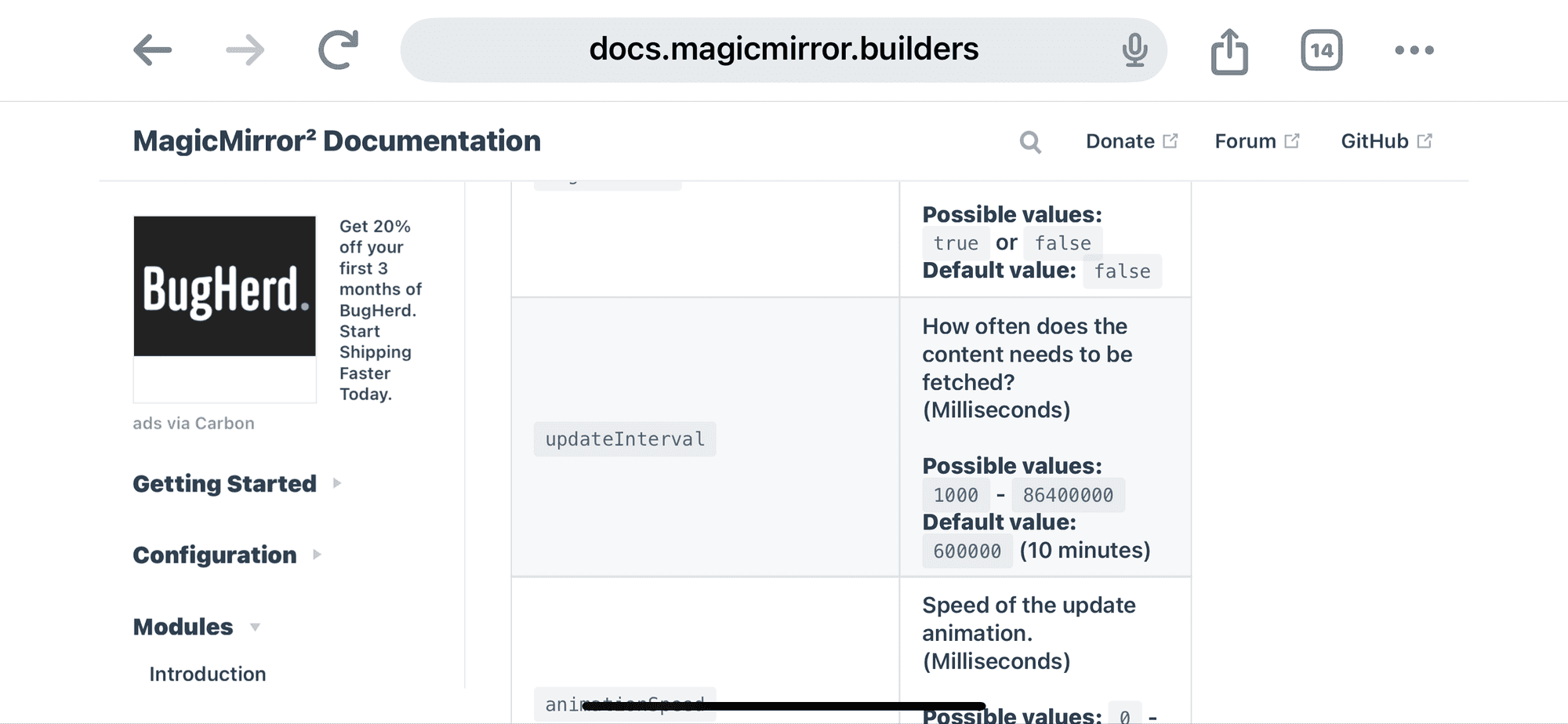
                                @sdetweil Sam, do you know how many calls the default weather module makes per day?
                                Am I right: default is every 10 minutes, so 24x6 per day?
                                I have two Magic mirrors (1 for me and 1 for my daughter) using the same API.
                                I would like to use the API (3.0) for free, so use not more than 1000 calls per day.
                                Thanks for your answer in advance.
                                Peter

                                S 1 Reply Last reply Reply Quote 0
                                • R Offline
                                  reilley @dawookie1979
                                  last edited by

                                  @dawookie1979 - just add it somewhere in the config for your weather module. I added "apiVersion: “3.0"” just above the apiKey.

                                  I’d help you write yours, but I’m struggling with mine as well so you might get better assistance from the gurus here!

                                  1 Reply Last reply Reply Quote 0
                                  • H Offline
                                    HeikoGr @kent79
                                    last edited by

                                    @kent79 @dawookie1979
                                    it’s all in the docs - but you need to read it carefully.

                                    in short: forecast needs

                                    • lat/lon , locationID isn’t working for forecast
                                    • weatherEndpoint: ‘/onecall’, must be set

                                    This works for me;

                                            {
                                                disabled: false,
                                                module: "weather",
                                                position: "top_right",
                                                config:
                                                {
                                                    // See 'Configuration options' for more information.
                                                    weatherProvider: 'openweathermap',
                                                    weatherEndpoint: '/onecall',
                                                    apiKey: 'xxx',
                                                    apiVersion: '3.0',
                                                    lat: '49.8',
                                                    lon: '8.49',
                                                    type: 'forecast',
                                                    colored: true,
                                                    fade: false,
                                                    maxNumberOfDays: 3,
                                                    degreeLabel: 'true',
                                                    showWindDirectionAsArrow: 'true',
                                                    decimalSymbol: ','
                                                }
                                            },
                                    
                                    R S 2 Replies Last reply Reply Quote 0
                                    • R Offline
                                      reilley @HeikoGr
                                      last edited by

                                      @HeikoGr - What are you seeing for the header? Does it say [country]/[city] and if so, is it correct? Mine is saying “America/New York”, when I’m in Canton, Georgia.

                                      1 Reply Last reply Reply Quote 0
                                      • S Do not disturb
                                        sdetweil @Peter
                                        last edited by sdetweil

                                        @Peter yes, every 10 minutes, 6 times per hour
                                        IMG_0367.png

                                        Sam

                                        How to add modules

                                        learning how to use browser developers window for css changes

                                        1 Reply Last reply Reply Quote 1
                                        • S Do not disturb
                                          sdetweil @HeikoGr
                                          last edited by sdetweil

                                          @HeikoGr is that gepos right?

                                          i am in texas and my lat is 30

                                          Sam

                                          How to add modules

                                          learning how to use browser developers window for css changes

                                          H 1 Reply Last reply Reply Quote 0
                                          • H Offline
                                            HeikoGr @sdetweil
                                            last edited by

                                            @sdetweil yes, lat/lon is correct as I am in Germany :-D

                                            @reilley unfortunately openweather doesnt respond with geoname but with timeszone… so it’s euroe/berlin in my case.

                                            1 Reply Last reply Reply Quote 0

                                            Hello! It looks like you're interested in this conversation, but you don't have an account yet.

                                            Getting fed up of having to scroll through the same posts each visit? When you register for an account, you'll always come back to exactly where you were before, and choose to be notified of new replies (either via email, or push notification). You'll also be able to save bookmarks and upvote posts to show your appreciation to other community members.

                                            With your input, this post could be even better 💗

                                            Register Login

                                            • 1
                                            • 2
                                            • 1 / 2
                                            • First post
                                              Last post
                                            Enjoying MagicMirror? Please consider a donation!
                                            MagicMirror created by Michael Teeuw.
                                            Forum managed by Sam, technical setup by Karsten.
                                            This forum is using NodeBB as its core | Contributors
                                            Contact | Privacy Policy