Read the statement by Michael Teeuw here.
MMM-Hoymiles-Wifi
-
First of all, where I write
/home/admin/please use
~/(tilde sign)
And can you please send me:
cd ~/MagicMirror/modules/MMM-Hoymiles-Wifi
git branch
git remote -v
Every time you get that port in use error, run the long command to see what programs are using the port.
And of course do not use HoymilesWifi.sh when it is also active under pm2.I am starting to wonder if the module works at all.
I finally got a picture, but it showed an error in it. -
You also might try this module:
https://github.com/CuddlyCow/MMM-HoymilesPVMonitor
I may give it a try myself.
-
* master
origin  https://github.com/schris88/MMM-Hoymiles-Wifi (fetch)
origin  https://github.com/schris88/MMM-Hoymiles-Wifi (push)
I used the ~ symbol.
-
Well I tried that but I’m to silly to install it.
florian@raspberrypi:~/MagicMirror/modules/MMM-Hoymiles-Wifi $ pip3 install hoymiles-wifi error: externally-managed-environment × This environment is externally managed ╰─> To install Python packages system-wide, try apt install python3-xyz, where xyz is the package you are trying to install. If you wish to install a non-Debian-packaged Python package, create a virtual environment using python3 -m venv path/to/venv. Then use path/to/venv/bin/python and path/to/venv/bin/pip. Make sure you have python3-full installed. For more information visit http://rptl.io/venv note: If you believe this is a mistake, please contact your Python installation or OS distribution provider. You can override this, at the risk of breaking your Python installation or OS, by passing --break-system-packages. hint: See PEP 668 for the detailed specification. florian@raspberrypi:~/MagicMirror/modules/MMM-Hoymiles-Wifi $ sudo apt install python3 hoymiles-wifi Error: Unable to locate package hoymiles-wifi florian@raspberrypi:~/MagicMirror/modules/MMM-Hoymiles-Wifi $ -
You installed that already, so no need to install it again.
Probably using:python -m pip install -r requirements.txt --break-system-packagesThe schris88 requirements.txt contains the hoymiles-wifi package.
-
By unsing this, I get the following error:
python -m pip install -r requirements.txt --break-system-packages Defaulting to user installation because normal site-packages is not writeable ERROR: Could not open requirements file: [Errno 2] No such file or directory: 'requirements.txt' -
>> You installed that already, so no need to install it again.
>>The schris88 requirements.txt contains the hoymiles-wifi package.
If you want to repeat it under the new module name, then you will need to copy the requirements.txt file from the previous module.
But again, since you already did this, no need to repeat. -
Okay. But in the end I can’t get it to work. Don’t know whats wrong …
Does this has to do with that:
florian@raspberrypi:~ $ pm2 restart MagicMirror Use --update-env to update environment variables [PM2] Applying action restartProcessId on app [MagicMirror](ids: [ 0 ]) [PM2] [MagicMirror](0) ✓ ┌────┬─────────────────┬─────────────┬─────────┬─────────┬──────────┬────────┬──────┬───────────┬──────────┬──────────┬──────────┬──────────┐ │ id │ name │ namespace │ version │ mode │ pid │ uptime │ ↺ │ status │ cpu │ mem │ user │ watching │ ├────┼─────────────────┼─────────────┼─────────┼─────────┼──────────┼────────┼──────┼───────────┼──────────┼──────────┼──────────┼──────────┤ │ 1 │ HoymilesWifi │ default │ 2.33.0 │ fork │ 3691100 │ 0 │ 367… │ stopped │ 0% │ 0b │ florian │ disabled │ │ 0 │ MagicMirror │ default │ 2.33.0 │ fork │ 3691094 │ 0s │ 3 │ online │ 0% │ 3.0mb │ florian │ enabled │ └────┴─────────────────┴─────────────┴─────────┴─────────┴──────────┴────────┴──────┴───────────┴──────────┴──────────┴──────────┴──────────┘ florian@raspberrypi:~ $ -
Yeah, stopped is not good.
I will need to get it working myself before I can give more useful information on what to check.
Will keep you posted. -
Remove the old module from the config:
$ vi ~/MagicMirror/config/config.js

Remove the "MMM-Hoymiles-Wifi" config, or set:

    module: "MMM-Hoymiles-Wifi"
    disabled: true,

Delete HoymilesWifi from pm2:

$ pm2 stop HoymilesWifi
$ pm2 delete HoymilesWifi
$ pm2 save

If desired, completely remove the old module:

$ cd ~/MagicMirror/modules/
$ rm -rf MMM-Hoymiles-Wifi
Install MMM-HoymilesPVMonitor:
$ cd ~/MagicMirror/modules

$ git clone https://github.com/CuddlyCow/MMM-HoymilesPVMonitor.git

$ cd MMM-HoymilesPVMonitor

$ git branch
* main

$ git remote -v
origin	https://github.com/CuddlyCow/MMM-HoymilesPVMonitor.git (fetch)
origin	https://github.com/CuddlyCow/MMM-HoymilesPVMonitor.git (push)

$ which hoymiles-wifi
/home/admin/.local/bin/hoymiles-wifi

$ echo $PATH
/home/admin/.local/bin:/usr/local/sbin:/usr/local/bin:/usr/sbin:/usr/bin:/sbin:/bin:/usr/local/games:/usr/games

$ vi ~/MagicMirror/config/config.js

  {
    module: "MMM-HoymilesPVMonitor",
    disabled: false,
    header: "PV Monitor",
    position: "top_left",
    config: {
      dtuIp: "192.168.178.50",        // IP address of your Hoymiles DTU
      maxPower: 800,                  // Maximum system power in watts
      updateInterval: 5 * 60 * 1000   // Update interval in milliseconds (default: 5 minutes)
    }
  }


$ grep 'dtuIp' ~/MagicMirror/config/config.js
      dtuIp: "192.168.178.50",        // IP address of your Hoymiles DTU


$ ls -als public/history_daily.json
4 -rw-r--r-- 1 admin admin 115 Nov  6 08:47 public/history_daily.json

$ cat public/history_daily.json
[
  {
    "timestamp": "2025-11-06 08:47",
    "power": 40,
    "energy_daily": 0.03,
    "energy_total": 0.8
  }

$ pm2 flush

$ pm2 restart MagicMirror

$ pm2 status MagicMirror
┌────┬────────────────┬─────────────┬─────────┬─────────┬──────────┬────────┬──────┬───────────┬──────────┬──────────┬──────────┬──────────┐
│ id │ name           │ namespace   │ version │ mode    │ pid      │ uptime │ ↺    │ status    │ cpu      │ mem      │ user     │ watching │
├────┼────────────────┼─────────────┼─────────┼─────────┼──────────┼────────┼──────┼───────────┼──────────┼──────────┼──────────┼──────────┤
│ 0  │ MagicMirror    │ default     │ 2.33.0  │ fork    │ 26202    │ 4m     │ 3    │ online    │ 0%       │ 2.1mb    │ admin    │ enabled  │
└────┴────────────────┴─────────────┴─────────┴─────────┴──────────┴────────┴──────┴───────────┴──────────┴──────────┴──────────┴──────────┘

$ pm2 logs MagicMirror --lines 100

0|MagicMir | [2025-11-06 08:47:43.474] [INFO]  [MMM-HoymilesPVMonitor.js:17:9] MMM-HoymilesPVMonitor started with DTU-IP: 192.168.178.50
:
:
0|MagicMir | [2025-11-06 08:47:49.226] [LOG]   [MMM-HoymilesPVMonitor] Running Python script: python3 /home/admin/MagicMirror/modules/MMM-HoymilesPVMonitor/dtu_data.py --ip 192.168.178.50 --max 800 --out /home/admin/MagicMirror/modules/MMM-HoymilesPVMonitor/public/history_daily.json
0|MagicMir | [2025-11-06 08:47:51.682] [LOG]   [MMM-HoymilesPVMonitor] Python script output: [WARNING] Could not load history: Expecting value: line 2 column 1 (char 1)
0|MagicMir | [2025-11-06 08:47] [INFO] Live DTU data appended: {'timestamp': '2025-11-06 08:47', 'power': 40, 'energy_daily': 0.03, 'energy_total': 0.8}
:
:
0|MagicMir | [2025-11-06 08:52:42.141] [LOG]   [MMM-HoymilesPVMonitor] Running Python script: python3 /home/admin/MagicMirror/modules/MMM-HoymilesPVMonitor/dtu_data.py --ip 192.168.178.50 --max 800 --out /home/admin/MagicMirror/modules/MMM-HoymilesPVMonitor/public/history_daily.json
0|MagicMir | [2025-11-06 08:52:43.287] [LOG]   [MMM-HoymilesPVMonitor] Python script output: [2025-11-06 08:52] [INFO] Live DTU data appended: {'timestamp': '2025-11-06 08:52', 'power': 41, 'energy_daily': 0.03, 'energy_total': 0.8}

$ cat public/history_daily.json
[
  {
    "timestamp": "2025-11-06 08:47",
    "power": 40,
    "energy_daily": 0.03,
    "energy_total": 0.8
  },
  {
    "timestamp": "2025-11-06 08:52",
    "power": 41,
    "energy_daily": 0.03,
    "energy_total": 0.8
  }
Tested on:
$ cat /proc/device-tree/model; echo Raspberry Pi 3 Model B Plus Rev 1.3 $ vcgencmd get_config total_mem total_mem=1024 $ grep version ~/MagicMirror/package.json "version": "2.33.0", -
Great job! It could work for me. Unfortunately it’s dark outside but I can see the gauge on my mirror.
I don’t even dare to ask, but do you have a hint how about resizing it? I tried it with width and height but it won’t work.
 {
    module: "MMM-HoymilesPVMonitor",
    disabled: false,
    header: "PV Monitor",
    position: "top_left",
    width: "100px",
    height: "105px",
    config: {
      dtuIp: "192.168.178.150",        // IP address of your Hoymiles DTU
      maxPower: 800,                  // Maximum system power in watts
      updateInterval: 5 * 60 * 1000   // Update interval in milliseconds (default: 5 minutes)
    }
  },
Many thanks and kind regards
Florian
-
@Jose1701 said in MMM-Hoymiles-Wifi:
width: "100px",
height: "105px",
those are outside the config:{} section, that means they are for the MM runtime…
but we don’t process width/heightif you want to do this you need to learn to use css(cascading style sheet) to customize the html presentation
ALL updated css goes in css/custom.cssa css entry in custom.css is
selector_clause {
   styles to apply to elements selected by the selector clause
}
we add the modulename as a class to the web content so that one can ‘select’ only for that module
key selector clause elements
starts with . means element has classname=xxx
starts with # means element has id=xxxx
does not start with either, means html element name, div, span, p, h1, img… -
-
@Jose1701 I understand , the browser provides a developer environment with different capabilities
logger
code execution
and elements viewer, css tester envsee the second link in my signature below for a starter course on the elements tab.
-
No, sorry, no idea.
What Sam says, but that needs knowledge.
But I opened an issue/request, so let’s see if it will be granted:
https://github.com/CuddlyCow/MMM-HoymilesPVMonitor/issues -
ok. Thank you for your patience and help.
-
@Jose1701 also. Sometimes the author documents it on the readme, sometimes the author provides their own css you can override w custom.css entries
Sometimes it’s all grunt work….
-
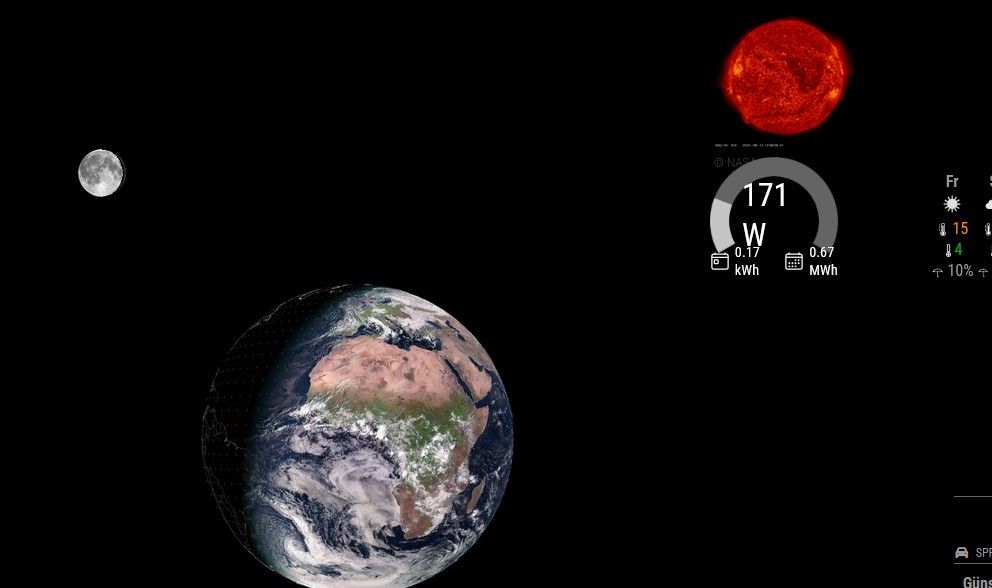
I spent a bit of time an got the following to work by using help of a friend.
I wrote the following in the css:/* custom.css */ /* Passt die Gesamtbreite des gesamten Moduls an */ .MMM-HoymilesPVMonitor { /* Beispiel: Setzt die maximale Breite des gesamten Moduls auf 200 Pixel */ max-width: 200px; /* Stellt sicher, dass das Modul zentriert bleibt, falls es kleiner als die Spalte ist */ margin-left: auto; margin-right: auto; } /* Passt den inneren Container an, der das Canvas-Diagramm enthält. Dies überschreibt die 95% Breite, die im JS definiert wurde. */ .MMM-HoymilesPVMonitor div:first-child { /* Setzt die Breite des Containers auf 100% der oben definierten max-width (z.B. 200px). Sie können hier auch absolute Werte (z.B. 180px) verwenden, aber 100% ist am flexibelsten. */ width: 100% !important; }Now it is smaller, nevertheless I can’t get it much more smaller because the gauge will disappear then.
(It’s not displayed correctly in the screenshot, but it is on my mirror.)

Hello! It looks like you're interested in this conversation, but you don't have an account yet.
Getting fed up of having to scroll through the same posts each visit? When you register for an account, you'll always come back to exactly where you were before, and choose to be notified of new replies (either via email, or push notification). You'll also be able to save bookmarks and upvote posts to show your appreciation to other community members.
With your input, this post could be even better 💗
Register Login