MagicMirror Forum
    • Recent
    • Tags
    • Unsolved
    • Solved
    • MagicMirror² Repository
    • Documentation
    • 3rd-Party-Modules
    • Donate
    • Discord
    • Register
    • Login
    A New Chapter for MagicMirror: The Community Takes the Lead
    Read the statement by Michael Teeuw here.

    Wunderlist - your todos on the mirror

    Scheduled Pinned Locked Moved Troubleshooting
    113 Posts 27 Posters 196.3k Views 22 Watching
    Loading More Posts
    • Oldest to Newest
    • Newest to Oldest
    • Most Votes
    Reply
    • Reply as topic
    Log in to reply
    This topic has been deleted. Only users with topic management privileges can see it.
    • C Offline
      carteblanche
      last edited by

      This module is working perfectly for me. As others mentioned it doesn’t work for the filters like Today, Week, etc. you can only assign it to specific lists that you create like “Work” for example.

      SexyTroggS 1 Reply Last reply Reply Quote 0
      • SexyTroggS Offline
        SexyTrogg @carteblanche
        last edited by

        @carteblanche I’ve moved all my tasks to the inbox and tried using that. Still cant get a list to show. Other todo modules have worked immediately though so I may have to just switch over to one of them.

        C 1 Reply Last reply Reply Quote 0
        • C Offline
          carteblanche @SexyTrogg
          last edited by

          @SexyTrogg You don’t need any of the tasks to be in the Inbox folder. You just need to create a new custom list of your todos separate from the auto generated folders that Wunderlist creates and call that list name out in the module config file.

          See a screenshot of my lists here…I can have either Work or Family show up on my mirror if I choose those names in the config file. But be careful it is case sensitive.
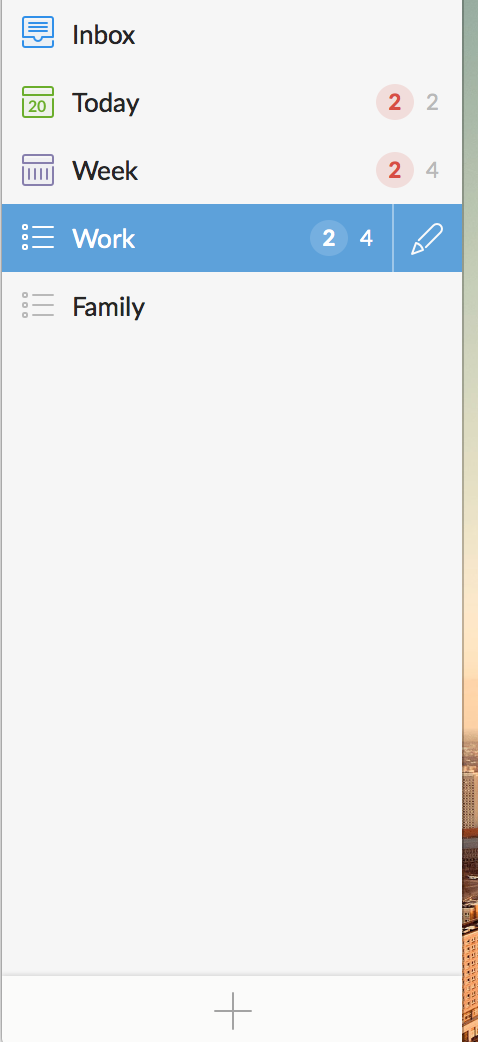
          0_1476985471306_Screen Shot 2016-10-20 at 10.44.22 AM.png

          1 Reply Last reply Reply Quote 0
          • SexyTroggS Offline
            SexyTrogg
            last edited by

            @carteblanche
            My set up is as follows:
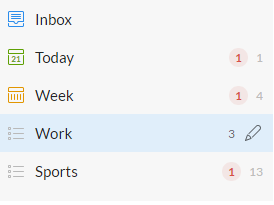
            0_1477086412643_Wunderlist.png

            module: 'MMM-Wunderlist',
                                   position: 'top_left',  
                                   header: 'Get this ish done', 
                                   config: {
                                   accesToken: '----',
                                   clientID: '----',
                                   lists: ["Sports","Work"],
                                   interval: 60,
                                   fade: true
                                   }
            

            Everything looks like it should work for me but again still just the black screen. Raspberry Pi 3 with the newest Wunderlist repo and updates.

            C 1 Reply Last reply Reply Quote 0
            • C Offline
              carteblanche @SexyTrogg
              last edited by

              @SexyTrogg you have a typo on “accessToken:” in the config file.

              SexyTroggS 1 Reply Last reply Reply Quote 0
              • SexyTroggS Offline
                SexyTrogg @carteblanche
                last edited by

                @carteblanche bah sorry that was a typo in the post not in my config :S

                C 1 Reply Last reply Reply Quote 0
                • C Offline
                  carteblanche @SexyTrogg
                  last edited by

                  @SexyTrogg damn…ok i assume you double checked your access token and client ID in the config match up perfectly with what you received from Wunderlist? Other than that I can’t think of any other reason why it wouldn’t show the lists.

                  1 Reply Last reply Reply Quote 0
                  • S Offline
                    Sunburned
                    last edited by

                    @pugsly Thanks for the suggestion. I gave repulling the app a shot and am still having the same issue, after a certain amount of time wunderlist decides to stop updating. It does seem to be lasting longer so i changed my cron job to restart the pi once a day and increased the wunderlist update interval to 120. We shall see how that works.

                    pugslyP 1 Reply Last reply Reply Quote 0
                    • pugslyP Offline
                      pugsly @Sunburned
                      last edited by

                      @Sunburned Yeah i spoke too soon, the app is still not updating again after a few hours. I really don’t want to make a cron job and restart the mm. I think im going to give this one a try:

                      https://github.com/cbrooker/MMM-Todoist

                      1 Reply Last reply Reply Quote 0
                      • S Offline
                        Sunburned
                        last edited by

                        Knock on wood… the wunderlist has been updating without issue. I have the pi and MM applicaiton restarting once a day at 2am and the interval is set at 120.

                        1 Reply Last reply Reply Quote 0
                        • H Offline
                          Headcrush
                          last edited by

                          Hey guys,

                          i have the following problem:

                          • header will be shown
                          • list is empty
                          • The code in line 42 always returns “undefined”

                          it looks to be the same problem Kukielka58 had.
                          Did someone find out where the problem could be?

                          if i use:
                          curl -H “X-Access-Token: TOKEN” -H “X-Client-ID: ID” https://a.wunderlist.com/api/v1/lists

                          the console returns: “{“unauthorized”: true}” but i have no idea why.

                          this are my configs:
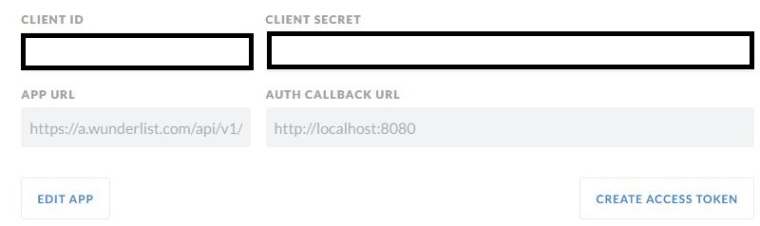
                          0_1479210616479_wunderlist.JPG

                          0_1479210623974_wunderlistConfig.JPG

                          i hope someone can help me.

                          With best regards.
                          Headcrush

                          1 Reply Last reply Reply Quote 0
                          • S Offline
                            Sunburned
                            last edited by

                            @Headcrush
                            I would try increasing your interval. 1 may be too short. Try 100, or at least 60

                            1 Reply Last reply Reply Quote 0
                            • H Offline
                              Headcrush
                              last edited by

                              I got a hint via private message.
                              The problem i had was something with the website of wunderlist.
                              I deleted all cookies and the cache.
                              Following i need to generate a new access token.
                              Now its working.

                              Special thanks to SexyTrogg.

                              1 Reply Last reply Reply Quote 0
                              • cowboysdudeC Offline
                                cowboysdude Module Developer
                                last edited by cowboysdude

                                Been playing with this for 2 hours… same issues… blank lists… no real answers. NO errors in the console, throwin in the towel on this one… too much work for something simple. NEVER thought I’d say this but going to stick with Google Calendar… it just works.

                                1 Reply Last reply Reply Quote 0
                                • pugslyP Offline
                                  pugsly
                                  last edited by

                                  I kept having this same problem where it would stop pulling the To-Do’s so I switched to ToDoist and thought the problem was solver but low and behold it started doing it with ToDoist as well.

                                  Although I do like the interface of ToDoist much better so I think i am going to stick with this one my only resort is to set a cron job to restart the pi nightly before it goes to sleep and blanks out the monitor.

                                  anyone know how I can get PM2 to automatically restart at midnight rather then reboot the entire pi?

                                  S 1 Reply Last reply Reply Quote 0
                                  • S Offline
                                    Sunburned @pugsly
                                    last edited by

                                    @pugsly

                                    This is the page that I used to set up my cron job. I set it up to reset at 2am and start the mirror at 2:03.

                                    pugslyP 1 Reply Last reply Reply Quote 0
                                    • pugslyP Offline
                                      pugsly @Sunburned
                                      last edited by

                                      @Sunburned
                                      I don’t want to reboot, I just want to restart pm2 and I have added it to my crontab but it doesn’t seem to work.

                                      i see in the logs that cron has executed the command but the node process never restarts.

                                      1 Reply Last reply Reply Quote 0
                                      • M Offline
                                        Mar
                                        last edited by

                                        Im managed to get this up and running, great job!!

                                        The one thing I’m trying to do is create two of these modules one for to-do and one for another list to keep them separate as we cant tell what is on each list. but putting two modules throws an error? Has anyone managed to get two lists up (from the same wunderlist account) in two separate modules or lists (not as one big list on the mirror).

                                        O 1 Reply Last reply Reply Quote 0
                                        • O Offline
                                          onetwankyfive @Mar
                                          last edited by yawns

                                          @Mar mine worked fine

                                           {
                                                  module: 'MMM-Todoist',
                                                  position: 'top_left',  // This can be any of the regions. Best results in left or right regions.
                                                  header: 'Alexa TO-DO List', // This is optional
                                                  config: { // See 'Configuration options' for more information.
                                                      accessToken: 'accesstokenaXXXXCXCC687',
                                                      maximumEntries: 60,
                                                      interval: 60,
                                                      lists: [ 12345 ],
                                                      fade: false
                                                }
                                              },
                                          
                                          
                                           {
                                                  module: 'MMM-Todoist',
                                                  position: 'top_left',  // This can be any of the regions. Best results in left or right regions.
                                                  header: 'Alexa Shopping List', // This is optional
                                                  config: { // See 'Configuration options' for more information.
                                                      accessToken: 'XXXX',
                                                      maximumEntries: 60,
                                                      interval: 60,
                                                      lists: [ 1234 ],
                                                      fade: false
                                                }
                                              },
                                          
                                          M 1 Reply Last reply Reply Quote 0
                                          • Hein-JanH Offline
                                            Hein-Jan
                                            last edited by

                                            I also have 2 Wunderlist/lists running one underneath the other.
                                            I also implemented this by having the module twice in the config.

                                            1 Reply Last reply Reply Quote 0

                                            Hello! It looks like you're interested in this conversation, but you don't have an account yet.

                                            Getting fed up of having to scroll through the same posts each visit? When you register for an account, you'll always come back to exactly where you were before, and choose to be notified of new replies (either via email, or push notification). You'll also be able to save bookmarks and upvote posts to show your appreciation to other community members.

                                            With your input, this post could be even better 💗

                                            Register Login

                                            • 1
                                            • 2
                                            • 3
                                            • 4
                                            • 5
                                            • 6
                                            • 5 / 6
                                            • First post
                                              Last post
                                            Enjoying MagicMirror? Please consider a donation!
                                            MagicMirror created by Michael Teeuw.
                                            Forum managed by Sam, technical setup by Karsten.
                                            This forum is using NodeBB as its core | Contributors
                                            Contact | Privacy Policy