MagicMirror Forum
    • Recent
    • Tags
    • Unsolved
    • Solved
    • MagicMirror² Repository
    • Documentation
    • 3rd-Party-Modules
    • Donate
    • Discord
    • Register
    • Login
    A New Chapter for MagicMirror: The Community Takes the Lead
    Read the statement by Michael Teeuw here.

    MMM-EARTH

    Scheduled Pinned Locked Moved Education
    34 Posts 7 Posters 22.9k Views 7 Watching
    Loading More Posts
    • Oldest to Newest
    • Newest to Oldest
    • Most Votes
    Reply
    • Reply as topic
    Log in to reply
    This topic has been deleted. Only users with topic management privileges can see it.
    • Mykle1M Offline
      Mykle1 Project Sponsor Module Developer @cowboysdude
      last edited by

      @cowboysdude said in MMM-EARTH (Captured unique perspective of Solar Eclipse August 21, 2017):

      That is really cool!

      Thank you!

      Again, I would like to thank you @cowboysdude and @strawberry-3-141 for your assistance when I was stuck developing this module.

      Create a working config
      How to add modules

      1 Reply Last reply Reply Quote 1
      • Mykle1M Offline
        Mykle1 Project Sponsor Module Developer
        last edited by

        Download:

        [card:mykle1/MMM-EARTH]

        Update Version 1.0.1

        NASA changed their data without consulting me first. :^)

        Thanks to JohnB7777 for creating the issue and bringing it to my attention.

        And a tremendous Thank You to @cowboysdude for the fix and the pull request.

        So, a git pull in your MMM-EARTH directory will correct the problem.

        Create a working config
        How to add modules

        1 Reply Last reply Reply Quote 0
        • Mykle1M Offline
          Mykle1 Project Sponsor Module Developer
          last edited by Mykle1

          In light of the recent hurricane activity plaguing the Caribbean and the Eastern United States, I did a quick check of conditions using MMM-EARTH. You can see the storm paths and their development.
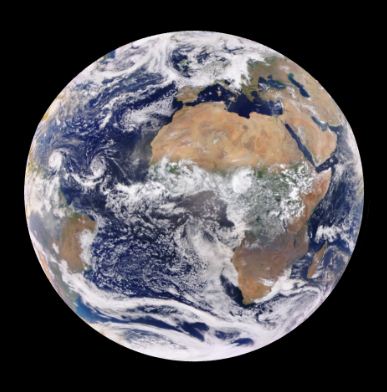
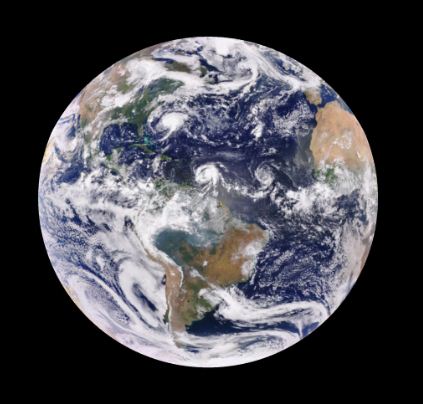
          0_1506050198316_vv.JPG 0_1506050206550_cc.JPG

          Create a working config
          How to add modules

          1 Reply Last reply Reply Quote 0
          • Mykle1M Offline
            Mykle1 Project Sponsor Module Developer
            last edited by

            Download:

            [card:mykle1/MMM-EARTH]

            Update Version 1.0.2

            NASA changed their data AGAIN without consulting me AGAIN.

            The nerve!

            So, once again, a git pull in your MMM-EARTH directory should set things to right, AGAIN. :^)

            Create a working config
            How to add modules

            1 Reply Last reply Reply Quote 0
            • P Offline
              Peter
              last edited by Peter

              Another old Noob trying to learn …
              I just started RPI and MM last week, changed some basic things in my config file.
              But EARTH will not turn (it is static).
              Can somebody have a look?

              /* Magic Mirror Config Sample
               *
               * By Michael Teeuw http://michaelteeuw.nl
               * MIT Licensed.
               *
               * For more information how you can configurate this file
               * See https://github.com/MichMich/MagicMirror#configuration
               *
               */
              
              var config = {
              	address: "localhost", // Address to listen on, can be:
              	                      // - "localhost", "127.0.0.1", "::1" to listen on loopback interface
              	                      // - another specific IPv4/6 to listen on a specific interface
              	                      // - "", "0.0.0.0", "::" to listen on any interface
              	                      // Default, when address config is left out, is "localhost"
              	port: 8080,
              	ipWhitelist: ["127.0.0.1", "::ffff:127.0.0.1", "::1"], // Set [] to allow all IP addresses
              	                                                       // or add a specific IPv4 of 192.168.1.5 :
              	                                                       // ["127.0.0.1", "::ffff:127.0.0.1", "::1", "::ffff:192.168.1.5"],
              	                                                       // or IPv4 range of 192.168.3.0 --> 192.168.3.15 use CIDR format :
              	                                                       // ["127.0.0.1", "::ffff:127.0.0.1", "::1", "::ffff:192.168.3.0/28"],
              
              	language: "nl",
              	timeFormat: 24,
              	units: "metric",
              
              	modules: [
              		{
                  			module: "MMM-EARTH",
                  			position: "top_center",
                  			config: {
                      		mode: "Natural",
                      		rotateInterval: 15000,
                      		MaxWidth: "20%",
                      		MaxHeight: "20%",
                  		}
              		},
              		{
              			module: "updatenotification",
              			position: "top_bar"
              		},
              		{
              			module: "clock",
              			position: "top_left"
              		},
              		{
              			module: "calendar",
              			header: "Feestdagen",
              			position: "top_left",
              			config: {
              				calendars: [
              					{
              						symbol: "calendar-check-o ",
              						url: "https://www.mozilla.org/media/caldata/DutchHolidays.ics"
              					}
              				]
              			}
              		},
              		{
              			module: "",
              			position: "lower_third"
              		},
              		{
              			module: "currentweather",
              			position: "top_right",
              			config: {
              				location: "Apeldoorn,Netherlands",
              				locationID: "",  //ID from http://www.openweathermap.org/help/city_list.txt
              				appid: "Xxxxxxxxxx"
              			}
              		},
              		{
              			module: "weatherforecast",
              			position: "top_right",
              			header: "Weersvoorspelling",
              			config: {
              				location: "Apeldoorn,Netherlands",
              				locationID: "",  //ID from http://www.openweathermap.org/help/city_list.txt
              				appid: "Xxxxxxxx"
              			}
              		},
              		
              		{
              			module: "newsfeed",
              			position: "bottom_bar",
              			config: {
              				feeds: [
              					{
              						title: "Nu.nl",
              						url: "http://www.nu.nl/rss/Algemeen"
              					}
              				],
              				showSourceTitle: true,
              				showPublishDate: true
              			}
              		},
              	]
              
              };
              
              /*************** DO NOT EDIT THE LINE BELOW ***************/
              if (typeof module !== "undefined") {module.exports = config;}


              Thanks!
              Peter

              Mykle1M 1 Reply Last reply Reply Quote 0
              • Mykle1M Offline
                Mykle1 Project Sponsor Module Developer @Peter
                last edited by Mykle1

                @Peter

                Hello Peter. It is not your config that is causing the EARTH not to spin. I just loaded your config and it rotates the EARTH every 15 seconds as per rotateInterval: 15000,. Have you waited 15 seconds?
                Are you expecting it to rotate more quickly? Or is it not updating at all?

                One thing I did notice about your config:

                {
                			module: "",
                			position: "lower_third"
                		},
                

                An empty module name

                Also, you should remove your API keys before you post on the forum. You can remove yours from here by clicking the three dots at the bottom right of your post and choose EDIT.

                Lastly, I see you are using 20% MaxWidth and MaxHeight in MMM-EARTH, and that’s just fine, but you can also choose mode: "naturalThumb", at 100% to achieve the same thing with less system load on your Pi. But let’s get you fixed up first. :-)

                Create a working config
                How to add modules

                P 1 Reply Last reply Reply Quote 0
                • P Offline
                  Peter @Mykle1
                  last edited by

                  @Mykle1 thanks!
                  It does not look like rotating.
                  It goes black (fades to black) and comes back again.
                  I will look at the other things you mention.
                  Peter

                  Mykle1M 1 Reply Last reply Reply Quote 0
                  • Mykle1M Offline
                    Mykle1 Project Sponsor Module Developer @Peter
                    last edited by Mykle1

                    @Peter

                    Pay close attention. When it fades and comes back, is the picture different? It should be. Watch a few times to see please. If you do not want the fade in/ fade out then you can add this to your config entry for EARTH
                    animationSpeed: 0,

                    Create a working config
                    How to add modules

                    P 1 Reply Last reply Reply Quote 0
                    • P Offline
                      Peter @Mykle1
                      last edited by

                      @Mykle1 I removed the empty module name and the ID.
                      Earth is turning, but I will take your advice to turn off the fading!
                      I am learning every minute!
                      Great!
                      Peter

                      Mykle1M 1 Reply Last reply Reply Quote 0
                      • Mykle1M Offline
                        Mykle1 Project Sponsor Module Developer @Peter
                        last edited by

                        @Peter

                        Yes, keep your API keys private. Use the config options to your liking. If you like the fade, keep it. It’s up to you.

                        We’re all learning, Peter. At least, I hope so. I’m glad it’s working for you now. Peace! :-)

                        Create a working config
                        How to add modules

                        1 Reply Last reply Reply Quote 0
                        • Mykle1M Offline
                          Mykle1 Project Sponsor Module Developer
                          last edited by

                          I think this is amazing. MMM-EARTH has captured Hurricane Florence as moves across the Caribbean, taking aim at the Carolinas.
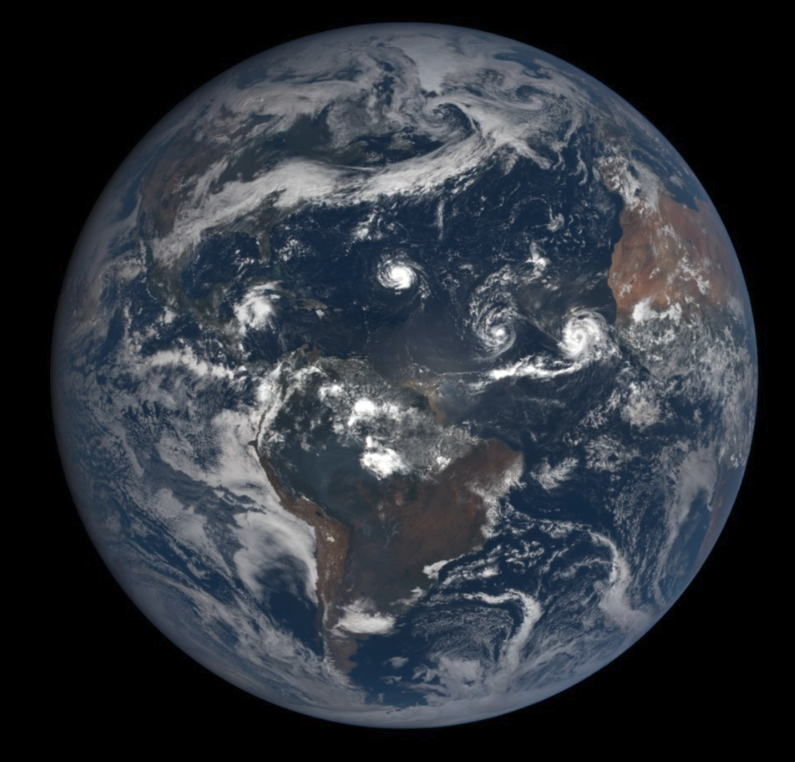
                          0_1536624882671_Florence2.png

                          Create a working config
                          How to add modules

                          1 Reply Last reply Reply Quote 1
                          • Mykle1M Offline
                            Mykle1 Project Sponsor Module Developer
                            last edited by

                            Announcement

                            Anyone that experienced problems with MMM-EARTH yesterday can breathe a sigh of relief. It was not the module that was at fault. It was the API. Whatever problems they were having seem to be over. The module is now working as intended.

                            Create a working config
                            How to add modules

                            justjim1220J 1 Reply Last reply Reply Quote 0
                            • justjim1220J Offline
                              justjim1220 Module Developer @Mykle1
                              last edited by

                              @mykle1

                              YAY!!! :face_with_tears_of_joy: :face_with_tears_of_joy:

                              "Life's Too Short To Dance With Ugly People"
                              Jim Hallock - 1995

                              1 Reply Last reply Reply Quote 0
                              • F Offline
                                fulmik Project Sponsor
                                last edited by

                                Is anyone else having a loading issue today with this module? I just put it on the other day and today after a reboot it stopped loading, all i see is hello mother earth.

                                Mykle1M 1 Reply Last reply Reply Quote 0
                                • Mykle1M Offline
                                  Mykle1 Project Sponsor Module Developer @fulmik
                                  last edited by

                                  @fulmik said in MMM-EARTH:

                                  Is anyone else having a loading issue today with this module? I just put it on the other day and today after a reboot it stopped loading, all i see is hello mother earth.

                                  This same thing happened 4 days ago and was resolved at the API source. Obviously, they are having some troubles on their end. I’m sorry about that. I will make another announcement when the API corrects the issue.

                                  Create a working config
                                  How to add modules

                                  1 Reply Last reply Reply Quote 0
                                  • F Offline
                                    fulmik Project Sponsor
                                    last edited by

                                    Thank you very much , love the module.

                                    Mykle1M 2 Replies Last reply Reply Quote 1
                                    • Mykle1M Offline
                                      Mykle1 Project Sponsor Module Developer @fulmik
                                      last edited by

                                      @fulmik said in MMM-EARTH:

                                      Thank you very much , love the module.

                                      Thanks dude. I love it as well. Been on my mirror since it was born. I’ll keep you posted

                                      Create a working config
                                      How to add modules

                                      1 Reply Last reply Reply Quote 1
                                      • Mykle1M Offline
                                        Mykle1 Project Sponsor Module Developer @fulmik
                                        last edited by

                                        @fulmik

                                        I looked into the data coming from the API. You can tell by the abundance of “null” responses that something is amiss with their data. The image: key shows an image name but the date: key is null, making it impossible to retrieve the image as the module code is written. Hopefully, they will fix the data as quickly as they did last week.
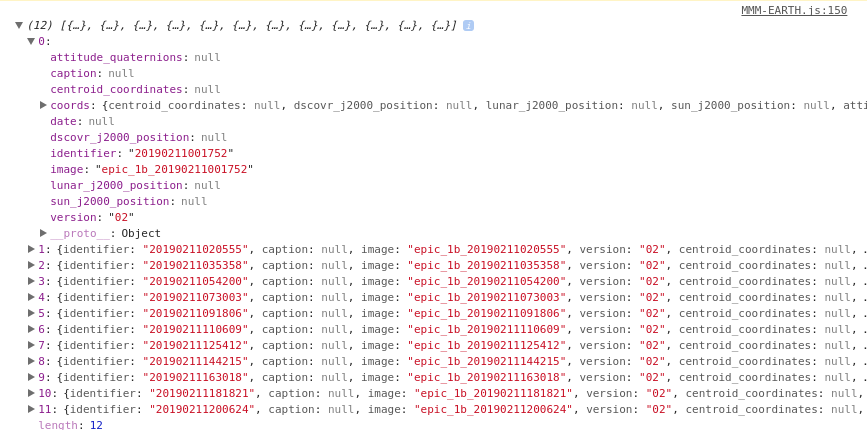
                                        0_1550029736352_earth.png

                                        Create a working config
                                        How to add modules

                                        1 Reply Last reply Reply Quote 0
                                        • G Offline
                                          geograha
                                          last edited by

                                          Glad I found this forum post. I was just trying out this module for the first time and thought I may have misconfigured something. Looks neat from the pictures I’ve seen.

                                          Mykle1M 1 Reply Last reply Reply Quote 0
                                          • Mykle1M Offline
                                            Mykle1 Project Sponsor Module Developer @geograha
                                            last edited by

                                            @geograha

                                            The API only just started have troubles recently. Up one day, down the next. This is not typical. They (NASA) have been very reliable until this point. Please give it a little time to be corrected. I’ll make an announcement here when it’s working again. I’m sure you’ll enjoy it then. The imagery is fantastic and current.


                                            Create a working config
                                            How to add modules

                                            1 Reply Last reply Reply Quote 0

                                            Hello! It looks like you're interested in this conversation, but you don't have an account yet.

                                            Getting fed up of having to scroll through the same posts each visit? When you register for an account, you'll always come back to exactly where you were before, and choose to be notified of new replies (either via email, or push notification). You'll also be able to save bookmarks and upvote posts to show your appreciation to other community members.

                                            With your input, this post could be even better 💗

                                            Register Login

                                            • 1
                                            • 2
                                            • 1 / 2
                                            • First post
                                              Last post
                                            Enjoying MagicMirror? Please consider a donation!
                                            MagicMirror created by Michael Teeuw.
                                            Forum managed by Sam, technical setup by Karsten.
                                            This forum is using NodeBB as its core | Contributors
                                            Contact | Privacy Policy