MagicMirror Forum
    • Recent
    • Tags
    • Unsolved
    • Solved
    • MagicMirror² Repository
    • Documentation
    • 3rd-Party-Modules
    • Donate
    • Discord
    • Register
    • Login
    A New Chapter for MagicMirror: The Community Takes the Lead
    Read the statement by Michael Teeuw here.

    MMM-MyCommute

    Scheduled Pinned Locked Moved Transport
    286 Posts 80 Posters 655.3k Views 77 Watching
    Loading More Posts
    • Oldest to Newest
    • Newest to Oldest
    • Most Votes
    Reply
    • Reply as topic
    Log in to reply
    This topic has been deleted. Only users with topic management privileges can see it.
    • B Offline
      banbutcher
      last edited by

      turns out i didnt have the address formatted correctly! took them directly from google maps and it worked great!

      thanks,
      Richie

      1 Reply Last reply Reply Quote 0
      • B Offline
        banbutcher
        last edited by banbutcher

        is there any way of knowing if calendar events are being passed? Ive added this code to mine and nothing gets added to my commute:

              maxCalendarEvents: 2,
              maxCalendarTime: 24 * 60 * 60 * 1000,
              calendarOptions: [
                      {
                      mode: 'driving'
                      }
              ],  
        

        am i missing something?

        1 Reply Last reply Reply Quote 0
        • T Offline
          testdruif
          last edited by

          Created issue for calendar events regarding arrival time & transit option.
          Also worth noting that calendar events are only first added when the module refreshes traffic (after 10 minutes from startup)

          https://github.com/qistoph/MMM-MyCommute/issues/12

          S T 2 Replies Last reply Reply Quote 0
          • S Do not disturb
            sdetweil @testdruif
            last edited by sdetweil

            @testdruif is this module getting cal events as broadcast by the calendar module? How often does the cal module refresh/broadcast?

            Sam

            How to add modules

            learning how to use browser developers window for css changes

            T 1 Reply Last reply Reply Quote 0
            • T Offline
              testdruif @testdruif
              last edited by testdruif

              @testdruif said in MMM-MyCommute:

              Created issue for calendar events regarding arrival time & transit option.
              Also worth noting that calendar events are only first added when the module refreshes traffic (after 10 minutes from startup)

              https://github.com/qistoph/MMM-MyCommute/issues/12

              When the calendar events are added the code crashes further down the line.
              Code doesn’t add the calendar collor variable.

              1 Reply Last reply Reply Quote 0
              • T Offline
                testdruif @sdetweil
                last edited by

                @sdetweil Yes, the module gets events from calendar module broadcast.

                Another issue: when you have multiple calendar modules configured the array gets wiped at unexpected times.
                So you can only use it correctly with 1 calendar module.

                because the commute module loads before all calendar entries are processed they are processed on the next “commute update” which is 10m by default config.

                S 1 Reply Last reply Reply Quote 0
                • S Do not disturb
                  sdetweil @testdruif
                  last edited by

                  @testdruif hm… I have a module that uses calendar events broadcast, and gets it right away…

                  Sam

                  How to add modules

                  learning how to use browser developers window for css changes

                  1 Reply Last reply Reply Quote 0
                  • S Offline
                    SoleLo
                    last edited by

                    Is there a way to remove the arrival time ?

                    bheplerB 1 Reply Last reply Reply Quote 0
                    • bheplerB Offline
                      bhepler Module Developer @SoleLo
                      last edited by

                      @SoleLo - You could probably modify the custom.css file to hide the value of the arrival time.

                      S 1 Reply Last reply Reply Quote 0
                      • S Offline
                        SoleLo @bhepler
                        last edited by SoleLo

                        @bhepler would something like this work?

                        .MMM-MYCommute.arrival-time-only .time {
                        display: none;

                        UPDATE: I actually tried
                        .MMM-MYCommute. transit-arrival-time.time
                        {
                        display: none;
                        }

                        Still doesn’t work.

                        1 Reply Last reply Reply Quote 0
                        • S Offline
                          sun34529
                          last edited by

                          @SoleLo and @bhepler , I’m trying to figure this out as well. Any luck?

                          S 1 Reply Last reply Reply Quote 0
                          • lavolp3L Offline
                            lavolp3 Module Developer
                            last edited by lavolp3

                            I see that the most recent active fork of this module has changed to @qistoph ?
                            I am wondering if the module still works with one origin or if there’s already a possibility for several routes with different origins and destinations?

                            How to troubleshoot modules
                            MMM-soccer v2, MMM-AVStock

                            1 Reply Last reply Reply Quote 0
                            • S Do not disturb
                              sdetweil @sun34529
                              last edited by sdetweil

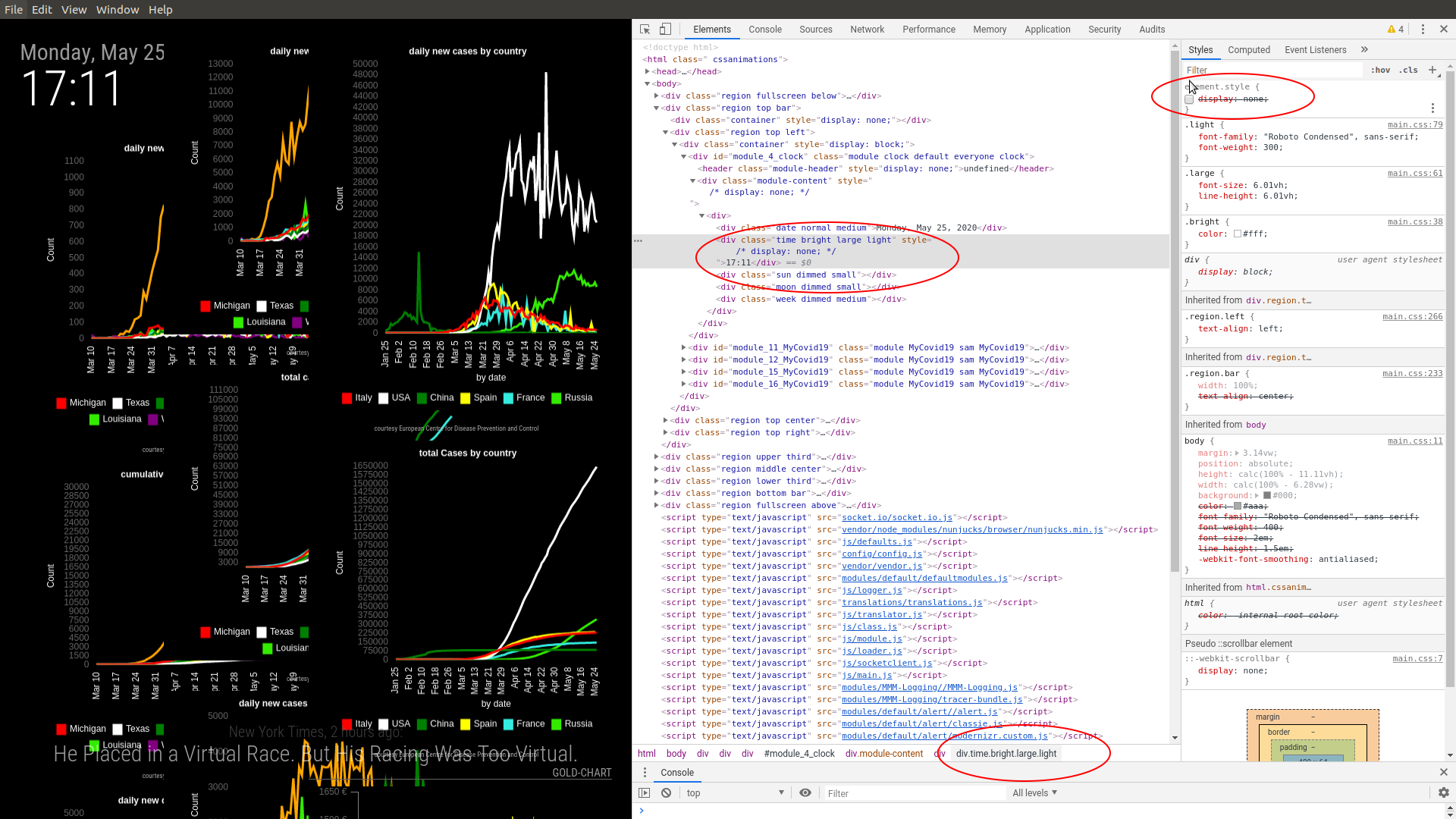
                              @sun34529 use a browser on your pc, chrome or firefox, and open the MM page, (make sure the mm config allows outside access with

                              address:"0.0.0.0",
                              ipWhitelist:[],
                              

                              in config.js)

                              then do ctrl-shift-i on your keyboard to open the developers window,
                              and select the elements tab, and navigate to the module content to the piece u are interested in
                              once there, click on it in the elements tree (so it becomes selected) and u will see the css tree for that element on the right side.

                              the top most is the info AT the element, u can click to add display:none and the element should not be shown…
                              on the bottom of the screen shows the class name tree
                              this will give u the info to get the file update right… Screenshot at 2020-05-25 17-11-54.png
                              Sam

                              How to add modules

                              learning how to use browser developers window for css changes

                              1 Reply Last reply Reply Quote 0
                              • RedNaxR Offline
                                RedNax Module Developer
                                last edited by RedNax

                                Hi everyone,

                                Just to remind you that this still works…

                                https://github.com/RedNax67/MMM-TrafficCal

                                https://forum.magicmirror.builders/topic/831/mmm-trafficcal-dynamically-display-commutes-based-on-calendar-entries?_=1590694194999

                                S 1 Reply Last reply Reply Quote 0
                                • S Offline
                                  Srcodesalittle
                                  last edited by

                                  Hi there. Thanks for making this module.
                                  I was running this flawlessly till a few days ago when it randomly just disappeared from my mirror. The API is still active, I haven’t crossed my billing threshold or anything and the startup logs do show that Mycommute has started. Do you by any chance have any suggestions on what could be happening?

                                  Thanks in advance!

                                  1 Reply Last reply Reply Quote 0
                                  • S Offline
                                    Srcodesalittle @RedNax
                                    last edited by

                                    @RedNax Thanks for the heads up. So, I don’t actually run a calendar module so I’m a little lost on how to specify the destination (I go to the same destination everyday).
                                    Could you possibly please give me a more broken down instruction on what I need to do to set a destination?
                                    Thanks in advance!

                                    1 Reply Last reply Reply Quote 0
                                    • L Offline
                                      leem2000
                                      last edited by

                                      Hi, I’m new to Pi and MM. I’ve installed few modules and got them working. MMM-MyCommute looks to be a very useful module but can’t get it to work. I installed it following the instructions on its git page. It’s failing to load. I get “Loading…”.

                                      I’m running with unmodified config from the git module page with my apiKey and hideDays set to []. The API key works as I have tested it with another module and also with https://maps.googleapis.com/maps/api/directions/json?origin=Disneyland&destination=Universal+Studios+Hollywood&key=. No errors in pm2 logs either. Peeking into the main .js file, there are log statements. I can’t locate a log file. Not familiar with Node or MM. Would appreciate pointers on what to try and where to look next.

                                      Thanks in advance.

                                      S 1 Reply Last reply Reply Quote 0
                                      • S Do not disturb
                                        sdetweil @leem2000
                                        last edited by

                                        @leem2000 for the MMM-MyCommute.js, open the developers window (ctrl-shift-i on the mirror keyboard), select the console tab… u can filter too, enter comm in the filter field to see messages out from only a module with ‘comm’ in its name

                                        Sam

                                        How to add modules

                                        learning how to use browser developers window for css changes

                                        L 1 Reply Last reply Reply Quote 0
                                        • L Offline
                                          leem2000 @sdetweil
                                          last edited by leem2000

                                          Thanks @sdetweil. There are some errors logged to the console.
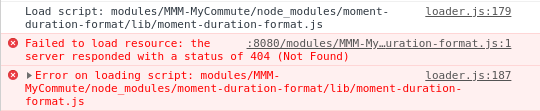
                                          7775e043-73e5-4686-9d3f-ad7796792449-image.png
                                          The module it’s trying to access is
                                          http://localhost:8080/modules/MMM-MyCommute/node_modules/moment-duration-format/lib/moment-duration-format.js.
                                          When I put that into the browser I get
                                          Cannot GET /modules/MMM-MyCommute/node_modules/moment-duration-format/lib/moment-duration-format.js

                                          Then for each destination, I get
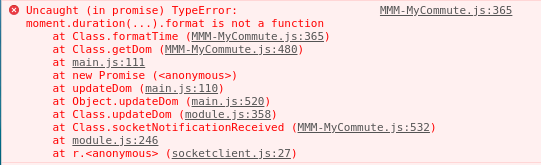
                                          573cee3c-59fb-4268-bd4b-2086421aa26d-image.png

                                          Clearly, moment.duration format function is missing. I installed node by following manual install instructions in MM install page.

                                          I have the following in node_modules/moment. This is as installed and not modified.

                                          pi@raspberrypi:~/MagicMirror/node_modules/moment $ pwd
                                          /home/pi/MagicMirror/node_modules/moment
                                          pi@raspberrypi:~/MagicMirror/node_modules/moment $ ls
                                          CHANGELOG.md  ender.js  locale  moment.d.ts  package.js    README.md  ts3.1-typings
                                          dist          LICENSE   min     moment.js    package.json  src
                                          

                                          Any ideas on how to fix this?

                                          S 1 Reply Last reply Reply Quote 0
                                          • S Do not disturb
                                            sdetweil @leem2000
                                            last edited by

                                            @leem2000its looking for the moment in the MODULE node_modules folder, NOT the base

                                            did u do the npm install in the module folder?

                                            Enter the MMM-MyCommute directory and execute npm install

                                            

                                            Sam

                                            How to add modules

                                            learning how to use browser developers window for css changes

                                            L 1 Reply Last reply Reply Quote 0

                                            Hello! It looks like you're interested in this conversation, but you don't have an account yet.

                                            Getting fed up of having to scroll through the same posts each visit? When you register for an account, you'll always come back to exactly where you were before, and choose to be notified of new replies (either via email, or push notification). You'll also be able to save bookmarks and upvote posts to show your appreciation to other community members.

                                            With your input, this post could be even better 💗

                                            Register Login

                                            • 1
                                            • 2
                                            • 3
                                            • 4
                                            • 5
                                            • 14
                                            • 15
                                            • 1 / 15
                                            • First post
                                              Last post
                                            Enjoying MagicMirror? Please consider a donation!
                                            MagicMirror created by Michael Teeuw.
                                            Forum managed by Sam, technical setup by Karsten.
                                            This forum is using NodeBB as its core | Contributors
                                            Contact | Privacy Policy