MagicMirror Forum
    • Recent
    • Tags
    • Unsolved
    • Solved
    • MagicMirror² Repository
    • Documentation
    • 3rd-Party-Modules
    • Donate
    • Discord
    • Register
    • Login
    A New Chapter for MagicMirror: The Community Takes the Lead
    Read the statement by Michael Teeuw here.

    MMM-MyCalendar

    Scheduled Pinned Locked Moved Utilities
    109 Posts 40 Posters 144.2k Views 38 Watching
    Loading More Posts
    • Oldest to Newest
    • Newest to Oldest
    • Most Votes
    Reply
    • Reply as topic
    Log in to reply
    This topic has been deleted. Only users with topic management privileges can see it.
    • J Offline
      j.e.f.f Project Sponsor Module Developer
      last edited by j.e.f.f

      [card:jclarke0000/MMM-MyCalendar]

      UPDATE: v2.0 released – requires MagicMirror v 2.2.0
      See below for details.

      This is based on the default calendar module, and is functionally exactly the same. The difference is in presentation layout:

      0_1494633843517_Screen Shot 2017-05-12 at 8.00.40 PM.png

      A note on v2.0:
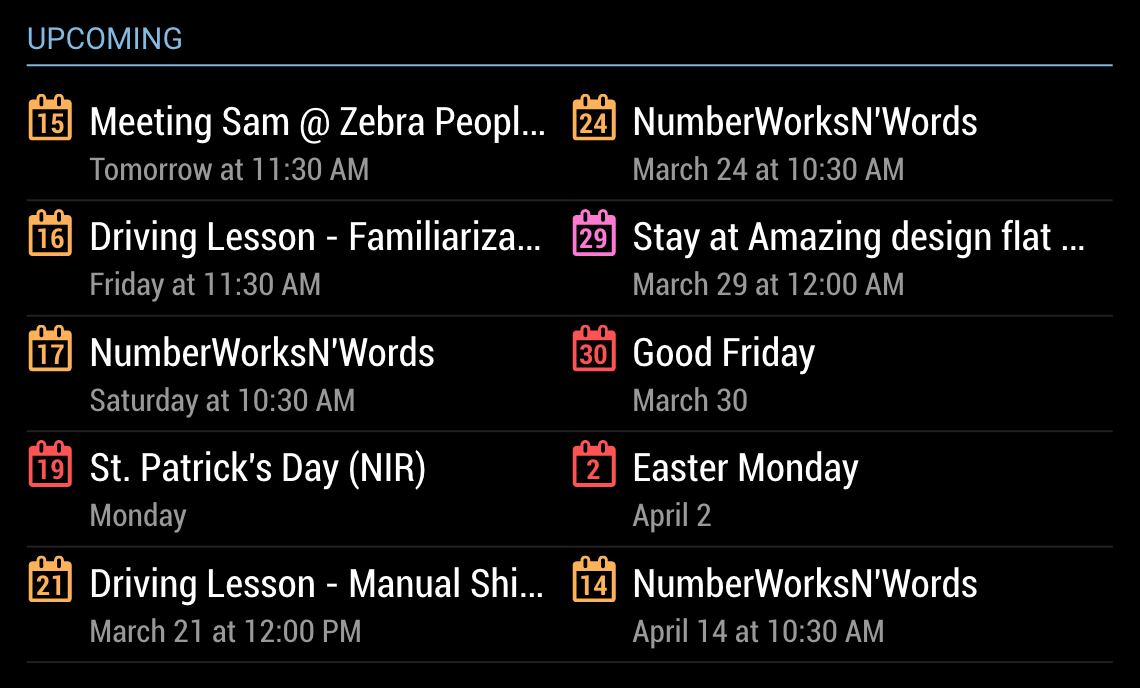
      I’ve updated this module to use the new Nunjucks templating system. It also adds a new optional 2-column layout, useful if you’ve assigned MMM-MyCalendar to a wide region in your layout. See screenshot below. If you want to use this version you will need MagicMirror v2.2.0. Otherwise, you can download v1.0 here, which will work with earlier MM versions but will not have the 2-column layout option:
      https://github.com/jclarke0000/MMM-MyCalendar/releases/tag/v1.0

      0_1521028879950_Screen Shot 2018-03-14 at 12.00.41 PM.png

      rudibaraniR ? C 3 Replies Last reply Reply Quote 1
      • rudibaraniR Offline
        rudibarani Project Sponsor @j.e.f.f
        last edited by rudibarani

        @j.e.f.f Hi j.e.f.f.,
        it seems, as you made all the cool modules - so I keep coming back to you with questions. Hope that is OK.
        I plan to use your module to show if today is a national holiday.

        I have three questions for you:

        • If today is no holiday, you module shows “keine Termine” (=no entries). Is it possible to completely hide it, if no entry is present? (I limited the module to show only today’s entry from a public national holiday calendar).

        • You designed a nice way to integrate the number of the day into the calendar icon. I found this to be very useful for upcoming events - but would love to use custom symbols like in the original calendar for entries that are today (e.g. cake for birthdays) to visually separate things easily. The “symbol” variable does not seem to change it. Is it disabled? Or could it be used to overwrite your symbol?

        *Every entry is shown with a symbol, the description and a text, when it will be. In this example “Dienstag” (=tuesday). Is it possible to hide this last element and show only the symbol and the description? As my holiday-checker only shows today’s entries, this could be omitted and look cleaner.

        Thanks for your help!

        J 1 Reply Last reply Reply Quote 0
        • ? Offline
          A Former User
          last edited by

          @j-e-f-f Nice job!
          I have a few question.

          1. How can I set the color of icons? My config is here. I don’t know why it doesn’t work.
          {...
              colored: true,  // required, right?
              config: {
                  calendars: [
                      {
                           color: '#99FF99', // I don't know why this color doesn't work
                           url: "something.ics"
                      }
          },
          
          1. How can you attach extra icon? In your screenshot, “Kinetic Social Pay” event has some image icon. I want to know how to do.
          strawberry 3.141S J 2 Replies Last reply Reply Quote 1
          • strawberry 3.141S Offline
            strawberry 3.141 Project Sponsor Module Developer @Guest
            last edited by

            @Sean you didn’t nest the config properly

            {...
                config: {
                    colored: true,  // required, right?
                    calendars: [
                        {
                             color: '#99FF99', // I don't know why this color doesn't work
                             url: "something.ics"
                        }
            },
            

            Please create a github issue if you need help, so I can keep track

            1 Reply Last reply Reply Quote 0
            • J Offline
              j.e.f.f Project Sponsor Module Developer @rudibarani
              last edited by j.e.f.f

              @rudibarani I just use a holiday calendar to add national holidays into the list. Like the ones you can find here:
              https://www.calendarlabs.com/ical-calendar-holidays.php

              If you download the ics file, you can insert the name into the url like this:
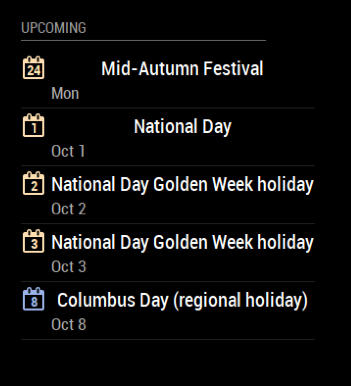
              http://www.calendarlabs.com/templates/ical/Canada-Holidays.ics

              renders like this:
              0_1498393758770_509802ac-dc34-407e-8a25-5964eea08bff-image.png

              As for bringing back the alternative icon, it would break the design. The number in the calendar is the only place where the day of the month is indicated. If there were were a custom icon, I would have to put the full date into the description line, which I was trying to keep as minimal as possible. My thought is that my family would look at this for 30 seconds max on the way out the door. So I’m trying to keep the mental processing down.

              Maybe the original calendar beter suits your needs?

              1 Reply Last reply Reply Quote 1
              • J Offline
                j.e.f.f Project Sponsor Module Developer @Guest
                last edited by

                @Sean That extra icon beside “Kinetic Social Pay” is an emoji in the calendar entry itself. It has nothing to do with this module. In any case, you’re seeing a screenshot from my laptop. It doesn’t render on the mirror running Raspberry Pi. I just see a box.

                Does anyone know how to incorporate emojis on the Pi?

                bdeelmanB 1 Reply Last reply Reply Quote 0
                • kruemelK Offline
                  kruemel
                  last edited by kruemel

                  Hey Jeff

                  Iam not sure if this happend with the change, but i just updated your other module…

                  Since you added the possibility to change the format of your MyCommute travelTime (travelTimeFormat: “h[h] m[m]”,) i have the following issue with your calendar module.

                  Iam from switzerland and we are using the 24h mode.
                  If i set 12h in the config, the apointment is correct 7:00pm
                  0_1502691338110_12h.png

                  If i change to 24h in the config (which here is the common setting) it shows 7:00 (am) instead of 19:00
                  0_1502691470769_24h.png

                  I know the module is just modified from you (with the integrated basic “calendar” module which comes with the MagicMirror itself i also have the same issue).
                  So i think this could be an effect of the recent change of the “moment-duration-format” you describe? Or is this not possible?
                  (that works by the way, perfectly)
                  0_1502692126077_traffic.png

                  Thank you and you made a great job with this modules, love those! :-)

                  J 2 Replies Last reply Reply Quote 0
                  • J Offline
                    j.e.f.f Project Sponsor Module Developer @kruemel
                    last edited by

                    @kruemel Ah! I see. The problem here is my version of the module is not properly respecting the global time format setting, so you’re getting a weird combination of 12 hour and 24 hour time in the output. I’ll see how soon I can get a fix in place for this.

                    1 Reply Last reply Reply Quote 0
                    • J Offline
                      j.e.f.f Project Sponsor Module Developer @kruemel
                      last edited by

                      @kruemel OK So I made a rather significant change in order to support this. Instead of trying to use the global time format parameter, you now explicitly specify how you would like days, dates and times displayed in your config. This gives you absolute control over everything.

                      To get the update, navigate to the MMM-MyCalendar directory and execute git pull.

                      IMPORTANT!!
                      One of the configuration parameters no longer means what it used to. If you used timeFormat to specify if you would like to see relative or absolute dates for upcoming events, that parameter is now named useRelativeDates, and you can specify true or false (Defaults to false).

                      timeFormat is now used to specify how you would like to see time displayed. For example, if you wanted 24 hour time with leading zeros, you would specify HH:mm (e.g.: 07:00, 23:30, etc).

                      dateFormat, which was previously used to specify a full string for date and time display is now used JUST to configure how you would like dates to be displayed. (e.g.: MMMM D for January 2, DD-MMM for 02-Jan, etc).

                      dayOfWeekFormat is new and is used to specify how you would like to see weekday names displayed (e.g.: dddd for Monday, ddd for Mon, etc.).

                      joiningWord is the word you would like to see displayed between Day/Date and Time. It defaults to at (e.g.: January 2 at 2:00 PM), so if you do not want a joining word, specify an empty string (i.e.: joiningWord : ""). In the above example you would configure joiningWord : "um".

                      The module will build the full event date string using bits and pieces of how your configure the items above.

                      1 Reply Last reply Reply Quote 1
                      • kruemelK Offline
                        kruemel
                        last edited by

                        You’r great :-)

                        Thank you very much, it works like a charm. Also happy about the joiningWord.
                        That makes fun to use with short response from developers ;-)

                        Wish you a nice week and thanks again for your fast adjustment!

                        J 1 Reply Last reply Reply Quote 0
                        • J Offline
                          j.e.f.f Project Sponsor Module Developer @kruemel
                          last edited by

                          @kruemel Glad you like the update!

                          1 Reply Last reply Reply Quote 0
                          • pjkoelemanP Offline
                            pjkoeleman
                            last edited by

                            Re: MMM-MyCalendar
                            @j-e-f-f Thanks a lot for the latest update. Now I have a request for an addittion.

                            In the line with the appointment date and time my line in Dutch now reads
                            “Morgen om 19:00” > “Tomorrow at 19:00”
                            Can we ad a suffix word like “joiningWord”? In this way I can configure my appointment day and time line as
                            “Morgen om 19:00 uur” > “Tomorrow at 19:00 hour”
                            When you don’t want the suffix make it possible to use an empty string like joiningWord (suffixWord : “”)

                            On Github I sent you my proposed file changes.

                            Thanks in advance.

                            J 1 Reply Last reply Reply Quote 0
                            • J Offline
                              j.e.f.f Project Sponsor Module Developer @pjkoeleman
                              last edited by

                              @pjkoeleman you can add that into your timeFormat config, like so:

                              timeFormat : "HH:mm [uur]"

                              Anything in the square brackets will display exactly as you type it.

                              pjkoelemanP 1 Reply Last reply Reply Quote 2
                              • pjkoelemanP Offline
                                pjkoeleman @j.e.f.f
                                last edited by

                                @j.e.f.f
                                That will do as well, thanks for your repley.

                                1 Reply Last reply Reply Quote 0
                                • KimzerK Offline
                                  Kimzer
                                  last edited by

                                  I love this module. Very nicely made. But i would like to be able to show a calender with every single day + something special to show the holidays(i only use it for holidays now)
                                  Can i create an ical with all the days in it and maybe have a certain color for holidays?

                                  J ? 2 Replies Last reply Reply Quote 0
                                  • J Offline
                                    j.e.f.f Project Sponsor Module Developer @Kimzer
                                    last edited by

                                    @Kimzer Do you mean you want to display the whole year? If so that is not what this is designed to do. The thinking behind this is that you really don’t spend a lot of time looking at the mirror, so it only displays information that is immediately useful and that can be consumed in about 30 seconds.

                                    That said, I think I saw a calendar module that displays a month at a time that might be more in line with what you are looking for. Sorry I don’t remember its name but if you do a search I’m sure you’ll find it.

                                    strawberry 3.141S 1 Reply Last reply Reply Quote 0
                                    • strawberry 3.141S Offline
                                      strawberry 3.141 Project Sponsor Module Developer @j.e.f.f
                                      last edited by

                                      @j.e.f.f should be calendar_monthly by @KirAsh4

                                      Please create a github issue if you need help, so I can keep track

                                      1 Reply Last reply Reply Quote 0
                                      • ? Offline
                                        A Former User @Kimzer
                                        last edited by

                                        @Kimzer Consider MMM-CalendarExt. It has daily view.(or something more than)

                                        1 Reply Last reply Reply Quote 0
                                        • J Offline
                                          Johans
                                          last edited by

                                          Nice module, great work.

                                          Now I see the US calendar but I would like to see a Belgian calendar with school hollidays and also where I can add local appointments.
                                          How can I do this - any instructions or help would be great

                                          J 1 Reply Last reply Reply Quote 0
                                          • J Offline
                                            j.e.f.f Project Sponsor Module Developer @Johans
                                            last edited by j.e.f.f

                                            @Johans Try this site:

                                            https://calendar.teamup.com/kb/holiday-calendar-feeds-preview-teamup/

                                            There is one for Belgium there, as well as a whole bunch of countries.

                                            To add your own appointments, just follow the same instructions as the default calendar for adding your own calendar account.

                                            J 1 Reply Last reply Reply Quote 0

                                            Hello! It looks like you're interested in this conversation, but you don't have an account yet.

                                            Getting fed up of having to scroll through the same posts each visit? When you register for an account, you'll always come back to exactly where you were before, and choose to be notified of new replies (either via email, or push notification). You'll also be able to save bookmarks and upvote posts to show your appreciation to other community members.

                                            With your input, this post could be even better 💗

                                            Register Login

                                            • 1
                                            • 2
                                            • 3
                                            • 4
                                            • 5
                                            • 6
                                            • 1 / 6
                                            • First post
                                              Last post
                                            Enjoying MagicMirror? Please consider a donation!
                                            MagicMirror created by Michael Teeuw.
                                            Forum managed by Sam, technical setup by Karsten.
                                            This forum is using NodeBB as its core | Contributors
                                            Contact | Privacy Policy