Read the statement by Michael Teeuw here.
MMM-Instagram - Pull and animate photos from Instagram feed
-
Hi,
I have not looked into autoresizing an image. It is on my list to get to when I have some time.
The image at this point is not being resized, I just take it and display it as it comes from instagram.
Videos will auto play when I get to them as well.Thanks!
-
@dr0pb0x , @kapsolas I had a quick look at your code (Not a fan of the bit.ly link) and if you go about displaying the Instagram image this way:
	var imageWrapper = document.createElement("img");
	imageWrapper.src = tempimpage.photolink;
	imageWrapper.style.maxWidth = this.config.instaMaxWidth;
	imageWrapper.style.maxHeight = this.config.instaMaxHeight;
	imageDisplay.appendChild(imageWrapper);
you should be able to specify two parameters
instaMaxWidthandinstaMaxHeightthat the user can change in their config.file so the beginning of your MMM-Instagram.js file would look like this:defaults: { format: 'json', lang: 'en-us', id: '', animationSpeed: 1000, updateInterval: 60000, // 10 minutes access_token: '', count: 200, min_timestamp: 0, loadingText: 'Loading...', instaMaxWidth: '100%', instaMaxHeight: '100%' },Now, any user of your module could define their own maximum image width and height, either by specifying an absolute figure like ‘300px’ or in relative terms using ‘20%’ or the like. I’ve created a pull request, but I suggest you test my code first as I don’t have an Instagram account or Instagram API key to test it.
You can use my fork to do so: https://github.com/yo-less/MMM-Instagram
-
@yo-less unfortunately this didn’t work :( I even tried setting it to 1px/1% just to make sure but the images didnt change in size
-
@dr0pb0x Have you tried using my forked version here:
https://github.com/yo-less/MMM-Instagram -
@dr0pb0x I’ve tried it with my forked version after changing the module to simply retrieve any picture from the internet. It’s working fine.
The only limitation is that you can’t set the MaxHeight in relative terms (percentages), other than that, it works as intended as far as I can tell without actually using the API. -
@yo-less I just had a chance to try it out and it still doesn’t work for me. Could it possibly be Instagram’s API?
-
Is there anyway to display images from my home server? And do someone have an idea how I should write the code?
-
-
Awesome work! My SO is very pleased with this idea. You might want to add a screenshot to the repo.
-
Just getting “Loading…”
-
This post is deleted! -
@cowboysdude said in MMM-Instagram - Pull and animate photos from Instagram feed:
Some of us are having issues here… little help please.
Installed per instructions with NPM Install and it isn’t working.
That’s all mine says too… “Loading…”
apparently this is an unsupported module… delete.
-
I just started up my mirror again and the instagram module loaded up correctly.
Are you use that you have configured the token correctly?
Additionally, install a tool like firebug on your browser and try to access the mirror using the browser. Then enable firebug. It will have error messages or plugin messages written to the console.
If the plugin gets images and starts to display them, you will get console entries such as: incrementing the activeItem and refreshing
-
Well we’re certainly glad it worked for you…however…
{
module: ‘MMM-Instagram’,
position: ‘top_right’,
config: {
access_token: ‘API_KEY from instagram’,
count: 200,
min_timestamp: 0,
animationSpeed: 2500,
updateInterval: 12500
}
},Replaced ‘API_KEY …’
and followed all directions and it still sits there and says “Loading…”…
-
@cowboysdude said in MMM-Instagram - Pull and animate photos from Instagram feed:
Well we’re certainly glad it worked for you…however…
{
module: ‘MMM-Instagram’,
position: ‘top_right’,
config: {
access_token: ‘API_KEY from instagram’,
count: 200,
min_timestamp: 0,
animationSpeed: 2500,
updateInterval: 12500
}
},Replaced ‘API_KEY …’
and followed all directions and it still sits there and says “Loading…”…
Same
-
What are you guys seeing in the console log? If you are not anything… then I will have to send you a version of the module with debug comments in it to see where the issue is.
FYI - I had a similar issue with the Module for Traffic and never solved it. It just sat on Loading…
-
@kapsolas Well gosh darn it LOL SOLVE IT MAN! Lives are hangin in the balance…
No I have run it in dev mode and I see or get no errors… so perhaps using a version with debug would be best :)
-
OH I stand corrected… here’s an error:
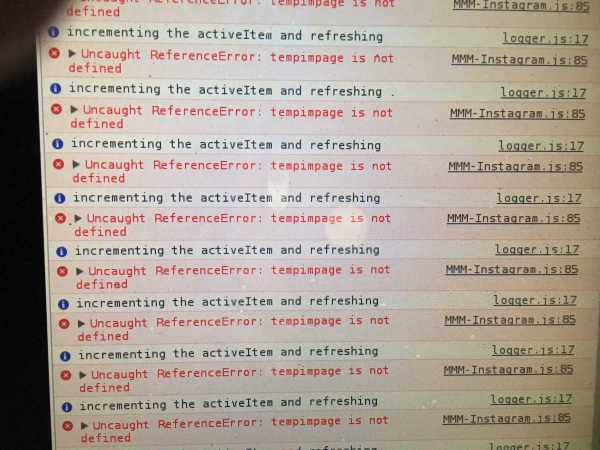
-
How do you get it to show in a browser??
-
@wjdw87 said in MMM-Instagram - Pull and animate photos from Instagram feed:
How do you get it to show in a browser??
restart your mirror like this:
npm start dev



Hello! It looks like you're interested in this conversation, but you don't have an account yet.
Getting fed up of having to scroll through the same posts each visit? When you register for an account, you'll always come back to exactly where you were before, and choose to be notified of new replies (either via email, or push notification). You'll also be able to save bookmarks and upvote posts to show your appreciation to other community members.
With your input, this post could be even better 💗
Register Login