MagicMirror Forum
    • Recent
    • Tags
    • Unsolved
    • Solved
    • MagicMirror² Repository
    • Documentation
    • 3rd-Party-Modules
    • Donate
    • Discord
    • Register
    • Login
    A New Chapter for MagicMirror: The Community Takes the Lead
    Read the statement by Michael Teeuw here.

    MMM-Instagram - Pull and animate photos from Instagram feed

    Scheduled Pinned Locked Moved Utilities
    87 Posts 26 Posters 114.7k Views 27 Watching
    Loading More Posts
    • Oldest to Newest
    • Newest to Oldest
    • Most Votes
    Reply
    • Reply as topic
    Log in to reply
    This topic has been deleted. Only users with topic management privileges can see it.
    • ? Offline
      A Former User @cowboysdude
      last edited by

      @cowboysdude said in MMM-Instagram - Pull and animate photos from Instagram feed:

      Well we’re certainly glad it worked for you…however…

      {
      module: ‘MMM-Instagram’,
      position: ‘top_right’,
      config: {
      access_token: ‘API_KEY from instagram’,
      count: 200,
      min_timestamp: 0,
      animationSpeed: 2500,
      updateInterval: 12500
      }
      },

      Replaced ‘API_KEY …’

      and followed all directions and it still sits there and says “Loading…”…

      Same

      1 Reply Last reply Reply Quote 0
      • K Offline
        kapsolas Module Developer
        last edited by

        What are you guys seeing in the console log? If you are not anything… then I will have to send you a version of the module with debug comments in it to see where the issue is.

        FYI - I had a similar issue with the Module for Traffic and never solved it. It just sat on Loading…

        cowboysdudeC 1 Reply Last reply Reply Quote 1
        • cowboysdudeC Offline
          cowboysdude Module Developer @kapsolas
          last edited by cowboysdude

          @kapsolas Well gosh darn it LOL SOLVE IT MAN! Lives are hangin in the balance…

          No I have run it in dev mode and I see or get no errors… so perhaps using a version with debug would be best :)

          1 Reply Last reply Reply Quote 0
          • cowboysdudeC Offline
            cowboysdude Module Developer
            last edited by

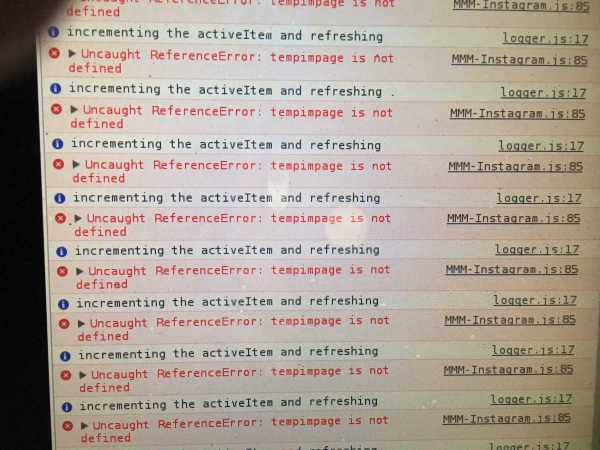
            OH I stand corrected… here’s an error:
            0_1477525313189_IMG_1938-min__1477525285_74.69.130.112.jpg

            1 Reply Last reply Reply Quote 0
            • ? Offline
              A Former User
              last edited by

              How do you get it to show in a browser??

              cowboysdudeC 1 Reply Last reply Reply Quote 0
              • cowboysdudeC Offline
                cowboysdude Module Developer @Guest
                last edited by

                @wjdw87 said in MMM-Instagram - Pull and animate photos from Instagram feed:

                How do you get it to show in a browser??

                restart your mirror like this:

                npm start dev

                1 Reply Last reply Reply Quote 0
                • ? Offline
                  A Former User
                  last edited by

                  cool thanks

                  cowboysdudeC 1 Reply Last reply Reply Quote 0
                  • cowboysdudeC Offline
                    cowboysdude Module Developer @Guest
                    last edited by

                    @wjdw87 You’re welcome :) NOW if he can solve the problem it’ll work! :)

                    1 Reply Last reply Reply Quote 0
                    • K Offline
                      kapsolas Module Developer
                      last edited by

                      Hmm. that tempimpage variable is not found in my code.

                      Did you modify the code at all? The code should look as below. In the error message it shows tempimpage which is not a valid variable. This would cause the script to not work.

                         var tempimage = this.images.photo[this.activeItem];
                          
                          // image
                          var imageLink = document.createElement('div');
                          imageLink.id = "MMM-Instagram-image";
                          imageLink.innerHTML = "<img src='" + tempimage.photolink + "'>";
                          
                          imageDisplay.appendChild(imageLink);
                          wrapper.appendChild(imageDisplay);
                      
                      cowboysdudeC ? 2 Replies Last reply Reply Quote 0
                      • cowboysdudeC Offline
                        cowboysdude Module Developer @kapsolas
                        last edited by cowboysdude

                        @kapsolas no didn’t modify. So what I’ll do is delete what’s there and recopy it since I already did the npm install.

                        Thank you!! 😊

                        1 Reply Last reply Reply Quote 0
                        • ? Offline
                          A Former User @kapsolas
                          last edited by

                          @kapsolas Where is this “added code” that needs to be removed, sorry missed that.

                          1 Reply Last reply Reply Quote 0
                          • ? Offline
                            A Former User
                            last edited by A Former User

                            Remove " + tempimage.photolink + “'>”" ?

                            /* global Module */

                            /* Magic Mirror

                            • Module: MMM-Instagram
                            • By Jim Kapsalis https://github.com/kapsolas
                            • MIT Licensed.
                              */

                            Module.register(‘MMM-Instagram’, {

                            defaults: {
                                format: 'json',
                                lang: 'en-us',
                                id: '',
                                animationSpeed: 1000,
                                updateInterval: 60000, // 10 minutes
                                access_token: '',
                                count: 200,
                                min_timestamp: 0,
                                loadingText: 'Loading...'
                            },
                            
                            // Define required scripts
                            getScripts: function() {
                                return ["moment.js"];
                            },
                            
                            /*
                            // Define required translations
                            getTranslations: function() {
                                return false;
                            },
                            */
                            
                            // Define start sequence
                            start: function() {
                                Log.info('Starting module: ' + this.name);
                                this.data.classes = 'bright medium';
                                this.loaded = false;
                                this.images = {};
                                this.activeItem = 0;
                                this.url = 'https://api.instagram.com/v1/users/self/media/recent' + this.getParams();
                                this.grabPhotos();
                            },
                            
                            grabPhotos: function() {
                                // the notifications are not working for some reason... so we won't do anything asynchronously
                                // we will just make the call to the method to get the object with photo links....
                                //Log.info('sending socket notification: INSTAGRAM_GET and URL: ' + this.url);
                                this.sendSocketNotification("INSTAGRAM_GET", this.url);
                                
                                // this may not be needed... need to think about it.
                                //setTimeout(this.grabPhotos, this.config.interval, this);
                            },
                            
                            
                            getStyles: function() {
                                return ['instagram.css', 'font-awesome.css'];
                            },
                            
                            // Override the dom generator
                            getDom: function() {
                                var wrapper = document.createElement("div");
                                var imageDisplay = document.createElement('div'); //support for config.changeColor
                            
                                if (!this.loaded) {
                                    wrapper.innerHTML = this.config.loadingText;
                                    return wrapper;
                                }
                                
                                // set the first item in the list...
                                if (this.activeItem >= this.images.photo.length) {
                                    this.activeItem = 0;
                                }
                                
                                var tempimage = this.images.photo[this.activeItem];
                                
                                // image
                            	var imageLink = document.createElement('div');
                            		imageLink.id = "MMM-Instagram-image";
                            		imageLink.innerHTML = "<img src='" + tempimage.photolink + "'>";
                            
                            		imageDisplay.appendChild(imageLink);
                            		wrapper.appendChild(imageDisplay);
                               
                                return wrapper;
                            },
                            
                            /* scheduleUpdateInterval()
                             * Schedule visual update.
                             */
                            scheduleUpdateInterval: function() {
                                var self = this;
                            
                                Log.info("Scheduled update interval set up...");
                                self.updateDom(self.config.animationSpeed);
                            
                                setInterval(function() {
                                    Log.info("incrementing the activeItem and refreshing");
                                    self.activeItem++;
                                    self.updateDom(self.config.animationSpeed);
                                }, this.config.updateInterval);
                            },
                            
                            /*
                             * getParams()
                             * returns the query string required for the request to flickr to get the 
                             * photo stream of the user requested
                             */
                            getParams: function() {
                                var params = '?';
                                params += 'count=' + this.config.count;
                                params += '&min_timestamp=' + this.config.min_timestamp;
                                params += '&access_token=' + this.config.access_token;
                                return params;
                            },
                            
                            // override socketNotificationReceived
                            socketNotificationReceived: function(notification, payload) {
                                //Log.info('socketNotificationReceived: ' + notification);
                                if (notification === 'INSTAGRAM_IMAGE_LIST')
                                {
                                    //Log.info('received INSTAGRAM_IMAGE_LIST');
                                    this.images = payload;
                                    
                                    //Log.info("count: " +  this.images.photo.length);
                                    
                                    // we want to update the dom the first time and then schedule next updates
                                    if (!this.loaded) {
                                    this.updateDom(1000);
                                        this.scheduleUpdateInterval();
                                    }
                                    
                                    this.loaded = true;
                                }
                            }
                            

                            });

                            1 Reply Last reply Reply Quote 0
                            • ? Offline
                              A Former User
                              last edited by A Former User

                              0_1477587891937_Screenshot 2016-10-28 00.03.39.png

                              K 1 Reply Last reply Reply Quote 0
                              • K Offline
                                kapsolas Module Developer @Guest
                                last edited by

                                @wjdw87 Based on the code you have provided above, it looks correct. It does not have the tempimpage anywhere.

                                I did not ask you to delete any code, but somehow the code you were running had tempimage misspelled to tempimpage.

                                The messages you are showing in the screenshot, are from the core system, but does show that the instagram feed module is running. So there is something else.

                                To confirm:

                                1. You cloned the module from github
                                2. You generated a token for instragram
                                3. Configured the config.js file, configuration for the module appropriately
                                1 Reply Last reply Reply Quote 0
                                • cowboysdudeC Offline
                                  cowboysdude Module Developer
                                  last edited by cowboysdude

                                  I’m all good… I have NO idea where I got that version from but I copied over your original and it fired up…

                                  Thank you!

                                  I believe that version is yoless fork… someone wanted the ability to adjust width and height… which is not a bad idea … ;)

                                  1 Reply Last reply Reply Quote 0
                                  • K Offline
                                    kapsolas Module Developer
                                    last edited by

                                    Awesome! Glad to hear we got it all set up! Enjoy the module!

                                    cowboysdudeC 1 Reply Last reply Reply Quote 1
                                    • cowboysdudeC Offline
                                      cowboysdude Module Developer @kapsolas
                                      last edited by

                                      @kapsolas said in MMM-Instagram - Pull and animate photos from Instagram feed:

                                      Awesome! Glad to hear we got it all set up! Enjoy the module!

                                      I really do! Thanks for all your hard work!

                                      1 Reply Last reply Reply Quote 0
                                      • ? Offline
                                        A Former User
                                        last edited by

                                        Hmm… from here : https://github.com/kapsolas/MMM-Instagram

                                        Do you have to install : https://www.npmjs.com/package/request - How?

                                        To confirm:

                                        You cloned the module from github - YES
                                        You generated a token for instragram - YES
                                        Configured the config.js file, configuration for the module appropriately - YES
                                        reply

                                        strawberry 3.141S cowboysdudeC 2 Replies Last reply Reply Quote 0
                                        • strawberry 3.141S Offline
                                          strawberry 3.141 Project Sponsor Module Developer @Guest
                                          last edited by

                                          @wjdw87

                                          cd ~/MagicMirror/modules/MMM-Instagram
                                          npm install
                                          

                                          Please create a github issue if you need help, so I can keep track

                                          1 Reply Last reply Reply Quote 1
                                          • cowboysdudeC Offline
                                            cowboysdude Module Developer @Guest
                                            last edited by

                                            @wjdw87 said in MMM-Instagram - Pull and animate photos from Instagram feed:

                                            Hmm… from here : https://github.com/kapsolas/MMM-Instagram

                                            Do you have to install : https://www.npmjs.com/package/request - How?

                                            To confirm:

                                            You cloned the module from github - YES
                                            You generated a token for instragram - YES
                                            Configured the config.js file, configuration for the module appropriately - YES
                                            reply

                                            OH that’s the easy part ;)

                                            In the terminal window [the one you type in ‘npm start’ to start the mirror]… go to the modules dir then the MMM-Instagram dir

                                            MagicMirror/modules/MMM-Instagram

                                            type in without quotes “npm install”

                                            Once that’s finished go back to the MagicMirror and start your mirror :)

                                            1 Reply Last reply Reply Quote 0

                                            Hello! It looks like you're interested in this conversation, but you don't have an account yet.

                                            Getting fed up of having to scroll through the same posts each visit? When you register for an account, you'll always come back to exactly where you were before, and choose to be notified of new replies (either via email, or push notification). You'll also be able to save bookmarks and upvote posts to show your appreciation to other community members.

                                            With your input, this post could be even better 💗

                                            Register Login

                                            • 1
                                            • 2
                                            • 3
                                            • 4
                                            • 5
                                            • 1 / 5
                                            • First post
                                              Last post
                                            Enjoying MagicMirror? Please consider a donation!
                                            MagicMirror created by Michael Teeuw.
                                            Forum managed by Sam, technical setup by Karsten.
                                            This forum is using NodeBB as its core | Contributors
                                            Contact | Privacy Policy