Read the statement by Michael Teeuw here.
-
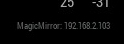
A module to show MagicMirror’s IPv4 Network Address
[card:fewieden/MMM-ip]
-
Thanks Strawberry!
I just installed it, works fine.
Except, I can’t really place it at the real bottom right… 'cause I’m using bottom_bar , bottom_right is just on top of bottom_bar
-
@PointPubMedia in your case you can take this config
{
	module: 'MMM-ip',
	position: 'bottom_bar'
}
combined with
div.MMM-ip div.module-content {
	text-align: right;
}
in ~/MagicMirror/css/custom.css
-
PERFECT
-
-
-
Small note which probably doesn’t apply to the majority here … if anyone at all … other than me that is: my secondary rpi runs IPv6 exclusively (it’s a test platform), so your module would not work as it is specifically looking for the IPv4 field.
Just something to think about …
-
Expanding on what I said above, it might be easier to have the module report both IPv4 and IPv6, then have config options to turn them off:
config: { displayIPv4: true, displayIPv6: false, }, -
@KirAsh4 done
-
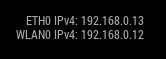
based on @shashank’s request there is a new version, where you can define which network interface (wireless, ethernet or both) you want to display
WARNING: one config attribute changed it’s name for those who update
[card:fewieden/MMM-ip]
-
@strawberry-3.141 Thanks a lot it’s working great
-
[card:fewieden/MMM-ip]
Changelog:
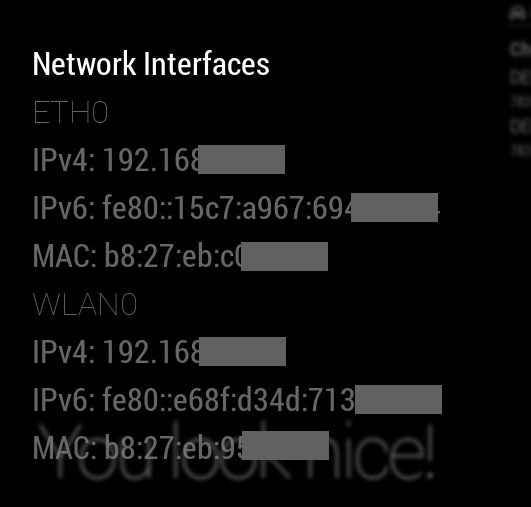
Implemented voice commands to show ip and mac adress, so it can be hidden by default
-
Hello!
Is it possible to update the IP periodically? -
Version 2.0.0
Added
- Nunjuck templates
- Integrated MMM-Modal for modal handling
- Documentation
Fixed
- MMM-voice mode in notificationReceived (Thanks to https://github.com/MillerMedia)
Changed
- Config files
Removed
- Config options (voice, showFamily, showType, and startHidden). Check out the readme for replacements.
- Internal modal handling (help, interfaces)
- Stylelint and CSS files
https://github.com/fewieden/MMM-ip
[card:fewieden/MMM-ip]
-
I’ve seen option with bottom_bar, it works, but I 'm already using bottom_bar for smth else and it gets shifted. Is there any other solution to place it in right bottom corner? I’ve tried refference it like that
.MMM-ip{
position: absolute;
left : 100px;
top : 50px;
}
but it doesn’t move, module (in config.js is using bottom_right position ATM -
@meaple absolute is absolute. u might want relative
-
@sdetweil I’ve tried with relative as well and it didn’t move either .MMM-ip{
position: relative;
left : 600px;
top : 600px;
} -
@sdetweil got it, smbdy helped me a little on Discord, I’ve moved it to bottom_right (that I don’t) use and then in custom.css added
.region.bottom.right{
bottom : -15px;
right: -15px;
} -
v2.1.0
MagicMirror² version >= 2.15.0 required.
Added
- Added config option
updateInterval - Github actions
Changed
- Node helper logs are now done through MagicMirror logger
- Github config files
Removed
- Travis-CI integration
Link to module https://github.com/fewieden/MMM-ip
[card:fewieden/MMM-ip]
- Added config option



Hello! It looks like you're interested in this conversation, but you don't have an account yet.
Getting fed up of having to scroll through the same posts each visit? When you register for an account, you'll always come back to exactly where you were before, and choose to be notified of new replies (either via email, or push notification). You'll also be able to save bookmarks and upvote posts to show your appreciation to other community members.
With your input, this post could be even better 💗
Register Login