Read the statement by Michael Teeuw here.
worldclock - nobody made this, so I did.
-
@richardh151
You can try this config.clocks: [ { title: "LA, USA", timezone: "America/Los_Angeles" }, { title: "Shanghai, China", timezone: "Asia/Shanghai", timegap: true, }, { title: "Mumbai, India", timezone: "Asia/Kolkata", timegap: true, }, ]
Whole available list of timezone name is here;
https://en.wikipedia.org/wiki/List_of_tz_database_time_zones -
@Sean said in worldclock - nobody made this, so I did.:
Whole available list of timezone name is here;
https://en.wikipedia.org/wiki/List_of_tz_database_time_zonesMaybe add the link to the timezones into your readme in case people don’t see it here.
Well done Sean!
-
@Mykle1 good suggestion. I’d missed it. Later i’ll add.
-
@Sean thank you works perfectly and looks great.
-
@Sean How to Add Country Picture like this
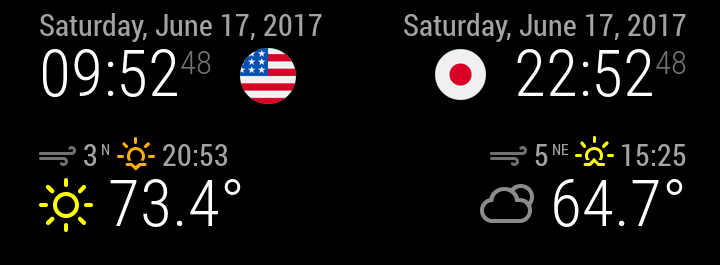
Thanks your help -
@nobita good suggestion. I like that circled flags. Where do you get that?
-
@Sean I can’t remember because a longtime ago
-
-
@nobita How about this?
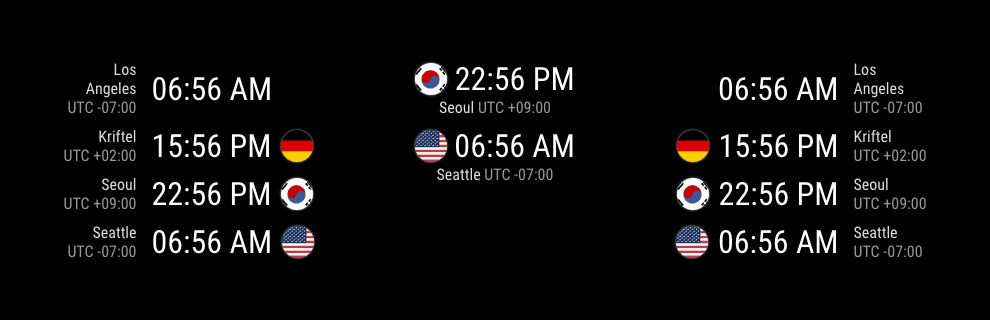
I cannot find any pretty flag images on the network, so I use
flag-icon-css.
@Mykle1 gave me good resources, but I feel some question.
Should we store all the flags in modules? Each person needs only a few flags at once. Therefore I try to find some resources approachable on the internet directly, which might be already hosted via CDN or something like. The only one thing I’ve found wasflag-icon-css.
But… The flag is not so pretty as I’ve thought.Anyway, I added flags feature, you can upgrade your module now.
[card:eouia/worldclock]
-
@Sean
Those look fantastic! Nice work Sean!
-
@Sean Very Nice and Good Module for all
-
@Sean thanks for the module, could you advise how to hide time gap, default is showing, but I can’t hide it when set “false”.
-
@iMAGiC in your custom
css, add this..worldclock .gap { display:none; } -
@Sean thanks, but I can’t get it work, found alternative. Thank you.
-
@iMAGiC
Sorry for my improper instruction. At that time I was not in front of machine, so I just simply guessed,.worldclock .world .caption .gap { display:none; }will do.
-
@Sean , How to Change your digital Clock to Analog Clock
like as the default module clock (MM2)
Configuration options
displayType : Possible values: digital, analog, or both
analogFace : Possible values: simple for a simple border, none for no face or border,
or face-### (where ### is currently a value between 001 and 012, inclusive)Thank so much for your all helps
-
@nobita
Unfortunately,worldclockdoesn’t support Analog face. Sorry. -
Hi There,
just starting out with MM and i like the module a lot.
one question i have is how to organize the clock’s in row instead of one below the other.thanks
Arjen
-
@Arjen_lima
Sorry for my English, I cannot catch your question.
The order of clocks is defined inconfig.jsby the sectionclocks, that is the array ofclock, then the order of display is same with the order of array element.Or… If you mean another problem, give me more detailed information. Of course, an image could be the great help for understanding.
-
@Sean said in worldclock - nobody made this, so I did.:
@Arjen_lima
Sorry for my English, I cannot catch your question.
The order of clocks is defined inconfig.jsby the sectionclocks, that is the array ofclock, then the order of display is same with the order of array element.Or… If you mean another problem, give me more detailed information. Of course, an image could be the great help for understanding.
Hey Sean,
Its probably my english ;-),
now the clocks in the array are all vertically aligned one clock below the next clock.
in some of the screen shots they are in a 3x3 grid i was wondering how to get it like that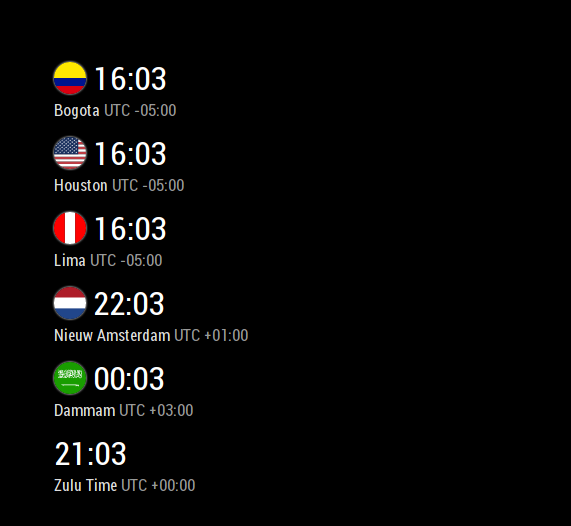
my current lay out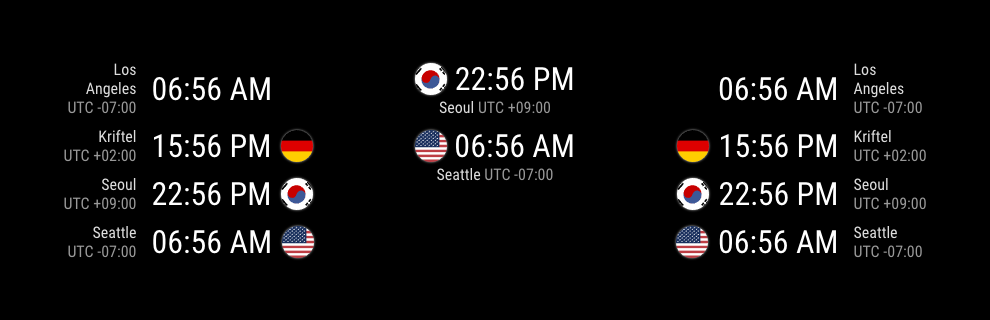
the lay out im looking for


Hello! It looks like you're interested in this conversation, but you don't have an account yet.
Getting fed up of having to scroll through the same posts each visit? When you register for an account, you'll always come back to exactly where you were before, and choose to be notified of new replies (either via email, or push notification). You'll also be able to save bookmarks and upvote posts to show your appreciation to other community members.
With your input, this post could be even better 💗
Register Login