MagicMirror Forum
    • Recent
    • Tags
    • Unsolved
    • Solved
    • MagicMirror² Repository
    • Documentation
    • 3rd-Party-Modules
    • Donate
    • Discord
    • Register
    • Login
    A New Chapter for MagicMirror: The Community Takes the Lead
    Read the statement by Michael Teeuw here.

    Box/Frame around module

    Scheduled Pinned Locked Moved Development
    12 Posts 8 Posters 11.3k Views 7 Watching
    Loading More Posts
    • Oldest to Newest
    • Newest to Oldest
    • Most Votes
    Reply
    • Reply as topic
    Log in to reply
    This topic has been deleted. Only users with topic management privileges can see it.
    • Da-ne-ezyD Offline
      Da-ne-ezy
      last edited by

      Hi,
      can anyone explain how to make a thin box around a module?
      Like in this picture below. I don’t want it on every module just on one or two. The Frame should be same size as the module itself. Thanks for your help!

      0_1500965213092_Future-625x352.jpg

      FREE IT-Projects and Raspberry Pi Tutorials on my Website: www.danykilian.com

      strawberry 3.141S 1 Reply Last reply Reply Quote 0
      • strawberry 3.141S Offline
        strawberry 3.141 Project Sponsor Module Developer @Da-ne-ezy
        last edited by

        @Da-ne-ezy custom.css

        .MODULENAME {
          border: 2px solid white;
        }
        

        Please create a github issue if you need help, so I can keep track

        Da-ne-ezyD mediathreatM 2 Replies Last reply Reply Quote 1
        • Da-ne-ezyD Offline
          Da-ne-ezy @strawberry 3.141
          last edited by

          @strawberry-3.141 Thank you very much.

          What if I want a special frame like this? How would you do it?

          0_1500968932358_14284711641_ba88f4c074_o.jpg

          FREE IT-Projects and Raspberry Pi Tutorials on my Website: www.danykilian.com

          yawnsY 1 Reply Last reply Reply Quote 0
          • yawnsY Offline
            yawns Moderator @Da-ne-ezy
            last edited by

            @Da-ne-ezy
            Maybe like this:

            http://border-image.com/#{"src"%3A"https%3A%2F%2Fforum.magicmirror.builders%2Fassets%2Fuploads%2Ffiles%2F1500968912312-14284711641_ba88f4c074_o.jpg"%2C"linkBorder"%3Atrue%2C"borderWidth"%3A[0%2C0%2C0%2C0]%2C"imageOffset"%3A[24%2C0%2C27%2C11]%2C"fill"%3Atrue%2C"setRepat"%3Afalse%2C"repeat"%3A["stretch"%2C"repeat"]%2C"scaleFactor"%3A0.7052709725315516%2C"setRepeat"%3Atrue}

            1 Reply Last reply Reply Quote 2
            • cowboysdudeC Offline
              cowboysdude Module Developer
              last edited by

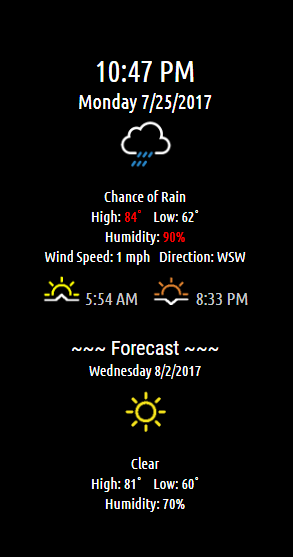
              Here’s a general idea of what @strawberry-3-141 and @yawns are talking about:

              Before frame:
              0_1500984573924_mm2.png

              After adding frame to css:

              0_1500984602375_frame.png

              I did this by adding this to my own css file:

                border-style: solid;
              border-width: 6px 5px 7px 4px;
              -moz-border-image: url(https://forum.magicmirror.builders/assets/uploads/files/1500968912312-14284711641_ba88f4c074_o.jpg) 6 5 7 4 stretch;
              -webkit-border-image: url(https://forum.magicmirror.builders/assets/uploads/files/1500968912312-14284711641_ba88f4c074_o.jpg) 6 5 7 4 stretch;
              -o-border-image: url(https://forum.magicmirror.builders/assets/uploads/files/1500968912312-14284711641_ba88f4c074_o.jpg) 6 5 7 4 stretch;
              border-image: url(https://forum.magicmirror.builders/assets/uploads/files/1500968912312-14284711641_ba88f4c074_o.jpg) 6 5 7 4 fill stretch;
              padding-top: 50px;   
              padding-bottom: 50px;    
              }
              
              A 2 Replies Last reply Reply Quote 3
              • Da-ne-ezyD Offline
                Da-ne-ezy
                last edited by

                Thank you @cowboysdude and @yawns. I will try this by myself later.

                FREE IT-Projects and Raspberry Pi Tutorials on my Website: www.danykilian.com

                1 Reply Last reply Reply Quote 1
                • justjim1220J Offline
                  justjim1220 Module Developer
                  last edited by

                  This is really cool.
                  Now, I would like to see how to do something like this for each module…

                  "Life's Too Short To Dance With Ugly People"
                  Jim Hallock - 1995

                  1 Reply Last reply Reply Quote 0
                  • mediathreatM Offline
                    mediathreat @strawberry 3.141
                    last edited by

                    @strawberry-3.141 where would that custom.css go? which directory? in the module directory?

                    brobergB 1 Reply Last reply Reply Quote 0
                    • brobergB Offline
                      broberg Project Sponsor @mediathreat
                      last edited by broberg

                      @mediathreat the custom.css -file already exists and is located in the folder aptly named css

                      mediathreatM 1 Reply Last reply Reply Quote 1
                      • mediathreatM Offline
                        mediathreat @broberg
                        last edited by

                        @broberg whoa you just opened a whole new world of customization for me thanks dude!

                        1 Reply Last reply Reply Quote 1
                        • A Offline
                          ATibbs @cowboysdude
                          last edited by

                          This post is deleted!
                          1 Reply Last reply Reply Quote 0
                          • A Offline
                            ATibbs @cowboysdude
                            last edited by

                            @cowboysdude said in Box/Frame around module:

                            -moz-border-image: url(https://forum.magicmirror.builders/assets/uploads/files/1500968912312-14284711641_ba88f4c074_o.jpg) 6 5 7 4 stretch;
                            -webkit-border-image: url(https://forum.magicmirror.builders/assets/uploads/files/1500968912312-14284711641_ba88f4c074_o.jpg) 6 5 7 4 stretch;
                            -o-border-image: url(https://forum.magicmirror.builders/assets/uploads/files/1500968912312-14284711641_ba88f4c074_o.jpg) 6 5 7 4 stretch;
                            border-image: url(https://forum.magicmirror.builders/assets/uploads/files/1500968912312-14284711641_ba88f4c074_o.jpg) 6 5 7 4 fill stretch;

                            So does this mean you are making constant calls out to the internet to reference this picture? Would it be a better option to store a copy of the image locally for reference? Sorry for the necro


                            1 Reply Last reply Reply Quote 0

                            Hello! It looks like you're interested in this conversation, but you don't have an account yet.

                            Getting fed up of having to scroll through the same posts each visit? When you register for an account, you'll always come back to exactly where you were before, and choose to be notified of new replies (either via email, or push notification). You'll also be able to save bookmarks and upvote posts to show your appreciation to other community members.

                            With your input, this post could be even better 💗

                            Register Login


                            • 1 / 1
                            • First post
                              Last post
                            Enjoying MagicMirror? Please consider a donation!
                            MagicMirror created by Michael Teeuw.
                            Forum managed by Sam, technical setup by Karsten.
                            This forum is using NodeBB as its core | Contributors
                            Contact | Privacy Policy