MagicMirror Forum
    • Recent
    • Tags
    • Unsolved
    • Solved
    • MagicMirror² Repository
    • Documentation
    • 3rd-Party-Modules
    • Donate
    • Discord
    • Register
    • Login
    A New Chapter for MagicMirror: The Community Takes the Lead
    Read the statement by Michael Teeuw here.

    MMM-forecast-io -- Localized up to the minute weather

    Scheduled Pinned Locked Moved Utilities
    127 Posts 36 Posters 223.5k Views 38 Watching
    Loading More Posts
    • Oldest to Newest
    • Newest to Oldest
    • Most Votes
    Reply
    • Reply as topic
    Log in to reply
    This topic has been deleted. Only users with topic management privileges can see it.
    • C Offline
      Claymobil
      last edited by paviro

      Hi everyone,

      I installed the mmm-forecast but I can’t figure out why i got the same error than @paulocarrasco …

      Here is my code:

      {
      			module: 'MMM-forecast-io',
      			position: 'top_right',  // This can be any of the regions.
      			config: {
      					// See 'Configuration options' for more information.
      					apiKey: 'my API key' // Dark Sky API key.
      					 // Only required if geolocation doesn't work:
      						latitude:   47.902964,
      						longitude: 1.9092510000000402
      					}
      		};
      

      I tried removing this part and averything else works.

      Do you have any idea ?

      thanks !


      Note from admin: Please use Markdown on code snippets for easier reading!

      I 1 Reply Last reply Reply Quote 0
      • I Offline
        ianperrin @Claymobil
        last edited by

        @Claymobil said in MMM-forecast-io -- Localized up to the minute weather:

        apiKey: ‘my API key’

        You’re possibly missing a comma after the API key, try
        apiKey: ‘my API key’,

        "Live as if you were to die tomorrow. Learn as if you were to live forever." - Mahatma Gandhi

        1 Reply Last reply Reply Quote 0
        • C Offline
          Claymobil
          last edited by Claymobil

          @ianperrin Thanks a lot !

          Works perfectly fine now :-)

          D 1 Reply Last reply Reply Quote 0
          • D Offline
            dmcinnes Module Developer @Claymobil
            last edited by

            @Claymobil glad it works! Sorry about that, that missing comma is in the example config. I’ve updated it.

            1 Reply Last reply Reply Quote 0
            • D Offline
              darrene
              last edited by

              Hi @dmcinnes, thank you for sharing an awesome module. It’s fantastic - the first one I installed and I think it must be the only one I haven’t swapped out since :)

              Is there any chance of having a precipitation/temperature graph like the one from Jangellx’s variant of @MichMich’s MagicMirror1, which could be swapped out for the current precipitation graph?
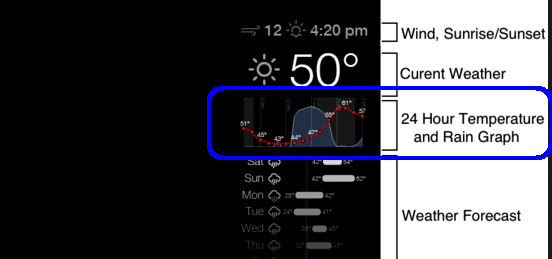
              0_1477752420244_MMM-weather.jpg

              The bulk of the javascript looks to be in the bottom half of this code: GitHub, uses d3 and d3min but it’s completely beyond me how to Frankenstein the code together…

              It’d give a superb optional look to a lovely module!

              D 1 Reply Last reply Reply Quote 0
              • P Offline
                plumcraft
                last edited by

                @paulocarrasco

                Have you done your forecast module by any chance ?

                Thanks

                1 Reply Last reply Reply Quote 0
                • D Offline
                  dmcinnes Module Developer @darrene
                  last edited by

                  @darrene glad you like the module! That would be cool to have but I’m working on another project right now so I’m not interested in taking that on. If anyone else wants to take a try at doing it, please be my guest and send a PR!
                  The original module used SVG, but I used HTML5 canvas to avoid external libraries (plus I prefer canvas anyway).

                  1 Reply Last reply Reply Quote 0
                  • S Offline
                    shavesophere
                    last edited by

                    great module! I’m curious to know how to configure it for “small”… i can’t find any clue in the documentation apart from trying to fiddle around with the .css. thanks!

                    D 1 Reply Last reply Reply Quote 0
                    • D Offline
                      dmcinnes Module Developer @shavesophere
                      last edited by

                      @shavesophere thanks! You can add the ‘small’ class to the module’s classes in the config.js.

                      S 1 Reply Last reply Reply Quote 0
                      • D Offline
                        dmcinnes Module Developer
                        last edited by

                        I’ve just pushed an update to the module. Previously if there was a network error the module would get “stuck” and no longer update. This is now fixed!

                        [card:dmcinnes/MMM-forecast-io]

                        1 Reply Last reply Reply Quote 1
                        • S Offline
                          shavesophere @dmcinnes
                          last edited by

                          @dmcinnes forgive me I’m a noob when it comes to classes in javascript… you you be so kind as to post the code that needs altering?

                          D 1 Reply Last reply Reply Quote 0
                          • D Offline
                            dmcinnes Module Developer @shavesophere
                            last edited by

                            @shavesophere sorry I wasn’t too descriptive!
                            Here’s the example from the repo with the added ‘small’ class, forth line from the top:

                              {
                                module: 'MMM-forecast-io',
                                position: 'top_right',  // This can be any of the regions.
                                classes: 'small',
                                config: {
                                  // See 'Configuration options' for more information.
                                  apiKey: 'abcde12345abcde12345abcde12345ab', // Dark Sky API key.
                                  // Only required if geolocation doesn't work:
                                  latitude:   16.77532,
                                  longitude: -3.008265
                                }
                             }
                            

                            Hope that helps!

                            S 1 Reply Last reply Reply Quote 1
                            • S Offline
                              shavesophere @dmcinnes
                              last edited by

                              @dmcinnes ah i see! much obliged. keep up the good work!

                              1 Reply Last reply Reply Quote 0
                              • R Offline
                                Rian9771
                                last edited by

                                Hello, has something changed to this module? I have clones the repo twice but i still don’t see the graph being displayed. Did ‘git checkout weather-forecast’ as mentioned but still a no go. I can see everything else but the graph. I am on debian, node serveronly, Firefox.

                                D 1 Reply Last reply Reply Quote 0
                                • D Offline
                                  dmcinnes Module Developer @Rian9771
                                  last edited by

                                  Hi @Rian9771 the rain graph only appears when there’s rain happening in the next hour.

                                  1 Reply Last reply Reply Quote 0
                                  • P Offline
                                    phrazelle
                                    last edited by

                                    Hello! Thanks for your time with this module!

                                    I would like to customize the weather icons. I am able to change the overall color of the icons with CSS, but taking that a step further, is there a way to alter sections of the icons instead of the icon as a whole?

                                    I.e. wi-day-cloudy with an orange sun poking out from a grey cloud.

                                    I see that the icons are pulled from the erikflowers github repository, but I don’t see where they are pulling from within the module. Based on most of these weather modules using the same iconset, I’m guessing they’re being pulled from that repo directly.

                                    My initial thought was to extract from the module, recolor with Photoshop and then replace the icons in the module. Is that possible? Would I just make a whole new set, store locally and change the path somewhere in the JS?

                                    strawberry 3.141S 1 Reply Last reply Reply Quote 0
                                    • strawberry 3.141S Offline
                                      strawberry 3.141 Project Sponsor Module Developer @phrazelle
                                      last edited by

                                      @phrazelle the css is located in the magicmirror vendor folder

                                      Please create a github issue if you need help, so I can keep track

                                      P 1 Reply Last reply Reply Quote 0
                                      • P Offline
                                        phrazelle @strawberry 3.141
                                        last edited by

                                        @strawberry-3.141 Thanks for the info!

                                        After looking through there, it looks like the module pulls the icons as a font file. I believe that would mean that CCS customization would be overall to each displayed character. So there would be no way to color segments of each character (like an orange sun poking out from a grey cloud) because the stylization would apply to the character as a whole.

                                        Am I assessing at that correctly?

                                        1 Reply Last reply Reply Quote 0
                                        • ooom416354O Offline
                                          ooom416354
                                          last edited by

                                          Great module!! One question, is there anyway to make the length of the temperature bars a bit smaller? I suppose because the NY weather is so erratic right now it is making the bars wider but was just curious if I can shrink them a bit to save some space. thanks!

                                          D 1 Reply Last reply Reply Quote 0
                                          • ooom416354O Offline
                                            ooom416354
                                            last edited by

                                            also it could just be me but I keep seeing the rain icon next to the temperature even though there’s no rain in the forecast for today (the small icon by the days of the week shows nothing but sun). Anything I can do to check that icon to see if it is an issue?

                                            1 Reply Last reply Reply Quote 0

                                            Hello! It looks like you're interested in this conversation, but you don't have an account yet.

                                            Getting fed up of having to scroll through the same posts each visit? When you register for an account, you'll always come back to exactly where you were before, and choose to be notified of new replies (either via email, or push notification). You'll also be able to save bookmarks and upvote posts to show your appreciation to other community members.

                                            With your input, this post could be even better 💗

                                            Register Login

                                            • 1
                                            • 2
                                            • 3
                                            • 4
                                            • 5
                                            • 6
                                            • 7
                                            • 2 / 7
                                            • First post
                                              Last post
                                            Enjoying MagicMirror? Please consider a donation!
                                            MagicMirror created by Michael Teeuw.
                                            Forum managed by Sam, technical setup by Karsten.
                                            This forum is using NodeBB as its core | Contributors
                                            Contact | Privacy Policy