Read the statement by Michael Teeuw here.
MMM-NOAA - Another Weather Module
-
@kris_huang said in MMM-NOAA - Another Weather Module:
{
“GATHERING WEATHER STUFF”: “天气预报”,
"Currently: ": “当前:”,
"Current Temp: ": "当前温度: ",
"UV Index: ": "紫外线指数: ",
"Wind: ": "风向: ",
"From: ": "从: ",
"Barometer: ": "气压 ",
“~~~ Forecast ~~~
”: “近期天气预测”,
“Monday”: “星期一”,
“Tuesday”: “星期二”,
“Wednesday”: “星期三”,
“Thursday”: “星期四”,
“Friday”: “星期五”,
“Saturday”: “星期六”,
“Sunday”: “星期日”,
“Overcast”: “阴天”,
“Cloudy”: “多云”,
“Rain”: “雨”,
“Clear”: “晴”,
“Partly Cloudy”: “部分多云”,
"High: ": "高: ",
"Low: ": "低: ",
"Barometer: ":“气压:”,
"Humidity: ": "湿度: ",
“Humidity: ” : "湿度: ",
“Safe”: “安全”,
“Moderate”: “中等”,
“Snow showers”: “阵雨”,
“Very High”: “非常高”,
“Extreme”: “极高”,
“Sunset”: “日落”,
“Sunrise”: “日出”,
" hours ": “小时”,
" minutes ": “分钟”,
“Amount of Daylight”: “白昼”,
"Air Quality Index: ": "空气质量指数: ",
"Good Morning ":"早上好! ",
"Good Afternoon ": "下午好! ",
"Good Evening ": "晚上好! ",
“Good Morning!”:“早上好!”,
“Good Afternoon!”: “下午好!”,
“Good Evening!”: “晚上好!”
}Thank you for the corrections :)
-
That looks absolutely BAD ASS with the Chinese characters!
-
-
alert and update module disabled -> problem solved ;)
-
@barnosch That’s the first thing I do when I install it LOL Hate to say it… but it’s cool that you can!
But am curious to what changes you made… you never know they make another version ;) I"m always looking for ideas… Even styling ideas…because the one thing I’m not is a css wizard LOL
-
As this is a NOAA weather module, I thought you might be interested in this, from NOAA. Pretty amazing!
https://weather.com/storms/hurricane/video/flying-into-the-eye-of-hurricane-irma
-
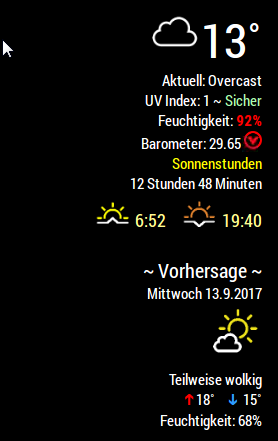
my fork looks like this.
Almost anything is hardcoded or directly changed in the code since i am to lazy and just made it for my needs ;)
-
@barnosch I like it!! Looks great!!
-
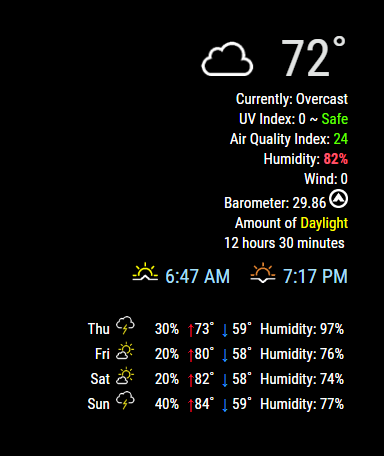
UPDATE V.2
Changed the format to show 3 days of weather instead of rotating. Quicker, easier and loads twice as fast!
Added 2 new config options:
- Show or hide wind
- Show or hide Date
See the README on Github
Thank you to @barnosch for the help and ideas!!
Download:
[card:cowboysdude/MMM-NOAA]
-
big like !
-
great, just got myself upgraded and looking awesome.
How do i increase font size of temperature to look big?
-
In your custom.css file you can add this:
.MMM-NOAA .wfont {
font-size: 1.6em;
}
[Corrected the entry it was wrong… sorry about that!] -
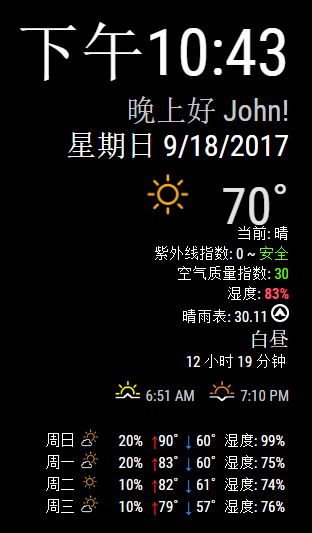
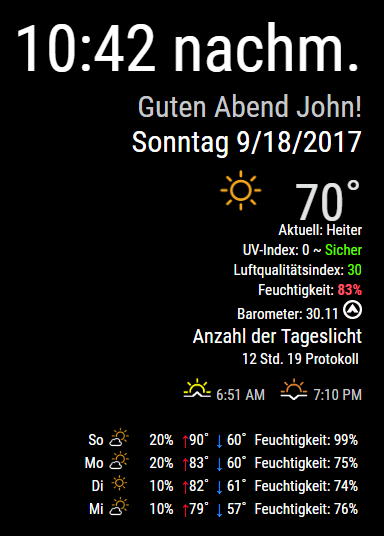
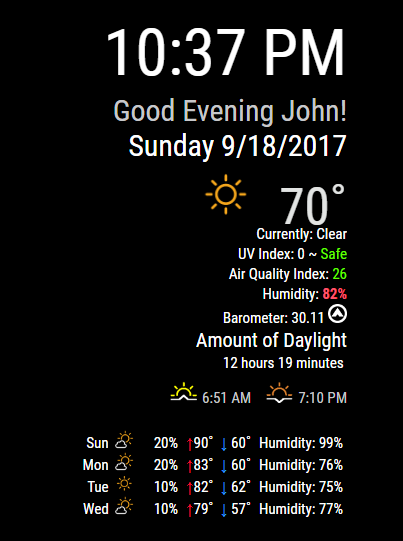
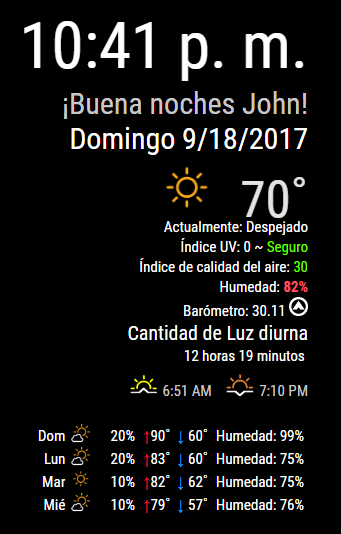
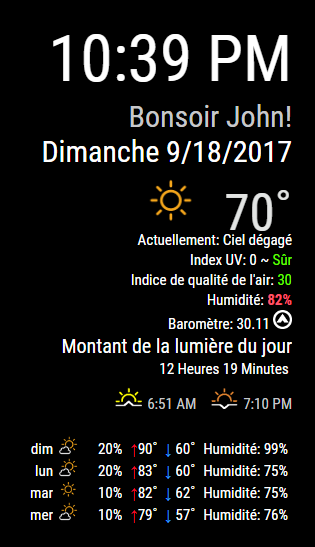
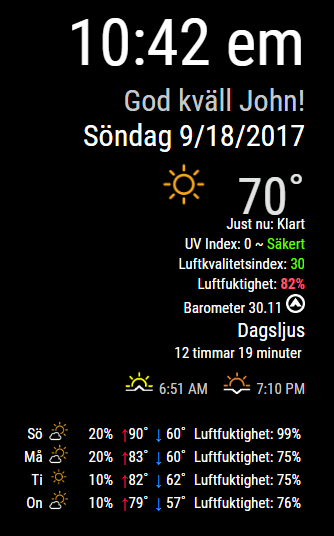
UPDATE V.2.1
ALL weather conditions are no longer in the translation file and are automatic in the language that’s supported in the module!!
See the README on Github
Download:
[card:cowboysdude/MMM-NOAA]
-
-
@cowboysdude Looking great! :) I have a suggestion… Change the “Humidity” text to an image of a droplet (https://thenounproject.com/term/raindrop/381297/) to save space. :) Or from font awesome: http://fontawesome.io/icon/tint/
If you cant find it, make it and share it
MMM-homeassistant-sensors,MMM-Modulebar,MMM-Profilepicture,MMM-Videoplayer,MMM-TautulliLatest -
@Snille Well I’ll give it a shot… I don’t usually have good luck with images that’s why I use words LOL
-
Hi!
Im stuck on the “Gather Wather Stuff” Message. Or “Samlar väderinformation” since im running a Swedish pi.
First of thanks for sharing the module, it looks badass.Ive been diagnosing alot without any luck but this is what ive done to confirm my config:
Ive been checking my api-key and pws with another module from RedNax67 called MMM_Wunderground.
And i can get that one to work.I also encounter this message on re-installing the module (can’t remember if it was there on the initial install).
npm WARN mmm-noaa@1.0.0 No repository field.This is my module config:
{
    disabled: false,
    module: 'MMM-NOAA',
    position: 'top_right',
    config: {
        apiKey: "Y507ba7785XXXXXXX",          // https://www.wunderground.com/weather/api  select the middle plan...
    useAir: false,             //set to false if you do not want to use Air Quality Index
    airKey: "Y507ba7785XXXXXXX",  //IF you want Air Quality Index
		pws: "IUHAMMAR4",       // go here to find your pws: https://www.wunderground.com/wundermap
                lat: "59.609900",        // need this for sunrise/sunset  if left blank none will show  -- find them here: http://www.latlong.net/
		lon: "16.544809",       // need this for sunrise/sunset  if left blank none will show
		showClock: true,            //Hides or shows clock
		dformat: false,             //for M/D/YYYY format, false for D/M/YYYY
		showClock: true,
		format: "24",             // 12 or 24 hour format.. will default to 12 hour if none selected.
		ampm: false,                 //to show AM and PM on Sunrise/Sunset time
		showGreet: false,          //deafult is false - to show greeting under clock and above date
                    name: "",                  // Your name
		showWind: false,
                    showDate: false,
}
Do you have any other ideas what i can try to get it running?
-
uncomment the “air stuff” for the moment
/* if (this.config.useAir != false || aquis != undefined) { var aqius = this.air.aqius; var aqi = document.createElement("div"); aqi.classList.add("xsmall", "bright"); if (aqius < 51) { aqi.innerHTML = this.translate("Air Quality Index: ") + "" + aqius + ""; } else if (aqius > 50 && aqius < 101) { aqi.innerHTML = this.translate("Air Quality Index: ") + "" + aqius + ""; } else if (aqius > 100 && aqius < 151) { aqi.innerHTML = this.translate("Air Quality Index: ") + "" + aqius + ""; } else if (aqius > 150 && aqius < 201) { aqi.innerHTML = this.translate("Air Quality Index: ") + "" + aqius + ""; } else { aqi.innerHTML = this.translate("Air Quality Index: ") + "" + aqius + ""; } wrapper.appendChild(aqi); } */@cowboysdude needs to check it, since the “aquis” variabel is undefined it quits. Had the same error and i needed some time to find the cause
edit: while i am reading i guess it is just a typo in the first line. should be “aqius” instead of “aquis” ;)
edit2: yes. thats it. just change
the lineif (this.config.useAir != false || aquis != undefined) {to
if (this.config.useAir != false || aqius != undefined) {and you are good to go again.
Sadly i have no idea how to push the fix to the git repository
-
It did work like a charm, thanks alot dude!
Also thanks to @Mykle1 for chatting with me and updating me on the social status of @cowboysdude hehe.
For a first time post, i must say you guys have impressed me of how welcoming a Forum can be. It’s rare from my experience. -
@barnosch said in MMM-NOAA - Another Weather Module:
and you are good to go again.
Sadly i have no idea how to push the fix to the git repositoryNice catch you guys.
Nice remedy @barnosch
If you go to the modules repo https://github.com/cowboysdude/MMM-NOAA
and click on the file you want to fix, then click on the “pencil” icon to the right, github will fork the repo for you. There you can make the edit and submit a pull request which will go to cowboysdude




Hello! It looks like you're interested in this conversation, but you don't have an account yet.
Getting fed up of having to scroll through the same posts each visit? When you register for an account, you'll always come back to exactly where you were before, and choose to be notified of new replies (either via email, or push notification). You'll also be able to save bookmarks and upvote posts to show your appreciation to other community members.
With your input, this post could be even better 💗
Register Login