Read the statement by Michael Teeuw here.
Electron CPU usage
-
@Mykle1 said in Electron CPU usage:
@djsunrise19 said in Electron CPU usage:
Thanks. Yes, v1.4.15.
I just had a thought (miracle). What version of MM is everyone using?
My Pi3 B mirror is running MM version 2.1.0. I’ve had no reason to update it. It’s rock solid
I had this problems since the new MM2 Version. Very long so. But my version is the newest one. 2.1.2 I think.
-
@djsunrise19 said in Electron CPU usage:
I had this problems since the new MM2 Version. Very long so. But my version is the newest one. 2.1.2 I think.
uh oh! So you DIDN’T have this problem before the new version?
-
Hi.
I made a downgrade Electron from v1.7.15 to v1.4.15.
CPU load up to 320% is gone.Hardware: BCM2835
Revision: a22082
MagicMirror: 2.1.2 -
-
@wtidwell said in Electron CPU usage:
@SashMare @Mykle1 my
I also downgraded electron to 1.4.15 and I’m seeing dramatically improved performance!Do you have some CPU load Screenshots? As I read, around 55% is to high too.
-
@djsunrise19
Not on hand but I’m seeing in the mid 20’s with newsfeed animations -
@wtidwell said in Electron CPU usage:
I also downgraded electron to 1.4.15 and I’m seeing dramatically improved performance!
Well, that’s good news! :^)
-
You guys are both running MM 2.1.2? There has been some mention that this problem arose after the upgrade. My Pi3 B mirror is still running MM 2.1.0. :-/
Just a thought.
-
@Mykle1
Today, I tried the following:MM 2.1.2 + Electron 1.7.5 --> CPU 100% during transitions
MM 2.1.2 + Electron 1.4.15 --> problem still there, CPU 100% during transitions
MM 2.1.0 + Electron 1.7.5 --> problem still there, CPU 100% during transitions
MM 2.1.0 + Electron 1.4.15 --> problem (probably) gone, CPU 40% during transitions
So i guess you have to downgrade both, MM and electron…!?
-
@mibafz00 said in Electron CPU usage:
MM 2.1.0 + Electron 1.4.15 --> problem (probably) gone, CPU 40% during transitions
I’m curious. What is the CPU load at rest, when no transitions are executing?
In any case, that’s a good amount of testing on your part, and hopefully it will lead to a final diagnosis of the problem.
-
Today, I tried a few things, too. Perhaps my results could be helpful for us. Sorry, this will be a long post ;). I have following the devices:
- Raspberry 3 Model B - my standard mirror device
- Asus Tinker Board
- odroid C2 (ARM64)
Software Versions MM:
- MM v2.1.2 on all devices
Electron Versions:
- Raspberry 3 Model B (v1.6.11)
- Asus Tinker Board (v1.4.15) but v1.6.11 works the same
- odroid C2 (ARM64) (v.1.8.0 - because of the x64; I uninstalled spectron, because there is no x64 support)
Configs:
- Standard (Calendar, Compliments, Newsfeed, Clock)
- MyConfig (Calendar, Compliments, Newsfeed, Clock, Todoist, Sonos, Netatmo, WheaterUnderground, Stocks, Reiseauskunft, Strava); here, cpu usage is a little bit higher, but the behaviour is the same.
The 100% usage topic seems to be a electron problem and I think it can be solved with some downgrades of MM2 and electron. v.1.7.5 seems to be bad. Whatever, here is what I found out:
-
nmonwith the ATB (v1.7.5 electron here) and default config:
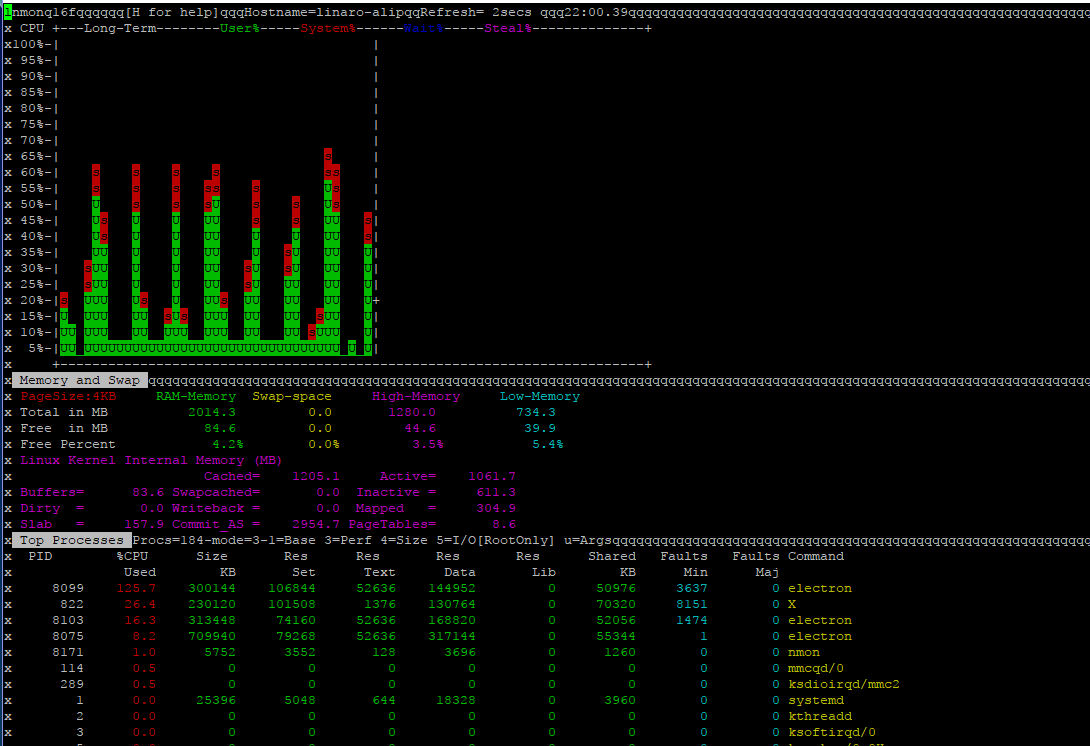
CPU usage while transitions is very high. Lagging! -
nmonwith the ATB (v1.4.15 electron here) and default config:
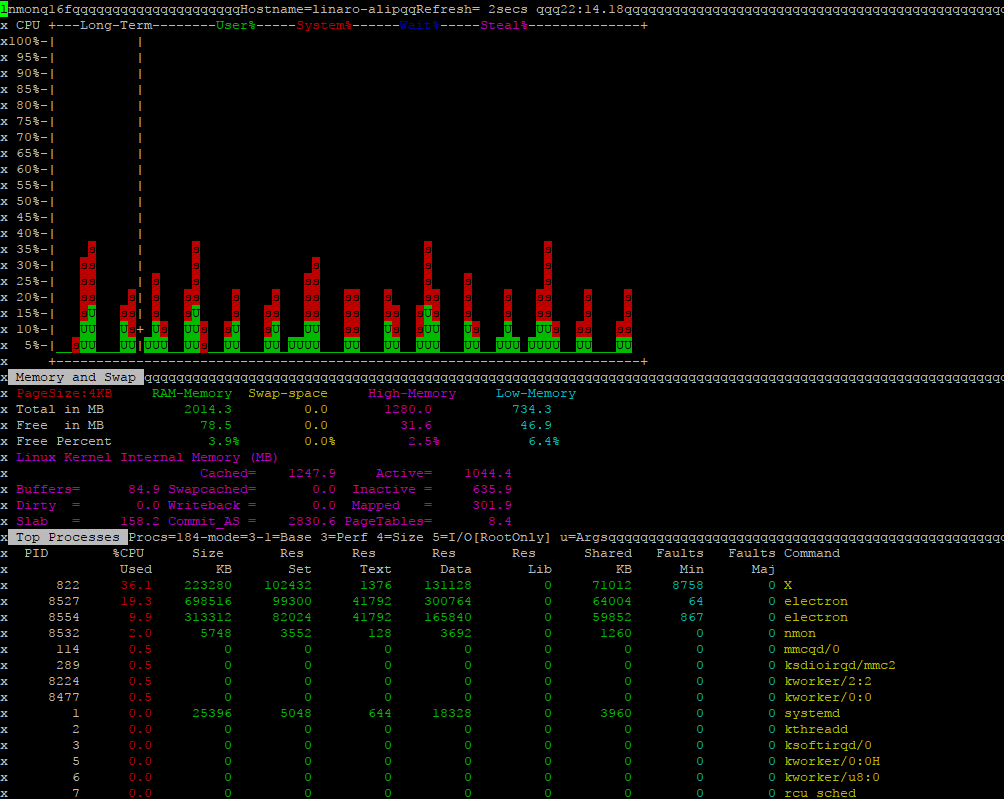
CPU usage is better but, to be honest, way to high for transitions (cpu peaks). And still some small lags. -
nmonwith the odroid and default config:
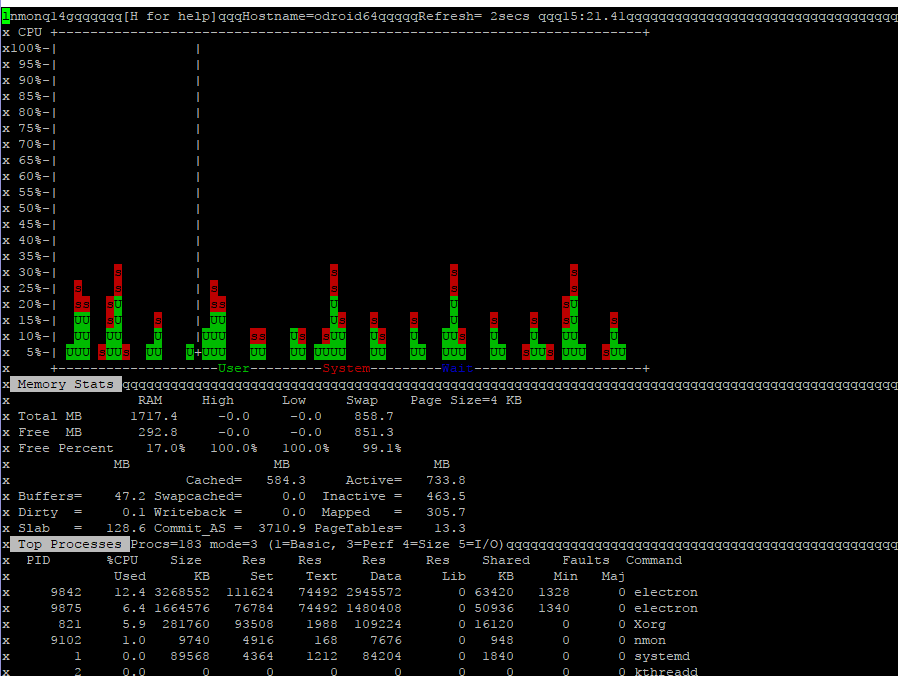
The best result. but still peaks while the transitions. Some lags here, too.
So, here is my actual config:
4)nmonwith the Raspberry 3 Model B and MyConfig:
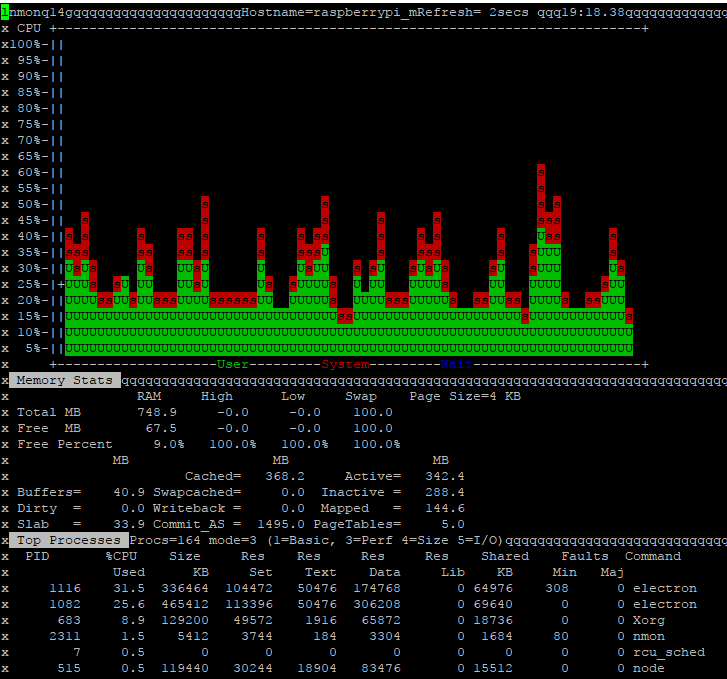
Same here, still lags.The last thing I tried was very interesting. I opened my chromium on the ATB and put the webadress from my Raspberry 3 Model B device in it. So I openend that Rapsberry 3 Model B MM2 on my ATB. And that happens:
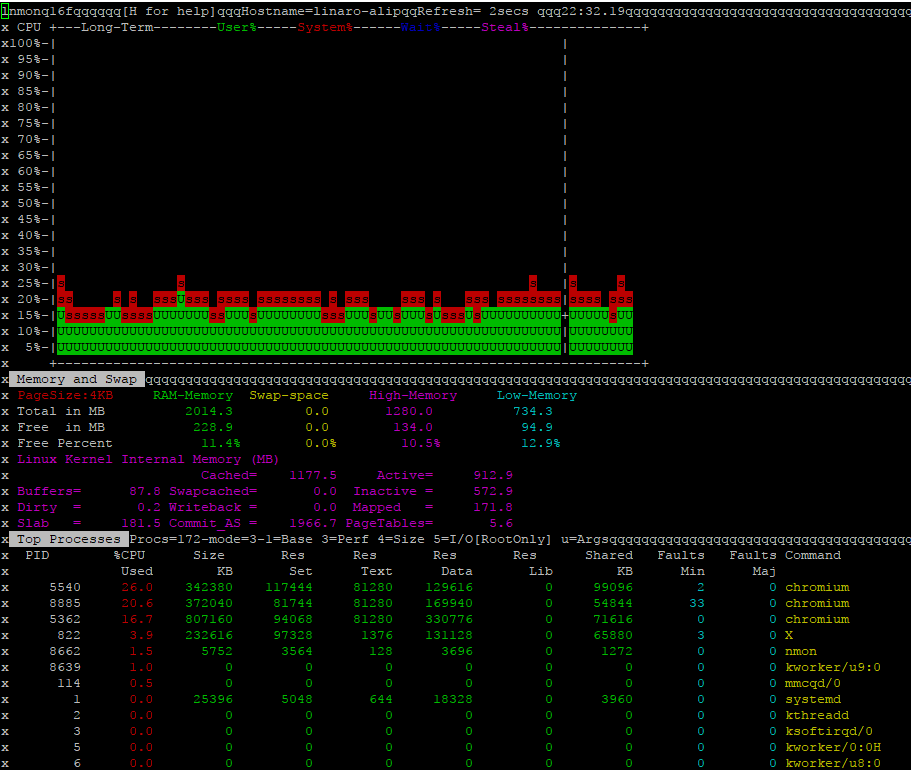
Absolutely smooth, no peaks at all.BTW: My Raspberry 3 Model didn’t have any more cpu usage while that process.
Can anybody tell us, WHY?
-
@djsunrise19
As I see, rendering engine of electron seems to be the reason of whole of thing. Electron has its own v8 and renderer. I doubt it goes worse on some late version. I don’t know why, but there is few things we could do.Report this to electron, wait a patch. Or downgrade or… turn off the animation.
-
@Sean said in Electron CPU usage:
@djsunrise19
As I see, rendering engine of electron seems to be the reason of whole of thing. Electron has its own v8 and renderer. I doubt it goes worse on some late version. I don’t know why, but there is few things we could do.Report this to electron, wait a patch. Or downgrade or… turn off the animation.
Seems logical. But I have to mention, that there is no MMv2 and electron version number combination that works without those peaks and small lags. The smoothest way ist the browser directly (like in MMv1 - everything was fine there).
So the question is: Anyone here who doesn’t have those peaks and lags while the transitions with MMv2 and electron?
-
@djsunrise19 said in Electron CPU usage:
So the question is: Anyone here who doesn’t have those peaks and lags while the transitions with MMv2 and electron?
This topic is only 17 days old, yet it has 5.0k views already. So, obviously there is a lot of interest. My answer likely was lost somewhere above, so:
I do NOT have those peaks and lags
-
@Sean said in Electron CPU usage:
I doubt it goes worse on some late version
With all due respect, I have to disagree. New versions can break existing installations in any software, not just MM. It’s the very reason for many patches. However, we don’t know the reason for this issue, and it may well be that electron isn’t the cause, but some users have had a small measure of improvement with earlier versions.
-
@TiemenMoesker HOLY MOLLY, I am having this exact problem you guys are having. I double checked my hardware and revision. which are
hardware =BCM2835
Revision= a02082
and I DO have this problem, it seems nothing you guys tried work except downgrade , so I’m going to ask arrow to send me a replacement since i actually ordered BCM2837 not BCM2835. Let’s hope it work out! (mean while I will try the downgrade option, seemed to improve performance drastically for others) -
@loctruong96 said in Electron CPU usage:
(mean while I will try the downgrade option, seemed to improve performance drastically for others)
Please keep us posted
-
OK, I can here by confirm that using MM 2.1.0 + Electron 1.4.15 improved performance massively. Each new transition now only uses 10-13% of CPU power (and very, very smooth). Even better than earlier report of 40%. For the specs of my pi 3 b
hardware = BCM2835
Revision = a02082
micro sd card - 16gb - class 4 (that’s right, only 4)
mouse + keyboard currently plugged in - no lag
OS = RASPBIAN STRETCH WITH DESKTOP
Thank you so much @Mykle1 for sharing your finding. Otherwise, I would be still trying to narrow down a potential work around.For those who not sure how to do this:
- Create a fresh install of RASPBIAN STRETCH WITH DESKTOP, connect to wifi, then run sudo apt-get update.
- sudo apt-get install npm
- sudo npm install electron@1.4.15 -g
- WAIT PATIENTLY FOR ELECTRON TO LOAD IN THE BACKGROUND
- a new line appear indicate electron has finished installing
- Go to your download folder, exact Magic Mirror 2.1.0
- Go to the newly exacted forlder, open another folder named config
- Change the file name Config.js.example to Config.js inside the config folder
- open terminal , cd Download/, cd MagicMirror-2.1.0, (OR whatever your location for the Magic Mirror 2.1.0 package is), npm install && npm start
9.5 If encounter error “404”, try “npm install npm@latest -g” (NOTE: some users experienced issues since they do not have the latest npm as global variable) @Reotch2 @EventHorizon - DONE!
Hopefully I will be able to return my pi 3 for a better hardware version to use with the latest Magic Mirror package but here is an acceptable work around for the time being.
-
@loctruong96 said in Electron CPU usage:
Thank you so much @Mykle1 for sharing your finding.
You are most welcome. :^)
I would like to give credit to everyone that is participating in this topic. By putting our heads together we’ve eliminated some possibilities but we haven’t pinpointed the problem, yet. We have narrowed it down a bit, though, and this workaround is helping some people. I’m glad you’re one of them.
-
Just a quick post in an attempt to re-create the above steps. I get to the part where I have to type “npm install && npm start” and I get an error 404 ‘Not Found’. ‘types/node’ is not in the npm registry. ‘It was specified as a dependency of ‘electron’’
Any idea what I’m doing wrong?
Thanks.


Hello! It looks like you're interested in this conversation, but you don't have an account yet.
Getting fed up of having to scroll through the same posts each visit? When you register for an account, you'll always come back to exactly where you were before, and choose to be notified of new replies (either via email, or push notification). You'll also be able to save bookmarks and upvote posts to show your appreciation to other community members.
With your input, this post could be even better 💗
Register Login