MagicMirror Forum
    • Recent
    • Tags
    • Unsolved
    • Solved
    • MagicMirror² Repository
    • Documentation
    • 3rd-Party-Modules
    • Donate
    • Discord
    • Register
    • Login
    A New Chapter for MagicMirror: The Community Takes the Lead
    Read the statement by Michael Teeuw here.

    MMM-Tools : System stat monitoring and commanding (ATB Supported)

    Scheduled Pinned Locked Moved System
    38 Posts 7 Posters 20.8k Views 6 Watching
    Loading More Posts
    • Oldest to Newest
    • Newest to Oldest
    • Most Votes
    Reply
    • Reply as topic
    Log in to reply
    This topic has been deleted. Only users with topic management privileges can see it.
    • ? Offline
      A Former User
      last edited by A Former User

      MMM-Tools

      Dsiplay stats and remote controlling MagicMirror on SBC(ATB & RPI), MMM-TelegramBot supported.

      Screenshots

      on MagicMirror

      on Telegram

      Feature

      • Display system status on MagicMirror
      • MMM-TelegramBot commands, /status and /screen on|off are supported.
      • You can set alert threshold for abnormal status of MagicMirror. You can get warning message by notification and TelegramBot

      Download

      [card:eouia/MMM-Tools]

      note)
      I know there is already MMM-SystemStat, however I need my own because of supporting Asus Tinker Board and my module MMM-TelegramBot.
      Of course, RPI is supported also. Anyway, is there any good way to detect current monitor status on SBC without X ?

      1 Reply Last reply Reply Quote 3
      • KimzerK Offline
        Kimzer
        last edited by

        Looks really good. Too bad it wont run on my Pi :\

        ? 2 Replies Last reply Reply Quote 0
        • ? Offline
          A Former User @Kimzer
          last edited by

          @Kimzer What’s the problem? I have not tested on RPI enough, (I have no RPI currently. my old one was not near me.)

          1 Reply Last reply Reply Quote 0
          • ? Offline
            A Former User @Kimzer
            last edited by

            @Kimzer If you are using Pi Zero or… without LXDE, It could not work properly maybe.

            1 Reply Last reply Reply Quote 0
            • KimzerK Offline
              Kimzer
              last edited by

              Im not sure what the issue is, simply wont display anything.
              Using a Pi2 model b.

              ? 1 Reply Last reply Reply Quote 0
              • ? Offline
                A Former User @Kimzer
                last edited by A Former User

                @Kimzer test npm start dev, and see which error messages are thrown in your terminal console, and chromium dev console.
                and report issue on my github, I’ll look and try to fix. :)

                Mykle1M 1 Reply Last reply Reply Quote 0
                • Mykle1M Offline
                  Mykle1 Project Sponsor Module Developer @Guest
                  last edited by Mykle1

                  @Sean said in MMM-Tools : System stat monitoring and commanding (ATB Supported):

                  see which error messages are thrown in your terminal console, and chromium dev console.

                  His problem might be the same as mine. My mirror is running MM 2.1.0 so your check stopped the module from loading.

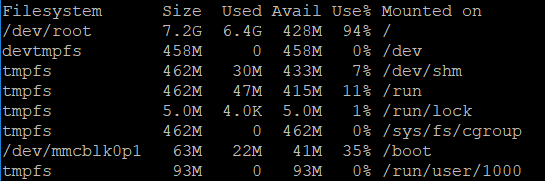
                  0_1504218471358_tools.JPG

                  Any chance you can add a PC option or move the check to MM version 2.1.0? I’m not really working with Pi’s anymore. A Windows PC dev machine, a Windows PC laptop and a laptop running uBuntu.

                  Nice work Sean!

                  Create a working config
                  How to add modules

                  ? 2 Replies Last reply Reply Quote 0
                  • ? Offline
                    A Former User @Mykle1
                    last edited by

                    @Mykle1 okay. You can just remove required version in module js file.
                    I cant be sure my module has any dependency to recent MM version. That code was just… habit? :)

                    I think it could be alright without version. But I cannot test this night. Yup, here is midnight, after sleep, I’ll do that.

                    Mykle1M 1 Reply Last reply Reply Quote 1
                    • ? Offline
                      A Former User @Mykle1
                      last edited by

                      @Mykle1 maybe genuine Ububtu and Debian, I can add, but not sure. Windows… hmmm my last windows work was 15years ago. ;) I’m oldschooled.

                      cowboysdudeC 1 Reply Last reply Reply Quote 0
                      • cowboysdudeC Offline
                        cowboysdude Module Developer @Guest
                        last edited by

                        @Sean said in MMM-Tools : System stat monitoring and commanding (ATB Supported):

                        @Mykle1 maybe genuine Ububtu and Debian, I can add, but not sure. Windows… hmmm my last windows work was 15years ago. ;) I’m oldschooled.

                        You aren’t missing anything LOL

                        1 Reply Last reply Reply Quote 0
                        • Mykle1M Offline
                          Mykle1 Project Sponsor Module Developer @Guest
                          last edited by Mykle1

                          @Sean said in MMM-Tools : System stat monitoring and commanding (ATB Supported):

                          You can just remove required version in module js file.

                          I commented out the version check but it still didn’t display on my Pi3B mirror. No errors, terminal or console

                          Create a working config
                          How to add modules

                          1 Reply Last reply Reply Quote 0
                          • K Offline
                            krisalexroberts
                            last edited by

                            Worked fine on my mirror on a Pi3B. Just had to remove some of the final commas from the config

                            ? 1 Reply Last reply Reply Quote 0
                            • ? Offline
                              A Former User @krisalexroberts
                              last edited by

                              @krisalexroberts Thanks! I typed this example not by copy, so i did mistakes. I fixed it.

                              1 Reply Last reply Reply Quote 0
                              • KimzerK Offline
                                Kimzer
                                last edited by

                                Same here. Redownloaded. Used the new settings. No bueno. Doesnt display

                                ? 1 Reply Last reply Reply Quote 0
                                • ? Offline
                                  A Former User @Kimzer
                                  last edited by

                                  @Kimzer I cant figure out what is problem, more detailed info is needed.

                                  • rpi model
                                  • os
                                  • your configuration values…
                                  • npm start dev result
                                    …
                                  Mykle1M 2 Replies Last reply Reply Quote 0
                                  • Mykle1M Offline
                                    Mykle1 Project Sponsor Module Developer @Guest
                                    last edited by

                                    @Sean

                                    I have to go to work, Sean. I will post that info for you when I get home.

                                    Create a working config
                                    How to add modules

                                    1 Reply Last reply Reply Quote 0
                                    • randomnoiseR Offline
                                      randomnoise
                                      last edited by randomnoise

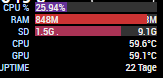
                                      Tried this module, even with a default config it doesn’t seem to display any of the actual values, just the titles:

                                      Running Rpi3 Raspian Jesse

                                      No errors during startup:

                                      Starting MagicMirror: v2.1.2
                                      Loading config ...
                                      Loading module helpers ...
                                      No helper found for module: alert.
                                      Initializing new module helper ...
                                      Module helper loaded: updatenotification
                                      No helper found for module: clock.
                                      Initializing new module helper ...
                                      Module helper loaded: calendar
                                      Initializing new module helper ...
                                      Module helper loaded: MMM-Tools
                                      No helper found for module: compliments.
                                      No helper found for module: currentweather.
                                      No helper found for module: weatherforecast.
                                      Initializing new module helper ...
                                      Module helper loaded: newsfeed
                                      All module helpers loaded.
                                      Starting server on port 8080 ... 
                                      Server started ...
                                      Connecting socket for: updatenotification
                                      Connecting socket for: calendar
                                      Starting node helper for: calendar
                                      Connecting socket for: MMM-Tools
                                      Connecting socket for: newsfeed
                                      Starting module: newsfeed
                                      Sockets connected & modules started ...
                                      Launching application.
                                      Create new calendar fetcher for url: http://www.calendarlabs.com/templates/ical/US-Holidays.ics - Interval: 300000
                                      Create new news fetcher for url: http://www.nytimes.com/services/xml/rss/nyt/HomePage.xml - Interval: 300000
                                      Use existing news fetcher for url: http://www.nytimes.com/services/xml/rss/nyt/HomePage.xml
                                      

                                      Config used:

                                      {
                                      		  module: 'MMM-Tools',
                                      		  position: 'bottom_right',
                                      		  config: {
                                      			device : "RPI", // "RPI" is also available
                                      			refresh_interval_ms : 10000,
                                      			warning_interval_ms : 1000 * 60 * 5,
                                      			enable_warning : true,
                                      			warning : {
                                      			  CPU_TEMPERATURE : 65,
                                      			  GPU_TEMPERATURE : 65,
                                      			  CPU_USAGE : 75,
                                      			  STORAGE_USED_PERCENT : 80,
                                      			  MEMORY_USED_PERCENT : 80
                                      			}
                                      		  }
                                      		},
                                      

                                      0_1504303845653_Untitled.png

                                      ? 1 Reply Last reply Reply Quote 0
                                      • Mykle1M Offline
                                        Mykle1 Project Sponsor Module Developer @Guest
                                        last edited by

                                        @Sean

                                        I just reinstalled MMM-Tool and it is working now. I don’t know why it didn’t work the first time. shrug

                                        • Pi 3 Model B, 1GB, Hardware : BCM2709, Revision = a02082, (Sony, UK)
                                        • Raspbian Jessie
                                        {
                                          	module: 'MMM-Tools',
                                          	position: 'top_center',
                                          	config: {
                                        		device : "RPI", // "RPI" is also available
                                        	        refresh_interval_ms : 10000,
                                        		warning_interval_ms : 1000 * 60 * 5,
                                        		enable_warning : false,
                                        		    warning : {
                                        		    CPU_TEMPERATURE : 65,
                                        		    GPU_TEMPERATURE : 65,
                                        		    CPU_USAGE : 75,
                                        		    STORAGE_USED_PERCENT : 80,
                                              		    MEMORY_USED_PERCENT : 80,
                                            	},
                                        

                                        0_1504306500135_22.JPG

                                        Create a working config
                                        How to add modules

                                        1 Reply Last reply Reply Quote 0
                                        • ? Offline
                                          A Former User @randomnoise
                                          last edited by

                                          @randomnoise only label is displayed, when module is stopped before getting results of script execution of node_helper. Possible suspicious point is…

                                          • module(including your other modules) has error, so front electron halts.

                                          npm start dev, see the browser dev console. If there is no suspicious message(usually red lines), hmmmm…

                                          1 Reply Last reply Reply Quote 0
                                          • KimzerK Offline
                                            Kimzer
                                            last edited by

                                            The issue seems pretty straightforward.
                                            If i place it top_center. It works fine.
                                            bottom_right (where i want it) without any other modules there, it displays the text only. No bars etc. If i re-add the module i already have there it doesnt show at all…

                                            ? randomnoiseR 2 Replies Last reply Reply Quote 0

                                            Hello! It looks like you're interested in this conversation, but you don't have an account yet.

                                            Getting fed up of having to scroll through the same posts each visit? When you register for an account, you'll always come back to exactly where you were before, and choose to be notified of new replies (either via email, or push notification). You'll also be able to save bookmarks and upvote posts to show your appreciation to other community members.

                                            With your input, this post could be even better 💗

                                            Register Login

                                            • 1
                                            • 2
                                            • 2 / 2
                                            • First post
                                              Last post
                                            Enjoying MagicMirror? Please consider a donation!
                                            MagicMirror created by Michael Teeuw.
                                            Forum managed by Sam, technical setup by Karsten.
                                            This forum is using NodeBB as its core | Contributors
                                            Contact | Privacy Policy