Read the statement by Michael Teeuw here.
Problem with Weather forecast
-
You can temporarly get around the problem by using 3h steps forecast (2nd link of my previous post) instead of daily, and by adding this to the weatherforecast.js :
in function processWeather,
after line var forecast = data.list[i];add:
if (forecast.dt_txt.split(" ")[1] != “00:00:00”) continue;
(in config)
maxNumberOfDays parameter now counts timepoints (each 3h) and not days:
maxNumberOfDays: 4 // means 4 forecast points: 0h, 3h, 6h, 9h
maxNumberOfDays: 8 // means 8 timepoints of 3h = 24h = 1 day
maxNumberOfDays: 40 // means 40 timepoints of 3h = 120h = 5 daysYou should also remove parameter check in the same script weatherforecast.js, which allow maximum 16 (for 16 days). it should be set to maximum 128 (timepoints) for 16 days.
example:
params += “&cnt=” + (((this.config.maxNumberOfDays < 1) || (this.config.maxNumberOfDays > 128)) ? 40 : this.config.maxNumberOfDays); -
@Mykle1 said in Problem with Weather forecast:
I don’t know what to tell you. That entry is working.
Reply to myself! LOL
An oversight on my part. I was testing that in MM 2.1.1 and it WAS working. I just moved to MM 2.1.2 and it does NOT
-
Same problem here, for weatherforecast it shows incorrect appid, but same appid is working for current weather.!!!
-
@Mykle1
So it means that it does not work with the latest version ??
How do you install 2.1.1? -
@Aurelsam said in Problem with Weather forecast:
So it means that it does not work with the latest version ??
It would appear so. You could try the workaround that @SP4M provided above. I have not tried it.
How do you install 2.1.1?
-
@Mykle1 said in Problem with Weather forecast:
@Aurelsam said in Problem with Weather forecast:
So it means that it does not work with the latest version ??
It would appear so. You could try the workaround that @SP4M provided above. I have not tried it.
I did. It works with additionnal calculations if you want to use temperatures - you have to average all temperatures (min and max) from all 3h timepoints of one day.
By the way, it’s less precise than real min and max of the day …@Mykle1 : how could it be a problem of MM version if openweather does not recognize “forecast/daily” in its url in your opinion ? I should have missed something
-
@Sp4M said in Problem with Weather forecast:
how could it be a problem of MM version if openweather does not recognize “forecast/daily” in its url in your opinion
Honestly, I don’t know. What I DO know is my appid was being rejected under MM 2.1.2, as reported by the console. Went back to 2.1.1 and the appid is accepted normally. I didn’t investigate any further. Perhaps something in the way the request is being made? I just don’t know.
-
@Sp4M said in Problem with Weather forecast:
how could it be a problem of MM version
Well, I just moved to the develop branch, and although the unauthorized appid error is gone, weatherforecast still won’t work, and a new error is reported. The module simply stays on “Loading . . .”
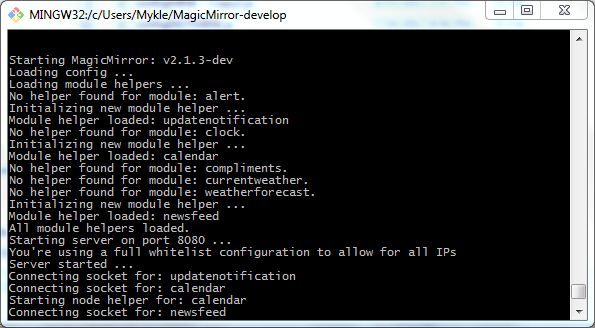

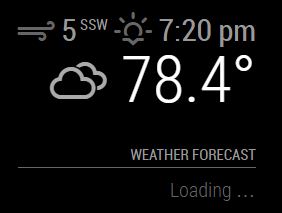
-
@Mykle1 I dont know about rhis module, but youd better to see
scalefield in config. I guess it is missed or invalid. -
@Mykle1 I read dev codes now,
scaleis not documented yet.(and it has also defined wrongly in defaults.)
Maybescale:"c"orscale:"f"may work. -
Same personal problem.
Mm2 does not display the Weatherforecast on the screen. -
There’s a problem with Openweather’s api not accepting certain api keys. In the meantime, you could try another weather module. There are many.
Scroll down to the weather category
https://github.com/MichMich/MagicMirror/wiki/MagicMirror²-Modules#3rd-party-modules
-
Well… Yesterday I submitted a patch to hack the situation with the new accounts in OpenWeather.
If you can test it will be great!
https://github.com/roramirez/MagicMirror/commit/e8438d37d78acc7a9e29e694a6987ce068324bcd -
Hi Roramirez, brother, it worked! but the day of the week, which should show “Monday” “Tuesday” “Wednesday” … shows everyone how “Sunday” to solve?
Thank you so much… -
@roramirez
Hello Ramirez, I had the same problem. But with your patch I can see the weatherforeast now
Thanks Frank -
Hello, I have exactly the same problem and I am trying to use your patch Ramirez. However, I am coming from the “mechanical world” and I’m new to Linux and GitHub. Could any of you write me how to apply such a patch?
-
@Azrael said in Problem with Weather forecast:
Could any of you write me how to apply such a patch?
You have to edit your weatherforecast.js file. Go to the link for the fix. The line you see highlighted in RED has to be removed (or commented out) of your weatherforecast.js file. The lines you see highlighted in GREEN have to be added in your weatherforecast.js file. The line numbers on the left make it easy for you to find exactly where the edits belong.
-
Thank you Mykle1. Now the weather forecast shows up where it should be.
However, I have exactly the same problem what luizcarlosnery mentioned earlier. Today (Saturday) I see: Sat,Sat,Sat,Sat,Sat,Sun,Sun. -
Sorry to hear that. Until the issues are resolved, you could always try another weather module. There are many to choose from.
Scroll down to the weather category
https://github.com/MichMich/MagicMirror/wiki/MagicMirror²-Modules#3rd-party-modules
-
You see the same day multiple times because this API is a “5 days/3 hour forecast API”, so you won’t get one result per day, but multiple forecasts for one single day with 3 hours between them.
E.g.
Result 1: "2017-09-24 00:00:00" Sunday
Result 2: "2017-09-24 03:00:00" Sunday
Result 3: "2017-09-24 06:00:00" Sunday
and so on



Hello! It looks like you're interested in this conversation, but you don't have an account yet.
Getting fed up of having to scroll through the same posts each visit? When you register for an account, you'll always come back to exactly where you were before, and choose to be notified of new replies (either via email, or push notification). You'll also be able to save bookmarks and upvote posts to show your appreciation to other community members.
With your input, this post could be even better 💗
Register Login