MagicMirror Forum
    • Recent
    • Tags
    • Unsolved
    • Solved
    • MagicMirror² Repository
    • Documentation
    • 3rd-Party-Modules
    • Donate
    • Discord
    • Register
    • Login
    A New Chapter for MagicMirror: The Community Takes the Lead
    Read the statement by Michael Teeuw here.

    Mirror Not Working

    Scheduled Pinned Locked Moved Troubleshooting
    16 Posts 4 Posters 7.6k Views 3 Watching
    Loading More Posts
    • Oldest to Newest
    • Newest to Oldest
    • Most Votes
    Reply
    • Reply as topic
    Log in to reply
    This topic has been deleted. Only users with topic management privileges can see it.
    • A Offline
      aayush447
      last edited by

      Hello Everyone, I am working to make my own MagicMirror, But When I Install the software and after creating the Config File, When I Type "npm start’ It Doesn’t show anything, just a black screen. Can anyone help me to fix this ?

      Mykle1M 1 Reply Last reply Reply Quote 0
      • Mykle1M Offline
        Mykle1 Project Sponsor Module Developer @aayush447
        last edited by

        @aayush447

        Can you post your terminal output?

        Create a working config
        How to add modules

        1 Reply Last reply Reply Quote 0
        • A Offline
          aayush447
          last edited by

          I Can’t It won’t let me do anything, just a black screen and mouse pointer. I can’t navigate to terminal or any other window

          Mykle1M 1 Reply Last reply Reply Quote 0
          • Mykle1M Offline
            Mykle1 Project Sponsor Module Developer @aayush447
            last edited by

            @aayush447

            When in black screen, press Alt, or Ctrl. You should get a menu bar at the top where you can quit MM. Then you can see your terminal

            Create a working config
            How to add modules

            1 Reply Last reply Reply Quote 0
            • A Offline
              aayush447
              last edited by

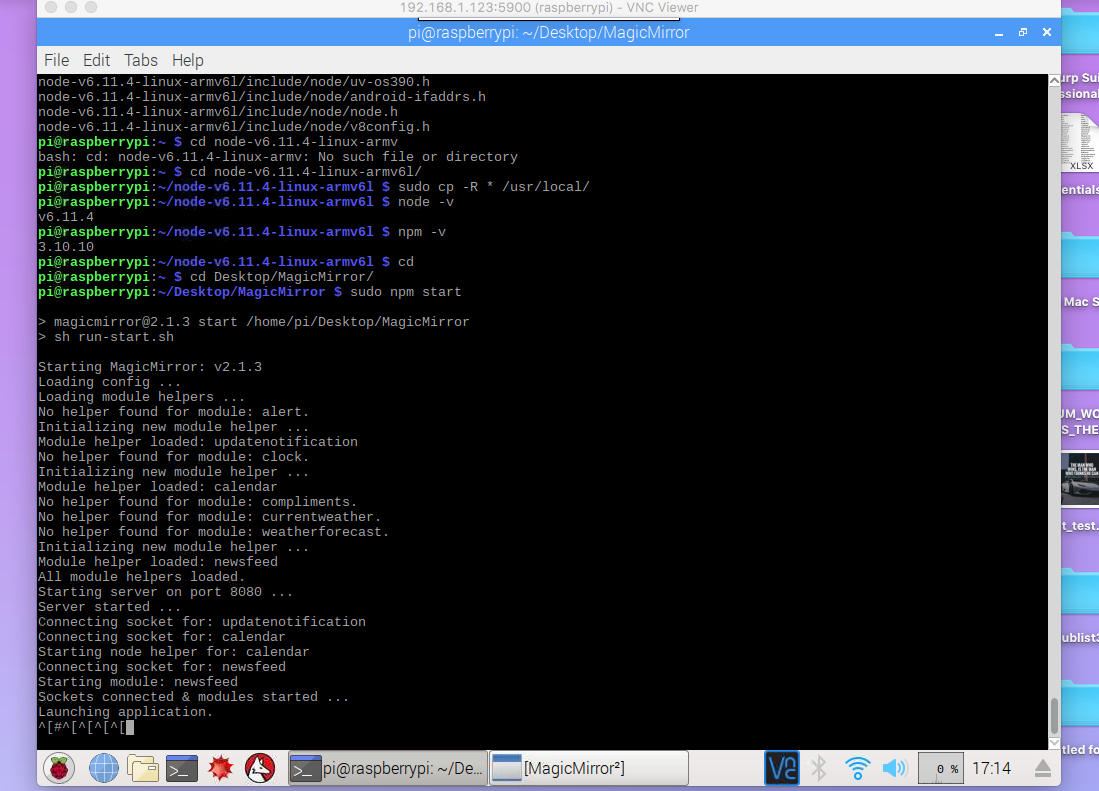
              Here’s the terminal output 0_1508845491480_Screen Shot 2017-10-24 at 5.14.06 PM.png

              Mykle1M 1 Reply Last reply Reply Quote 0
              • Mykle1M Offline
                Mykle1 Project Sponsor Module Developer @aayush447
                last edited by

                @aayush447

                Don’t know why you installed MM on your desktop.

                Also, did you install MM using sudo? That it not necessary or recommended.

                You can try running npm start in the MM directory, without sudo

                Create a working config
                How to add modules

                1 Reply Last reply Reply Quote 0
                • Mykle1M Offline
                  Mykle1 Project Sponsor Module Developer
                  last edited by

                  I’m off to work. I will check back here later

                  Create a working config
                  How to add modules

                  1 Reply Last reply Reply Quote 0
                  • A Offline
                    aayush447
                    last edited by

                    I installed the MM Directory on desktop then After navigating there I typed this “npm start” After that nothing happened

                    1 Reply Last reply Reply Quote 0
                    • axellejamousA Offline
                      axellejamous
                      last edited by

                      When you’re in the MagicMirror directory try going into the vendor file (cd vendor) and typing “npm install”. I had the same symptoms when I installed mine so it could be the same issue.

                      axellejamousA 1 Reply Last reply Reply Quote 0
                      • axellejamousA Offline
                        axellejamous @axellejamous
                        last edited by

                        @axellejamous said in Mirror Not Working:

                        When you’re in the MagicMirror directory try going into the vendor file (cd vendor) and typing “npm install”. I had the same symptoms when I installed mine so it could be the same issue.

                        Never mind. I realise I was running it with node serveronly and that works perfectly with 0 errors. However if I run it with npm start it’s still black.

                        A 1 Reply Last reply Reply Quote 0
                        • A Offline
                          aayush447 @axellejamous
                          last edited by

                          @axellejamous What Does ServerOnly Do?

                          axellejamousA 1 Reply Last reply Reply Quote 0
                          • axellejamousA Offline
                            axellejamous
                            last edited by

                            This post is deleted!
                            1 Reply Last reply Reply Quote 0
                            • axellejamousA Offline
                              axellejamous @aayush447
                              last edited by

                              @aayush447
                              Severonly works perfectly, all modules come up like they should and no errors

                              A 1 Reply Last reply Reply Quote 0
                              • A Offline
                                aayush447 @axellejamous
                                last edited by

                                @axellejamous How to install that?

                                axellejamousA bheplerB 2 Replies Last reply Reply Quote 0
                                • axellejamousA Offline
                                  axellejamous @aayush447
                                  last edited by

                                  @aayush447
                                  Ok. I seemed to have solved my issue, the MM works with npm start now.
                                  Electron seemed to be causing the issue for me.

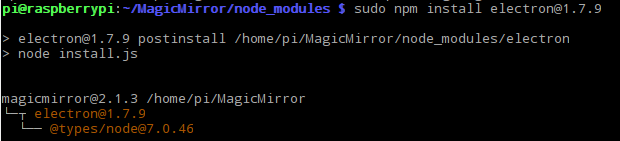
                                  Try this:
                                  0_1508876151290_dd0a940d-ad6e-44cf-8428-82dc1438c451-image.png
                                  and then:
                                  0_1508876202764_b91dd1d8-8b98-4e72-bf20-5b8b90cd45ec-image.png
                                  Then just try running npm start in the MagicMirror directory.

                                  I’m not sure why, but this solved it for me! Since you seem to have the same issue it might solve yours too.

                                  1 Reply Last reply Reply Quote 0
                                  • bheplerB Offline
                                    bhepler Module Developer @aayush447
                                    last edited by

                                    @aayush447 Serveronly is included with the MagicMirror framework. What it does is skip displaying the interface on the Raspberry Pi via Electron and the HDMI video output. You can still see the interface by pointing a web browser (especially the browser included with the Raspberry Pi operating system) at the Pi. But the Pi itself will still display the desktop and/or command prompt.

                                    This is especially useful for people who remote in to their Pi for development, multiple displays or remote access. For example, you could have one Pi run the MagicMirror framework and have a mirror in your bathroom, a display in your kitchen and a display in your man cave all showing the same output of the Pi.

                                    I use node serveronly during my development on my office PC. It lets me use a web browser to view the interface, which I can resize, move to a different monitor, etc. Otherwise, Electron would take over one entire monitor to display the output of the Magic Mirror framework.


                                    1 Reply Last reply Reply Quote 1

                                    Hello! It looks like you're interested in this conversation, but you don't have an account yet.

                                    Getting fed up of having to scroll through the same posts each visit? When you register for an account, you'll always come back to exactly where you were before, and choose to be notified of new replies (either via email, or push notification). You'll also be able to save bookmarks and upvote posts to show your appreciation to other community members.

                                    With your input, this post could be even better 💗

                                    Register Login

                                    • 1 / 1
                                    • First post
                                      Last post
                                    Enjoying MagicMirror? Please consider a donation!
                                    MagicMirror created by Michael Teeuw.
                                    Forum managed by Sam, technical setup by Karsten.
                                    This forum is using NodeBB as its core | Contributors
                                    Contact | Privacy Policy