MagicMirror Forum
    • Recent
    • Tags
    • Unsolved
    • Solved
    • MagicMirror² Repository
    • Documentation
    • 3rd-Party-Modules
    • Donate
    • Discord
    • Register
    • Login
    A New Chapter for MagicMirror: The Community Takes the Lead
    Read the statement by Michael Teeuw here.

    ioBroker MagicMirror Module

    Scheduled Pinned Locked Moved Requests
    16 Posts 8 Posters 8.3k Views 7 Watching
    Loading More Posts
    • Oldest to Newest
    • Newest to Oldest
    • Most Votes
    Reply
    • Reply as topic
    Log in to reply
    This topic has been deleted. Only users with topic management privileges can see it.
    • cruunnerrC Offline
      cruunnerr
      last edited by cruunnerr

      @GermanBluefox

      Hello,

      i just installed the module and it works :) so far so good ^^

      The only thing is, that no icons appear. Any idea?
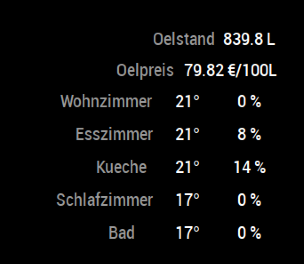
      0_1538556432738_Bildschirmfoto 2018-10-03 um 10.46.52.png

      {
                disabled: false,
                module: 'MMM-ioBroker',
                position: 'top_center',
                config: {
                  host: '192.168.x.x',
                  port: '8082',
                  https: false,
                  devices: [
                      { name: "Oelstand",
                        deviceStates: [
                                          { id: "mqtt.0.Oeltank.Oelstand", icon: "fa fa-oil-can", suffix: " L" },
                                      ]
                      },
                      { name: 'Oelpreis',
                        deviceStates: [
                                          { id: 'javascript.0.Heizoel.Ist.Price', icon: 'fa fa-euro-sign', suffix: ' €/100L' },
                                       //   { id: 'avascript.0.Heizoel.Ist.Date',    icon: 'fa clock',    suffix: '' }
                                      ]
                      },
                      { name: 'Wohnzimmer',
                        deviceStates: [
                                          { id: 'maxcube.0.devices.thermostat_XXXXX.setpoint', icon: 'wi wi-thermometer', suffix: '°' },
                                          { id: 'maxcube.0.devices.thermostat_XXXXX.valve', icon: 'wi wi-thermometer', suffix: ' %' },
                                      ]
                      },
                      { name: 'Esszimmer',
                        deviceStates: [
                                          { id: 'maxcube.0.devices.thermostat_XXXXX.setpoint', icon: 'wi wi-thermometer', suffix: '°' },
                                          { id: 'maxcube.0.devices.thermostat_XXXXX.valve', icon: 'wi wi-thermometer', suffix: ' %' },
                                      ]
                      },
                      { name: 'Kueche',
                        deviceStates: [
                                          { id: 'maxcube.0.devices.thermostat_XXXXX.setpoint', icon: 'wi wi-thermometer', suffix: '°' },
                                          { id: 'maxcube.0.devices.thermostat_XXXXX.valve', icon: 'wi wi-thermometer', suffix: ' %' },
                                      ]
                      },
                      { name: 'Schlafzimmer',
                        deviceStates: [
                                          { id: 'maxcube.0.devices.thermostat_XXXXX.setpoint', icon: 'wi wi-thermometer', suffix: '°' },
                                          { id: 'maxcube.0.devices.thermostat_XXXXX.valve', icon: 'wi wi-thermometer', suffix: ' %' },
                                      ]
                      },
                      { name: 'Bad',
                        deviceStates: [
                                          { id: 'maxcube.0.devices.thermostat_XXXXX.setpoint', icon: 'wi wi-thermometer', suffix: '°' },
                                          { id: 'maxcube.0.devices.thermostat_XXXXX.valve', icon: 'wi wi-thermometer', suffix: ' %' },
                                      ]
                      },
                    ]
                }
              },
      
      1 Reply Last reply Reply Quote 0
      • C Offline
        Chris87-ux
        last edited by

        @GermanBluefox ,

        Thanks for this module it is a great thing, unfortunately it seems to be not working with modbus values.

        {
              module: 'MMM-ioBroker',
              position: 'bottom_bar',
              config: {
                host: '192.168.178.xx',
                port: '8087',
                https: false,
                devices: [
                    { name: 'Pufferspeicher',
                      deviceStates: [
                                        { id: 'modbus.0.inputRegisters.12288_puffer_füllung',       icon: 'wi wi-thermometer',   suffix: '%' },
                                        { id: 'modbus.0.inputRegisters.78_Pufferspeicher_Druck',    icon: 'wi wi-barometer',     suffix: 'bar'}
                                        
                                    ]
                    },
                    { name: 'Druckluft',
                      deviceStates: [
                                        { id: 'modbus.0.inputRegisters.42_Druckluft_Dachboden1',       icon: 'wi wi-barometer',   suffix: 'bar' }
                                    ]
                    }
                  ]
              }
            },
        

        do you see any failure in the code?

        Everything i see on the mirror is e.g. “— %”.

        Br Chris

        FoziF 1 Reply Last reply Reply Quote 0
        • FoziF Offline
          Fozi Project Sponsor @Chris87-ux
          last edited by

          @Chris87-ux I’m a bit late to the party but as I’m tinkering with that module. too, maybe I can help.

          First, change the port to 8082. This seems to have been changed in one of the 2.x releases of the simple API.

          Second, go in ioBroker to the adapter setting for the web adater (!) and check “Eingebaute ‘Simple API’”
          Now the values should be pulled from ioBroker. Hope that helps.
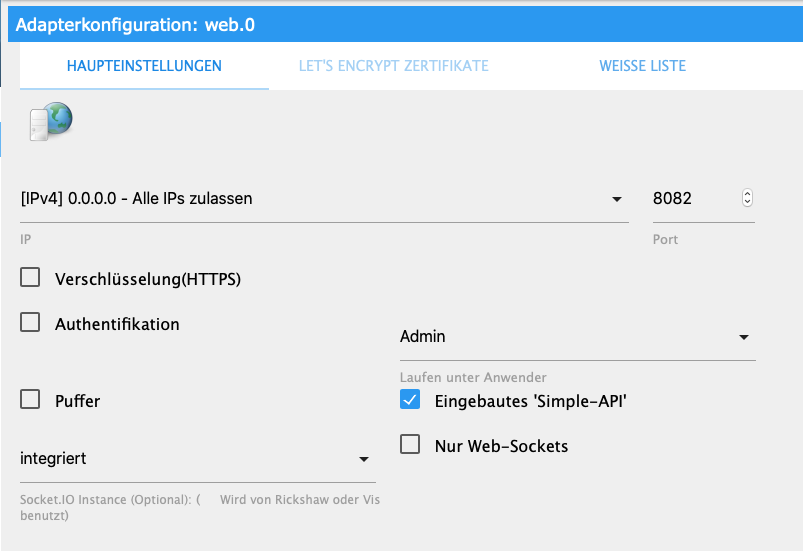
          0_1576517940097_Bildschirmfoto 2019-12-16 um 18.36.38.png

          HowTo: Replace PIR Sensor with a RCWL-0516 Microwave Sensor

          F 1 Reply Last reply Reply Quote 0
          • F Offline
            falke69 @Fozi
            last edited by

            @Fozi does not work :disappointed_face:

            FoziF 1 Reply Last reply Reply Quote 0
            • FoziF Offline
              Fozi Project Sponsor @falke69
              last edited by

              @falke69 is “[IPv4] 0.0.0.0 - Alle IP-Adressen zulassen” enabled?
              If this doesn’t work, too, the I’d ask bluefox in the ioBroker forum. There is also a very lenghty thread about that issue.

              HowTo: Replace PIR Sensor with a RCWL-0516 Microwave Sensor

              F 1 Reply Last reply Reply Quote 0
              • F Offline
                falke69 @Fozi
                last edited by

                @Fozi have all settings exactly as in the screenshot

                FoziF 1 Reply Last reply Reply Quote 0
                • FoziF Offline
                  Fozi Project Sponsor @falke69
                  last edited by

                  @falke69 Damned…Then try port 8087, maybe this is your standard port.

                  Are you using Homematic components, too? If so, then check MMM-Homematic. I switched to that module as its presentation is much nicer and the readouts of the actuators and sensors are translated and can be coloured if thresholds are met.

                  HowTo: Replace PIR Sensor with a RCWL-0516 Microwave Sensor

                  F 1 Reply Last reply Reply Quote 0
                  • F Offline
                    falke69 @Fozi
                    last edited by

                    @Fozi have already installed MMM-Homematic.
                    But found the other module better (line break)
                    If all of my windows are open, everything is shown on one line

                    FoziF 1 Reply Last reply Reply Quote 0
                    • FoziF Offline
                      Fozi Project Sponsor @falke69
                      last edited by

                      @falke69 What I didn’t like with MMM-ioBroker, was that the door and windows sensor didn’t display “auf”/“zu” but “true”/“false” or “1”/“0”. I couldn’t find a place in the code to modify or translate the status messages, so I dropped it.

                      HowTo: Replace PIR Sensor with a RCWL-0516 Microwave Sensor

                      F 1 Reply Last reply Reply Quote 0
                      • F Offline
                        falke69 @Fozi
                        last edited by

                        @Fozi
                        that’s how I solved it
                        Program on CCU

                        var sec=dom.GetObject("Verschlussensoren");
                        string i;
                        string list;
                        string seit;
                        string itemName;
                        string status_new;
                        string stunde=system.Date("%H").ToInteger();
                        string minute=system.Date("%M").ToInteger();
                        string textReplace = "Kontakt";
                        list="";
                        integer textReplaceLength = textReplace.Length();
                        foreach(i,sec.EnumUsedIDs()) {
                        var item=dom.GetObject(i);
                        var dev=dom.GetObject(item.Device());
                        if((dev.HssType()=="HM-Sec-RHS") || 
                        (dev.HssType()=="HM-Sec-SC") || 
                        (dev.HssType()=="HM-Sec-SC-2")|| 
                        (dev.HssType()=="HM-Sec-RHS-2")|| 
                        (dev.HssType()=="HM-Sec-SCo")) {
                        var status = item.DPByHssDP("STATE").Value();
                        if(status.Value()) {
                        if (status == 1 ) { status_new = "gekippt"; }
                        if (status == 2 ) { status_new = "offen"; }
                        itemName=dev.Name();
                        if(itemName.Length() >= textReplaceLength){
                        itemName = itemName.Substr(textReplaceLength, itemName.Length() - textReplaceLength);
                        }
                        list=list # itemName #",";
                        }
                        }
                        }
                        if(list.Length() < 5){
                        list=" kein Fenster ";
                        }
                        WriteLine(list);
                        dom.GetObject("offene Fenster").State(list);
                        

                        settings MMM-ioBroker

                        // iobroker offene Fenster / brennende Lampen
                        {
                                 disabled: false,
                                 module: 'MMM-ioBroker',
                                 position: 'top_right',
                                 config: {
                              host: 'localhost',
                                port: '8082',
                                https: false,
                                devices: [
                                { name: 'offene Fenster:',
                                deviceStates: [
                              { id: 'hm-rega.0.3102', icon: '',  suffix: '' },
                        
                                                 ]
                        
                              },
                            
                              { name: 'brennende Lampen:',
                                deviceStates: [
                                { id: 'hm-rega.0.9048', icon: '',  suffix: '' },
                        
                                                 ]
                        }
                                    ]
                                 }
                        },
                        
                        
                        FoziF M 2 Replies Last reply Reply Quote 1
                        • FoziF Offline
                          Fozi Project Sponsor @falke69
                          last edited by

                          @falke69 Thanks so much! I bookmarked this post for later use, if the MMM-Homeatic module won’t serve as I expect. Very interesting that you have to script the CCU. Great job!

                          HowTo: Replace PIR Sensor with a RCWL-0516 Microwave Sensor

                          1 Reply Last reply Reply Quote 0
                          • kusselinK Offline
                            kusselin
                            last edited by kusselin

                            Hallo Zusammen, ich klinke mich hier mal mit ein. Ich habe das MMM-irobroker modul installiert und auch in die Config geschrieben. Ich habe einen Zigbee stick udn dort habe ich ein lumi weather sensor erfolgreich gepairt.

                            Leider bin ich mir nun nicht schlüssig was in die Config mit reinkommt damit die humidity und die temoeratur angezeigt wird. Könnt ihr mir den Code bitte mitteilen…jetzt sieht der Code so aus:

                            {
                                module: 'MMM-ioBroker',
                                position: 'bottom_right',
                                config: {
                                  host: '192.168.200.120',
                                  port: '8081',
                                  https: false,
                                  devices: [
                                      { name: 'lumi.weather',
                                        deviceStates: [
                                                          { id: 'mqtt.0.sensorX.temperature', icon: 'wi wi-thermometer', suffix: '&deg;' },
                                                          { id: 'mqtt.0.sensorX.humidity',    icon: 'wi wi-humidity',    suffix: '%' }
                                                      ]
                                      },
                                      
                                    ]
                                }
                              },
                            

                            Das mqtt passt natürlich nicht. Ich weiss es aber nicht wie ich es einfügen muss.
                            Hier noch die Infos aus iobroker für den Weather adapter:

                            00158d0002fb4915	
                            lumi.weather
                            	device					
                            battery	
                            Battery percent
                            	state	battery.percent			 	
                            humidity	state
                            Humidity
                            	state	value.humidity			50.3 %	
                            link_quality	state
                            Link quality
                            	state	state			70	
                            pressure	state
                            Pressure
                            	state	value.pressure			1009 hPa	
                            temperature	state
                            Temperature
                            	state	value.temperature			20.31 °C	
                            voltage	
                            Battery voltage
                            	state	battery.voltage
                            

                            Über ne Info wie der Code aussehen muss herzichen Dank.

                            Gruss

                            (Hello everyone, I’m going to hook myself in here. I installed the MMM-irobroker module and also wrote it in the config. I have a Zigbee stick and there I successfully paired a lumi weather sensor.

                            Unfortunately I am not conclusive now what comes into the config so that the humidity and the temperature is displayed. Can you tell me the code please … now the code looks like this:)

                            Das Webinterface von iobroker erreiche ich mit 192.168.200.120:8081
                            Die ID habe ich gelesen ist wichtig…nur finde ich diese auch nicht…ist halt immer schwer wenn man sowas zum ersten mal macht! Ist mit ID die API gemeint?

                            1 Reply Last reply Reply Quote -1
                            • J Offline
                              Jensen
                              last edited by Jensen

                              Ich habe beim Modul ioBroker Probleme.
                              Es wird nur undefined angezeigt.
                              Ich konnte durch console.Logs erkennen, daß dort die Daten ankommen.
                              Wo muß ich nun weitersuchen?
                              Bin für jede Hilfe dankbar.
                              Gruß Jens

                              1 Reply Last reply Reply Quote -1
                              • J Offline
                                Jensen
                                last edited by

                                das war die Lösung, ändern in MMM-ioBroker.js

                                  getTemplate: function () {
                                    return 'MMM-ioBroker.njk';
                                  },
                                
                                
                                1 Reply Last reply Reply Quote 1
                                • M Offline
                                  MichaelS @falke69
                                  last edited by

                                  @falke69

                                  Hallo, ich habe auch das Problem mit den Anzeigen true und false. Würde gerne Ihre Lösung umsetzten. Ich verstehe aber nicht mit welchem Programm und wo das programmiert wird.
                                  Im ioBroker selbst (welcher Adapter) oder auf dem Magic Mirror (welches Modul).

                                  Ich würde mich sehr über Unterstützung freuen.

                                  Beste Grüße
                                  Michael

                                  1 Reply Last reply Reply Quote 0

                                  Hello! It looks like you're interested in this conversation, but you don't have an account yet.

                                  Getting fed up of having to scroll through the same posts each visit? When you register for an account, you'll always come back to exactly where you were before, and choose to be notified of new replies (either via email, or push notification). You'll also be able to save bookmarks and upvote posts to show your appreciation to other community members.

                                  With your input, this post could be even better 💗

                                  Register Login

                                  • 1 / 1
                                  • First post
                                    Last post
                                  Enjoying MagicMirror? Please consider a donation!
                                  MagicMirror created by Michael Teeuw.
                                  Forum managed by Sam, technical setup by Karsten.
                                  This forum is using NodeBB as its core | Contributors
                                  Contact | Privacy Policy

