MagicMirror Forum
    • Recent
    • Tags
    • Unsolved
    • Solved
    • MagicMirror² Repository
    • Documentation
    • 3rd-Party-Modules
    • Donate
    • Discord
    • Register
    • Login
    A New Chapter for MagicMirror: The Community Takes the Lead
    Read the statement by Michael Teeuw here.

    MMM-NetworkConnection

    Scheduled Pinned Locked Moved Utilities
    19 Posts 8 Posters 12.5k Views 6 Watching
    Loading More Posts
    • Oldest to Newest
    • Newest to Oldest
    • Most Votes
    Reply
    • Reply as topic
    Log in to reply
    This topic has been deleted. Only users with topic management privileges can see it.
    • A Offline
      AgP42 Project Sponsor Module Developer
      last edited by

      Hello,

      I try to monitor my internet connection as my WiFi disconnect a lot, but none of the avaliable modules (this one, but also the 2 originals ones “internet-monitor” and “MMM-connection-status”) are able to detect a disconnection…

      When the WiFi is properly working, then I have the values displayed correctly, but in case of connection lost (I remove the wifi key…), then the module continu to display previous valid values.

      I am on a RPI2 with WiFi USB key, can this be the origin of the issue ?

      Thanks in advance for any help :slightly_smiling_face:

      1 Reply Last reply Reply Quote 0
      • E Offline
        epi
        last edited by epi

        Installed as in readme file, fails to show up. No errors in browser. Module is not working.

        Mykle1M 1 Reply Last reply Reply Quote 0
        • Mykle1M Offline
          Mykle1 Project Sponsor Module Developer @epi
          last edited by

          @epi said in MMM-NetworkConnection:

          Module is not working.

          Uhh, I just installed it and it works just fine.

          0_1538956706928_22.png

          Post your config entry in a code block

          Create a working config
          How to add modules

          1 Reply Last reply Reply Quote 0
          • E Offline
            epi
            last edited by

            That is very strange, as I see nothing. OK, my code

            {
            		module: "MMM-NetworkConnection",
            		position: "top_center",
            		config: { 
            			updateInterval: 600000,
            			maxTime: 5000,
            			initialLoadDelay: 2500,
            			decimal: 1,
            			displayTextStatus: true,
            			animationSpeed: 2500
            		}
            	},
            
            Mykle1M 1 Reply Last reply Reply Quote 0
            • Mykle1M Offline
              Mykle1 Project Sponsor Module Developer @epi
              last edited by

              @epi

              I copy and pasted your config entry and it fires right up. Did you follow the directions in the readme for installation and dependencies? Have you tried the module by itself? Have you modified any of the module files?

              My terminal output upon launch:
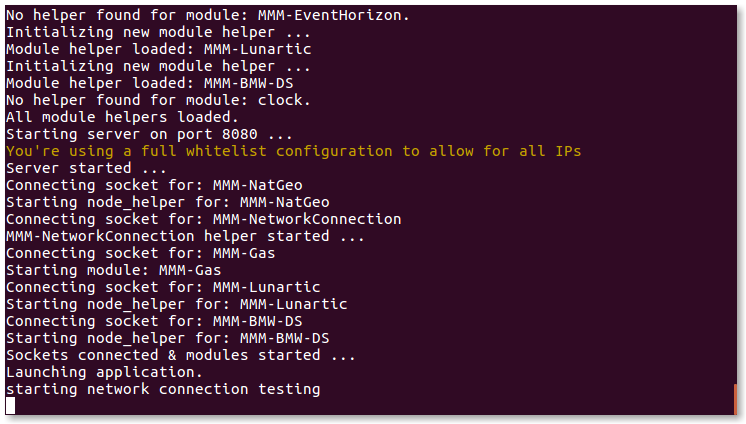
              0_1539304459454_Screenshot from 2018-10-11 20-31-41.png

              Create a working config
              How to add modules

              1 Reply Last reply Reply Quote 0
              • Sandy2503S Offline
                Sandy2503
                last edited by

                @epi said in MMM-NetworkConnection:

                module: “MMM-NetworkConnection”,

                @epi

                change in your config.js the name of the module from

                module: "MMM-NetworkConnection",
                

                to

                module: "MMM-NetworkConnections",
                

                I think that is your problem.

                Sandy

                Mykle1M 1 Reply Last reply Reply Quote 0
                • Mykle1M Offline
                  Mykle1 Project Sponsor Module Developer @Sandy2503
                  last edited by

                  @sandy2503

                  Uhhh . . . . no.

                  Create a working config
                  How to add modules

                  1 Reply Last reply Reply Quote 0
                  • E Offline
                    epi
                    last edited by

                    @Sandy2503 I changed to “-s” and still did not work.
                    @Mykle1 I followed the installation guide, incl. the dependencies. I did not modify anything. I tried the module alone (all other cfg removed), still did not work for me.

                    What is the installation folder for dependencies in your case?

                    Mykle1M 1 Reply Last reply Reply Quote -1
                    • Mykle1M Offline
                      Mykle1 Project Sponsor Module Developer @epi
                      last edited by

                      @epi

                      Dependencies should be installed by running npm install in the MMM-NetworkConnection directory

                      Create a working config
                      How to add modules

                      1 Reply Last reply Reply Quote 0
                      • E Offline
                        epi
                        last edited by

                        Guys, can someone also make a simplified version? No need for internet speed metrics, just the ability to ping specific ip address and return as “internet is working” either “network down”?

                        yawnsY 1 Reply Last reply Reply Quote 0
                        • yawnsY Offline
                          yawns Moderator @epi
                          last edited by

                          @epi said in MMM-NetworkConnection:

                          Guys, can someone also make a simplified version? No need for internet speed metrics, just the ability to ping specific ip address and return as “internet is working” either “network down”?

                          Like this? https://github.com/sheyabernstein/MMM-connection-status

                          1 Reply Last reply Reply Quote 1
                          • E Offline
                            epi
                            last edited by

                            Thanks :)

                            1 Reply Last reply Reply Quote 0
                            • Cr4z33C Offline
                              Cr4z33 @slametps
                              last edited by

                              @slametps here is the Italian translation if you want to add it.

                              {
                              	"NETCONN_CONNECTED": "Connesso ad Internet",
                              	"NETCONN_NOTCONNECTED": "Nessuna connessione ad Internet",
                              	"NETCONN_MILLISECOND": "ms",
                              	"NETCONN_NA": "ND",
                              
                              	"TXT_NETCONN": "CONNESSIONE DI RETE",
                              	"TXT_NETCONN_DESC": "mostra lo stato di connessione ad Internet"
                              }
                              
                              
                              1 Reply Last reply Reply Quote 0
                              • Cr4z33C Offline
                                Cr4z33 @slametps
                                last edited by

                                @slametps I had long read at speedtest readme however I couldn’t figure out what to edit to have a different server selected as best/favourite server.

                                These are the details of the wanted server:

                                server url="http://speedtestrm1.telecomitalia.it/speedtest/upload.php" lat="41.9000" lon="12.5000" name="Rome" country="Italy" cc="IT" sponsor="Telecom Italia S.p.A." id="3243" host="speedtestrm1.telecomitalia.it:8080"
                                
                                slametpsS 1 Reply Last reply Reply Quote 0
                                • slametpsS Offline
                                  slametps @Cr4z33
                                  last edited by

                                  @Cr4z33 said in MMM-NetworkConnection:

                                  @slametps I had long read at speedtest readme however I couldn’t figure out what to edit to have a different server selected as best/favourite server.

                                  These are the details of the wanted server:

                                  server url="http://speedtestrm1.telecomitalia.it/speedtest/upload.php" lat="41.9000" lon="12.5000" name="Rome" country="Italy" cc="IT" sponsor="Telecom Italia S.p.A." id="3243" host="speedtestrm1.telecomitalia.it:8080"
                                  

                                  Currently, the module is using default test server provided by speedtest-net node module. You should modify node_helper.js to add your desired test server.
                                  You can find how to add the options, in here.

                                  regards,

                                  Slamet PS

                                  Cr4z33C 1 Reply Last reply Reply Quote 0
                                  • Cr4z33C Offline
                                    Cr4z33 @slametps
                                    last edited by

                                    @slametps that is where I looked at, but then I didn’t understand what file and what lines to edit.

                                    The problem is that the default server looks to be located in the US therefore showing a very high ping and low speed results isn’t really what someone is expecting from the module. ;)

                                    Cr4z33C 1 Reply Last reply Reply Quote 0
                                    • Cr4z33C Offline
                                      Cr4z33 @Cr4z33
                                      last edited by Cr4z33

                                      @slametps at the end of the day I found finally some examples around, but everybody is reporting that setting a specific server somehow is not working (anymore?).

                                      The line should look like

                                      var test = speedTest({maxTime: 5000, serverId : "3243"});
                                      

                                      however this causes an error in node_helper.js at MM loading and the screen goes black until I end MM itself. :confused_face:


                                      1 Reply Last reply Reply Quote 0

                                      Hello! It looks like you're interested in this conversation, but you don't have an account yet.

                                      Getting fed up of having to scroll through the same posts each visit? When you register for an account, you'll always come back to exactly where you were before, and choose to be notified of new replies (either via email, or push notification). You'll also be able to save bookmarks and upvote posts to show your appreciation to other community members.

                                      With your input, this post could be even better 💗

                                      Register Login

                                      • 1 / 1
                                      • First post
                                        Last post
                                      Enjoying MagicMirror? Please consider a donation!
                                      MagicMirror created by Michael Teeuw.
                                      Forum managed by Sam, technical setup by Karsten.
                                      This forum is using NodeBB as its core | Contributors
                                      Contact | Privacy Policy