MagicMirror Forum
    • Recent
    • Tags
    • Unsolved
    • Solved
    • MagicMirror² Repository
    • Documentation
    • 3rd-Party-Modules
    • Donate
    • Discord
    • Register
    • Login
    A New Chapter for MagicMirror: The Community Takes the Lead
    Read the statement by Michael Teeuw here.

    MMM-iFrame-Ping

    Scheduled Pinned Locked Moved Utilities
    58 Posts 12 Posters 43.4k Views 13 Watching
    Loading More Posts
    • Oldest to Newest
    • Newest to Oldest
    • Most Votes
    Reply
    • Reply as topic
    Log in to reply
    This topic has been deleted. Only users with topic management privileges can see it.
    • B Offline
      bolish
      last edited by bolish

      The sensor I’m using doesn’t offer this option, unfortunatly.
      link text

      Thinking of it again :

      Would it not be more “sustainable” to PR MMM-PIRSensor by putting a second notification trigger “USER_PRESENCE, Screen Off” after the timeout delay.
      Then, we could play within MMM-SmartWebDisplay with that one instead of the only USER PRESENCE false, true.
      By doing that + adding the option to use it or not, it would make the full thing more reliable and generic.

      If I believe it’s somewhere here :

                      else if (value == valueOff) {
                          self.sendSocketNotification('USER_PRESENCE', false);
                          if (!self.config.powerSaving){
                              return;
                          }
      
                          self.deactivateMonitorTimeout = setTimeout(function() {
                              self.deactivateMonitor();
                          }, self.config.powerSavingDelay * 1000);
                      }
                  });
      
      A 1 Reply Last reply Reply Quote 0
      • A Offline
        AgP42 Project Sponsor Module Developer @bolish
        last edited by

        @bolish
        On the link you sent, this sensor is exactly the same as mine and its allow to change the timer ! ;-)

        The best way to make that clean will be to change the PIR-sensor module to send the notification only at the end of the timer, but I have no time to do so now…

        What you can do for now to desactivate the Stop at the reception of a USER_PRESENCE = false notification is to go on the file MMM-SmartWebDisplay.js, on the function “GestionUpdateIntervalSWD”, then comment (//) the line "this.StopDisplay();

        In fact I have no time to change the module PIR-Sensor now because I am about to finish an update of the module MMM-RemoteControl to be able to use "Next/Prev/Play/Pause/Stop directly on RemoteControl :
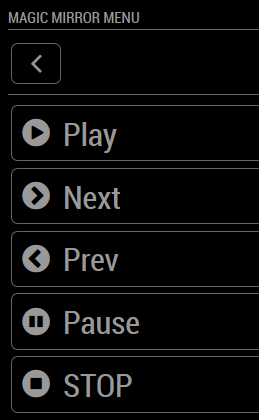
        0_1549816846729_RemoteSWD.png

        1 Reply Last reply Reply Quote 0
        • B Offline
          bolish
          last edited by bolish

          oh! I will look on the module again as I didn’t saw the famous screws you’re referring too…

          Don’t worry @AgP42 , you already did a great job! Thanks again for that.

          For the time being I will leave it like that (with your workaround) and if I have time on my side, I will maybe try to update MMM-PIRSensor. Maybe I could do it with trial and error method.

          Thanks to the latest update of your module and MMM-GroveGestures (from @Sean ) , I end up with a perfect user experience :

          • On my page 1 (main MM page), up / down gestures are handling news RSS details, etc…
          • On my page 2, I have your iFrame and I’m able to change youtube live channels by up / down gestures also.

          Perfect!

          The Remote Control you are working on looks great also!

          A bientôt et bonne continuation!! (tu as laissé qques indices dans ton code :-)

          1 Reply Last reply Reply Quote 0
          • A Offline
            AgP42 Project Sponsor Module Developer
            last edited by

            :winking_face:

            Here is the new post about MMM-SmartWebDisplay, and the modification of MMM-RemoteControl to control it !

            1 Reply Last reply Reply Quote 0
            • L Offline
              lpgjg
              last edited by

              Hey everyone,
              Hoping I can jump in here at the beginners level. Been trying to load a number of YouTube modules for a week to no avail.

              I’m more old school so this stuff doesn’t come natural to me and I’ve been trying to get iFrame-Ping to work the last few days.

              Long story short, all I get is YouTube trying to load on the MM and then “Video unavailable” where the video should be.

              The rest of the MM and its modules are working as should be. Strangely enough, I can click on the iframe-Ping module and the whole magic mirror disappears and the Pi switches to YouTube, full screen?

              The only way to get out of youtube at this point is with “ctrl Q”.

              Can anyone help?

              A 1 Reply Last reply Reply Quote 0
              • A Offline
                AgP42 Project Sponsor Module Developer @lpgjg
                last edited by

                @lpgjg
                Hello,

                can you send your configuration ?

                And also the log ? (when the MagicMirror is running, Ctrl+i and then filter to “iFrame-Ping” and copy the data°

                Thanks,
                AgP42

                1 Reply Last reply Reply Quote 0
                • L Offline
                  lpgjg
                  last edited by

                  Will try to do so when I get home from work tonight. May take a few attempts as this very alien to me given that I’m probably older than most all of you…or your dads.

                  May be worth noting: After a few attempts I noticed if I used my companies playlist, or that of Bombardier, Nord-Gear or any other company / commercial play list, it works fine. Always begins at the same place when started but the module shows up and plays the videos.

                  But if I try to add a Pop music playlist or any of the popular artist out their, it gives me the “video unavailable.”

                  As if it’s a copy right issue when going through the mirror.

                  BTW: I’m in Montreal, Canada

                  S A 2 Replies Last reply Reply Quote 0
                  • S Offline
                    sdetweil @lpgjg
                    last edited by

                    @lpgjg I’m 67… some of us are older…

                    Sam

                    How to add modules

                    learning how to use browser developers window for css changes

                    Mykle1M 1 Reply Last reply Reply Quote 1
                    • A Offline
                      AgP42 Project Sponsor Module Developer @lpgjg
                      last edited by

                      @lpgjg @sdetweil,

                      the good news is that technology don’t care about the user age !

                      and I also don’t care, old or young, gives me your logs and I will help you ! :smiling_face_with_halo: :face_with_tears_of_joy:

                      1 Reply Last reply Reply Quote 0
                      • L Offline
                        lpgjg
                        last edited by

                        Nothing happens when I hit “ctrl” and then the letter ”i” while the mirror is running. Or was I actually suppose to add the plus sign “+”…and I tried that as well. Only thing that works is ctrl Q.

                        As to my configuration. I assume this is what you are asking for:

                        {
                        module: ‘MMM-iFrame-Ping’,
                        position: ‘bottom_right’, // This can be any of the regions.
                        config: {
                        // See ‘Configuration options’ for more information.
                        url: “https://www.youtube.com/embed/LH4Y1ZUUx2g?list=PLw-VjHDlEOguL2K_NwIl_tYcs9_FSt5v_&autoplay=1&modestbranding=1&iv_load_policy=3”, //url to display
                        height:“80%”,
                        width:“80%”,
                        autoRefresh: false, //set to false for video
                        updateInterval: 1, //in min. Only if autoRefresh: true
                        displayLastUpdate: true,
                        width: “100%”, // Optional. Default: 100%
                        height: “400px”, //Optional. Default: 100px
                        scrolling: “no”
                        }

                        S A 2 Replies Last reply Reply Quote 0
                        • S Offline
                          sdetweil @lpgjg
                          last edited by sdetweil

                          @lpgjg ctrl-shift-i (letter I) to open the dev window, then select the console tab

                          Sam

                          How to add modules

                          learning how to use browser developers window for css changes

                          1 Reply Last reply Reply Quote 0
                          • A Offline
                            AgP42 Project Sponsor Module Developer @lpgjg
                            last edited by

                            @lpgjg
                            This video is not available on youtube, so yes it is normal that the magicmirror cannot load it.

                            Is it a private video ?

                            1 Reply Last reply Reply Quote 0
                            • Mykle1M Offline
                              Mykle1 Project Sponsor Module Developer @sdetweil
                              last edited by

                              @sdetweil said in MMM-iFrame-Ping:

                              I’m 67… some of us are older…

                              I’m the youngest of my older friends. (60)

                              Create a working config
                              How to add modules

                              1 Reply Last reply Reply Quote 0
                              • L Offline
                                lpgjg
                                last edited by

                                I guess I am the baby of the group after all at 58.

                                AgP42
                                The videos are all from YouTube and do not seem to be private. I have tried this three amongst quite a few others. If someone has a pop play list that works, can you please give it to me. I can try it.

                                https://www.youtube.com/watch?v=LH4Y1ZUUx2g&list=PLw-VjHDlEOguL2K_NwIl_tYcs9_FSt5v_
                                https://www.youtube.com/watch?v=JGwWNGJdvx8&list=PLMC9KNkIncKtPzgY-5rmhvj7fax8fdxoj
                                https://www.youtube.com/watch?v=WXBHCQYxwr0&list=PL4o29bINVT4EG_y-k5jGoOu3-Am8Nvi10

                                I right click on the video while its playing and then click on copy embed code, from there I copy the src and input that into iFrame and/or iFramPing. Which gives me the “video unavailable” when I start the mirror.

                                When I do the exact same for the following YouTube videos, the vids play fine.

                                https://www.youtube.com/watch?v=I_bOFxxqXOg&list=PL6GgLDsVQ7J-JEVldGtzIVlmC1MbvIZbO
                                https://www.youtube.com/watch?v=M3AYuDFdf88&list=PLwMdN-ylsjO5633clbN4nkygVXHpbcFwX

                                I will try the ctrl-shift-i and will be back soon…hopefully.

                                1 Reply Last reply Reply Quote 0
                                • L Offline
                                  lpgjg
                                  last edited by

                                  Wow…did not expect that screen to pop up? Hope I got what you asked for.

                                  Filter:
                                  Load script: modules/MMM-iFrame//MMM-iFrame.js
                                  module.js:477 Module registered: MMM-iFrame
                                  loader.js:152 Bootstrapping module: MMM-iFrame
                                  loader.js:157 Scripts loaded for: MMM-iFrame
                                  loader.js:197 Load stylesheet: modules/MMM-iFrame/MMM-iFrame.css
                                  loader.js:159 Styles loaded for: MMM-iFrame
                                  loader.js:161 Translations loaded for: MMM-iFrame
                                  loader.js:182 Load script: modules/MMM-iFrame-Ping//MMM-iFrame-Ping.js
                                  module.js:477 Module registered: MMM-iFrame-Ping
                                  loader.js:152 Bootstrapping module: MMM-iFrame-Ping
                                  loader.js:157 Scripts loaded for: MMM-iFrame-Ping
                                  loader.js:197 Load stylesheet: modules/MMM-iFrame-Ping/MMM-iFrame-Ping.css
                                  loader.js:159 Styles loaded for: MMM-iFrame-Ping
                                  loader.js:161 Translations loaded for: MMM-iFrame-Ping
                                  MMM-iFrame-Ping.js:30 Starting module: MMM-iFrame-Ping
                                  module.js:156 MMM-iFrame received a system notification: ALL_MODULES_STARTED
                                  module.js:156 MMM-iFrame received a system notification: MODULE_DOM_CREATED
                                  module.js:156 MMM-iFrame received a system notification: DOM_OBJECTS_CREATED
                                  module.js:154 MMM-iFrame received a module notification: WEATHER from sender: MMM-NOAA3
                                  module.js:154 MMM-iFrame received a module notification: CALENDAR_EVENTS from sender: calendar
                                  MMM-iFrame.js:26 update0
                                  MMM-iFrame.js:26 update1
                                  MMM-iFrame.js:26 update2
                                  MMM-iFrame.js:26 update3
                                  MMM-iFrame.js:26 update4
                                  MMM-iFrame.js:26 update5
                                  MMM-iFrame.js:26 update6

                                  Actually been trying both the MMM-iFrame & MMM-iFrame-Ping.

                                  1 Reply Last reply Reply Quote 0
                                  • A Offline
                                    AgP42 Project Sponsor Module Developer
                                    last edited by

                                    Please try only one module at the time : or iFrame or iFrame-Ping but not both on the same config file.

                                    All the 5 link you gave bellow are also working fine in my browser, but the first one you gave previously didn’t work.

                                    1 Reply Last reply Reply Quote 0
                                    • L Offline
                                      lpgjg
                                      last edited by

                                      At first I did only try one module at a time , removing one complete before trying the other. I’ve only recently installed a few at a time just to try different links on each module try to triple my combinations.

                                      I see no difference if I try one at a time or three at the same time. Even have MMM-SmartWebDisplay installed now and it also behaves the same way.

                                      But i will try one at a time again when I get home later.

                                      Wondering if its a Canadian copy right thing? Any Canadians on here have these modules running properly. If so, would love to see which playlists you have running.

                                      Was there any errors on the info I provided?

                                      1 Reply Last reply Reply Quote 0
                                      • J Offline
                                        JeroenV99
                                        last edited by

                                        Anyone can help me?:slightly_smiling_face:

                                        i want to put my google spreadsheets on my Magic Mirror and I thought it would be best with iframe

                                        but when i put my link in the config there is no new item on my mirror

                                        https://docs.google.com/spreadsheets/d/e/2PACX-1vTd-e8mpbbkZSfsZzQHrIevINnb-DVZnm5mPOmX3FqzS6yp6q_mxd0SnBbZ-hurB_7ET3sZDH_GFXil/pubhtml?gid=0&single=true
                                        0_1553070813490_4a834d4c-11d9-4c83-81b1-c45436915682-image.png

                                        A 1 Reply Last reply Reply Quote 0
                                        • A Offline
                                          AgP42 Project Sponsor Module Developer @JeroenV99
                                          last edited by

                                          @JeroenV99

                                          I also have an empty page with your link, so normal that the iFrame don’t display it !

                                          1 Reply Last reply Reply Quote 0
                                          • E Offline
                                            Egnos
                                            last edited by Egnos

                                            Thank you very much to the developer for the excellent work!

                                            I would have a problem:
                                            In my MM I call the “MMM-iFrame-Ping” module twice, it appear on two different pages.
                                            The problem is if I want to set two different sizes.
                                            For some reason the size of one module affects the other, not allowing to have two distinct measures.

                                            Here is my config.js:

                                            		{
                                            		module: 'MMM-iFrame-Ping',
                                            		//position: 'middle_center',	// This can be any of the regions.
                                            		pages: {Welcome: "middle_center"},
                                            		config: {
                                            			// See 'Configuration options' for more information.
                                            			url: "xxxxxxxxxx",
                                            			//height:"100%", 
                                            			//width:"100%",
                                            			autoRefresh: false, //set to false for video
                                            			updateInterval: 1, //in min. Only if autoRefresh: true
                                            			displayLastUpdate: false,
                                            			width: "50%", // Optional. Default: 100%
                                            			height: "500px", //Optional. Default: 100px
                                            			scrolling: "no" 
                                            				}
                                            		},
                                            
                                            		{
                                            		module: 'MMM-iFrame-Ping',
                                            		//position: 'middle_center',	// This can be any of the regions.
                                            		pages: {Sport: "middle_center"},
                                            		config: {
                                            			// See 'Configuration options' for more information.
                                            			url: "xxxxxxxxxx",
                                            			//height:"100%", 
                                            			//width:"100%",
                                            			 autoRefresh: false, //set to false for video
                                            			updateInterval: 1, //in min. Only if autoRefresh: true
                                            			displayLastUpdate: false,
                                            			width: "30%", // Optional. Default: 100%
                                            			height: "350px", //Optional. Default: 100px			
                                            			//width: "50%", // Optional. Default: 100%
                                            			//height: "500px", //Optional. Default: 100px
                                            			scrolling: "no" 
                                            				}
                                            		},
                                            

                                            Does it happen to you too?
                                            Is this behavior correct?

                                            I hope I explained myself!

                                            Thanks.

                                            My Mirror https://forum.magicmirror.builders/topic/17262/the-raspimirror-was-born/7

                                            1 Reply Last reply Reply Quote 0

                                            Hello! It looks like you're interested in this conversation, but you don't have an account yet.

                                            Getting fed up of having to scroll through the same posts each visit? When you register for an account, you'll always come back to exactly where you were before, and choose to be notified of new replies (either via email, or push notification). You'll also be able to save bookmarks and upvote posts to show your appreciation to other community members.

                                            With your input, this post could be even better 💗

                                            Register Login

                                            • 1
                                            • 2
                                            • 3
                                            • 1 / 3
                                            • First post
                                              Last post
                                            Enjoying MagicMirror? Please consider a donation!
                                            MagicMirror created by Michael Teeuw.
                                            Forum managed by Sam, technical setup by Karsten.
                                            This forum is using NodeBB as its core | Contributors
                                            Contact | Privacy Policy

