MagicMirror Forum
    • Recent
    • Tags
    • Unsolved
    • Solved
    • MagicMirror² Repository
    • Documentation
    • 3rd-Party-Modules
    • Donate
    • Discord
    • Register
    • Login
    A New Chapter for MagicMirror: The Community Takes the Lead
    Read the statement by Michael Teeuw here.

    MMM-DarkSkyForecast - Yet ANOTHER weather module

    Scheduled Pinned Locked Moved Utilities
    334 Posts 67 Posters 835.6k Views 74 Watching
    Loading More Posts
    • Oldest to Newest
    • Newest to Oldest
    • Most Votes
    Reply
    • Reply as topic
    Log in to reply
    This topic has been deleted. Only users with topic management privileges can see it.
    • S Offline
      surger13 Project Sponsor @chris1971
      last edited by

      @chris1971

      concise: true,
      

      Hello, Chris,
      you can set concise: true. Then wind direction and speed are gone. Unfortunately also with the current weather.

      My wish would also be that wind direction and wind speed can only be displayed for the current weather. Does anyone know a solution for this?

      Greetings

      1 Reply Last reply Reply Quote 0
      • C Offline
        chris1971
        last edited by

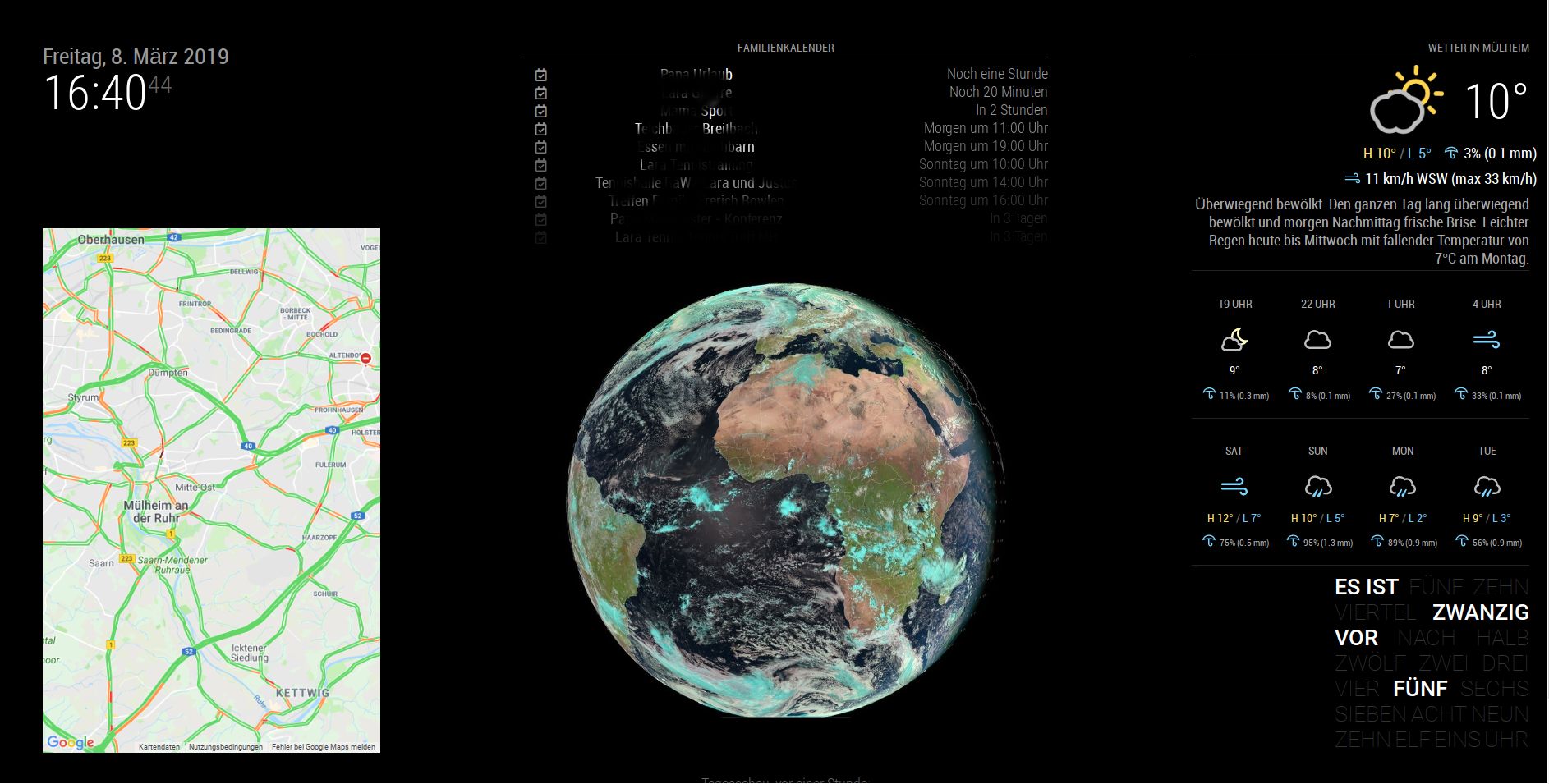
        The crazy situation is, that I have done it before… after a crash I had to config the system again, but I do not know how I have done this in the past. My backup didn’t work and the file was corrupt… :-(

        This is the design I would like to have again.
        Hope that an expert can support…0_1553156684416_Screenshot2.jpg
        1 Reply Last reply Reply Quote 0
        • S Offline
          surger13 Project Sponsor
          last edited by

          I hope so, too. Just like on your picture I would configure it for myself.

          1 Reply Last reply Reply Quote 0
          • O Offline
            onkelbobby
            last edited by

            @chris1971
            if you just wanna remove the wind in the forecast tile try to add that line in MMM_DarkSkyForecast.css

            .MMM-DarkSkyForecast .wrapper.tiled .forecast-container .forecast-item .wind-container{
              display: none;
            } 
            

            of course it makes sense to remove the existing line before
            hope this helps

            C 1 Reply Last reply Reply Quote 0
            • E Offline
              evil_gusgus @j.e.f.f
              last edited by

              @j-e-f-f

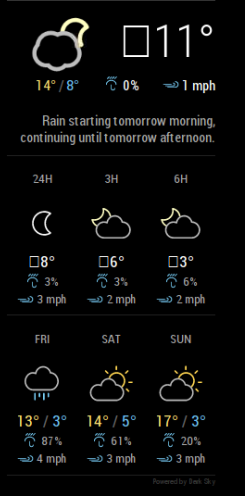
              Hey there, I’ve also run into this issue. Not sure if anyone has made any progress on it?
              0_1553229267957_weather.PNG

              1 Reply Last reply Reply Quote 1
              • S Offline
                sdetweil @j.e.f.f
                last edited by

                @j-e-f-f this looks like a null character before some translation…

                I think it is caused by this line of code in MMM-DarkSkyForecast.js

                        animatedIconId: this.config.useAnimatedIcons ? this.getAnimatedIconId() : null,
                

                and I think the template check has failed

                          {% if forecast.currently.animatedIconId %}
                

                Sam

                How to add modules

                learning how to use browser developers window for css changes

                1 Reply Last reply Reply Quote 0
                • pugslyP Offline
                  pugsly
                  last edited by

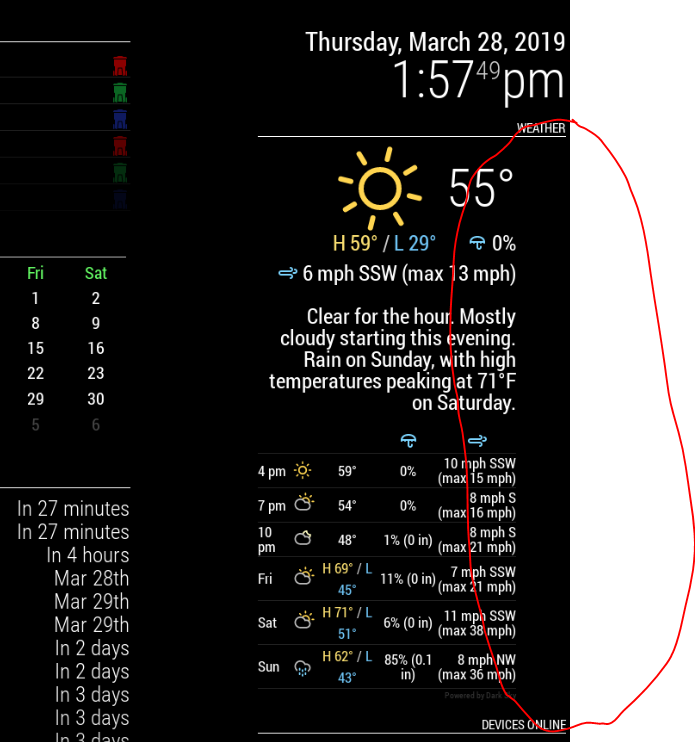
                  Trying to find out how to remove this spacing circled in RED.
                  0_1553796017174_dd83a999-2901-44a0-86b7-3b3cfa7e07cc-image.png

                  lavolp3L J 2 Replies Last reply Reply Quote 0
                  • M Offline
                    mydiva
                    last edited by

                    Hi all, why my day forecast jambs to the hourly forecast? This happens not always just rendemly?0_1553890445243_49a02d18-cc4e-40b9-85f4-336acfe0f773.jpg image url)

                    lavolp3L J 2 Replies Last reply Reply Quote 0
                    • lavolp3L Offline
                      lavolp3 Module Developer @pugsly
                      last edited by

                      @pugsly You can check out the css of the part using the developer’s tools of your browser.
                      The css properties can then be switched on and off and with that you can find out what is responsible for the space.

                      I would guess your module has become broader due to another module. The forecast part, however, seems to have a fixed width and is aligned left. Then you get an empty space on the right.

                      How to troubleshoot modules
                      MMM-soccer v2, MMM-AVStock

                      1 Reply Last reply Reply Quote 0
                      • lavolp3L Offline
                        lavolp3 Module Developer @mydiva
                        last edited by

                        @mydiva The width of your module seems to have become so big that the daily forecast slips into hourly line. I would suggest to set a fixed width for this part or control the width of the other module influencing this.

                        How to troubleshoot modules
                        MMM-soccer v2, MMM-AVStock

                        1 Reply Last reply Reply Quote 0
                        • J Offline
                          j.e.f.f Project Sponsor Module Developer @mydiva
                          last edited by

                          @mydiva said in MMM-DarkSkyForecast - Yet ANOTHER weather module:

                          Hi all, why my day forecast jambs to the hourly forecast? This happens not always just rendemly?
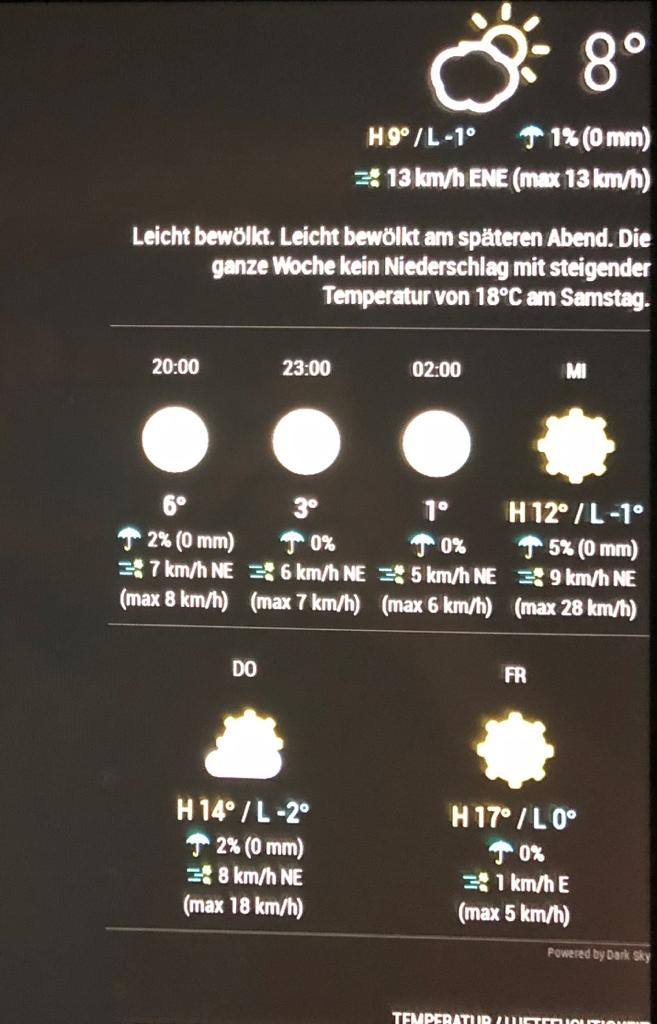
                          By default, my module does not force a size for the tiles in this view, as I can’t guess how many columns you’ll have if you’ve adjusted the size of your main layout columns. It should be three columns on a default magic mirror installation, but the actual forecast information might cause the tiles to grow or shrink.

                          You can fix this in your custom.css file. Try this:

                          .MMM-DarkSkyForecast .forecast-item {
                            width: 33%; /* for a three column layout */
                          }
                          

                          Adjust as desired. For a four-column layout, specify 25% (You may need to also increase the size of the main container (e.g.: top_left) to get it all to fit. For a two-column layout, use 50%.

                          I might add a specific configuration to handle this in the future so that you don’t need to write CSS to address this.

                          1 Reply Last reply Reply Quote 0
                          • J Offline
                            j.e.f.f Project Sponsor Module Developer @pugsly
                            last edited by

                            @pugsly said in MMM-DarkSkyForecast - Yet ANOTHER weather module:

                            Trying to find out how to remove this spacing circled in RED.

                            By default my module forces a fixed width of 300px. It looks like your parent column (i.e.: top_right) is either explicitly set to be larger or is being forced larger by another module (maybe the “Devices Online” module underneath the forecast in your screenshot).

                            You can address either of the above situations in your custom.css file. If you’ve set an explicit width for the parent column, then this should fix the issue:

                            .MMM-DarkSkyForecast .module-content {
                              width: 100%;
                            }
                            

                            Otherwise, if another module is forcing the width of the column to be larger than normal, then you can either try to tame the width of that module, or you can set an explicit pixel width for your forecast to use the extra space. Try something like this:

                            .MMM-DarkSkyForecast .module-content {
                              width: 450px; /* adjust this as desired */
                            }
                            
                            1 Reply Last reply Reply Quote 1
                            • C Offline
                              chris1971 @onkelbobby
                              last edited by

                              @onkelbobby
                              Done… after several trails I got the right setup … 0_1554403496449_04.04.2019.jpg
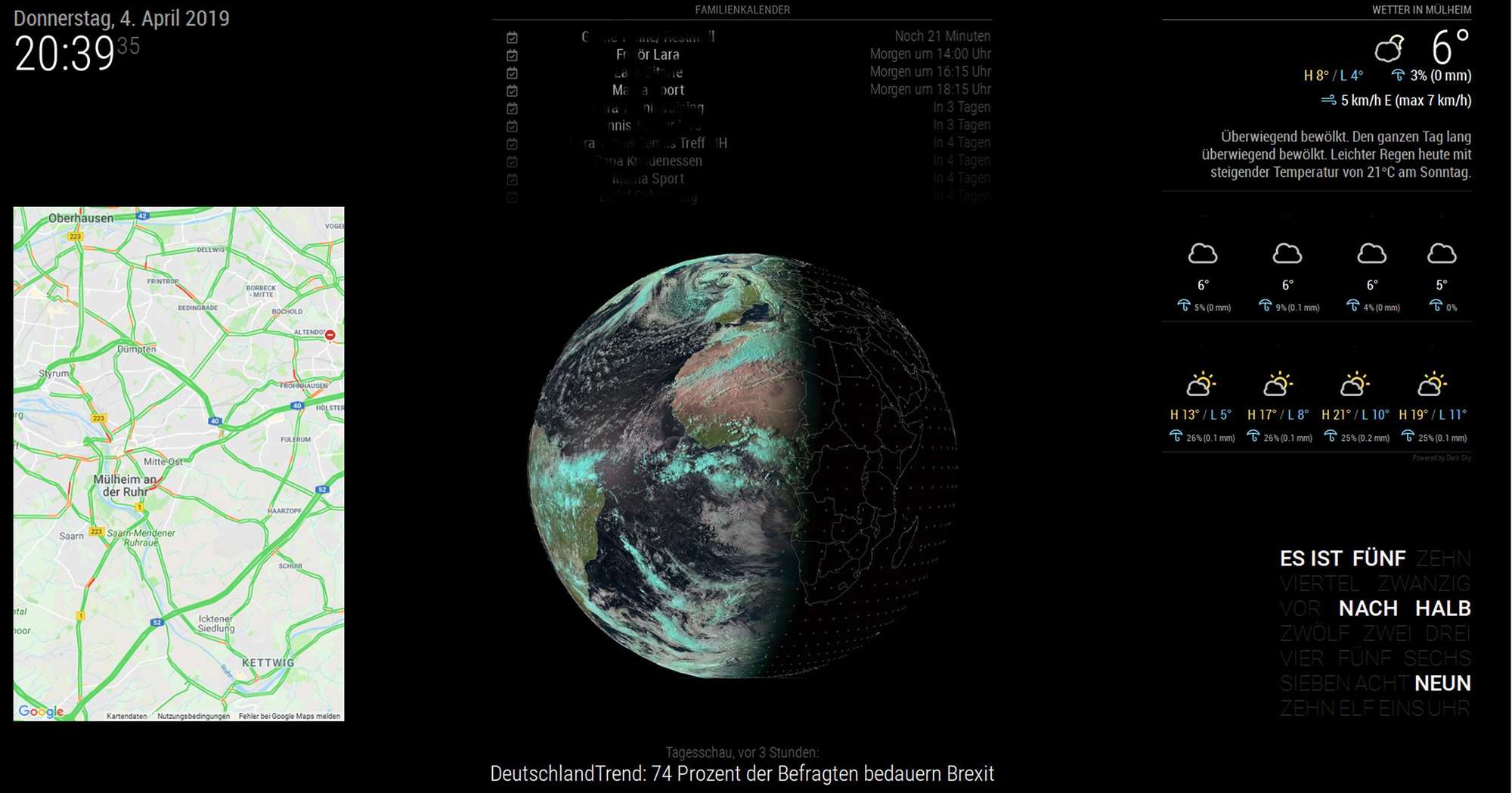
                              Thanks

                              1 Reply Last reply Reply Quote 1
                              • T Offline
                                trividar
                                last edited by trividar

                                Is there a way to hide or delete the „power by …“ signet? Thx… by the way thanks for answering my previous question, I just resized 20px and it works now 👌 thx🤘

                                N 1 Reply Last reply Reply Quote 0
                                • S Offline
                                  Smotx
                                  last edited by Smotx

                                  Hi,

                                  I have test to modify every lines on original CSS and i can’t found how to reduce space top and under ‘day’

                                  alt text

                                  Thx for help

                                  sorry, I knew stupid, I had already asked this question and already had the answer ^^

                                  For help others who wants to redure space :

                                  .MMM-DarkSkyForecast .module-header {
                                    margin-bottom: 20px; /* adjust to taste */
                                  }
                                  
                                  .MMM-DarkSkyForecast .module-header.forecast-header {
                                    margin-bottom: 20px; /* adjust to taste */
                                  }
                                  
                                  .MMM-DarkSkyForecast .wrapper.tiled .forecast-container .forecast-item .time,
                                  .MMM-DarkSkyForecast .wrapper.tiled .forecast-container .forecast-item .day-name {
                                  line-height: 20px; /* adjust to taste */
                                  }
                                  
                                  Thx to module designer
                                  
                                  1 Reply Last reply Reply Quote 0
                                  • O Offline
                                    Ore77
                                    last edited by

                                    Hello,

                                    can someone help me out?
                                    I dont know how to resolve this issue.
                                    My console says : " …MIME type is not executable…".
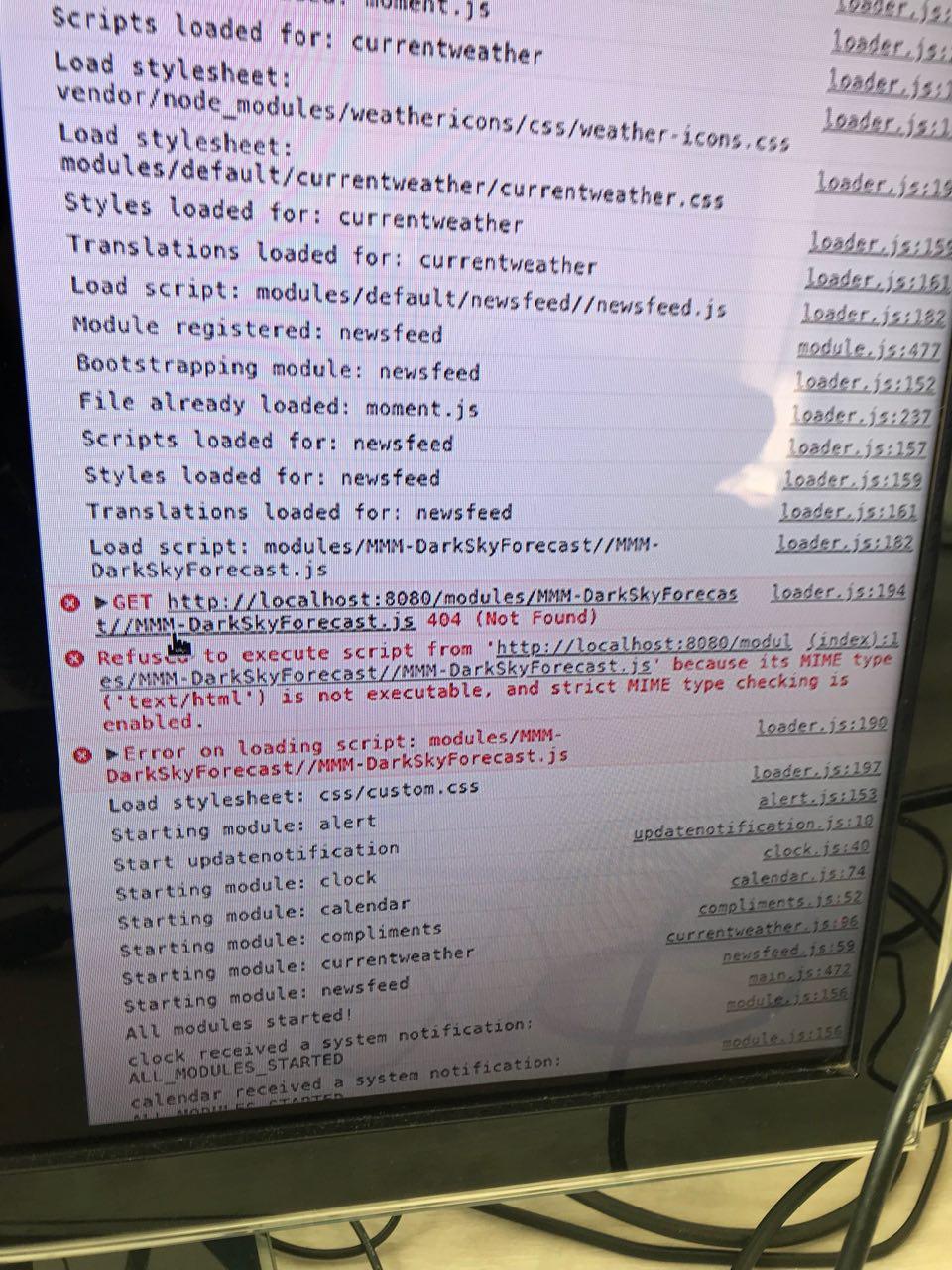
                                    0_1555173011787_MIME_error.jpg

                                    1 Reply Last reply Reply Quote 0
                                    • S Offline
                                      sdetweil
                                      last edited by sdetweil

                                      go to the MM/modules folder and do

                                      ls MMM-Dark*
                                      

                                      then

                                      cd MMM-DarkSkyForecast
                                      

                                      then

                                      ls
                                      

                                      the error says that MMM-DarkSkyForecast.js is not present in the MMM-DarkSkyForecast folder (error 404)

                                      Sam

                                      How to add modules

                                      learning how to use browser developers window for css changes

                                      1 Reply Last reply Reply Quote 0
                                      • O Offline
                                        Ore77
                                        last edited by Ore77

                                        thanks for you reply.
                                        The file is definitely in that directory.

                                        S 1 Reply Last reply Reply Quote 0
                                        • S Offline
                                          sdetweil @Ore77
                                          last edited by sdetweil

                                          @Ore77 is it spelled exactly like that… can u edit that file (nano MMM-DarkSkyForecast.js , ctrl-x to exit editor)

                                          Sam

                                          How to add modules

                                          learning how to use browser developers window for css changes

                                          1 Reply Last reply Reply Quote 0
                                          • O Offline
                                            Ore77
                                            last edited by

                                            yea its exactly this file. And i´m able to edit and save without issues.

                                            1 Reply Last reply Reply Quote 0

                                            Hello! It looks like you're interested in this conversation, but you don't have an account yet.

                                            Getting fed up of having to scroll through the same posts each visit? When you register for an account, you'll always come back to exactly where you were before, and choose to be notified of new replies (either via email, or push notification). You'll also be able to save bookmarks and upvote posts to show your appreciation to other community members.

                                            With your input, this post could be even better 💗

                                            Register Login

                                            • 1
                                            • 2
                                            • 9
                                            • 10
                                            • 11
                                            • 12
                                            • 13
                                            • 16
                                            • 17
                                            • 11 / 17
                                            • First post
                                              Last post
                                            Enjoying MagicMirror? Please consider a donation!
                                            MagicMirror created by Michael Teeuw.
                                            Forum managed by Sam, technical setup by Karsten.
                                            This forum is using NodeBB as its core | Contributors
                                            Contact | Privacy Policy