Read the statement by Michael Teeuw here.
MMM-Hue-Lights - new module for your Philips Hue lights!
-
@Smotx said in MMM-Hue-Lights - new module for your Philips Hue lights!:
Hi,
very great module. Thanks for job.
It’s not possible to just see ‘your Rooms’, same as android Hue official app ?
Sure - in the config, set this:
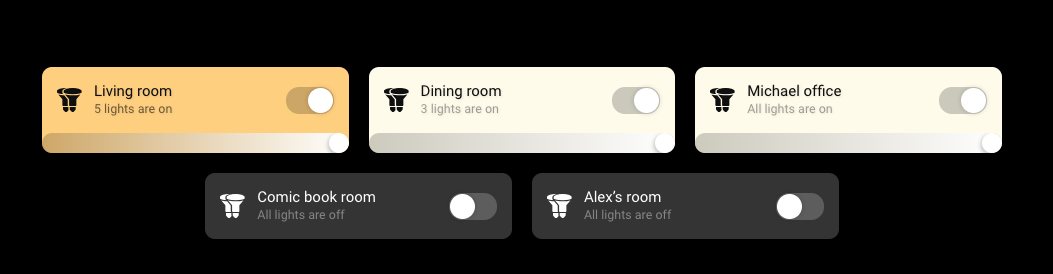
displayMode: 'groups',and then it will only show your Rooms.
-
@Smotx said in MMM-Hue-Lights - new module for your Philips Hue lights!:
I don’t understand why settings 'displaymode: “groups” does not work :(Setting ‘groups’ work only in mmm-hue-lights?js file, on config file does not work.
What do you mean it doesn’t work? That’s what I do on my mirror:
-
If i set
displayMode: ‘groups’,
in config file, MM show ‘lights’,
to view Groups, I have to parameter on mmm-hue-lights.js.
I don’t know why.
-
@Smotx said in MMM-Hue-Lights - new module for your Philips Hue lights!:
If i set
displayMode: ‘groups’,
in config file, MM show ‘lights’,
to view Groups, I have to parameter on mmm-hue-lights.js.
I don’t know why.
Please paste in your entire config for this module - you can XXX out the sensitive info. Thanks!
-
Amazing job !!
did you plan to make your module tactile ready :-p
-
```{
module: “mmm-hue-lights”,
position: “lower_third”, // pick whichever position you want
config: {
bridgeIp: “192.168.1.156”,
user: “xxxxxxxxx”,
displayType: “grid”,
displaymode: “groups”,
hideFilter: [“Bloom”, “V3”, “SDB”],
// … and whatever else configuration options you want to use
}
}, -
Hi,
Why if i set
var config = {
	address: "0.0.0.0",
(To open my MM from another computer)
I have error on this module :
Hue api erroe:error ; read ECONNREST
hue api error: null
Thx
-
I just reinstalled magic mirror on the pi. I installed the mmm-hue-lights module. I tried the default config, and my old config and neither seem to work. The module just sits there with ‘Loading…’
Anybody have ideas?
I did open debug logs and see the module load.
‘Starting module: mmm-hue-lights, version 1.3.2’ with no errors.Inserting GET and POST with the user id works fine in the api nginx webpage.
I just noticed: Someone on GitHub put a bug report in this as well with the same issue.
-
have you tried restarting the hue hub ?
-
I installed mmm-hue-lights by default and get the following error message after 5 minutes. Hue API ERROR: Error: Read ECONNRESET. I ask for help with this problem. I’ve already reinstalled everything and it doesn’t help.
-
Even after using Hue Developer to access the API debug/clip.html and generate a user string the Magic Mirror displays “please add your hue bridge IP and user to MagicMirror config.js file.”
Has anyone seen anything new on this? Is there a change in the authentication for Hue, maybe something that broke this module? -
@jasim can nobody help me?
-
@jasim can you post module config?
-
{
module: “mmm-hue-lights”,
position: “top_right”, // pick whichever position you want
config: {
bridgeIp: “192.168.178.21”,
user: “ueRkyc6AclD2RnpgaUjnTYZb-1Z30eRsjYeF5bt”,
// … and whatever else configuration options you want to use -
@jasim
defaults: {
bridgeIp: ‘192.168.178.21’,
user: ‘ueRkyc6AclD2RnpgaUjnTYZb-1Z30eRsjYeF5bt’,
displayType: ‘grid’,
displayMode: ‘lights’,
displayFilter: [‘all’],
hideFilter: [],
hideOff: false,
alignment: ‘left’,
coloredList: true,
minimalList: false,
minimalGrid: false,
minimalGridUltra: false,
motionSleep: false,
motionSleepSeconds: 300, // this is in seconds (not ms)
updateInterval: 2 * 60 * 1000,
animationSpeed: 2 * 1000,
initialLoadDelay: 0,
version: ‘1.3.2’ -
@jasim die Benutzer ID habe ich etwas gekürzt.
-
@jasim Ich versuche heute Abend mal deine config. das wir wissen ob da irgendwo ein Fehler ist…
-
@jasim versuch mal meins, das funktioniert…
{ module: "mmm-hue-lights", header: "Philips-Hue", position: "bottom_right", // pick whichever position you want config: { bridgeIp: "xxxxxxxxxxxxxxxxxxx", user: "xxxxxxxxxxxxxxxxxxx", displayType: 'grid', displayMode: 'lights', displayFilter: ['all'], hideFilter: [], hideOff: false, alignment: 'right', coloredList: true, minimalList: false, minimalGrid: true, minimalGridUltra: false, motionSleep: false, motionSleepSeconds: 300, // this is in seconds (not ms) updateInterval: 2 * 60 * 1000, animationSpeed: 2 * 1000, initialLoadDelay: 0, version: '1.3.2' } }, -
Funktioniert leider auch nicht nach 10 min kommt besagte Fehlermeldung.
-
@jasim also kann es ja nur an der Installation liegen…


Hello! It looks like you're interested in this conversation, but you don't have an account yet.
Getting fed up of having to scroll through the same posts each visit? When you register for an account, you'll always come back to exactly where you were before, and choose to be notified of new replies (either via email, or push notification). You'll also be able to save bookmarks and upvote posts to show your appreciation to other community members.
With your input, this post could be even better 💗
Register Login