Read the statement by Michael Teeuw here.
MM Error - .AppleDouble and UnhandledPromiseRejectionWarning
-
@bolish said in MM Error - .AppleDouble and UnhandledPromiseRejectionWarning:
.appledouble issue…
This seems to be specific to the MacOS. If you google “.appledouble issue…” you’ll find some interesting reads
-
@bolish
Regarding the UnhandledPromiseRejection, you’d have to find out which module is creating this.
Can you list the modules you are using?
I had this error with MMM-rfacts. Do you have that installed? -
@bolish I would guess your system has created an .appledouble file in the modules directory.
wikipedia says the file is created for so-called double-forks used in the A/UX system.Don’t know if there’s a wa to ignore files/folders in the modules directory.
-
You will have had your files on the OS X computer, then OS X automatically makes these .AppleDouble files.
Search your Magic Mirror completely for these files and delete them.
These can be safely deleted. -
@Mykle1 @lavolp3 @robiv8
.appledouble : found the rootcause!!
I believe it’s because I mounted my raspberry Pi as a share on my MacBook.
By making “all hidden files visible” on the Pi, I noticed that ALL (literally ALL) folders on the Pi where showing an .appledouble folder with a lot of files inside…
By removing the .appledouble folder which was into the /MagicMirror/Modules one…this error message stopped.
I’m convinced this .appledouble folder will be created again later my the MacOs…Nevertheless, I’m now sure that this error message was not causing any trouble in the end…So everything fine.Anyway, thanks for support!!
-
Here is the list of the modules I’m using :
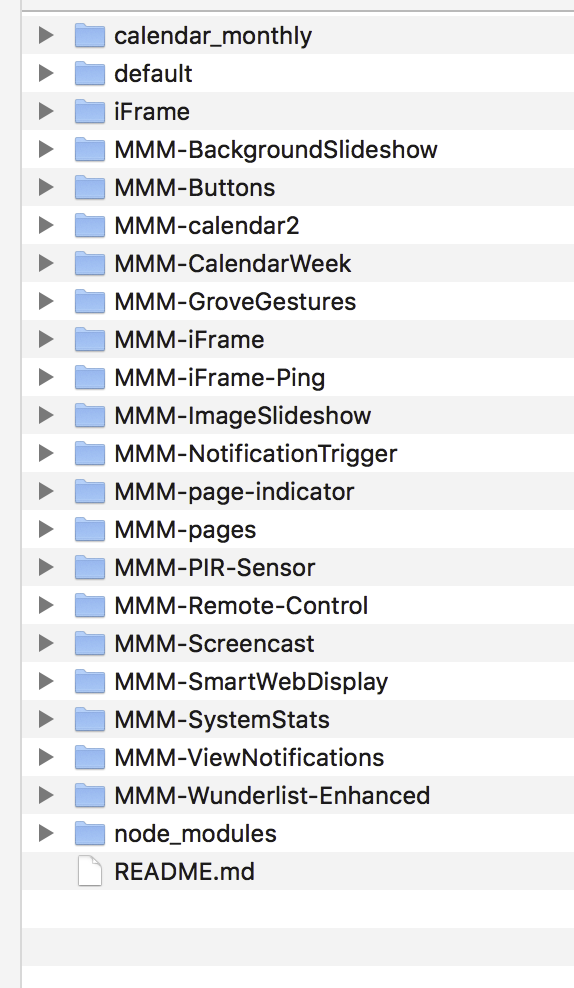
It’s a lot…So it seems difficult to identify the one causing the issue, don’t you think so? Maybe you know an analysis method that could help?
Do you think that by “disabled : true” then one by one, it could work to identify which one is causing the issue?
Regards
-
@bolish Well at first I would rule out:
MMM-Wunderlist
MMM-remote-control
MMM-SystemStats
calendar_monthly
all in defaultI have these as well and not the message you’re finding.
What you could try out:
There is a module MMM-Logging by @shbatm giving the logging output more detail. It’s easy to install and you don’t need to configure anything.
That module could be able to show where the unhandled promise reection is sitting. -
@lavolp3
OK I will give it a try this weekend and check the logs.
Disabling them on by one (through the config.js) will not help? -
@bolish It will but it’s more work :-) That would be my next approach
-
@lavolp3
Done…I can indeed see strange things…2019-02-15T22:45:59 <log> Launching application. (/home/pi/MagicMirror/js/electron.js:82 App.<anonymous>) 2019-02-15T22:45:59 <error> ERROR! Could not find main module js file for .AppleDouble (/home/pi/MagicMirror/modules/MMM-Remote-Control/node_helper.js:258 Class.loadModuleDefaultConfig) 2019-02-15T22:46:03 <error> (node:6793) UnhandledPromiseRejectionWarning: Unhandled promise rejection (rejection id: 1): TypeError: Cannot read property 'refs' of undefined (/home/pi/MagicMirror/internal/process/warning.js:18 writeOut) 2019-02-15T22:46:03 <error> (node:6793) [DEP0018] DeprecationWarning: Unhandled promise rejections are deprecated. In the future, promise rejections that are not handled will terminate the Node.js process with a non-zero exit code. (/home/pi/MagicMirror/internal/process/warning.js:18 writeOut) 2019-02-15T22:46:03 <error> (node:6793) UnhandledPromiseRejectionWarning: Unhandled promise rejection (rejection id: 2): TypeError: Cannot read property 'refs' of undefined (/home/pi/MagicMirror/internal/process/warning.js:18 writeOut) 2019-02-15T22:46:03 <error> (node:6793) UnhandledPromiseRejectionWarning: Unhandled promise rejection (rejection id: 3): TypeError: Cannot read property 'refs' of undefined (/home/pi/MagicMirror/internal/process/warning.js:18 writeOut) 2019-02-15T22:46:03 <error> (node:6793) UnhandledPromiseRejectionWarning: Unhandled promise rejection (rejection id: 4): TypeError: Cannot read property 'refs' of undefined (/home/pi/MagicMirror/internal/process/warning.js:18 writeOut) 2019-02-15T22:46:04 <error> (node:6793) UnhandledPromiseRejectionWarning: Unhandled promise rejection (rejection id: 5): TypeError: Cannot read property 'refs' of undefined (/home/pi/MagicMirror/internal/process/warning.js:18 writeOut) 2019-02-15T22:46:08 <info> MMM-Logging updated config received, reloading console (/home/pi/MagicMirror/modules/MMM-Logging/node_helper.js:30 Class.socketNotificationReceived)What do you think?
Regards
-
@bolish
OK that didn’t help.
MMM-Logging at least gave us the file putting the error out but not file from which it originated.But isn’t Linux a beautiful wild monsterous creature?
Try this commandfind . -maxdepth 2 -exec grep -nwl Promise 2>/dev/null {} +in the MagicMirror directory.
“find” looks for all files in the 3rd party module directories (all files with depth of 2 directories maximum, we don’t want to have all the numerous node module files included), then it executes (“-exec”) a grep function searching the files for the “Promise” function.
“2>/dev/null” is there to put all error output (there’s a lot) away from the standard outputThis will give you all 3rd party module files including the promise function. Then we can limit it to a few modules.
With these you can do the “deactivate and look for errors” workflow and find out the one responsible
-
@lavolp3
this is the result I have :./js/main.js ./js/module.js ./clientonly/index.jsSeems to be linked to the core system itself only and not to any particular module?
I’ve already made a git pull for MM itself but it’s already up to date. -
@bolish Sorry my bad. You need to do it in the modules folder. Then maxdepth 2 leads to the folder itself and all 3rd party folders.
Sorry again! -
@lavolp3
!!! it’s not your fault, it’s shame on me!!!Anyway, I just did it…Result is zero…Nothing…
pi@MagicPi:~/MagicMirror/modules $ find . -maxdepth 2 -exec grep -nwl  Promise 2>/dev/null {} +
pi@MagicPi:~/MagicMirror/modules $
So…disable them one by one is the next analysis step??
-
@bolish First, try another one
find . -maxdepth 2 -exec grep -nwl .then 2>/dev/null {} +Promises are not always processed by a Promise function, but I also by calling something and then calling .then().
Actually I know these bastards for two or three days now, so I’m far from being an expert -
@lavolp3
thxHere is the result
pi@MagicPi:~/MagicMirror/modules $ find . -maxdepth 2 -exec grep -nwl  .then 2>/dev/null {} +
./MMM-Remote-Control/node_helper.js
./MMM-Remote-Control/installer.sh
./MMM-BackgroundSlideshowInfo/README.md
./MMM-NotificationTrigger/README.md
pi@MagicPi:~/MagicMirror/modules $
So… Remote Control I believe…
I will try to disable it and see what happens. -
I confirm…
No error message anymore after disabling MMM-RemoteControl.Wao…and now?? Do you have a clue about next step or should I raise an issue into MMM-ControlRemote git?
-
@bolish That’s odd. Something doesn’t add up, sorry. I think a “then” is searched as well. But try these modules.
If not successfull you’d need to go with disabling one module after another -
@bolish Well, great!! BUt oddly, I dont have this… and I have the module as well.
Do you have Jopyth’s original version installed? Or a fork? -
@lavolp3
I have the original version from Jopyth.
S***, I hoped it would have been easier to figure out!!I just Git Pulled… Was already up to date


Hello! It looks like you're interested in this conversation, but you don't have an account yet.
Getting fed up of having to scroll through the same posts each visit? When you register for an account, you'll always come back to exactly where you were before, and choose to be notified of new replies (either via email, or push notification). You'll also be able to save bookmarks and upvote posts to show your appreciation to other community members.
With your input, this post could be even better 💗
Register Login