Sebastian -
I used https://a.wunderlist.com/api/v2/lists for the APP URL
I used http://localhost:8080 for the Auth Callback
it worked - for a while (I changed my password and just requested a new key)
Give it a try & let me know
Sebastian -
I used https://a.wunderlist.com/api/v2/lists for the APP URL
I used http://localhost:8080 for the Auth Callback
it worked - for a while (I changed my password and just requested a new key)
Give it a try & let me know
@Jopyth
It would probably help if I installed it into MODULES instead of into the ROOT directory
(as a matter of fact, it helped a LOT!)
DUH. Sorry to have wasted your time. My bad :8ball:
Not sure if everyone already knows this… but I just figured out that if you add
.MMM-GoogleSheets table {
  background-color: transparent !important;
  border-collapse: collapse;
}

.MMM-GoogleSheets td,
.MMM-GoogleSheets th {
  background-color: transparent !important;
  color: white !important;
  border: none !important;
}
to your custom.css, the background becomes transparent!
(nice if you use, eg, https://github.com/parnic/MMM-Unsplash for a nicer background)
Thought I’d share this just for the fun of it.
Best,
Karl
@Jakllo
I initially had that problem too - you need to be logged in as PI - not root.
I’d suggest starting all over: it really wont take that long. Follow the
tutorial @strawberry-3-141 mentioned (https://forum.magicmirror.builders/topic/236/complete-setup-tutorial) to the letter. It was written by @KirAsh4 & made all of my problem go away. I have now done it 4 times, getting it done in less than an hour from unpacking to having it all run!
My raspberry all of a sudden even connected via WiFi, and I am expecting my hair to grow back any day now.
I’m telling you - pure magic, these guys.
All the best
THIS is the setup that worked GREAT for me:
https://forum.magicmirror.builders/topic/236/complete-setup-tutorial
Really - even someone like me could not mess it up.
There are now so many wonderful modules out there that my MM is a bit crowded :)
So the logical question arises: might it be possible to alternate two modules in one location?
I’m thinking along the lines of
postion: top_left
{module 1 = weather
module2 = tasklist
switchtime = 120 seconds}
and every two minutes weather and tasklist would alternate.
Thanks,
Karl
Happend to me too (and to others: see here for commiseration)
https://forum.magicmirror.builders/topic/259/installing-mm2
THIS is the setup that worked GREAT for me:
https://forum.magicmirror.builders/topic/236/complete-setup-tutorial
All the best!
@PointPubMedia
I like @barnabycolby 's version (ie exempting all but the ones you want to rotate) a lot.
But here is something KirAsh4 made for me a while ago
https://forum.magicmirror.builders/topic/373/alternating-modules-to-save-on-real-estate/3
that will do the job too - and it will let you learn a bit java along the way
Enjoy
@KirAsh4
Thanks! I messed around a bit with it - here is what I came up with. (and yes, 99.999% is yours!)
Still, here it is for anyone else who wants to play with it. But ALL credit goes to @KirAsh4
This works best for me for MMM-Wunderground and MMM-Wunderlist - which I keep at top-right.
a) my config.js extract:
                {
                        module: 'my_swap',      // as supplied by KirAsh4
                        config: {
                                showsecs: 30,   // seconds each module is shown (default =30)
                                                // 30 is a "relaxed" speed
                                fadems: 4000,   // fade time in ms (default = 4000)
                                                //  4000 is also very relaxed - no coffee yet.
                                modA: 'MMM-WunderGround',  // both modules need to be listed NEXT
                                modB: 'MMM-Wunderlist'     // they should be of similar size,
                                                           // and in the same location.
                                                           // These two are _prefect_
                                }
                },
                {
                        module: 'MMM-WunderGround',
                        position: 'top_right',
                        config: {
                                apikey: '****',
                                pws: '****',
                                lang: 'EN',
                                fctext: '1',
                                fcdaycount: "5",
                                fcdaystart: "0",
                                hourly: '1',
                                hourlyinterval: "3",
                                hourlycount: "1",
                                alerttime: 10000,
                                alerttruncatestring: "english:",
                                fade: true
                        }
                },
                {
                        module: 'MMM-Wunderlist',
                        position: 'top_right',
                        config: {
                                accessToken: '****',
                                clientID: '****',
                                lists: [
                                        'MagicMirror'
                                        ],
                                interval: 60,
                                fadePoint: 0.9,
                                fade: true
                                }
                },
Then the file my_swap.js ( in \modules\my_swap) needs to look like this:
Module.register("my_swap",{

  // Default module config.
  defaults: {
        modA: "MMM-NonExistA",  // if we dont know the EXACT NAME, we don't do anything!
        modB: "MMM-NonExistB",  //    ="=
        showsecs: 30,           //  as in compliments
        fadems: 4000            //    ="=
  },

  // Define required scripts.
  getScripts: function() {
    return ["moment.js"];
  },

  start: function() {
    Log.log("Starting module: " + this.name);
    this.DOMloaded = 0;
    this.isHidden = 0;

    var self = this;
    setInterval(function() {
      self.swapModules();
    }, 1000);
  },

  notificationReceived: function(notification, payload, sender) {
    if (notification === 'DOM_OBJECTS_CREATED') {
      this.DOMloaded = 1;
    }
  },

  // swapModules.
  swapModules: function() {

    var now = moment();
    var self = this;

        var mod1 = this.config.modA     // yank from config file
        var mod2 = this.config.modB
        var fadems = this.config.fadems
        var showsecs = this.config.showsecs

    if (!(now.seconds() % showsecs)) {
      if (this.DOMloaded) {
        if (self.isHidden) {
          MM.getModules().exceptModule(this).enumerate(function(module) {
            if (module.name === mod1) {
              module.hide(fadems, function() {
                MM.getModules().exceptModule(this).enumerate(function(module) {
                  if (module.name === mod2) {
                    module.show(fadems, function() {
                    });
                  }
                });
              });
            }
          });
          self.isHidden = 0;
        } else {
          MM.getModules().exceptModule(this).enumerate(function(module) {
            if (module.name === mod2) {
              module.hide(fadems, function() {
                MM.getModules().exceptModule(this).enumerate(function(module) {
                  if (module.name === mod1) {
                    module.show(fadems, function() {
                    });
                  }
                });
              });
            }
          });
          self.isHidden = 1;
        }
      }
    }
  }
});
Works great for me! Thanks again for the clean code to play with. You should submit it as an official module.
@cowboysdude - DUH. Sorry - good point!
@cowboysdude It was nearly that easy… on LTS 16.04 on an ancient Dell:
sudo npm install (failed)
sudo apt install nodejs-legacy
sudo npm install (succeeded)
npm start
-> Please create a config.js file
Thanks for the help!
After a few hours of having fun with this module (wanted to track phones vs MAC), here is what finally worked for ME:
I added one “dummy” IP address (eg of my home NAS). Once the program saw the IP address, it also found all the MAC addresses.
NO idea why, so don’t knock this. Banged my head against it for hours.
[then again, maybe the black cat I sacrificed helped too]
Anyway, that’s my 2c.
K
@yawns
Upvote.
Sorry that I seem to have kicked a hornet’s nest – I was just reading that people had had problems, and found a way that worked for me. But yes, updating etc is not going to work. And yes, GIT pulls are best…
BUT for real Noobs (been there, done that), GIT might be a bit “weird”, while ZIP is recognized.
Bottom line:
This all works - use @yo-less instructions, then either go the ZIP route (where you have to remove the -master) OR the GIT route (nice & easy).
Thanks everyone for finding all the problems. Let’s leave this with the conclusion that THIS AWESOME MAGIC MIRROR works on Win-boxes too!
@Mykle1 I have it on my working laptop (ie Win10) - slight pain, since I have to launch MM & it runs in a console in the background, so I regularly worry what that is :) I dumped it onto an old laptop (which actually works with Ubuntu!) & that headache is gone… Now I just glance over into the corner & know what I am working on (i LOVE Wunderlist). So it does work on Win10 and Ubuntu.
Good luck
Looks interesting.
Request: Multiple email accounts?
OR - better still since I just need the ALERT: any way I can just get a NUMBER of emails I need to read:
joeshmoe@gmail.com - 17 unread
suzieQ@public.com - 5 unread
UncleSam@gov.com - 0 unread
I’ll have a look at your module once I sort one other problem on my MM2 out.
I like it!
Request: can you add a SCALE factor? Right now the image is considerably larger than I can accommodate… (yes, minor problem, I know). Maybe I have to mess with the custom.css?
Anyway, apart from that small inconvenience, I like it.
@ronny3050
Thx for updating the README.
Followed instructions (requested app-pwd since I have 2-factor authentication).
My config.js:
                {
                        module: 'email',
                        position: 'bottom_left',
                        header: 'Email',
                        config:{
                        user: 'XXX@gmail.com',
                        password: '****************',
                        host: 'imap.gmail.com',
                        port: 993,
                        tls: true,
                        authTimeout: 10000,
                        numberOfEmails: 5,
                        fade: true
        }
Restarted (NOT REBOOTED) Pi.
Got this:
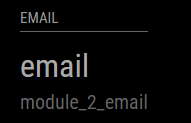
Rebooted (just to be safe) - same result.
Just did a clean install on a brand new pi in about 5 minutes flat. COOL MODULE.
(still need to work on 2-auth, please. Plus I’ll want to change your config to make the display single line etc. I’ll look at the js file)